linkerd2-proxy: the Rust sidecar behind Linkerd, built from dozens of small crates and released every few weeks
A purpose-built proxy for the Linkerd service mesh. Written in Rust.
At a glance
- What is it?
- linkerd2-proxy is the transparent data plane proxy of the Linkerd service mesh, written in Rust under Apache-2.0. It is meant to run next to your workloads on Linux in Kubernetes, not as a standalone gateway you configure by hand.
- Who is it for?
- Read this repository if you debug or contribute to the Linkerd data plane, or need to know exactly what runs beside your pods. Do not use it as a general purpose proxy, since it is configured through the linkerd2 control plane and the Destination gRPC API.
- Can I use it commercially?
- Yes. Apache-2.0 is a permissive licence: you can use, modify and sell software built on it, as long as you keep its copyright and licence notices.
- Is it still maintained?
- Yes. The repository last received commits 3 days ago.
- What is it written in?
- Mainly Rust, according to GitHub's language statistics.
Answers come from the project's GitHub data, last synced on November 23, 2026, and from our analysis. They are not legal advice.
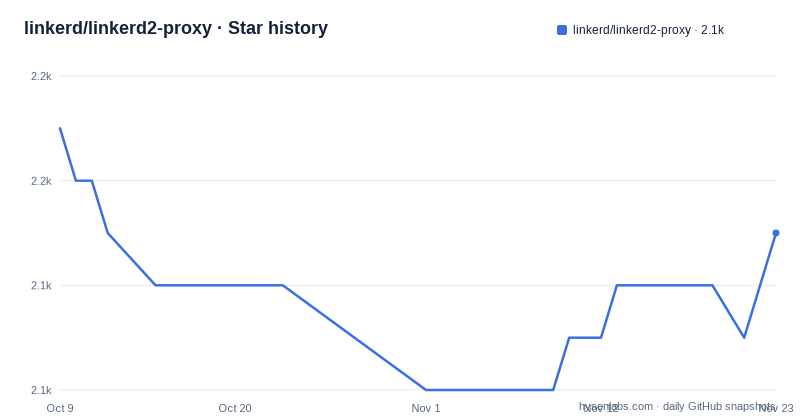
Star history
- linkerd/linkerd2-proxy2,149 ★ · -2
| Repository | 2026-10-09 | 2026-11-23 |
|---|---|---|
| linkerd/linkerd2-proxy | 2.2k | 2.1k |
-2 Stars in the last 45 days, measured from the daily GitHub snapshot. Compare with other projects
Editorial analysis
A proxy that takes no configuration file because the control plane feeds it
The first thing missing from this repository is a config file format. The proxy is described as transparent and zero config for HTTP, HTTP/2 and arbitrary TCP protocols, and it does the same for WebSocket traffic. It learns where to send traffic through service discovery, using DNS and the linkerd2 Destination gRPC API, whose definitions live in a separate linkerd2-proxy-api repository.
That design pushes all policy upstream. If you want to change a route, a timeout or a retry rule, you change it in the Linkerd control plane, not here. The crate list in Cargo.toml hints at the policy surface the proxy understands, with names such as client-policy, opaq-route, http/route and http/retry, and a stream-timeouts crate under linkerd/http.
The README also says the Linkerd 2 proxy is heavily influenced by the Linkerd 1.X proxy but is an entirely new codebase in Rust, so experience with the older Linkerd 1 does not carry over as code, only as ideas. Anyone migrating knowledge from Linkerd 1 should treat this as a fresh project with its own crates, its own build tooling and its own release stream. The cost is that you cannot run the binary in isolation and expect it to know what to do. Without a control plane answering Destination lookups, there is nothing for the proxy to route by. This repository is one half of a system, and the other half is the linkerd2 repository.
Seven listed behaviors, and the one that costs the most to verify
The README lists the proxy's features: zero config proxying for HTTP, HTTP/2 and arbitrary TCP, automatic Prometheus metrics export for HTTP and TCP traffic, zero config WebSocket proxying, automatic latency aware layer 7 load balancing, automatic layer 4 load balancing for non HTTP traffic, automatic Mutual TLS, and an on demand diagnostic tap API.
The word automatic carries the weight. Metrics need no instrumentation in your application. Mutual TLS needs no certificates in your containers. Layer 7 balancing is latency aware, and the repository has crates for it: ewma, load-biaser, pool/p2c and proxy/balance, plus a hyper-balance directory at the top level.
Layer 4 balancing covers non HTTP traffic, so a database connection through the mesh is balanced per connection, not per request. The tap API is the odd one. It is on demand, so you only pay for it when you ask. The README gives no detail on its wire format or permissions, so confirm in the Linkerd documentation who is allowed to tap traffic before you enable it in a cluster that carries sensitive requests.
Linux in containers is the target, and macOS only gets a maybe
The platform statement is narrow. The proxy is primarily intended to run on Linux in containerized environments like Kubernetes, though it may also work on other Unix-like systems such as macOS. May is the operative word. No guarantee backs it.
The repository's own tooling agrees. The justfile defines the architecture as either amd64 or arm64 and raises an error for anything else, and its os variable offers linux or windows for packaging. A Dockerfile sets the cross build up for both architectures, adding binutils-aarch64-linux-gnu when TARGETARCH is arm64.
For a developer on a Mac, that means the native build might work, but the supported path is the Dev Container or the Docker image. If you need to reproduce a bug that appeared in a cluster, reproduce it on Linux first. A difference between your laptop build and the cluster binary is a poor place to start debugging.
More than sixty workspace crates, so you compile one piece at a time
The project is broken into many small libraries so components can be compiled and tested independently. The workspace in Cargo.toml uses resolver 2 and lists members from linkerd/addr and linkerd/dns to linkerd/identity, linkerd/meshtls, linkerd/opentelemetry and linkerd/proxy/spire-client.
The README singles out four. linkerd2-proxy holds the executable. linkerd2-app-integration holds the integration tests. linkerd2-app bundles linkerd2-app-inbound and linkerd2-app-outbound so either the executable or the tests can run them.
The split between inbound and outbound mirrors the sidecar's job: traffic arriving at a pod and traffic leaving it. Other directories are worth a look by name: linkerd/app/gateway, linkerd/app/admin, linkerd/http/metrics, linkerd/http/access-log and a spiffe-proto directory at the top level.
The trade is navigation cost. A change to retry behavior can touch crates in several directories. The upside is that a test for one crate does not need the whole proxy built.
Three just recipes build, test and containerize, and a Dockerfile marked development only
The project uses just-cargo, a thin wrapper around just and cargo. The README gives three recipes:
just build
just test
just docker
build compiles the proxy locally using cargo. test runs unit and integration tests locally. docker builds a Docker container image for testing.
The justfile compiles in debug mode by default because it is faster, and switches to release when the RELEASE environment variable is set. It also stamps LINKERD2_PROXY_VERSION with 0.0.0-dev plus the short git hash unless you set it.
The Dockerfile carries a loud warning in its first comment: it is intended for development only, so proxy developers can test in the context of the larger linkerd2 project. It pulls identity initializing and linkerd-await wrappers from a ghcr.io/linkerd/proxy edge image. Do not ship that image to production. The README recommends the included Dev Container, for Visual Studio Code, to avoid setting up the complex development environment by hand.
Releases arrive every two to three weeks, numbered in a single rising minor
The release tags run v2.370.0 on 2026-09-23, v2.371.0 on 2026-10-07 and v2.372.0 on 2026-10-28. The last push was on 2026-10-23, and the repository is not archived. That is a short, regular cadence, and it matches a proxy that is bumped by the Linkerd project as a component.
The version number is not semver in the usual sense. There is no 3.0 to wait for, and the minor number just climbs. Treat each tag as a build of the proxy that Linkerd picked up, not as a signal of breaking changes.
The Dockerfile shows how closely proxy and platform track each other, pinning a Linkerd edge image at edge-25.11.3 and a Rust dev image tagged v51. Matching those pins is the first job when you rebuild an older proxy. The repository also carries rust-toolchain.toml, deny.toml and a .checksec directory, which fix the compiler and constrain dependencies.
Security rests on fuzzing and a 2021 audit, not on a recent review
The security section is short. The project tests its code by fuzzing, described in docs/FUZZING.md. A third party audit focused on fuzzing linkerd2-proxy was performed by Ada Logics in 2021, and the full report sits in docs/reports/linkerd2-proxy-fuzzing-report.pdf.
Two limits follow. The audit is from 2021, and the codebase has changed a great deal since then, as the crate list and the release stream show. And the audit's scope was fuzzing, so it says nothing about the design of the automatic Mutual TLS or the tap API.
Governance files are present: GOVERNANCE.md, MAINTAINERS.md, CONTRIBUTING.md and a DCO file. The README notes the Linkerd project is hosted by the Cloud Native Computing Foundation, and the license is Apache-2.0, with a copyright notice dated 2018. Read the audit report before a security review of your own, and do not rely on it as a current clearance.
Editorial conclusion
Read this repository if you debug or contribute to the Linkerd data plane, or need to know exactly what runs beside your pods. Do not use it as a general purpose proxy, since it is configured through the linkerd2 control plane and the Destination gRPC API. Before building it yourself, confirm your platform is Linux, because macOS is only said to possibly work.
Frequently asked questions
What does Linkerd do, and where does linkerd2-proxy fit?
linkerd2-proxy is the transparent proxy component of Linkerd2, giving zero config proxying, Prometheus metrics, latency aware load balancing and automatic Mutual TLS. It is meant to run on Linux in containerized environments like Kubernetes.
Is Linkerd open source, and what license does linkerd2-proxy use?
Yes. linkerd2-proxy is licensed under the Apache License, Version 2.0, and the Linkerd project is hosted by the Cloud Native Computing Foundation.
How do you build linkerd2-proxy from source?
Use just build for a local cargo build, just test for unit and integration tests, and just docker for a test container image. The README also recommends the included Dev Container.
Official sources
Add this badge to your README
If you maintain this project, the badge below links readers to this analysis and shows its maintenance status from the daily GitHub snapshot. Paste the markdown into your README; add ?metric=license or ?metric=stars to the image URL for a different field.

[](https://hysenlabs.com/projects/linkerd-linkerd2-proxy)Star history chart for your README
[](https://hysenlabs.com/projects/linkerd-linkerd2-proxy)Was this useful?