youki's benchmark table predates the current release by four minors
A container runtime written in Rust
At a glance
- What is it?
- An OCI container runtime written in Rust, with a comparison table against runc and crun that was measured on youki 0.3.3 while the current release is 0.7.0. The build runs through just, the workspace carries WebAssembly and checkpoint-restore dependencies, and local builds are Linux only.
- Who is it for?
- youki fits a container platform team that wants an OCI runtime in a memory-safe language, and that can run the integration suites before adopting it. It does not fit a developer on macOS or Windows expecting a local build, since that path goes through a Vagrantfile or a cloud development environment.
- Can I use it commercially?
- Yes. Apache-2.0 is a permissive licence: you can use, modify and sell software built on it, as long as you keep its copyright and licence notices.
- Is it still maintained?
- Yes. The repository received new commits within the last day.
- What is it written in?
- Mainly Rust, according to GitHub's language statistics.
Answers come from the project's GitHub data, last synced on November 15, 2026, and from our analysis. They are not legal advice.
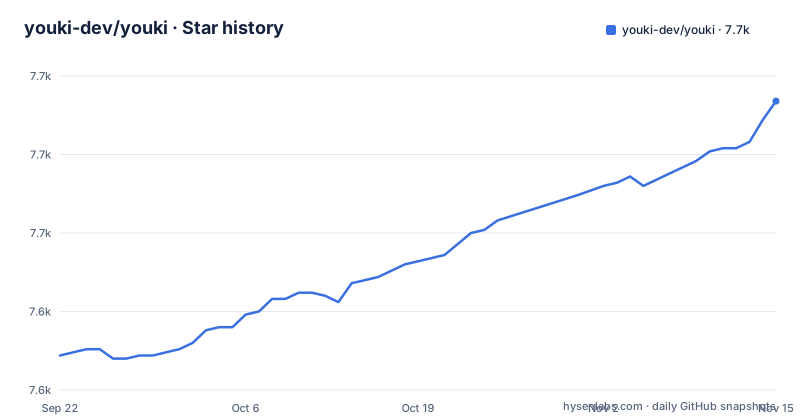
Star history
- youki-dev/youki7,692 ★ · +81
| Repository | 2026-09-22 | 2026-11-15 |
|---|---|---|
| youki-dev/youki | 7.6k | 7.7k |
81 Stars in the last 54 days, measured from the daily GitHub snapshot. Compare with other projects
Editorial analysis
The comparison table was measured on 0.3.3
The motivation section argues that youki has the potential to be faster and to use less memory than runc, and then shows a table of a container from creation to deletion. youki comes in at 111.5 ms plus or minus 11.6 ms, runc at 224.6 ms plus or minus 12.0 ms, and crun at 47.3 ms plus or minus 2.8 ms. The versions column records youki at 0.3.3, runc at 1.1.7 and crun at 1.15.
Two things follow. First, crun is the fastest of the three in this measurement, at forty-two percent of youki's time, so the readme is not claiming a clean sweep. Second, the youki figure is from 0.3.3 while the newest release is 0.7.0, which means the number describes an implementation several minor versions older than the one you would install.
The method is documented in a collapsible section rather than in a footnote. The benchmark command drops the page cache before each run, warms up ten times and takes a hundred minimum runs, and the environment is recorded from the runtime's own info output: sixteen cores, unified cgroups, and every namespace enabled.
Recording the environment is what makes the table usable later, because you can tell whether it applied to your machine.
Rust is the argument, memory safety is the differentiator
The motivation for writing a new runtime in Rust is given in three bullets, and the first is the substantive one.
Many container tools are written in Go, but the runtime requires system calls, which need special handling when implemented in Go. The readme names two by reference, the namespaces system call and fork. With Rust that special handling is still needed but it is not as tricky, and unlike in C, Rust provides the benefit of memory safety.
The bullet then makes a measured claim about the ecosystem rather than about the code: Rust is not yet a major player in the container field, but it has the potential to contribute a lot, and something this project attempts to exemplify.
The third bullet is a sentence about the author rather than the software, saying that implementing it is fun and that this may be the most important thing. That is worth reading as a signal about how the project will be sustained: the status section says youki has passed real-world use cases including containerd's end-to-end test and is adopted in several production environments, with a roadmap tracked in the containers organisation.
Local builds are Linux only
The getting started section states the constraint in one sentence: local build is only supported on Linux.
The requirements that follow explain why. Rust is needed at edition 2024, and the Linux kernel must be 5.3 or newer. The task runner, just, is the third dependency and is installed separately.
Two escape hatches are offered for other platforms. There is a Vagrantfile prepared in the repository, which means a virtual machine rather than a native toolchain, and GitHub Codespaces for a fully preconfigured environment in the cloud. The Codespaces tip even lists the commands to build and then run a container there.
That is a reasonable arrangement for a project whose output is a Linux syscall wrapper. It does mean the quick start, the tutorial and the integration suites are all Linux-only activities, so a contributor on a Mac is either in a virtual machine or in the cloud.
just drives four builds and a long test ladder
The task file is the best description of how the project is verified, and it is long. There are four build targets: a development build, a release build, a runtime test binary, and a contest binary that runs the integration suite. Two aliases sit on top, so build points at the release build and youki at the development build.
The test ladder is longer. Unit tests run across all libraries, binaries, targets and features with a single test thread and no fail-fast. Documentation tests run separately. There is a permutated feature compilation target, which builds the crate against combinations of feature flags. There is an integration target that runs the OCI runtime tools suite, and a contest target for the Rust implementation of that suite. Then test-all chains them and explicitly notes that the Rust OCI tests are not run in that chain.
The last target is the most interesting: validate-contest-runc runs the same contest suite with a runtime kind set to runc, so youki's own results can be checked against the reference implementation on identical tests.
The workspace excludes its own experiments
The Cargo manifest has three workspace globs, covering the crates, the contest tests and the tools, and then an exclude list with three entries: two experiment directories and one tool.
The excluded experiments are for seccomp and for SELinux, and the excluded tool is the deployment one. Excluding a directory from a workspace rather than deleting it keeps the code in the repository and out of every default build, which is a reasonable way to keep an approach under evaluation without maintaining it as a supported surface.
The dependency list explains the scope of the runtime itself. There are the obvious pieces for a container runtime, a capability library, a seccomp binding, the low-level system interface library, and the OCI runtime specification crate with its runtime feature enabled. There are also path-based dependencies for a command line client and for the test framework the contest suite uses.
The release profile enables link time optimisation and nothing else, which is a minimal configuration for a binary whose startup cost matters.
WebAssembly, checkpoint-restore and eBPF are all dependencies
Three groups of dependencies in the workspace describe further capabilities, and they are the most informative part of the manifest.
The WebAssembly group is the largest: a WebAssembly runtime, a WebAssembly SDK for one host, a variant runtime with its own WebAssembly interface bindings, the standard interface definitions, and a compatibility layer. Whatever the current plan for WebAssembly isolation is, it is a dependency rather than a proposal.
The second group is checkpoint and restore, through a Rust binding for the CRIU tooling, which is what makes migrating a running container elsewhere possible.
The third is the observability and networking group: an eBPF system binding and its userspace counterpart, netlink packet parsing including route netlink messages, and journald logging through a tracing layer.
A runtime with WebAssembly, checkpoint-restore and eBPF dependencies is a runtime planning to be more than a minimal spec implementation, and the roadmap linked from the status section is where those intentions are tracked.
The tutorial is a JSON spec and five lifecycle commands
The tutorial is the part of the readme most worth reading, because it shows what using the runtime actually involves. It requires Docker, and it notes that root permission may be needed.
The root filesystem is prepared by exporting a stock image:
mkdir -p tutorial/rootfs
cd tutorial
# use docker to export busybox into the rootfs directory
docker export $(docker create busybox) | tar -C rootfs -xvf -
Then the configuration is generated rather than written by hand. A spec subcommand produces a file named config.json containing the metadata and specs for the container, such as the process to run, environment variables to inject and sandboxing features to use. You edit it to change the process to a sleep command, and then drive the lifecycle:
cd ..                                                # go back to the repository root
sudo ./youki create -b tutorial tutorial_container   # create a container with name `tutorial_container`
sudo ./youki state tutorial_container                # you can see the state the container is `created`
sudo ./youki start tutorial_container                # start the container
sudo ./youki list                                    # will show the list of containers, the container is `running`
sudo ./youki delete tutorial_container               # delete the container
Five verbs, each run under sudo, against a JSON document you own. That is the whole interface, and it is the same shape as the reference runtime it is imitating.
Editorial conclusion
youki fits a container platform team that wants an OCI runtime in a memory-safe language, and that can run the integration suites before adopting it. It does not fit a developer on macOS or Windows expecting a local build, since that path goes through a Vagrantfile or a cloud development environment. Before benchmarking it yourself, check the version in your numbers against the release you are testing, because the published table predates several minor releases.
Frequently asked questions
What is youki?
It is an implementation of the OCI runtime specification written in Rust, similar to runc, licensed Apache-2.0 and hosted on a documentation site with user and developer guides. The project says it has passed real-world use cases including containerd's end-to-end test and is adopted in several production environments.
How do I build youki?
On Linux, clone the repository, change into it and run just youki-dev for a development build or just youki-release for a release build, then check the result with ./youki -h. You need Rust at edition 2024, a kernel of 5.3 or newer, and just. Local builds are Linux only; other platforms use the repository Vagrantfile or GitHub Codespaces.
How do I run a container with youki?
Export a stock image into a rootfs directory with docker, run the spec subcommand to generate a config.json, edit the process field to the command you want, then use create, state, start, list and delete under sudo. The steps are given as a worked tutorial in the readme.
How does youki compare with runc and crun?
The readme publishes one container lifecycle benchmark: youki at 111.5 ms, runc at 224.6 ms and crun at 47.3 ms, with drop-caches between runs, ten warmups and a hundred minimum runs on sixteen cores with unified cgroups. The youki figure was measured on version 0.3.3 while the current release is 0.7.0.
Official sources
Add this badge to your README
If you maintain this project, the badge below links readers to this analysis and shows its maintenance status from the daily GitHub snapshot. Paste the markdown into your README; add ?metric=license or ?metric=stars to the image URL for a different field.

[](https://hysenlabs.com/projects/youki-dev-youki)Star history chart for your README
[](https://hysenlabs.com/projects/youki-dev-youki)Was this useful?