Termux-Desktops: choosing proot, native or chroot for a Linux desktop on Android
Collection of scripts to launch Desktops with audio in Termux X11 and how to use hardware acceleration
At a glance
- What is it?
- A GPL-3.0 documentation and script collection from a YouTube-first author, covering eight proot distributions, three chroot routes and hardware acceleration in Termux X11. The README is an index; the real instructions live one directory deeper.
- Who is it for?
- Take this repository if your goal is an XFCE4 desktop on an Android phone and you would rather follow written steps than reassemble a video tutorial. What you are getting is documentation organised around a choice between three isolation strategies, with per-distribution files under `Documentation/proot/` and a separate hardware acceleration page, not a single installable tool.
- Can I use it commercially?
- Yes, with conditions. GPL-3.0 is a copyleft licence: if you distribute software that includes it, you must release that software's source code under the same licence. Running it internally without distributing it does not trigger that obligation.
- Is it still maintained?
- Yes. The repository last received commits 8 days ago.
- What is it written in?
- Mainly Shell, according to GitHub's language statistics.
Answers come from the project's GitHub data, last synced on October 23, 2026, and from our analysis. They are not legal advice.
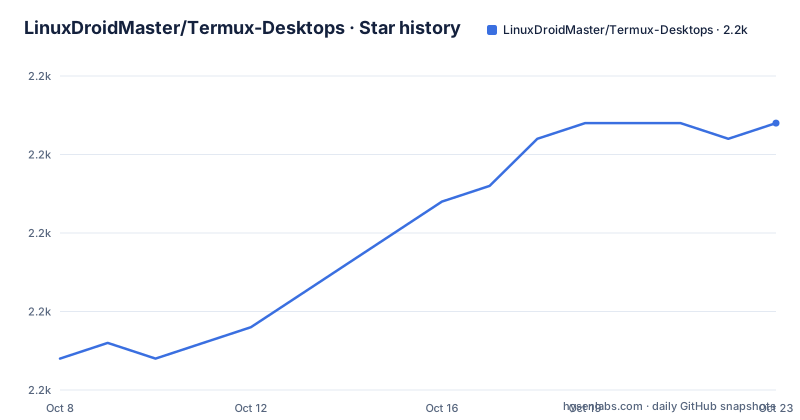
Star history
- LinuxDroidMaster/Termux-Desktops2,207 ★ · +15
| Repository | 2026-10-08 | 2026-10-23 |
|---|---|---|
| LinuxDroidMaster/Termux-Desktops | 2.2k | 2.2k |
15 Stars in the last 15 days, measured from the daily GitHub snapshot. Compare with other projects
Editorial analysis
The repository is an index, and the instructions are one level down
The tree has five entries: `Documentation/`, `LICENSE`, `README.md`, `README_old.md` and `scripts/`. The repository description calls it a collection of scripts for launching desktops with audio in Termux X11, and the `scripts/` directory is where those live. The README itself, though, is mostly navigation.
Its structure is a table of contents with anchors, then video links, then comparison tables, then eight logo tiles. Each logo tile is a link to a separate markdown file under `Documentation/proot/`: alpine, ubuntu, debian, arch, kalinethunter, parrotos, postmarket and voidlinux. Eight distributions, eight files, and none of them is in the README.
There is a `README_old.md` kept alongside the current one, and the README opens by pointing at it for anyone who wants the information as it appeared before a restructure, noting that most of the videos show the older layout. That is a useful signal about how the project evolved: the prose got reorganised and the older version was preserved rather than discarded.
The homepage for the repository is a YouTube channel rather than a documentation site, and the README says the whole process is explained there with a video linked for each distribution. So the intended learning path is written notes plus a video per distro, and the written notes are the part you can skim.
The one command block on the page, and why x11-repo comes first
The README's only runnable block is the initial package setup in Termux, and the ordering is the substance of it:
pkg update
pkg upgrade
pkg install x11-repo
pkg install termux-x11-nightly
pkg install tur-repo
pkg install pulseaudio
pkg install proot-distro
pkg install wget
pkg install git
Three things are worth reading out of that list. `x11-repo` is installed before `termux-x11-nightly`, which is the repository that makes the nightly X11 package visible at all, so swapping the order gives you a package that is not found. `termux-x11-nightly` rather than a stable release is deliberate: Termux X11 for Android is where the active work is, and a pinned stable build would lag. `pulseaudio` sits alongside them because the project description advertises audio in Termux X11, and there is no separate audio step later.
`tur-repo` is the Termux user repository, which matters because `pkg` will not find everything in the main repo. `proot-distro` is the helper that manages the rootless distributions, `wget` and `git` are needed to fetch the per-distro documentation files this repository points at. Both video links for installing Termux and Termux X11 themselves sit just above this block.
Everything after this point depends on which of the three environments you pick, and the README is explicit that XFCE4 is what all the environments are configured with, while leaving you free to change it.
Three isolation strategies and what each one costs
This is the section worth the most of your attention, because the choice is not about which distribution to install. It is about what the kernel and the filesystem will let you do.
Termux native means running Linux commands directly in the Termux app with no virtualization or containerization at all. The README describes it as lightweight and straightforward, and in its comparison table it gets Good performance but is marked as having limited Linux app support. It is the option for a shell environment, not a desktop.
Proot-Distro uses proot, which the README defines as a user-space implementation of chroot, mount `--bind` and binfmt_misc. Because it works in user space, no root is needed, and it lets you install full distributions. The cost is in the comparison table's own words: moderate performance. That is the syscall interception overhead, and it is the price of not rooting the device.
Chroot is the real chroot, which changes the apparent root directory for a running process and its children. It gets Good performance and full app support, and the table marks it as the only environment needing root. That single cell is the whole decision: if the only reason you want chroot is speed, you need a rooted device, and on an unrooted phone the proot route is the only one left.
The table has four rows and the explanatory bullets below it cover three of them: needs root, many Linux apps, and customization level. There is no customization row in the table above, so the third bullet describes a row that is not there. The performance row is the one with no bullet at all. Small inconsistency, but it means the table is not a complete key to itself.
Chroot has three routes, and the section leads with a heading that is cut off
The README's chroot section is titled how to install Chroot distributions and lists Ubuntu, Debian and Box64Droid. Box64Droid is the interesting inclusion, because it is an Android box64 translation layer rather than a distribution, so the section mixes two different things under one heading.
The detail is not on the README page. Like the proot section, the chroot section ends in a list of links, and the README stops there. Anyone reading the repository gets the choice of route and the requirement that it needs root, and then has to open the corresponding documentation file or watch the video.
That pattern is consistent across the project. It is documentation written to accompany video, with each step one hop away and no single page you can read start to finish in text. Whether that is a limitation depends on what you want. If you are comfortable with a video, the format is faster. If you are following this on a device with a small screen and no intention of watching a walkthrough, the per-distribution markdown files are the part that carries the information.
The repository also links a separate hardware acceleration page at `Documentation/HardwareAcceleration.md`, which is the topic the repository description calls out second. Whether acceleration works for you depends on your device's GPU driver under Android, and that is exactly the kind of thing that cannot be answered generically, which is presumably why it has its own page.
A single release tag that is a debootstrap recipe, not a release
There is exactly one GitHub release, tagged `Debian`, published 2024-04-04, and its contents are not a packaged version of anything. The body is a note that the author created a Debian 12 rootfs for Termux from Windows WSL, followed by the command sequence used to do it: installing debootstrap and qemu-user-static, optionally registering the aarch64 binfmt handler with `update-binfmts`, running debootstrap against `http://deb.debian.org/debian/` for the arm64 bookworm target, copying the static QEMU binary into the tree, and packing the result into a tarball.
So the release is a working recipe rather than an artifact. Read as documentation it is useful, because it shows how to produce an arm64 Debian rootfs without an arm64 machine, using binfmt to let debootstrap run the foreign architecture. Read as a release it is confusing, since a tag named after a distribution suggests a downloadable image that is not there.
That release predates the restructure by some months, and it is the only published tag on a repository whose last push was on 2026-06-29. Take the dates together as the maintenance picture: the prose is current, the release history is not. Anyone tracking versions by tag will find one tag from April 2024 and nothing since, which is not a good proxy for how much the documentation has moved.
The license is GPL-3.0, which is worth noting for a collection of scripts you might copy into your own project: that copyleft obligation travels with the code you take.
Editorial conclusion
Take this repository if your goal is an XFCE4 desktop on an Android phone and you would rather follow written steps than reassemble a video tutorial. What you are getting is documentation organised around a choice between three isolation strategies, with per-distribution files under `Documentation/proot/` and a separate hardware acceleration page, not a single installable tool. Two things to check before you start. First, whether chroot is your route at all, since the README's own comparison marks it as the only option requiring root, which changes the device requirement rather than just the setup. Second, that the distribution file you need exists: the README indexes Alpine, Ubuntu, Debian, Arch, Kali NetHunter, Parrot OS, PostMarketOS and Void, and each is a separate markdown file you have to fetch. The last push was on 2026-06-29.
Frequently asked questions
Do I need to root my Android phone to run a Linux desktop with Termux?
Not if you use the proot or native routes. The repository's comparison table marks chroot as the only environment that requires root, while proot works in user space and native needs nothing at all. Chroot is the one that buys Good performance and full app support.
Which Linux distributions does Termux-Desktops cover?
Eight under proot: Alpine, Ubuntu, Debian, Arch, Kali NetHunter, Parrot OS, PostMarketOS and Void, each with its own markdown file under `Documentation/proot/`. The chroot section covers Ubuntu, Debian and Box64Droid. Every environment is configured with XFCE4 by default, and you can change the desktop.
What do I need to install first to get Termux X11 working?
Run `pkg update`, `pkg upgrade`, then install x11-repo before termux-x11-nightly, since the repository has to be added for the nightly package to be visible. The README also installs tur-repo, pulseaudio for audio, proot-distro, wget and git.
Can I get hardware acceleration in Termux X11?
The repository links a dedicated hardware acceleration page at `Documentation/HardwareAcceleration.md`, which is a separate document from the desktop guides. Whether acceleration works depends on your device's GPU driver under Android rather than on anything configurable here.
Official sources
Add this badge to your README
If you maintain this project, the badge below links readers to this analysis and shows its maintenance status from the daily GitHub snapshot. Paste the markdown into your README; add ?metric=license or ?metric=stars to the image URL for a different field.

[](https://hysenlabs.com/projects/linuxdroidmaster-termux-desktops)Star history chart for your README
[](https://hysenlabs.com/projects/linuxdroidmaster-termux-desktops)Was this useful?