ZenDesktop skins the Windows 11 shell through Windhawk rather than replacing it
A ultra-lightweight, high-performance Windows desktop and taskbar enhancement utility with a native C++ Windhawk mod and a standalone tray daemon.
At a glance
- What is it?
- Six compiled C++ Windhawk mods plus one external tool, deployed by a batch script, that restyle the taskbar, Start menu, notification centre and Settings app without shipping a persistent process of its own.
- Who is it for?
- ZenDesktop is a good fit if you want the Windows 11 shell to look a specific way and would rather inject code into the existing shell than replace it with a different one. The trade is that you are running a C++ injection framework, a deployment script that asks for administrator rights, and a suite whose own release notes twice describe conflicts with anti-cheat software and blank windows in other applications.
- Can I use it commercially?
- Yes, with conditions. GPL-3.0 is a copyleft licence: if you distribute software that includes it, you must release that software's source code under the same licence. Running it internally without distributing it does not trigger that obligation.
- Is it still maintained?
- Yes. The repository last received commits 4 days ago.
- What is it written in?
- Mainly C++, according to GitHub's language statistics.
Answers come from the project's GitHub data, last synced on October 23, 2026, and from our analysis. They are not legal advice.
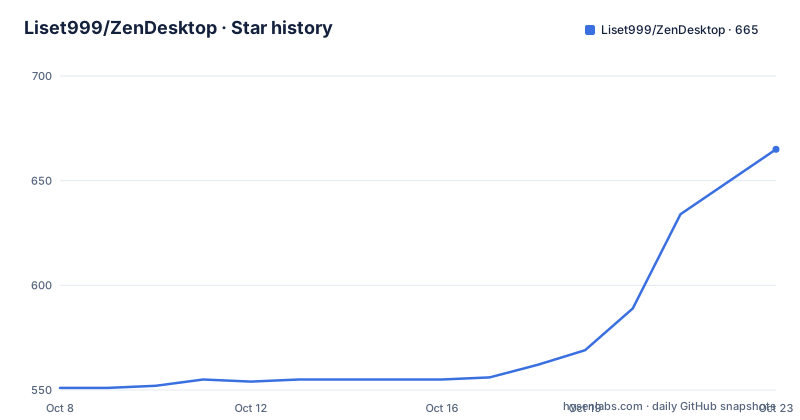
Star history
- Liset999/ZenDesktop665 ★ · +114
| Repository | 2026-10-08 | 2026-10-23 |
|---|---|---|
| Liset999/ZenDesktop | 551 | 665 |
114 Stars in the last 15 days, measured from the daily GitHub snapshot. Compare with other projects
Editorial analysis
Six Windhawk mods and one borrowed external tool
The suite is not a shell replacement. It is a set of Windhawk mods, which are compiled C++ units that hook the Windows 11 interface in place, plus one program the author did not write. The README lists seven numbered features, and the sixth local mod plus the external tool account for all of them.
The taskbar styler, registered as local@zen-taskbar-acrylic, offers Clear, Acrylic and Apple Liquid Glass presets with automatic adaptation when a window is maximized. The notification centre mod covers Quick Settings and the calendar panel with real-time acrylic effects. The Start menu mod adds native blur with independent sizing for the panel and for folder opacity. The Settings mod handles the app behind Win+I. Two behaviour mods sit alongside them: double-clicking empty desktop space hides or shows icons, with the state surviving restarts, and a macOS-style genie minimize animation built on a Direct2D mesh engine.
That last one is not the author's code. The README credits Abdullah Masood and Potassiumuncher for the minimize animation, and the v4.1.0 notes say the engine was upgraded to the authors' latest algorithm with mesh density adjustable from 8 to 96 tiles.
The seventh item is ExplorerBlurMica by Maplespe, which adds Blur, Acrylic and Mica to File Explorer. The repository tree shows both ExplorerBlurMica/ and ExplorerBlurMica_Source/, and the v4.0.0 notes say a separate config-editor-wpf.exe front end was built for it because the original author did not publish source, so the lower layer could not be modified directly. Attribution is explicit throughout, including thanks to m417z for the Windhawk core framework.
Deploying through deploy.bat and compiling in the Windhawk UI
Installation is three steps, and the second one is the part people miss. Right-click deploy.bat and run it as administrator. The script detects Windhawk, registers the mods, writes default settings and restarts the Windhawk service. Then open the Windhawk dashboard and click Save / Compile inside each mod, which builds the native C++ locally in about five to ten seconds per mod. Configuration happens afterwards through each mod's Settings page.
The compile step is the whole design. Every mod file in the tree is prefixed local@, and the README marks this as important: the suite uses pure local compilation so your system builds the C++ itself. That bypasses the official Windhawk mod server entirely, which the README frames as avoiding mod server connection failures and as being fully offline-ready.
The cost is that the repository contains C++ source you are compiling and injecting into system processes, and the deployment script wants administrator rights to do it. The repository tree makes the inventory plain: six .wh.cpp files sit at the top level next to deploy.bat, deploy.ps1, dev-windhawk-mod.ps1, restart_explorer.bat and build_releases.py, alongside ExplorerBlurMica, its source directory, a Readme.txt, ZenDesktop_Developer_Notes.md and CLAUDE.md.
File Explorer transparency is separate from everything else. To enable it you run ExplorerBlurMica\register.cmd as administrator, and the v4.0.0 notes are honest about two limits: Windows' own rendering means Explorer cannot reach full transparency and will retain some blur, and when File Explorer loses focus its title bar reverts to the system solid colour.
The zero background process claim and the tray daemon description
Two descriptions of the same architecture sit side by side and do not match. The repository description calls the project a Windows desktop and taskbar enhancement utility with a native C++ Windhawk mod and a standalone tray daemon. The README's own opening line says all real-time customizations are handled natively via the Windhawk UI with zero background process bloat, zero UI lag and 0% CPU overhead.
The README's version is the one the tree supports. The top-level entries are six Windhawk C++ mod sources, four scripts and two ExplorerBlurMica directories. There is no tray daemon source file, no daemon project file and no build target for one. The absence of a license field in the repository metadata is consistent with that too: the README states the project is licensed under GPL-3.0 and points at the LICENSE file, but that file's presence is asserted by the README rather than by a license field.
The CPU claim is harder to take at face value than the process claim. Injected mods run inside shell processes and repaint the taskbar and Start menu, and the v4.0.0 release notes describe removing synchronous debug logging from high-frequency UI redraw events as a performance fix. A project that ships a redraw optimization in a release has acknowledged the cost profile of its own rendering path, which is more informative than a headline number.
Windhawk itself is the component that keeps running: it hosts the mods, restarts shell processes and offers the UI. If your objection is a resident background process, the honest answer is that this suite adds none of its own and depends entirely on that framework.
Anti-cheat exclusions and the blank window reports in the release notes
The v4.1.0 release is worth reading for a reason the feature list does not suggest. Its first item is not cosmetic. It describes fixing an error dialog with the code 3, 1051, 150002 and a message saying an abnormal system environment was detected, which appeared when starting League of Legends, WeGame and Valorant. That is Tencent's ACE anti-cheat reporting on the machine.
The fix is described as a two-layer hard isolation, with an exclusion list embedded in the macOS animation mod's C++ and also registered globally in the Windhawk engine through Exclude and InjectIntoGames = 0. The release notes say it takes effect on deploy and removes false positives and ban risk.
That is the honest reason to read the notes before installing. A mod that injects into shell processes can trip anti-cheat heuristics, and the response here was to hard-code process exclusions rather than to reduce the injection surface. For anyone who plays competitive games on the same machine, the exclusion list is the part to verify against your own titles, and injecting into games is exactly what the release configures against.
The same release also reports blank white windows on startup when opening Lenovo PC Manager, Antigravity and VS Code, attributed to DirectComposition hardware acceleration and fixed with full framework refresh instructions. The v4.0.0 notes previously described options occasionally not loading, showing late, or appearing as an empty white frame in Quick Settings, the Start menu and the taskbar.
Both are real failure modes of injecting into user interfaces you did not write, and both arrived as user reports rather than design goals. The suite also removed a deprecated maximize helper mod in 4.1.0, folding that logic into the main taskbar mod to avoid conflicts.
A GPL suite assembled from other people's GPL components
The licensing picture is straightforward and worth stating precisely. The README says the project is licensed under GPL-3.0 and directs you to the LICENSE file, and the release notes credit Maplespe for ExplorerBlurMica, m417z for the Windhawk core framework, and Abdullah Masood and Potassiumuncher for the macOS minimize animation.
GPL-3.0 has a distribution obligation, so redistributing these mods means carrying the licence and source with them. The repository does ship source for its own mods, since the six .wh.cpp files are the mods. It does not ship source for ExplorerBlurMica, and the v4.0.0 notes say the original author did not publish it, which is why a front end was built around it instead. That is a distinction between shipping the binary and shipping the code, and the README's thanks section is where you would look first to establish what you may redistribute.
The three version lines tell a short history. v3.8.0 in June 2026 added UXTheme API hooks for column headers, sorted columns and navigation splitters in File Explorer, inverted the whole-window alpha scale so larger means more transparent, made the hidden-icons state persist, and added a Python customizer GUI launcher. v4.0.0 in the same month added per-folder Start menu styling, the XAML redraw fix, and Start menu resizing that previously needed a separate mod. v4.1.0 in August brought the anti-cheat work, the light-mode Settings fix and full Chinese localization of every mod name and setting.
The last push was on 2026-08-24, the same day v4.1.0 was published.
Who this suits and what to check before the first deploy
The project is aimed at a specific person: someone on Windows 11 who wants a translucent or glass taskbar and Start menu, is comfortable running a batch file as administrator, and is willing to compile C++ mods locally. If you want a different desktop environment entirely, or you want zero admin prompts, this is the wrong shape of solution, because the deployment path is an elevated script registering hooks into system processes.
The comparison worth making is against doing nothing and against a full third-party shell. Compared with nothing, this is a visible improvement with a real cost: a resident framework, compiled code, and known conflicts. Compared with replacing the shell, it preserves the actual Windows 11 interface and its behaviour while changing how it looks, which is the trade most people in this category are making.
There are no repository topics and no project homepage field. The README's outbound links are the author's Bilibili, Douyin and Afdian pages rather than a documentation site, so depth of written guidance lives in the release notes and in ZenDesktop_Developer_Notes.md rather than on a hosted manual. The English and Chinese sections of the README duplicate each other, with the Chinese running ahead in describing behaviour in places, which is useful context for anyone trying to work out which release note matches which change.
Everything in the suite compiles from source you can read before running it, and that is the most useful thing to know about the trust question. Six C++ files, one batch script, and a separate register.cmd for the borrowed Explorer component.
Editorial conclusion
ZenDesktop is a good fit if you want the Windows 11 shell to look a specific way and would rather inject code into the existing shell than replace it with a different one. The trade is that you are running a C++ injection framework, a deployment script that asks for administrator rights, and a suite whose own release notes twice describe conflicts with anti-cheat software and blank windows in other applications. The GPL-3.0 licence and the fact that every mod is a local C++ file you can read before compiling both matter more than the star count. Start by running deploy.bat as administrator and compiling one mod in the Windhawk UI, leave the excluded process list alone if you play games, and read the v4.1.0 notes about the anti-cheat exclusions before you apply the whole suite at once.
Frequently asked questions
What is ZenDesktop and does it replace the Windows shell?
ZenDesktop does not replace the shell. It restyles Windows 11 in place through Windhawk mods, six of which are C++ source files compiled locally on your machine, plus the separate ExplorerBlurMica tool for File Explorer transparency.
How do I install ZenDesktop?
Right-click deploy.bat and run it as administrator, which detects Windhawk, registers the mods and restarts the Windhawk service. Then open the Windhawk dashboard and click Save / Compile in each mod, which builds the C++ locally in roughly five to ten seconds. File Explorer transparency needs a separate step: run ExplorerBlurMica\register.cmd as administrator.
Does ZenDesktop affect games or anti-cheat software?
Version 4.1.0 addresses reports of a Tencent ACE anti-cheat error dialog when starting titles including League of Legends, WeGame and Valorant. The fix embeds an exclusion list in the mod source and registers Exclude with InjectIntoGames = 0 in Windhawk, so the mods do not inject into games.
What licence is ZenDesktop released under?
The README states the project is licensed under GPL-3.0 and points to the LICENSE file, though the repository metadata itself carries no licence field. Components come from other authors: ExplorerBlurMica by Maplespe, the Windhawk core by m417z, and the macOS minimize animation by Abdullah Masood and Potassiumuncher.
Are the ZenDesktop mods compiled on my computer or downloaded?
They are compiled on your computer. Every mod file is prefixed local@ and the README describes the suite as pure local compilation, so your system builds the C++ in the Windhawk UI rather than fetching a binary from the Windhawk mod server.
Official sources
Add this badge to your README
If you maintain this project, the badge below links readers to this analysis and shows its maintenance status from the daily GitHub snapshot. Paste the markdown into your README; add ?metric=license or ?metric=stars to the image URL for a different field.

[](https://hysenlabs.com/projects/liset999-zendesktop)Star history chart for your README
[](https://hysenlabs.com/projects/liset999-zendesktop)Was this useful?