QField for QGIS: Offline GIS on Mobile and Desktop
A simplified touch optimized interface for QGIS
At a glance
- What is it?
- QField is a touch-oriented QGIS client for collecting and working with geographic data offline. It is best suited to field teams that need QGIS projects on supported mobile or desktop platforms, with synchronization available through the separate QFieldCloud backend.
- Who is it for?
- QField is appropriate for field teams that depend on QGIS projects and need offline or connected data collection across supported app stores and desktop systems. It is less suitable when the absence of a documented project-opening tutorial, project packaging rules, synchronization requirements, or device-specific deployment process creates an unacceptable adoption risk.
- Can I use it commercially?
- Yes, with conditions. GPL-2.0 is a copyleft licence: if you distribute software that includes it, you must release that software's source code under the same licence. Running it internally without distributing it does not trigger that obligation.
- Is it still maintained?
- Yes. The repository received new commits within the last day.
- What is it written in?
- Mainly C++, according to GitHub's language statistics.
Answers come from the project's GitHub data, last synced on October 23, 2026, and from our analysis. They are not legal advice.
Star history
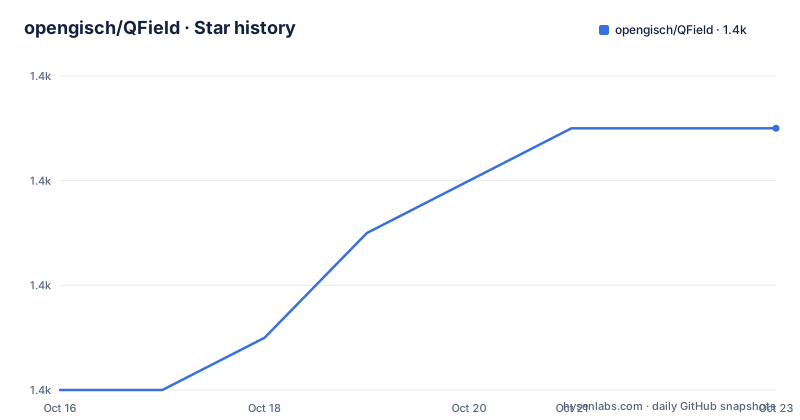
- opengisch/QField1,389 ★ · +5
| Repository | 2026-10-16 | 2026-10-23 |
|---|---|---|
| opengisch/QField | 1.4k | 1.4k |
5 Stars in the last 7 days, measured from the daily GitHub snapshot. Compare with other projects
Editorial analysis
QField's role in offline GIS field work
QField addresses a specific gap between desktop GIS and physical fieldwork. QGIS projects are commonly prepared by GIS specialists on a computer, but surveyors, inspectors, researchers and other field users often need to inspect or edit geographic information on a phone or tablet. QField provides a simplified, touch-oriented interface for that audience rather than asking field users to work through the full QGIS desktop application.
The project supports Android, iOS, Windows, Linux and macOS according to its repository topics. The README links QField through Google Play, the Microsoft Store and the App Store, and it also provides direct Linux and macOS downloads. This distribution model makes it possible to evaluate the same field-oriented client across several device classes, although the repository summary does not claim identical feature sets for every platform.
QField can operate fully offline or while connected. That choice matters when a field location has no usable network. Offline operation does not mean that QField can create an arbitrary QGIS project without prior preparation. The README says that QField works with QGIS but does not provide a project packaging tutorial, supported layer-format matrix or device storage procedure. Those omissions are important during adoption planning.
The intended users are therefore people who already have GIS workflows or project requirements, especially teams that want a familiar QGIS-oriented environment in the field. QField may not suit someone looking for a standalone mapping product with no connection to QGIS project conventions.
Project structure behind the QField client
The repository identifies C++ as its primary language and includes QML-related configuration at the top level. Its structure also contains `src/`, `platform/`, `resources/`, `i18n/`, `test/`, `cmake/` and `scripts/`. Based on that layout, the application is not a single monolithic interface directory. Native application code, platform-specific work, resources, localization, tests and build configuration have separate homes.
The presence of `CMakeLists.txt`, `.cmake-format.yaml`, `.clang-format`, `.qmlformat.ini`, `vcpkg.json` and `vcpkg/` indicates a configured native build rather than a browser application. The `test/` tree also shows that testing is represented in the repository. The cleaned README does not identify the test command or describe the test categories, so the repository layout supports only a limited claim about development tooling.
QField's offline or connected operation concerns how the field client handles work during use. The README does not describe its internal synchronization protocol, conflict-resolution algorithm, local database schema or project cache format. Those implementation details should not be inferred from the optional connection to QFieldCloud.
For collaborative use, the README points to the separate open-source `opengisch/QFieldCloud` repository and describes it as the optional synchronization platform. That division means adopting QField does not automatically settle the architecture of the synchronization service. An organization may need only offline project use, or it may also have to assess QFieldCloud deployment, account management and data exchange.
Installing QField from supported distribution channels
The README does not provide source-build installation steps for ordinary users. It directs users to application stores for Android, Windows and iOS, with direct downloads available for Linux and macOS. GitHub Releases contains the full list when a direct download or an older version is needed.
For Android, install `QField for QGIS` from the linked Google Play listing. For Windows, use the Microsoft Store link. For iOS, use the App Store listing. On Linux or macOS, select the matching download from the README. The repository does not state supported OS versions, minimum device specifications, storage requirements or architecture support, so those details must be checked in the relevant store listing or release documentation before deploying devices.
The repository also advertises a separate Google Play beta channel containing the latest `master` build. The README states that this is unstable and not intended for production. Normal adoption should therefore use the stable store application or a stable GitHub release unless a development build has been selected deliberately.
Android package authenticity can be checked with the command documented by the project. Replace `[filename.apk]` with the local APK filename, then confirm that the printed signing certificate hash matches the documented value:
apksigner verify --print-certs [filename.apk] | grep "5a7dd946a4b700c081a5bd375dbc8f0d11aa89d53832567ce5b8a92088e0e898"This check applies only to Android. It does not verify Windows, iOS, Linux or macOS packages.
Preparing the first field use after installation
The cleaned README does not document the first-use sequence. It does not say how to transfer a QGIS project to a device, which directory should contain it, how users select the project, or what permissions QField requests. It also provides no sample project, menu path or configuration file that could safely be turned into an invented tutorial.
That silence is a concrete limitation rather than a missing detail for this review. GIS deployment commonly depends on project packaging, layer references, forms, symbology, basemaps and field constraints. The project documentation must be consulted for those subjects, and the full documentation at `https://docs.qfield.org/` is the next project-specific source named by the README.
A safe first-use verification should still remain bounded by what is documented. Install the stable release on one target device, obtain a project prepared for that intended QField workflow from the responsible GIS team, and follow the project's documented preparation process. Do not assume that desktop QGIS can simply open an arbitrary mobile directory or that every desktop plugin is available in QField. The README does not make either promise.
If connected collaboration is required, QFieldCloud must be considered before field rollout. If it is not required, the README supports choosing a local offline workflow. It does not state that a QFieldCloud account is mandatory for every installation.
QFieldCloud as an optional synchronization layer
QField offers two operating contexts according to the README: fully offline or connected. The optional QFieldCloud platform provides synchronization for collaborative field-to-office workflows. The backend itself is open source and resides in the separate `opengisch/QFieldCloud` repository.
This separation gives QField users a choice about infrastructure. A single-device or disconnected workflow does not require presenting QFieldCloud as part of the mobile client itself. A collaborative deployment, however, adds questions about where the backend runs, how users are provisioned, how changes move between devices and office systems, and how competing edits are handled. The QField README does not answer those operational questions, so they cannot be attributed to the client documentation.
The phrase "field-to-office workflows" describes the intended collaboration boundary but does not define supported data formats, synchronization frequency, conflict resolution or retention policy. Teams should not treat the presence of a QFieldCloud link as proof that their existing QGIS data can be synchronized without conversion or administrative work.
There is also an architectural trade-off between offline use and collaboration. Offline access removes dependence on connectivity at the point of work, but it requires the project and data to be present on the device before that work begins. Connected synchronization can coordinate changes, yet it introduces a backend and a synchronization process. QField's documentation excerpt does not quantify the added operational burden.
Platform coverage, licensing and upgrade boundaries
QField is distributed under `GPL-2.0`, while the README describes the license as GPLv2 or later. It states that users may use and modify the software under those terms. Any organization redistributing a modified build or incorporating the licensed code into a distributed product needs to review its own compliance obligations. This is a licensing boundary, not legal advice.
The repository is not archived. Its last push was on 2026-10-15, one day before this review. The listed stable releases are `v4.3.5` dated 2026-09-30, `v4.3.4` dated 2026-09-27 and `v4.3.3` dated 2026-09-17. These facts show recent repository and release activity, but they do not establish compatibility for every supported device or every existing QGIS project.
Upgrading has two separate tracks. The `master` build is published through a beta channel and is explicitly not intended for production. Stable users can use the store applications, direct platform downloads or GitHub Releases. The README offers older versions through GitHub Releases, but it does not document upgrade migration steps, settings compatibility or rollback procedures.
Development work also has a different documentation path. Contributors are directed to `doc/dev.md`, while user documentation lives at the QField documentation site. This distinction matters because the main README is not a substitute for a build guide, migration guide or field deployment manual.
Where QField differs from desktop-only QGIS use
The clearest alternative is desktop QGIS used directly on the workstation. QGIS remains the project preparation environment referenced by QField, while QField replaces that interface in the field with a simplified, touch-optimized client. Desktop-only QGIS keeps work on a computer and does not rely on transferring a project to a phone, tablet or other supported target device.
A second design choice is to treat QField and QFieldCloud as one synchronized product. QField is the field client; QFieldCloud is an optional backend for collaboration. Compared with a disconnected local workflow, adding QFieldCloud introduces synchronization and backend administration. Compared with desktop-only QGIS, it permits field-to-office exchange but adds device preparation and connectivity concerns.
QField is the wrong choice when field users require the full desktop QGIS interface, an undocumented plugin workflow or an arbitrary project configuration without testing. It is also a poor fit when the organization cannot package and support projects for the intended devices. The application distribution covers several operating systems, but the README does not establish identical parity across them.
Its strongest case is narrower: a team has a QGIS-based field process, needs that process on touch-oriented devices, and can verify project and device compatibility. QField directly addresses that requirement with offline and connected modes, while leaving QFieldCloud as an optional infrastructure decision.
Editorial conclusion
QField is appropriate for field teams that depend on QGIS projects and need offline or connected data collection across supported app stores and desktop systems. It is less suitable when the absence of a documented project-opening tutorial, project packaging rules, synchronization requirements, or device-specific deployment process creates an unacceptable adoption risk. Review doc/dev.md, confirm the QGIS project works on the target devices, and decide whether QFieldCloud is required before selecting a production release.
Frequently asked questions
Does QField work without an internet connection?
Yes. The README states that QField can work fully offline or while connected. It does not document how projects must be prepared or transferred for offline use.
Is QFieldCloud required to use QField?
No. QFieldCloud is optional and is described as the synchronization platform for collaborative field-to-office workflows.
Which platforms provide QField?
The README links QField through Google Play for Android, the Microsoft Store for Windows and the App Store for iOS. It also provides direct downloads for Linux and macOS.
Can developers build the latest master version?
The README says the latest `master` build is published through a dedicated Google Play beta channel. It requires joining the beta program, and the build is explicitly not intended for production.
Official sources
Add this badge to your README
If you maintain this project, the badge below links readers to this analysis and shows its maintenance status from the daily GitHub snapshot. Paste the markdown into your README; add ?metric=license or ?metric=stars to the image URL for a different field.

[](https://hysenlabs.com/projects/opengisch-qfield)Star history chart for your README
[](https://hysenlabs.com/projects/opengisch-qfield)Was this useful?