LiveSplit review: a customizable speedrun timer with game-time support
A sleek, highly customizable timer for speedrunners.
At a glance
- What is it?
- LiveSplit is an open source C# timer for speedrunners who need local timing, comparisons, split detection, online leaderboards, and customizable layouts. Its main constraint is that game-time and auto-splitting depend on support from the game or emulator being run.
- Who is it for?
- LiveSplit fits runners who want precise local timing, split comparisons, racing, and a configurable stream layout. It is less suitable for runners whose game or emulator cannot expose game time and auto-splitting, or for people who prefer a manual stopwatch workflow.
- Can I use it commercially?
- Yes. MIT is a permissive licence: you can use, modify and sell software built on it, as long as you keep its copyright and licence notices.
- Is it still maintained?
- Yes. The repository last received commits 18 days ago.
- What is it written in?
- Mainly C#, according to GitHub's language statistics.
Answers come from the project's GitHub data, last synced on November 7, 2026, and from our analysis. They are not legal advice.
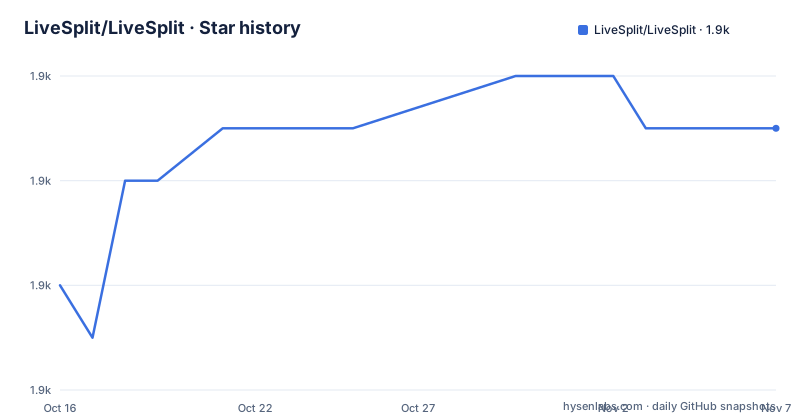
Star history
- LiveSplit/LiveSplit1,857 ★ · +3
| Repository | 2026-10-16 | 2026-11-07 |
|---|---|---|
| LiveSplit/LiveSplit | 1.9k | 1.9k |
3 Stars in the last 22 days, measured from the daily GitHub snapshot. Compare with other projects
Editorial analysis
LiveSplit's role in a speedrun timing workflow
LiveSplit solves the timing and split-management part of a speedrun. The README describes it as a timer program for speedrunners that is designed to be easy to use while still providing detailed timing features. Its intended users are people running PC games or emulator-based games who need to know where time is gained or lost, compare attempts, and prepare timing layouts for recording or streaming.
The project covers more than a stopwatch. A run is organized around splits, and LiveSplit can compare the current attempt with user-defined comparisons and automatically generated comparisons such as Sum of Best Segments or an average run. The README also documents Speedrun.com integration, which allows users to browse leaderboards, download splits, submit runs, and display world records. That combination makes it useful both for local practice and for online speedrun participation.
It is not intended to replace the game, emulator, capture software, or a streaming platform. Its job is to observe timing, organize the run, and present the relevant information. Game Time and Auto Splitting are optional capabilities rather than universal guarantees, which is important when deciding whether it matches a particular runner's setup.
How LiveSplit reads and presents run data
LiveSplit uses local timing for ordinary runs. The README states that it synchronizes with an atomic clock over the Internet to estimate inaccuracies in the local PC timer, then automatically adjusts the local timer to correct those inaccuracies. This is a clock-synchronization mechanism, not a replacement for reading the game's internal timer.
For supported games, Game Time is read directly from an emulator or PC game. Auto Splitting detects whether game time and auto-splitting are available, after which the runner can enable the relevant behavior in the Splits Editor. The README specifically says that Game Time is selected under Compare Against. That distinction matters because a split setup can record local time while still lacking access to the game's own clock.
The timer can switch between comparisons dynamically, including during a run. Layouts control the visible components, and components can be added, removed, rearranged, and customized. Dynamic resizing scales the parts when the window changes size, which supports stream overlays and different recording resolutions. During races, the timer starts when the race begins and writes `.done` when the race is complete. The Video Component can start a local video with the run and stop it when the run is reset.
The internal LiveSplit Server adds an automation path. It accepts named-pipe connections at `\\<hostname>\pipe\LiveSplit`, raw TCP/IP connections, or a WebSocket endpoint at `ws://<hostname>:port/livesplit`. The named pipe is always available while LiveSplit runs. TCP and WS must be started manually from `Control`, and they cannot run simultaneously because WS runs on top of TCP/IP. The documented default port is `16834`, although network policy may block it.
Building LiveSplit from the repository
The README does not provide a separate installer workflow. It directs users to the project website at `https://livesplit.org` and links to GitHub releases through the release badge. For source builds, the repository requires .NET Framework 4.8.1, the .NET 10.0 SDK, and a compatible Visual Studio installation.
Clone the repository with submodules, because the README identifies missing submodules as a common build problem. The recursive clone command is:
git clone --recursive https://github.com/YourUsername/LiveSplit.gitReplace `YourUsername` with the account hosting the fork, as the README's contribution instructions show. If the repository was already cloned without submodules, run this from its root directory:
git submodule update --init --recursiveThe README then gives one build command, run from the repository root:
dotnet build LiveSplit.slnxThe source tree includes `LiveSplit.slnx`, `src/`, `components/`, `lib/`, `res/`, and `test/`, so the build is organized as a solution rather than as a single source file. The documented prerequisite for Visual Studio is a version that supports the installed .NET SDK. The README names Visual Studio 2026 as the most recent version at the time of writing, but the build command is the repository-level instruction that matters for a source checkout.
A first LiveSplit run using splits and comparisons
The README describes the available actions but does not provide a complete first-run click-by-click procedure or a sample split file. It identifies the Splits Editor as the place to enable detected Game Time and Auto Splitting, and it identifies Compare Against as the place where Game Time is selected. Those are the documented configuration points for a first run.
A practical first use based on the README is therefore limited to opening or obtaining splits, reviewing the comparison settings, and selecting the timing method that the game or emulator supports. Speedrun.com integration can supply downloadable splits, leaderboard information, and run submission. For an online race, the runner can start or join a race through SpeedRunsLive or racetime.gg from LiveSplit. The timer is documented to start with the race and write `.done` after completion.
A layout is equally part of a real first use. The README says every user can modify layouts, add or remove parts, rearrange them, customize individual parts, and use a custom background image. A runner can also add the Video Component and point it at a local video file. This is a display and recording setup, not an automatic video export pipeline.
The main point to check before relying on LiveSplit is whether the selected game exposes Game Time and Auto Splitting. The README says LiveSplit will detect their availability, but it does not claim support for every game. A split file alone does not establish that those timing features are available.
Where LiveSplit's features create constraints
The clearest limitation is the dependency on game-specific timing support. Local timer behavior is available as the general timing model, but Game Time and Auto Splitting are read from an emulator or PC game only when that software exposes the relevant information. A runner using unsupported software may still use LiveSplit for manual splits and comparisons, but automatic split detection should not be assumed.
Online services add another dependency. Speedrun.com integration requires access to that service, while racing depends on SpeedRunsLive or racetime.gg and, for runner comparisons during a race, on the other runners also using LiveSplit. The README does not document offline behavior for these integrations, so network-dependent workflows should be treated as such.
The server controls are also operationally specific. The named pipe is always open while LiveSplit is running, but TCP and WS require manual startup each time the application launches. TCP and WS cannot both run at once. The default `16834` port may be blocked by a network configuration. A tool intended to control LiveSplit therefore needs to select the appropriate transport and account for startup order.
Component customization increases flexibility but creates a maintenance surface. The README describes a component development system and downloadable components, yet it does not give a compatibility policy for every component. Layout changes can also affect readability at different stream sizes. These are design trade-offs rather than defects, but they matter for teams maintaining a fixed streaming setup.
LiveSplit compared with a manual timing workflow
The direct alternative is a manual stopwatch or spreadsheet workflow: start and stop the timer yourself, record split times separately, and compare them afterward. That approach has less software configuration and does not depend on Game Time or Auto Splitting support, but it does not provide LiveSplit's automatic clock correction, dynamic comparisons, race synchronization, Speedrun.com workflow, or component layout system.
LiveSplit also differs from a simple split list. A basic list records checkpoints, while LiveSplit can calculate comparisons, update the display during a run, connect to online services, and expose control endpoints for other programs. The trade-off is that a larger feature set creates requirements around .NET, game integration, network access, and component configuration.
The choice is therefore operational. Manual timing may be preferable when a game lacks supported timing data or when an external runner prefers complete control over every split. LiveSplit is the stronger fit when the runner values automatic comparison, online participation, and a streaming-oriented layout.
LiveSplit maintenance, releases, and MIT licensing
The repository is not archived, and its last push was on 2026-10-11. Recent releases listed for the project are `1.8.37` on 2026-02-15, `1.8.36` on 2025-11-06, and `1.8.35` on 2025-10-04. Those facts show recent repository activity and published releases, but the README does not promise a release schedule or a specific upgrade policy.
Upgrading may involve more than replacing a single executable because layouts, components, split files, and server integrations are part of the workflow. The README documents components and layouts as user-facing extension points, but it does not state which versions of external components are compatible with each LiveSplit release. Users should therefore check component and layout behavior when changing versions.
The repository is licensed under the MIT License. That permits use, modification, distribution, and private use subject to the license conditions, but this review does not provide legal advice. The practical licensing implication is that LiveSplit can be used and modified under the stated MIT terms, while downstream components may have their own licensing requirements that should be checked separately.
Editorial conclusion
LiveSplit fits runners who want precise local timing, split comparisons, racing, and a configurable stream layout. It is less suitable for runners whose game or emulator cannot expose game time and auto-splitting, or for people who prefer a manual stopwatch workflow. Verify the required .NET Framework 4.8.1 support, the game or emulator timing integration, and whether the named pipe or server-based control approach fits your automation before adopting it.
Frequently asked questions
How do I build LiveSplit from source?
The README requires .NET Framework 4.8.1, the .NET 10.0 SDK, and a compatible Visual Studio version. Clone with submodules, then run `dotnet build LiveSplit.slnx` from the repository root.
Does LiveSplit support game time and automatic splitting?
Yes, when the game or emulator provides the required timing information. The README says LiveSplit detects whether Game Time and Auto Splitting are available, and Game Time can be selected under Compare Against.
Can LiveSplit connect to online speedrun services?
The README documents Speedrun.com integration for leaderboards, split downloads, run submission, and world records. It also documents racing through SpeedRunsLive and racetime.gg.
Official sources
Add this badge to your README
If you maintain this project, the badge below links readers to this analysis and shows its maintenance status from the daily GitHub snapshot. Paste the markdown into your README; add ?metric=license or ?metric=stars to the image URL for a different field.

[](https://hysenlabs.com/projects/livesplit-livesplit)Star history chart for your README
[](https://hysenlabs.com/projects/livesplit-livesplit)Was this useful?