PrivateBin hands the key to whoever holds the link, and nothing else
A minimalist, open source online pastebin where the server has zero knowledge of pasted data. Data is encrypted/decrypted in the browser using 256 bits AES.
At a glance
- What is it?
- A PHP pastebin that encrypts in the browser with 256 bit AES in GCM mode, so the server stores ciphertext and nothing readable. It also spells out, unusually plainly, what that guarantee does not cover: server-side code injection, access logs, and a compromised instance that logs decryption keys.
- Who is it for?
- PrivateBin is a sound choice for short-lived text and code sharing when you control the instance or trust the operator, and it is a poor fit for durable storage, for anonymous accounts, or for anything you would not want read by whoever holds a screenshot of your URL bar. Before deploying, verify three things yourself: HTTPS with HSTS, whether file uploads stay disabled, and whether your paste needs a password because the key alone is not a secret.
- Can I use it commercially?
- Check first. The repository uses a licence we do not classify automatically, so read its LICENSE file before any commercial use.
- Is it still maintained?
- Yes. The repository last received commits 1 day ago.
- What is it written in?
- Mainly PHP, according to GitHub's language statistics.
Answers come from the project's GitHub data, last synced on November 13, 2026, and from our analysis. They are not legal advice.
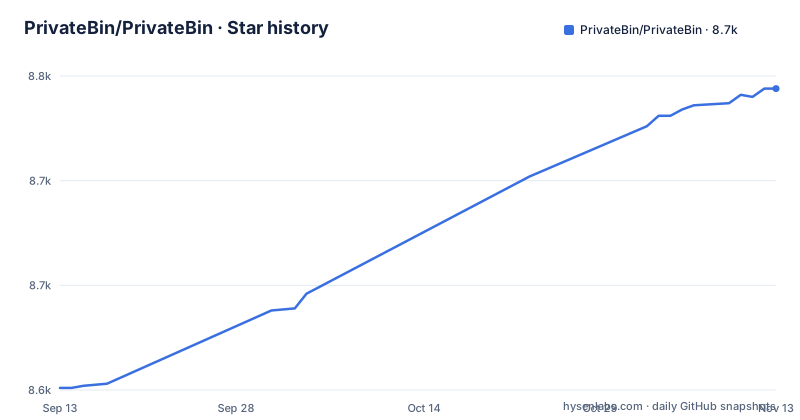
Star history
- PrivateBin/PrivateBin8,744 ★ · +143
| Repository | 2026-09-13 | 2026-11-13 |
|---|---|---|
| PrivateBin/PrivateBin | 8.6k | 8.7k |
143 Stars in the last 61 days, measured from the daily GitHub snapshot. Compare with other projects
Editorial analysis
The decryption key rides in the URL fragment, so the link is the secret
PrivateBin encrypts and decrypts in the browser using 256 bit AES in Galois Counter mode. The server stores ciphertext and has zero knowledge of the stored data, which is the whole design claim. PrivateBin is a fork of Sébastien Sauvage's ZeroBin, refactored to allow easier and cleaner extensions.
The mechanism has a direct consequence that catches people out. The key used to encrypt the paste is part of the URL, in the fragment part separated by the `#`. Browsers do not send that fragment to the server, so the key never travels to the host. But the fragment travels with the link itself: if you publicly post the URL of a paste that is not password protected, anyone can read it.
So a PrivateBin link is the credential, not a locator. Paste it into a chat, a ticket, a commit message, or a screenshot and the paste is open. The password option exists for exactly this, and it is optional in the configuration file, which means a fresh install can be publishing unprotected pastes without anyone deciding to. Use a password, make it strong, and share it privately over an end-to-end encrypted channel, separate from the link.
Encryption does not protect you from the server that serves the page
The threat that client-side encryption cannot address is the code that runs while you read. The documentation is blunt about it: as a user you have to trust the server administrator not to inject any malicious code. A server could be abused, or an administrator could be legally forced into sending malicious code to users, which logs the decryption key and sends it to a server when a user accesses a paste.
That is the failure mode to reason about. The ciphertext on disk stays unreadable, but the key arrives with the page, and hostile page code does not need the ciphertext at all. The advice given is direct: do not access any PrivateBin instance if you think it has been compromised. The mitigating condition is that as long as no user accesses this instance with a previously generated URL, the content cannot be decrypted. Nobody reading it means nothing leaks it.
The transport requirements follow from the same logic. For security, a PrivateBin installation has to be used over HTTPS, and the instance should be secured by HSTS. It can use traditional certificate authorities and/or use a DNSSEC protected DANE record. Over plain HTTP you are also trusting your internet provider and every jurisdiction the traffic passes through.
Access logs can still expose who opened a paste first
It is easy to assume that zero knowledge means zero trace. It does not. A server admin can be forced to hand over access logs to the authorities. PrivateBin encrypts your text and the discussion contents, but who accessed a paste first might still be disclosed via access logs.
That single sentence changes what the tool is good for. The request for the page arrives at the host with a timestamp and a source address, and that is server-side metadata that no amount of AES in the browser touches. If your threat model includes not revealing that you were the first reader, or not revealing when you read, the encryption story does not get you there. Sharing a link with a colleague who then opens it while you are both online can leave a trace that names you as the earlier visitor.
The same gap widens if you turn on discussion threads. So the decision about discussions is not only a moderation decision. Enabling nicknames, IP based identicons, or vizhashes on a paste you care about publishes an IP-derived visual or hash to every reader of that thread, which is a different and larger disclosure than the text itself.
Plausible deniability is sold to the administrator, not to the reader
The argument for running your own instance is written from the operator's side. As a server administrator you don't have to worry if your users post content that is considered illegal in your country. You have plausible deniability of any of the pastes content. If requested or enforced, you can delete any paste from your system.
Read carefully, that is a liability transfer. The operator is told they cannot be forced to produce content, and they are also handed a deletion power that is unconditional and unaudited from the reader's perspective. A paste you created and shared a link to can be removed by the person running the host, and the link will simply stop resolving to content. If the paste mattered later, the guarantee you have is that it was never readable on the server, not that it is still there.
Administrators also inherit the version and preview problem described further down, since attachment handling is exactly where rendered content has gone wrong in this project's recent releases. In short, the operator's comfort and the user's durability are separate properties, and self-hosting improves the first while saying nothing about the second.
The optional feature set is mostly about who can see that you were there
Some features are optional and can be enabled or disabled in the configuration file. The list includes password protection, discussions anonymous or with nicknames and IP based identicons or vizhashes, expiration times including a forever and burn after reading option, Markdown format support for HTML formatted pastes including preview, syntax highlighting for source code using prettify.js including 4 prettify themes, file upload support for image, media and PDF preview disabled by default with an adjustable size limit, templates, a translation system with automatic browser language detection, language selection, and a QR code for paste URLs.
Two of those deserve attention because each has a price. Burn after reading is a self destruct option that the author, not the reader, sets in advance, and it means a mistyped link handed to the wrong person consumes the paste for everyone. Forever is the opposite trade, storing content indefinitely on a host that may be seized.
Language selection is disabled by default, and the stated reason is that it uses a session cookie. That is a small privacy decision with a practical edge: a reader who blocks cookies falls back to automatic browser language detection and may get a different interface than you intended. QR codes for paste URLs help with hand off to a phone, which shortens the distance between sharing and a link sitting in a chat history.
Attachment previews are a render path, and 2.0.5 and 2.0.6 narrowed it
File upload support covers image, media and PDF preview, it is disabled by default, and the size limit is adjustable. That default is the safe configuration, and the release history explains why it exists in that state.
Version 2.0.6, released 2026-08-08, restricts MIME types accepted for PDF and sanitized SVG previews to prevent HTML render fallback. Version 2.0.5, released 2026-07-11, fixes rendering unsafe attachments and base path in JSON API responses. Two consecutive releases about the same class of problem: previewing an uploaded file meant letting the browser render something an untrusted uploader chose.
The consequence for an administrator is that turning uploads on is not a storage decision but a rendering decision. You are choosing to serve attacker supplied content types through the browser of every reader, and the fixes above are mitigations rather than a promise that the path is closed. Note also that the second release touched base path handling in JSON API responses, so any integration you built against that endpoint deserves a re-test against 2.0.6 rather than an assumption that a security release kept its shape.
A version number lives in six files and the Makefile rewrites all of them
The build file is where the release process shows through. CURRENT_VERSION is 2.1.0, matching the current version at the top of the README, and VERSION_FILES lists README.md, SECURITY.md, doc/Installation.md, js/package.json, lib/Controller.php, and the Makefile itself. The bump is scripted:
make increment VERSION=1.2.3That target greps the current version across those files, rewrites each hit, then stages VERSION_FILES together with CHANGELOG.md and commits with the message incrementing version. It is a reminder that a version is not one string but six, and that a fork or a downstream package pinned to an older Controller.php or js/package.json can drift from the documented version without anyone noticing.
Signing is scripted too, so releases are verifiable rather than assumed. Tests run on both sides of the stack, JavaScript first and PHP with coverage, and the dependency target updates production packages only:
cd js && nyc mocha
cd tst && XDEBUG_MODE=coverage phpunit 2> /dev/null
composer update --no-dev --optimize-autoloader
Documentation is generated from source as well, with jsdoc over js/privatebin.js and js/legacy.js and phpdoc over lib/. If you want to know what an option actually does in this codebase, those generated pages are closer to the truth than a wiki page written years earlier.
The installation steps live in doc/Installation.md, not in the front page
If you search the front page for a command to copy, you will not find one. The setup path is a link to an installation guide kept in the repository at doc/Installation.md on the master branch, and the page itself stops there. Deployment specifics are handled in that guide and in the configuration guide, which is the reference for every option named in the list above.
The tree gives hints about the shape of the project. There is index.php at the root, lib/ for the PHP side, js/ for the browser code, tpl/ for templates, cfg/ for configuration, i18n/ for translations, css/ and img/ for assets, and tst/ for tests. A composer.json and composer.lock sit next to a vendor directory, and a Procfile is checked in.
Templates default to bootstrap5, bootstrap CSS, and darkstrap, and adapting one to your own site layout is a supported path rather than a fork. If you take that path, remember you are now responsible for shipping your own template code to every reader of every paste, which is the same category of trust decision as trusting an administrator you did not choose.
Editorial conclusion
PrivateBin is a sound choice for short-lived text and code sharing when you control the instance or trust the operator, and it is a poor fit for durable storage, for anonymous accounts, or for anything you would not want read by whoever holds a screenshot of your URL bar. Before deploying, verify three things yourself: HTTPS with HSTS, whether file uploads stay disabled, and whether your paste needs a password because the key alone is not a secret. If you run a public instance, read the administrator warnings again before you delete anything.
Frequently asked questions
Is PrivateBin trustworthy?
It depends on the operator, and the project says so directly: as a user you have to trust the server administrator not to inject any malicious code, since such code could log the decryption key when you open a paste. For that reason a PrivateBin installation has to be used over HTTPS, and the instance should be secured by HSTS.
Is PrivateBin legal?
The project frames it as an operator benefit rather than a legal opinion: as a server administrator you don't have to worry if your users post content that is considered illegal in your country, you have plausible deniability of any of the pastes content, and if requested or enforced you can delete any paste from your system. Your own jurisdiction still applies to you.
What is a PrivateBin?
It is a minimalist, open source online pastebin where the server has zero knowledge of stored data, encrypting and decrypting in the browser with 256 bit AES in Galois Counter mode. It is a fork of ZeroBin by Sébastien Sauvage, refactored to allow easier and cleaner extensions. The current version is 2.1.0.
Is PrivateBin free to use?
The project is open source and self hosted, so the software cost is not the question, but check the terms yourself: the repository declares its license as NOASSERTION and ships a LICENSE.md file alongside SECURITY.md. The cost of a public instance is your hosting and your reputation as the operator.
how to install privatebin
The front page prints no commands and links an installation guide kept in the repository at doc/Installation.md on the master branch. A configuration guide, FAQ, Templates page, translation guide, and developer guide are maintained separately in the wiki, and the optional features listed there are switched in the configuration file.
Official sources
Add this badge to your README
If you maintain this project, the badge below links readers to this analysis and shows its maintenance status from the daily GitHub snapshot. Paste the markdown into your README; add ?metric=license or ?metric=stars to the image URL for a different field.

[](https://hysenlabs.com/projects/privatebin-privatebin)Star history chart for your README
[](https://hysenlabs.com/projects/privatebin-privatebin)Was this useful?