vue-json-schema-form: one JSON Schema, five UI libraries, and an editor that moved out
Generate HTML forms from Vue/Vue3, JSON Schema and ElementUI/antdv/iview3/naiveUI, for use in activity editors, H5 editors, CMS and other data configuration tools; supports visual generation of form schemas.
At a glance
- What is it?
- lljj-x/vue-json-schema-form turns a JSON Schema into a validated form for Vue 2 or Vue 3, with separate packages for Element, iView 3, Element Plus, Ant Design Vue and Naive UI. Its last release is v1.19.0 from 2023-10-05, and the last push was on 2026-05-20.
- Who is it for?
- Choose this library if you build a Vue 2 or Vue 3 admin or editor tool where the form shape comes from data, and your UI library is Element, iView 3, Element Plus, Ant Design Vue or Naive UI. Skip it for any other UI kit, since no adapter exists in the repository.
- Can I use it commercially?
- Yes. Apache-2.0 is a permissive licence: you can use, modify and sell software built on it, as long as you keep its copyright and licence notices.
- Is it still maintained?
- Yes. The repository last received commits 9 days ago.
- What is it written in?
- Mainly JavaScript, according to GitHub's language statistics.
Answers come from the project's GitHub data, last synced on November 7, 2026, and from our analysis. They are not legal advice.
Star history
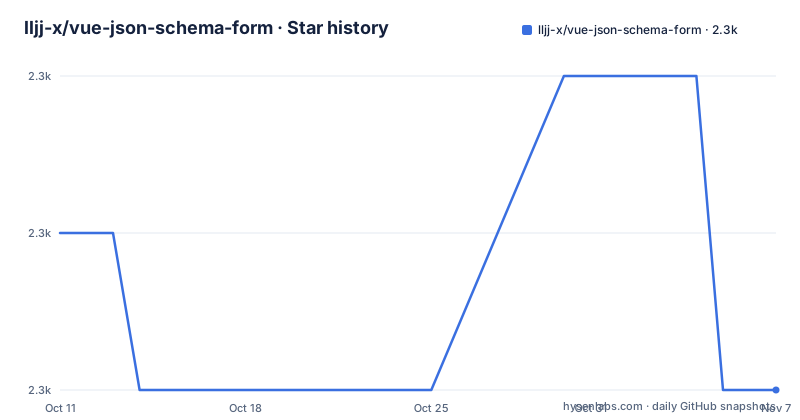
- lljj-x/vue-json-schema-form2,267 ★ · -1
| Repository | 2026-10-11 | 2026-11-07 |
|---|---|---|
| lljj-x/vue-json-schema-form | 2.3k | 2.3k |
-1 Stars in the last 27 days, measured from the daily GitHub snapshot. Compare with other projects
Editorial analysis
Each UI library gets its own package, so you pick one adapter and install only that
The repository is a monorepo, and the form logic is shared while the visual layer is split by UI framework. The README lists five adapters: vue2 ElementUi, vue2 Iview3, vue3 Element Plus, vue3 Antdv and vue3 NaiveUi. Each lives under packages/lib/vue2 or packages/lib/vue3, in folders named vue2-form-element, vue2-form-iview3, vue3-form-element, vue3-form-ant and vue3-form-naive.
The root package.json shows the published names through its workspace scripts: @lljj/vue-json-schema-form for the Vue 2 Element adapter, @lljj/vue2-form-iview3, @lljj/vue3-form-element, @lljj/vue3-form-ant and @lljj/vue3-form-naive. Note that the Vue 2 Element package drops the vue2 prefix in its name, which is easy to miss when you search npm.
The consequence is a hard boundary. If your project uses a different component library, there is no sixth adapter to install, and you would be writing one. The description of the repository names the same four UI kits plus Vue itself, so the support list is stable and short.
The schema does the work: validation with ajv, parsing modeled on react-jsonschema-form
The core idea is stated in the README: follow the JSON Schema specification, and given a JSON Schema alone, the library generates the matching form. Validation of the schema uses ajv. The design and the way schemas are parsed and indexed refer to react-jsonschema-form, which the README links.
That lineage tells you what to expect from the mental model. You describe data, not widgets. The README promises quick configuration of custom UI views and of validation error messages, and says the library adapts to common UI libraries.
There is a second benefit the author names under the reasons for building it. The server can use the same schema to keep validation rules in step with the front end. One schema file then serves as both the form definition and the server contract. The README does not show a code sample of a schema or of mounting the component, so read the docs package or the homepage at https://form.lljj.me/ for the actual props.
The author wrote it because no Vue Element library fit the editor use case
The README gives the motive in its section titled why it was developed. When doing visual front-end editing, the author needed a general data configuration form, so a JSON Schema describes the data structure and the form is generated dynamically. This avoids repeating the same work for every configuration form.
The author also says no suitable library could be found for Vue with Element UI, so they decided to implement one after a while. That origin explains the target audience in the repository description: activity editors, H5 editors, CMS and other data configuration tools, with support for visually generating form schemas.
If you are building a public sign-up form with a few fields, the overhead of a schema layer is hard to justify from this material. If you are building a tool where administrators define many different forms, the same schema pipeline pays for itself. The repository speaks to the second case and says nothing about the first.
The activity editor moved to a separate repository, vjsf-demo-editor
The README repeats a notice twice in bold: the activity editor project is now a new standalone repository, and you should use https://github.com/lljj-x/vjsf-demo-editor directly. Anyone following older tutorials that point to the editor inside this repository will hit that.
What remains here are the Playground and the visual form schema generator. The demo is started with yarn. Install first:
yarn installThen run everything at once:
yarn run demo:devThe three entries are the Playground at http://127.0.0.1:8800/, the schema editor at http://127.0.0.1:8800/schema-generator.html and the H5 activity editor at http://127.0.0.1:8800/vue-editor.html. The README still lists that last page even though it also says the editor moved, so treat the vue-editor entry as the part most likely to be stale and verify it before you depend on it.
Running one demo entry is faster than running all three
Compiling the whole demo workspace takes longer than compiling a single page, so the README offers a flag to select an entry. These commands run one at a time:
yarn run demo:dev --dir=indexyarn run demo:dev --dir=schema-generatoryarn run demo:dev --dir=vue-editorThe first starts only the Playground, the second only the form schema generator, and the third only the H5 activity editor. The package.json scripts show a separate Vue 3 demo as well: demo3:dev and demo3:build run the demo-v3 workspace, so Vue 3 users have their own entry point.
If you only want to see what the generated forms look like for your UI library, the Playground entry is the shortest path. If you need to write a schema by clicking instead of typing JSON, the schema-generator entry is the one to open.
Lerna scripts build five libraries one after another, and the docs are a workspace of their own
The root package.json is private, and its workspaces cover everything under packages/lib, packages/docs and everything under packages/demo. The lib:build script chains five builds in order: lib-element:build, lib-iview3:build, lib3-element:build, lib3-ant:build and lib3-naive:build. There is a watch script for Element, iView 3, Element Plus and Ant, but the scripts shown include no lib3-naive:watch, so Naive UI work has no dedicated watch command in the visible part of the file.
Documentation has docs:dev and docs:build. Release housekeeping uses lerna: packages:diff, packages:list and packages:changed, along with a changelog script that runs conventional-changelog with the angular preset into CHANGELOG.md. The root also holds lerna.json, .commitlintrc.js and yarn.lock, which says yarn is the expected package manager.
A contributor therefore needs yarn and lerna, and a change to the shared core touches five adapter builds. That is the real cost of the one-schema, many-UIs design.
The newest release is from October 2023, so check the date before you rely on it
The repository is not archived. The last push was on 2026-05-20, and the license is Apache-2.0. The recent releases listed are v1.19.0 on 2023-10-05, v1.18.0 on 2023-08-05 and v1.17.0 on 2023-05-01.
That gap matters. The last release is more than three years old by the dates shown, and the later push is a commit without a matching release in the list. You cannot assume that Vue, ajv or any UI library has been tested against the newest versions. The README itself asks that usage problems go first to GitHub issues, so the issue tracker is the place to look for known breakage.
A team starting a new product should open the issues, read the CHANGELOG.md and try the Playground against the Vue and UI library versions it actually uses before committing. The README also thanks Tencent EdgeOne for CDN acceleration and security protection for the project, which concerns the docs site and says nothing about code quality.
Editorial conclusion
Choose this library if you build a Vue 2 or Vue 3 admin or editor tool where the form shape comes from data, and your UI library is Element, iView 3, Element Plus, Ant Design Vue or Naive UI. Skip it for any other UI kit, since no adapter exists in the repository. Before you commit, check the release dates: v1.19.0 was published on 2023-10-05, and the last push to the repository was on 2026-05-20.
Frequently asked questions
Is there a schema generator for JSON in vue-json-schema-form?
Yes. Running yarn run demo:dev --dir=schema-generator starts a visual form schema editor at http://127.0.0.1:8800/schema-generator.html.
What is the JSON Schema format that vue-json-schema-form uses?
The library follows the JSON Schema specification, and given only a JSON Schema it generates the matching form. The schema describes the data structure, and validation runs through ajv.
How do I create a JSON Schema for vue-json-schema-form?
You can write the schema by hand following the JSON Schema specification, or use the visual form schema generator that ships in the demo workspace.
Is Vue.js still being used today, going by this library?
This repository supports both Vue 2 and Vue 3 through separate adapter packages. Its last push was on 2026-05-20, though the newest listed release, v1.19.0, is dated 2023-10-05.
Official sources
Add this badge to your README
If you maintain this project, the badge below links readers to this analysis and shows its maintenance status from the daily GitHub snapshot. Paste the markdown into your README; add ?metric=license or ?metric=stars to the image URL for a different field.

[](https://hysenlabs.com/projects/lljj-x-vue-json-schema-form)Star history chart for your README
[](https://hysenlabs.com/projects/lljj-x-vue-json-schema-form)Was this useful?