dompdf.js: Browser-Based DOM to Vector PDF
HTML to PDF in the browser — one line of code for selectable, searchable vector PDFs (10,000+ pages). Pure frontend: zero backend, zero runtime deps. TypeScript over a Rust + WebAssembly engine; an html2canvas/jsPDF alternative.
At a glance
- What is it?
- dompdf.js converts HTML and SVG content into selectable, searchable PDF documents entirely in the browser through TypeScript, Web Workers, Rust, and WebAssembly. It suits frontend applications that need local vector PDF generation without uploads or a backend service.
- Who is it for?
- Frontend developers should consider dompdf.js when documents must remain in the browser and text must stay selectable or searchable. It is a weaker fit for workflows centered on browser screenshot fidelity, unsupported page designs, or environments that cannot execute its WebAssembly worker architecture.
- Can I use it commercially?
- Yes. MIT is a permissive licence: you can use, modify and sell software built on it, as long as you keep its copyright and licence notices.
- Is it still maintained?
- Yes. The repository last received commits 27 days ago.
- What is it written in?
- Mainly TypeScript, according to GitHub's language statistics.
Answers come from the project's GitHub data, last synced on November 7, 2026, and from our analysis. They are not legal advice.
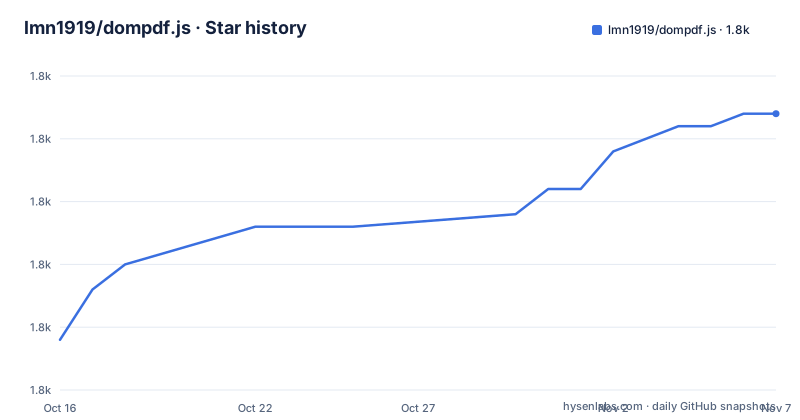
Star history
- lmn1919/dompdf.js1,807 ★ · +18
| Repository | 2026-10-16 | 2026-11-07 |
|---|---|---|
| lmn1919/dompdf.js | 1.8k | 1.8k |
18 Stars in the last 22 days, measured from the daily GitHub snapshot. Compare with other projects
Editorial analysis
Where dompdf.js Fits in Browser PDF Workflows
dompdf.js addresses a specific frontend problem: converting an existing DOM tree into a PDF without sending the document to a server. The target user is a JavaScript or TypeScript developer who already has styled HTML in the browser and wants the generated file to remain text-based instead of becoming one large image. That distinction matters for documents whose recipients need to select, search, and copy text.
The project presents itself as an html2canvas and jsPDF alternative. Its stated output is vector text and paths, while the project also supports images, watermarks, hyperlinks, interactive forms, and PDF encryption. This places it closer to a document publishing tool than to a general PDF manipulation library. It is intended for reports, long browser-rendered documents, and other cases where producing the file locally is part of the application design.
The package description says “Pure Frontend Zero Dependencies.” The README also says all DOM geometry extraction and PDF compilation happen locally in the browser. “Zero dependencies” should not be confused with zero project infrastructure: the implementation is backed by Rust and WebAssembly, and the package uses Web Workers for background compilation. Node.js 18 or later is listed as the package engine requirement, although that requirement concerns package tooling and installation rather than necessarily defining the runtime versions of end-user browsers.
A pure-frontend design changes the operational boundary. There is no document upload for a PDF service to process, and the README does not describe a server component. However, WebAssembly support, worker execution, DOM rendering, browser security rules for cross-origin resources, and available fonts remain relevant constraints. Local generation reduces infrastructure requirements, but it does not make PDF output independent of browser capabilities.
dompdf.js DOM Extraction and WebAssembly PDF Compilation
The documented architecture starts with a DOM element and ends with a Blob. TypeScript provides the public interface, while a background compilation stage is described as using WebAssembly and Web Workers. The README attributes this separation to background worker threads. That architecture keeps the export path from relying entirely on the browser's main thread while Rust-based code handles the PDF compilation layer.
The public example passes an element, `document.querySelector("#content")`, to the default `dompdf` function. Configuration selects `a4`, enables pagination, and sets a white background. The Promise resolves to a Blob, which the example converts into an object URL and opens in a new browser tab. Revoking that URL after 30 seconds prevents the temporary URL from remaining associated with the Blob longer than the example requires.
The documentation lists several rendering domains. These include page dimensions and margins, automatic pagination, dynamic headers and footers, custom TTF fonts, font subsetting, text and image watermarks, SVG, Canvas, CSS effects, hyperlinks, AcroForm fields, and encryption with user and owner passwords. Progress callbacks and lower-level Snapshot APIs are also documented. These are documented capabilities, not a guarantee that every CSS feature behaves exactly like browser print preview.
The source repository reinforces that this is a compiled package rather than a thin wrapper around an external service. Its scripts include `build:wasm`, `inline:wasm`, `build:types`, Rollup configuration, TypeScript declarations, and a `wasm/` directory. The published package points CommonJS users to `dist/dompdf.js`, ES module users to `dist/esm/dompdf.esm.js`, and TypeScript users to `dist/types/index.d.ts`. This separation gives consumers explicit module and type entry points.
Installing dompdf.js and Exporting an A4 Document
The README documents installation from npm. The package requires Node.js 18 or later according to `package.json`, so developers using the npm workflow should check that requirement before installation.
Install the published package in the frontend project:
npm install dompdf.jsThis adds `dompdf.js` to the project's npm dependencies. No separate PDF service or backend package is required by the documented setup.
Import the default function and select the HTML element to export. This first example creates an A4 document with pagination and a white background:
import dompdf from "dompdf.js";

const element = document.querySelector("#content");
const blob = await dompdf(element, {
  format: "a4",
  pagination: true,
  backgroundColor: "#ffffff",
});
The element must exist before this code runs because `document.querySelector("#content")` selects the source used by the call. The README does not document the error behavior when no matching element exists.
Create a temporary object URL, open the PDF, and release the URL after the documented delay:
const url = URL.createObjectURL(blob);
window.open(url, "_blank");
setTimeout(() => URL.revokeObjectURL(url), 30_000);
A browser tab containing the generated PDF is the expected result described by the example. Applications that need a download control can use the returned Blob in their own interface, although the README excerpt does not specify a built-in download helper.
For a page that does not use a bundler, the README provides a CDN script:
<script src="https://cdn.jsdelivr.net/npm/dompdf.js@latest/dist/dompdf.min.js"></script>This loads the latest published CDN asset according to the URL shown in the README. The README excerpt does not explain the global name exposed by that script or provide a separate direct-browser example.
Vector Output, Pagination, Fonts, and Interactive PDF Features
The main technical distinction in dompdf.js is its vector-oriented output. The README states that exported text and paths remain searchable, selectable, and copyable because the engine does not rely on a full-page screenshot. That is a direct contrast with workflows that produce PDFs from full-page screenshots. A searchable PDF is usually more useful for generated reports, archived records, and documents that users need to inspect with PDF text tools.
Pagination is enabled in the basic example, and the online documentation covers margins, custom dimensions, advanced controls, and headers and footers with dynamic page-number placeholders. For a long report, these controls matter because page breaks are part of the document model rather than just a screenshot crop. The README also advertises support for 10,000 or more pages and gives a 500-page export timing of approximately two seconds. Those are project claims rather than independently reproduced results, and actual behavior will depend on document content and the client environment.
Typography receives dedicated treatment. The documentation list includes Unicode and multilingual support, custom TTF font loading, and built-in font subsetting. The repository includes `examples/SourceHanSansSC-Regular.ttf`, which confirms at least one example font asset for Chinese text. The README excerpt does not specify the browser APIs required to load that font or the complete custom-font configuration, so those details should be taken from the online API documentation before implementation.
The project also documents SVG, Canvas, advanced CSS effects, cross-origin images, hyperlinks, watermarks, AcroForm fields, and encryption. This breadth makes dompdf.js relevant to richer business documents, but it also creates a larger acceptance surface than a basic text-only converter. The visual appearance of flexbox, grid, transforms, effects, page breaks, and external resources should be validated against the actual PDF output rather than assumed from the browser preview.
Browser, Resource, and PDF Fidelity Boundaries
The first genuine limitation is that browser-origin HTML and PDF-page output are different rendering contexts. dompdf.js starts with DOM geometry and styling, but the README does not promise pixel-identical results for every browser layout or CSS feature. CSS effects and Canvas are documented, yet the README gives no compatibility matrix for individual properties. A team that treats browser preview as its acceptance test could therefore accept a layout that does not survive PDF pagination unchanged.
WebAssembly and Web Workers are also central to the stated architecture. The README does not document a fallback for browsers without WebAssembly or a policy that blocks Blob URLs or newly opened windows. The package is described as frontend-only, but its execution still depends on browser capabilities. Those capabilities are not listed as minimum versions in the README.
External assets introduce another boundary. Cross-origin images are listed as supported, but the README does not state whether CORS headers are always required, how authentication-bearing images are fetched, or how remote fonts behave under content security policies. An image that renders in the page does not necessarily remain available to PDF generation if the generator cannot read its bytes. Asset embedding, timing, and server response headers therefore need testing in the target application.
Long-document memory use is not documented. A 10,000-page claim and an approximate 500-page timing do not state peak browser memory, Blob size, or behavior on lower-powered devices. Vector output can reduce the need for page-sized raster images, but the repository does not document a method in the README for measuring memory or validating output at extreme page counts. Large documents should be generated on representative hardware before they become a default user workflow.
Finally, the online demo, editor, and documentation are separate web properties. The README offers them as related resources, but it does not state that the editor is part of the npm package. They should not be treated as packaged components without checking the documentation and distribution files.
dompdf.js Compared with html2canvas, jsPDF, and Server Conversion
The clearest documented alternative is html2canvas plus jsPDF. The README contrasts dompdf.js's vector text and paths with low-quality full-page screenshots. The practical difference is document structure. dompdf.js is designed to retain selectable text, whereas a page-image approach makes the PDF primarily visual.
A server-side HTML-to-PDF service takes a different route. It can process a complete document on infrastructure chosen by the application owner, which may fit centralized font management, standardized rendering, or workflows outside the browser. dompdf.js instead removes that server step and compiles locally. The README does not compare output fidelity, operating cost, browser compatibility, or security controls against a named server converter, so teams should not infer that local compilation automatically reproduces a server renderer's page model.
The documented dompdf.js path starts with an existing DOM element and supports features such as pagination, fonts, watermarks, and headers and footers. Its implementation uses Rust, WebAssembly, Web Workers, and its own pagination logic.
The choice therefore comes down to output type and deployment boundary. Use a capture-based workflow when matching a rendered canvas image is the central goal. Consider dompdf.js when local processing and selectable vector content are more important. Neither option should be accepted solely from feature lists, because the README does not provide a page-by-page compatibility comparison.
dompdf.js Release Cadence, Build Process, and MIT Terms
The repository is not archived, and the last push was on 2026-10-12. The project changelog lists v2.0.7 on 2026-10-12, v2.0.6 on 2026-09-19, and v2.0.5 on 2026-09-17. That recent activity indicates current project work, although a release number by itself does not establish API stability or browser compatibility.
The published package is version 2.0.7. Consumers should check `CHANGELOG.md` before upgrading because the README directs users there for recent version changes. The package exports CommonJS, ES module, browser, and TypeScript declaration entries. Changes to those entry points or to the WebAssembly build process can require an application build review even when the JavaScript API appears unchanged.
Repository development requires more than editing TypeScript. The `build` script invokes Rollup and generates declarations, while `prebuild` removes `dist`, builds the WebAssembly component, and inlines it. The repository also provides verification and PDF comparison scripts. `npm test` is mapped to `npm run verify`, while `npm run build` creates the distributable bundles and type declarations. These entries indicate a Rust and WebAssembly build path with generated distribution artifacts, so contributors should not treat the package as TypeScript-only.
The project is licensed under the MIT License. That license includes permissions and conditions that apply to use and redistribution, but this article does not provide legal advice. Organizations should read the repository's `LICENSE` and any applicable notices when preparing a distribution. The package metadata says zero runtime dependencies, but repository development and build tooling should be evaluated separately from the use of the published browser package.
Editorial conclusion
Frontend developers should consider dompdf.js when documents must remain in the browser and text must stay selectable or searchable. It is a weaker fit for workflows centered on browser screenshot fidelity, unsupported page designs, or environments that cannot execute its WebAssembly worker architecture. Before adoption, generate representative pages containing the required CSS, fonts, images, SVG, Canvas, headers, footers, and form controls, then inspect pagination and PDF text selection. dompdf.js 2.0.7 is a current browser-oriented package whose practical fit depends on matching its documented features to the document types the application must export.
Frequently asked questions
How do I install dompdf.js and generate a browser PDF?
Install it with `npm install dompdf.js`, import the default `dompdf` function, pass a DOM element with options such as `format`, `pagination`, and `backgroundColor`, and use the returned Blob. The README also documents a CDN script for `dist/dompdf.min.js`.
Does dompdf.js create selectable and searchable PDFs?
Yes. The README states that its high-definition vector output keeps text selectable, searchable, and copyable instead of converting each page into a screenshot.
Does dompdf.js require a backend or runtime dependencies?
The project describes itself as a pure-frontend engine with zero runtime dependencies, so the documented export process does not require a backend or document upload. Its internal implementation still uses Rust, WebAssembly, and Web Workers.
Which features does dompdf.js support beyond basic HTML pages?
The documented feature set includes A4 and custom page sizes, pagination, headers and footers, custom TTF fonts, watermarks, SVG, Canvas, CSS effects, hyperlinks, AcroForm fields, encryption, and progress callbacks. The online documentation contains the detailed configuration reference.
Does dompdf.js work with Node.js 18?
The package metadata lists Node.js 18 or later under `engines`. PDF generation is documented as a browser-side operation, while Node.js applies to the package's build and installation environment.
Official sources
Add this badge to your README
If you maintain this project, the badge below links readers to this analysis and shows its maintenance status from the daily GitHub snapshot. Paste the markdown into your README; add ?metric=license or ?metric=stars to the image URL for a different field.

[](https://hysenlabs.com/projects/lmn1919-dompdf-js)Star history chart for your README
[](https://hysenlabs.com/projects/lmn1919-dompdf-js)Was this useful?