logrotate for Scheduled Log Compression and Retention
The logrotate utility is designed to simplify the administration of log files on a system which generates a lot of log files.
At a glance
- What is it?
- logrotate is a C utility for rotating, compressing, removing, and mailing log files according to time or size rules. It is aimed at systems whose applications produce many logs and need repeatable file management.
- Who is it for?
- logrotate fits system administrators and applications that need scheduled rotation, compression, removal, or mailing of log files. It does not fit teams that need application-specific log processing or a management service with a separate daemon interface.
- Can I use it commercially?
- Yes, with conditions. GPL-2.0 is a copyleft licence: if you distribute software that includes it, you must release that software's source code under the same licence. Running it internally without distributing it does not trigger that obligation.
- Is it still maintained?
- Yes. The repository last received commits 7 days ago.
- What is it written in?
- Mainly C, according to GitHub's language statistics.
Answers come from the project's GitHub data, last synced on November 7, 2026, and from our analysis. They are not legal advice.
Star history
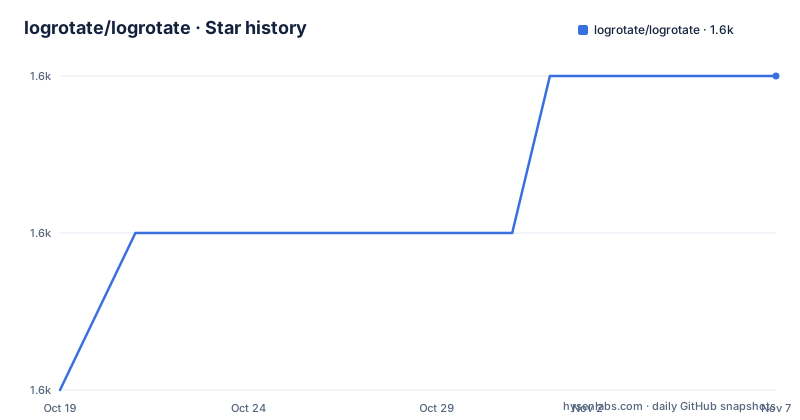
- logrotate/logrotate1,556 ★ · +2
| Repository | 2026-10-19 | 2026-11-07 |
|---|---|---|
| logrotate/logrotate | 1.6k | 1.6k |
2 Stars in the last 19 days, measured from the daily GitHub snapshot. Compare with other projects
Editorial analysis
Why logrotate Exists for High-Volume Log Systems
logrotate addresses a basic operational problem: a system that generates many log files needs to keep those files from accumulating without limit. The README describes automatic rotation, compression, removal, and mailing. Rotation means that an existing log file is moved into a new sequence or replaced according to a configured rule, while compression reduces the storage needed for older files. Removal provides retention behavior, and mailing sends selected rotated files onward according to the configuration.
The intended audience is operators administering systems with substantial logging activity, including services that produce logs hourly or at much shorter intervals. A web server, database, security tool, or custom application can create files faster than an administrator wants to handle manually. logrotate does not replace the application that writes the log. Its scope is the file lifecycle around those logs, which is why it is relevant to infrastructure and system administration rather than application development.
The schedule can follow elapsed time or file size. The README names hourly, daily, weekly, monthly, a time measured in minutes, and a specific size. This gives an operator a choice between predictable calendar or clock-based rotation and rotation triggered by log growth. The available rules are configuration choices, not separate programs. A single installation can contain policy for several groups of files.
The C Configuration Model Behind Rotation
The repository identifies C as its primary language. Its top-level files include logrotate.c, log.c, log.h, logrotate.h, queue.h, and config.c. That layout indicates a command-line utility built around configuration parsing, logging, queues, and policy processing rather than a hosted service with a network interface. The repository also includes logrotate.conf.5, which is the manual page source for the configuration format, and logrotate.8.in, which is the command-line manual page source.
The configuration model is visible through the README's list of supported triggers. A rule can select a time interval or a file-size condition. The broader feature set includes compression, removal, and mailing, so configuration determines what happens after a log reaches its rotation point. The repository contains example files such as examples/logrotate.conf, examples/btmp, examples/wtmp, examples/logrotate.cron, examples/logrotate.service, and examples/logrotate.timer. These files show that the project is intended for both configuration examples and integration with system scheduling services.
The presence of both a cron example and systemd examples matters for deployment design. logrotate itself can define when a file is eligible for rotation, but the surrounding system still needs a way to invoke it. The README does not claim that logrotate runs continuously, so it should not be described as a resident log-monitoring daemon. The project manages rotation work when invoked, while scheduler integration supplies the recurring execution context.
Cloning, Release Signatures, and Source Selection
The README gives two ways to obtain the source: download a release tarball or clone the repository. For a first source checkout, the documented Git command selects the main branch. Replace `main` with the branch or tag that the reader intends to use, as the README instructs.
git clone https://github.com/logrotate/logrotate.git -b mainThis command creates a checkout of the requested branch. A reader who needs a released code point should select a release tag instead of assuming that the default branch matches a packaged deployment. The repository includes `autogen.sh`, `configure.ac`, `Makefile.am`, and `INSTALL`, which are source-build related files.
Release archives also have detached signatures. For the latest listed release, the README names Christian's PGP key and gives commands for retrieving it and verifying the archive. The key retrieval command is shown here exactly as documented.
gpg --keyserver pgp.mit.edu --recv-key 8ECCDF12100AD84DA2EE7EBFC78CE737A3C3E28EAfter downloading `logrotate-3.22.0.tar.xz` and `logrotate-3.22.0.tar.xz.asc`, verify the archive with the signature file.
gpg --verify logrotate-3.22.0.tar.xz.asc logrotate-3.22.0.tar.xzA successful verification should report a good signature from Christian Göttsche using the listed key. Older releases may use Kamil's key, which the README identifies separately. Verification is a concrete release-integrity check, but it does not by itself establish that the archive is the correct version for a particular host.
A First Configuration and Scheduled Invocation
The README does not provide a complete configuration example with concrete paths, so it would be inaccurate to invent one. It does, however, identify `examples/logrotate.conf` as a configuration example and lists the supported rotation conditions. A first use should begin with the example configuration supplied by the repository and the host's actual log locations rather than copied paths from an unrelated system.
The example files also show the two documented scheduling styles. `examples/logrotate.cron` provides a cron-based integration point, while `examples/logrotate.service` and `examples/logrotate.timer` provide systemd-oriented files. The README does not include their contents, so the exact invocation line, unit settings, and timer interval are not reproduced here. That omission is deliberate. Those details must be checked against the local `INSTALL` file and the checked-out example files before deployment.
The resulting workflow has two separate policies. First, the configuration decides whether rotation is due based on time or size and what happens to the resulting files. Second, a scheduler decides when logrotate is run. This separation is useful because an operator can align rotation with an existing administration schedule, but it also means a correct configuration can still appear inactive if no scheduler invokes the utility.
The README does not document rollback, recovery after a failed rotation, or a separate configuration reload command. Those behaviors should not be assumed from the project name. They require examination of the relevant manual page or local operational documentation.
Compression, Retention, and Mailing Trade-offs
The feature set is useful because it addresses several common log-storage tasks in one policy tool. Compression can reduce the footprint of rotated files. Removal can discard files that exceed a retention policy, provided that the configuration specifies the relevant behavior. Mailing can move rotated logs to recipients outside the local host. These capabilities are especially relevant where log files are numerous enough that manual naming, compression, and deletion become inconsistent.
The same breadth creates configuration risk. A time-based policy and a size-based policy answer different operational questions. Time-based rotation gives predictable retention intervals, while size-based rotation limits the size of individual files but may produce a rotation frequency that depends on application traffic. Choosing one does not remove the need to think about how many rotated files remain. A size threshold without an appropriate removal policy can still allow storage to grow.
Mailing also changes the trust and operational boundary of the system. The README states that mailing is supported, but it does not describe transport setup, authentication, recipient configuration, or failure handling. Those details must come from `logrotate.conf.5` and the deployment's mail configuration. The feature should therefore be evaluated as part of a host's existing mail policy, not treated as a default reporting mechanism.
Where logrotate Is the Wrong Tool
logrotate is a poor fit when the requirement is to interpret log contents, extract fields, trigger alerts, or decide what an event means. Its stated job is administration of files, including rotation, compression, removal, and mailing. The repository's C sources and configuration examples support that file-management scope, but the README does not describe parsing, searching, alerting, or dashboard functionality.
It is also a poor fit when the application owns a log lifecycle that cannot tolerate renaming or replacement. The README does not explain how individual applications reopen descriptors after rotation, how `copytruncate` behaves, or which service-specific integration is required. Those are application and deployment questions. An operator should not assume that rotating a file automatically makes the original application continue writing to the intended path.
A service-oriented log platform may be more appropriate when logs must be shipped to a central collector, indexed, queried, or retained under per-tenant policies. That alternative uses a different data flow: an application or agent sends records away from the host, while logrotate manages local files and schedules actions on them. The choice depends on whether the requirement is local file administration or centralized log processing.
Maintenance, License, and Upgrade Considerations
The repository is not archived, and the last push was on 2026-10-01. That indicates recent repository activity according to the repository status facts. The latest listed release is 3.22.0 from 2024-06-01, while the listed releases also include 3.21.0 and 3.20.1. A repository receiving pushes does not by itself specify when a host's packaged version will be upgraded, so administrators still need to compare their installed version with the release they intend to use.
The project is licensed under GPL-2.0. That license identifier is relevant when redistributing modified source or incorporating the software into another distribution, but this article does not provide legal advice. Upgrade planning should account for changes in configuration behavior, manual pages, scheduler files, and interactions with the services that write the logs. The repository's `ChangeLog.md` and release changelogs are the documented places to inspect release-specific changes, although their contents are not reproduced here.
The project is written in C and ships example configurations for cron and systemd. An upgrade review should therefore include the exact configuration used by the host, the scheduler entry, the release signature, and the service-specific behavior after file rotation. Those are more concrete upgrade checks than assuming that a newer release preserves every existing policy.
Editorial conclusion
logrotate fits system administrators and applications that need scheduled rotation, compression, removal, or mailing of log files. It does not fit teams that need application-specific log processing or a management service with a separate daemon interface. Verify first that the release signature is valid and that the deployment's existing log paths and scheduling files match the installed version.
Frequently asked questions
How do I install logrotate?
The README provides a Git checkout command and release archive downloads, but it does not include a complete installation procedure. The repository contains `autogen.sh`, `configure.ac`, `Makefile.am`, and `INSTALL`, which are the relevant files for following the source-build instructions.
Can logrotate rotate logs by time or file size?
Yes. The README lists hourly, daily, weekly, monthly, minute-based, and file-size rotation conditions. The exact configuration syntax is documented in `logrotate.conf.5`.
How can I verify a logrotate release archive?
The README provides GPG commands for retrieving the release signing key and verifying the `.asc` signature against `logrotate-3.22.0.tar.xz`. A successful check should report a good signature from Christian Göttsche using key `8ECCDF12100AD84DA2EE7EBFC78CE737A3C3E28E`.
Official sources
Add this badge to your README
If you maintain this project, the badge below links readers to this analysis and shows its maintenance status from the daily GitHub snapshot. Paste the markdown into your README; add ?metric=license or ?metric=stars to the image URL for a different field.

[](https://hysenlabs.com/projects/logrotate-logrotate)Star history chart for your README
[](https://hysenlabs.com/projects/logrotate-logrotate)Was this useful?