RevitLookup for inspecting Revit elements and relationships
Interactive Revit database exploration tool
At a glance
- What is it?
- RevitLookup is a C# add-in for interactively inspecting parameters, properties, and relationships in a Revit project database. It suits Revit developers and BIM practitioners who need to understand what the Revit API exposes for selected elements.
- Who is it for?
- RevitLookup is appropriate for Revit API developers, add-in authors, and technical BIM users who need direct visibility into element parameters, properties, and relationships. It is not a substitute for Revit itself, a general-purpose database client, or an automated reporting system.
- Can I use it commercially?
- Yes. MIT is a permissive licence: you can use, modify and sell software built on it, as long as you keep its copyright and licence notices.
- Is it still maintained?
- Yes. The repository last received commits 27 days ago.
- What is it written in?
- Mainly C#, according to GitHub's language statistics.
Answers come from the project's GitHub data, last synced on November 7, 2026, and from our analysis. They are not legal advice.
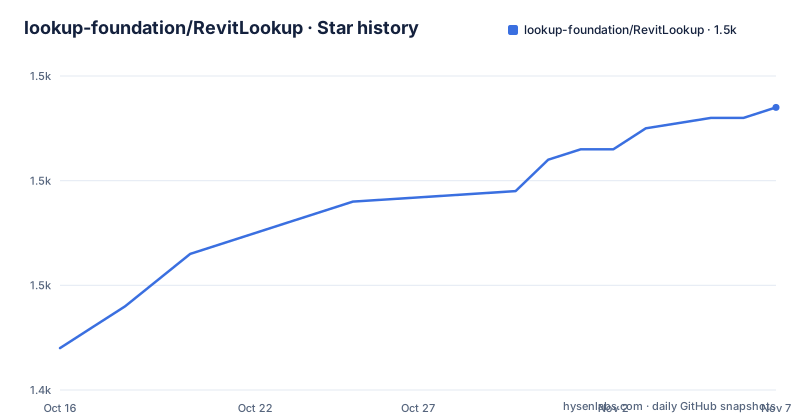
Star history
- lookup-foundation/RevitLookup1,467 ★ · +23
| Repository | 2026-10-16 | 2026-11-07 |
|---|---|---|
| lookup-foundation/RevitLookup | 1.4k | 1.5k |
23 Stars in the last 22 days, measured from the daily GitHub snapshot. Compare with other projects
Editorial analysis
Why RevitLookup targets the Revit API inspection gap
RevitLookup addresses a specific problem in Autodesk Revit development: an add-in author or BIM practitioner may know that a selected element exists in the model without knowing which parameters, properties, and relationships the Revit API exposes for it. The project is positioned as an interactive exploration tool for the Revit project database. Its scope is narrower than general model editing, model checking, or data export. The central task is inspection and navigation.
The intended audience includes people who work with Revit projects, but the repository description and topic labels place particular emphasis on the Revit API, .NET, and add-in development. That makes it most relevant to programmers writing or debugging C# add-ins. A Revit user investigating a selected object can also benefit, provided the available release supports the relevant Revit version and the documentation explains how the tool should be launched in that environment.
The README mentions exploring, analyzing, and manipulating the Revit database, but the concrete feature statement is narrower: view and navigate BIM element parameters, properties, and relationships. The repository does not document reporting templates, batch queries, automated assertions, or export formats. Those capabilities should not be assumed merely from the word “interactive.”
What the repository reveals about RevitLookup’s implementation
RevitLookup is primarily written in C# and is packaged as a Revit add-in. Its repository layout separates `source/`, `tests/`, `installer/`, and `wiki/`, with `RevitLookup.slnx` at the top level. Build-wide settings appear in `Directory.Build.props` and package references in `Directory.Packages.props`, while `global.json` and `GitVersion.yml` provide visible build and versioning configuration. This is the layout of a .NET codebase with dedicated source, testing, installation, and documentation areas.
The README does not describe the internal object-inspection algorithm or explain how selected elements are converted into displayed fields. It therefore does not support claims about caching, reflection behavior, deferred loading, or database-query strategy. What can be confirmed is the data domain shown to users: BIM element parameters, properties, and relationships. The tool’s purpose is to expose those records through an interactive workflow rather than require users to infer them from source code.
That distinction matters for API debugging. RevitLookup can answer a practical question about the API surface available for a selected element, but the repository does not claim that it reproduces every internal Revit state or diagnoses failures inside another add-in. Its usefulness comes from reducing the distance between a visual Revit selection and the objects and members exposed through the API.
Installing RevitLookup and reaching the first inspection workflow
The README presents three installation paths. WinGet is described as the recommended route for installation and automatic updates. AppBundle supports deployment as an Autodesk bundle without a system-wide installer. The third option is the MSI installer attached to the latest GitHub Release. The README does not publish a complete `winget install` command or document the first in-application commands, so inventing either would be misleading.
For a first installation, open the project’s WinGet versions page through the link in the README and use the package identified there for the required Revit release line. Windows Package Manager can then install the package and handle subsequent updates according to the documented distribution method. No console command is shown here because the README does not provide the exact syntax or the complete package identifier required for a safe command.
Organizations that avoid a system-wide installer can use the AppBundle route. Autodesk-compatible deployment is the relevant distinction: the package is delivered as a bundle rather than installed through the MSI path. For a conventional workstation installation, download the latest `.msi` from GitHub Releases and run it.
After installation, open Revit and follow the project wiki for the supported add-in invocation workflow. The README does not identify the ribbon tab, keyboard shortcut, dockable panel, or selection command, so those interface details cannot be confirmed. The observable first goal is also simple: select or otherwise identify a BIM element using the workflow documented in the wiki, then inspect its parameters, properties, and relationships.
Release packaging and the Revit version boundary
The project publishes packages for supported Revit versions, and the release list includes versions `2027.0.4`, `2027.0.3`, and `2027.0.2`. Those releases were published on 2026-09-06, 2026-07-05, and 2026-06-07 respectively. The repository’s default branch is `develop`, while the README directs users to GitHub Releases for downloadable packages rather than presenting source code as the normal installation route.
This distinction is operationally important for a Revit add-in. A C# assembly compiled against one Revit API contract is not automatically interchangeable with every installed Revit release. The project’s version page and release assets should be treated as the compatibility boundary. The README says that releases contain packages for supported Revit versions, but it does not publish a complete compatibility matrix.
The repository was not archived, and its last push was on 2026-10-11. The release cadence and recent push indicate continuing repository activity, but they do not by themselves guarantee compatibility with every Revit deployment or eliminate upgrade work. The changelog and package-specific documentation are the appropriate sources for deciding whether an upgrade changes behavior.
Where interactive inspection falls short
RevitLookup is the wrong tool when the task is to monitor an entire BIM dataset, execute repeatable queries across many projects, or generate scheduled reports. The README documents inspection of selected BIM element information. It does not document a query language, automation interface, background scan, batch report, or server-side deployment model. Treating those features as available would extend the project beyond the confirmed scope.
It is also a poor substitute for debugging source code. An inspector can expose parameters, properties, and relationships, but the repository does not say that it traces method calls, captures exceptions, or compares model states before and after an operation. A developer investigating execution flow still needs normal diagnostic tools and knowledge of the relevant Revit API behavior.
The interactive model creates another practical limitation. Database exploration depends on being able to identify and inspect the intended element through Revit’s add-in workflow. The README does not define support for filtering very large result sets, exporting inspection results, or correlating findings across revisions. Teams with strict governance requirements should also check whether viewing internal objects is permitted by their model-management policy. RevitLookup can expose implementation detail without turning that detail into an approved BIM workflow.
RevitLookup compared with direct API inspection
The practical alternative is to inspect the same data directly through the Revit API in a purpose-built C# add-in or external diagnostic utility. RevitLookup takes an interactive route: a user opens the inspection experience, identifies an element, and navigates the displayed parameters, properties, and relationships. Direct inspection instead makes the relevant Revit API calls inside code that the developer controls.
This difference affects control and effort. Direct API inspection can be integrated with existing logging or test logic, but the interface of another utility is not documented by this project. RevitLookup is more convenient for exploratory questions because it does not require the team to first write a dedicated display layer. The trade-off is that its documentation does not expose a documented automation API, assertion format, or export workflow for converting an exploration session into a repeatable test.
Another alternative is reading the model through Autodesk’s own authoring interface. That answers questions about visible element state but does not necessarily expose the full API representation that an add-in receives. RevitLookup sits between those approaches by focusing on API-visible element information. It is most appropriate when the developer needs to discover what is available before deciding how to encode the behavior in a production add-in.
MIT licensing and the operational cost of upgrades
RevitLookup uses the MIT license. The repository includes `LICENSE.md`, so integrators can inspect the exact permissions, conditions, and disclaimer there. The license also requires preservation of the copyright and permission notice in copies or substantial portions of the software. That is a repository fact, not legal advice about a particular deployment.
The upgrade cost appears primarily tied to packaging and Revit compatibility rather than license negotiation. Three acquisition methods introduce different operational responsibilities. WinGet is documented as supporting automatic updates, which can reduce manual package handling. AppBundle is intended for Autodesk bundle deployment without a system-wide installer. MSI requires downloading and running the installer from GitHub Releases. Organizations should compare those models against their own machine management and Autodesk deployment practices.
Source contributions require reading `CONTRIBUTING.md`, which the README identifies as containing build instructions, code style, and contribution guidance. Release changes can be checked in `CHANGELOG.md`. The repository does not document a migration tool, automatic conversion of user settings, or backward compatibility policy, so an upgrade should be treated as a package and Revit-version decision rather than assumed to be transparent.
Editorial conclusion
RevitLookup is appropriate for Revit API developers, add-in authors, and technical BIM users who need direct visibility into element parameters, properties, and relationships. It is not a substitute for Revit itself, a general-purpose database client, or an automated reporting system. Before adoption, verify that the package matches the installed Revit version, follow the project wiki for the exact launch workflow, and inspect the MIT license against your organization’s distribution requirements.
Frequently asked questions
What is RevitLookup used for?
RevitLookup is an interactive Revit project database exploration tool for viewing and navigating BIM element parameters, properties, and relationships. It is aimed at people working with Revit models, especially Revit API developers and add-in authors.
How do I install RevitLookup?
The README offers three routes: WinGet for installation and automatic updates, AppBundle for Autodesk bundle deployment without a system-wide installer, and an MSI installer from the latest GitHub Release. Use the package associated with the required supported Revit version.
Can I install RevitLookup with WinGet?
Yes. The README lists WinGet as the recommended installation method and says it supports installation and automatic updates through Windows Package Manager. The project links to its own WinGet versions page rather than documenting a complete command.
Official sources
Add this badge to your README
If you maintain this project, the badge below links readers to this analysis and shows its maintenance status from the daily GitHub snapshot. Paste the markdown into your README; add ?metric=license or ?metric=stars to the image URL for a different field.

[](https://hysenlabs.com/projects/lookup-foundation-revitlookup)Star history chart for your README
[](https://hysenlabs.com/projects/lookup-foundation-revitlookup)Was this useful?