mvSQLite: Distributed SQLite Through FoundationDB
Distributed, MVCC SQLite that runs on FoundationDB.
At a glance
- What is it?
- mvSQLite places a custom VFS below SQLite to distribute database files across FoundationDB while preserving SQLite features. It suits applications that need FoundationDB-backed storage and time travel, but its deployment model and experimental commit-group feature require careful evaluation.
- Who is it for?
- Adopt mvSQLite when an existing SQLite application needs FoundationDB storage, MVCC time travel, or concurrent access and the team can operate mvstore plus FoundationDB. Do not choose it for a simple embedded database, or treat commit groups as a stable cross-database serializability solution.
- Can I use it commercially?
- Yes. Apache-2.0 is a permissive licence: you can use, modify and sell software built on it, as long as you keep its copyright and licence notices.
- Is it still maintained?
- Yes. The repository received new commits within the last day.
- What is it written in?
- Mainly Rust, according to GitHub's language statistics.
Answers come from the project's GitHub data, last synced on October 23, 2026, and from our analysis. They are not legal advice.
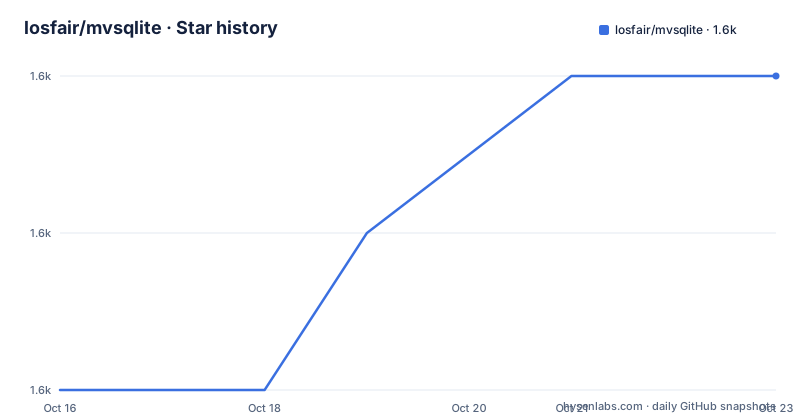
Star history
- losfair/mvsqlite1,582 ★ · +2
| Repository | 2026-10-16 | 2026-10-23 |
|---|---|---|
| losfair/mvsqlite | 1.6k | 1.6k |
2 Stars in the last 7 days, measured from the daily GitHub snapshot. Compare with other projects
Editorial analysis
Why mvSQLite Exists
mvSQLite solves a specific deployment problem: keeping SQLite as the SQL and file-format layer while moving the underlying data operations to a distributed FoundationDB data plane. It is intended for applications that want SQLite's familiar interface, including its full feature set, but need distributed transactions, replication, backup and restore, and historical database snapshots. The project is primarily written in Rust and is organized as a workspace containing mvSQLite, mvstore, mvclient, mvfs, the preload library, a FUSE component, and stress tooling.
The important design choice is that mvSQLite does not replace SQLite with a new SQL dialect. According to the README, it integrates with SQLite as a custom VFS layer below SQLite, so SQLite features remain available above that storage interface. That makes mvSQLite more relevant to teams adapting an existing SQLite application than to teams looking for a standalone distributed SQL client.
The project also targets workloads that benefit from fine-grained optimistic concurrency. Its documentation describes lock-free, scalable reads and writes with `BEGIN CONCURRENT`-like semantics. The README attributes this property to FoundationDB and states that no distributed lock is acquired during data-plane operation. That claim concerns mvSQLite's documented architecture, not a guarantee that every application workload will have low contention or low latency.
SQLite VFS, mvstore, and FoundationDB Data Flow
mvSQLite has a server-side and client-side split. The server-side component is `mvstore`, which is intended to be colocated with the FoundationDB cluster in production. It exposes a data-plane listener and an admin API, while mvSQLite accesses the data plane through the environment variable `MVSQLITE_DATA_PLANE`.
The flow begins when SQLite opens a database through the custom VFS. Instead of relying on a local filesystem for the database operation, mvSQLite sends requests toward mvstore. mvstore uses FoundationDB for distributed transactions and stores data under configured metadata and raw-data prefixes. The startup example uses `--metadata-prefix mvstore` and `--raw-data-prefix m`, so those names identify namespaces or key areas within the backing system.
There is also an administrative namespace step. The example creates a namespace named `test` through `/api/create_namespace`. The SQLite shell then opens `test` while `LD_PRELOAD` loads `libmvsqlite_preload.so`. This lets an application use mvSQLite without being initially rewritten around a new database API. The README also describes using a patched `libsqlite3.so` as an alternative integration route.
The system presents a versioned storage interface. Its stated time-travel capability lets a client check out a database snapshot from a point in the past. The README does not describe the exact snapshot-retention policy, garbage collection rules, or user interface for selecting historical versions, so those details would need confirmation before adoption.
Installing FoundationDB, mvstore, and SQLite
The README's quick-start path installs FoundationDB client and server packages, downloads prebuilt mvSQLite binaries, starts mvstore, creates a namespace, builds a dynamic `libsqlite3.so`, and launches the SQLite shell with `LD_PRELOAD`. The commands below reproduce that documented path. The release example uses v0.2.1 even though the repository's recent release list includes v0.3.22, so release selection should be checked before copying the commands into a deployment.
The README provides this FoundationDB installation sequence:
wget https://github.com/apple/foundationdb/releases/download/7.3.69/foundationdb-clients_7.3.69-1_amd64.deb
sudo dpkg -i foundationdb-clients_7.3.69-1_amd64.deb
wget https://github.com/apple/foundationdb/releases/download/7.3.69/foundationdb-server_7.3.69-1_amd64.deb
sudo dpkg -i foundationdb-server_7.3.69-1_amd64.deb
It then downloads the preload library and `mvstore`:
curl -L -o ./libmvsqlite_preload.so https://github.com/losfair/mvsqlite/releases/download/v0.2.1/libmvsqlite_preload.so
curl -L -o ./mvstore https://github.com/losfair/mvsqlite/releases/download/v0.2.1/mvstore
chmod +x ./mvstore
Start the service with the documented listeners and prefixes:
RUST_LOG=info ./mvstore \
  --data-plane 127.0.0.1:7000 \
  --admin-api 127.0.0.1:7001 \
  --metadata-prefix mvstore \
  --raw-data-prefix m
The service should expose the data plane on port 7000 and the admin API on port 7001. Create the namespace used by the later SQLite command:
curl http://localhost:7001/api/create_namespace -i -d '{"key":"test"}'The README then builds SQLite from the pinned amalgamation because the system `sqlite3` binary is often statically linked, which prevents `LD_PRELOAD` from replacing its SQLite library:
wget https://sqlite.org/2026/sqlite-amalgamation-3510300.zip
unzip sqlite-amalgamation-3510300.zip
cd sqlite-amalgamation-3510300
gcc -O2 -fPIC --shared -o libsqlite3.so ./sqlite3.c -lpthread -ldl -lm
gcc -O2 -o sqlite3 ./shell.c -L. -lsqlite3
Finally, set the data plane and launch the shell against the `test` namespace:
export RUST_LOG=info MVSQLITE_DATA_PLANE="http://localhost:7000"
LD_PRELOAD=../libmvsqlite_preload.so LD_LIBRARY_PATH=. ./sqlite3 test
A successful launch gives the SQLite shell prompt. At that point, creating a table is the first meaningful application-level check. The README does not provide a specific table-creation command, so the next step should use the application's existing SQLite schema rather than an invented mvSQLite-specific DDL sequence.
Time Travel and Concurrent Transactions
Time travel is one of the clearest reasons to evaluate mvSQLite. The README says that a database snapshot from any point in the past can be checked out. For applications with reporting, audit, debugging, or recovery workflows, this can provide a versioned view without changing the SQL-facing storage model.
The concurrency model is optimistic and fine-grained. SQLite transactions use semantics described as similar to `BEGIN CONCURRENT`, allowing readers and writers to proceed while conflicts are detected rather than serialized through a global distributed lock. The FoundationDB layer supplies distributed transaction behavior, while mvSQLite presents that behavior through SQLite's VFS boundary.
This architecture does not mean every transaction succeeds. Conflicts can still occur when concurrent operations touch the same rows or pages. The commit-group notes make this boundary explicit: ordinary concurrent write conflicts on touched rows or pages can still abort a group, and a commit-group conflict is returned as SQLite `SQLITE_PERM`.
The README also states that mvSQLite does not inherit FoundationDB's five-second transaction limit and that a SQLite transaction can be approximately 39 times larger than a native FoundationDB transaction. That is a documented project claim, but the README gives no benchmark, workload, hardware configuration, or measurement method. Treat the figure as a claim to validate in the intended workload, not as a capacity guarantee.
Experimental Commit Groups
Commit groups are the main experimental feature in the README. They batch writes from multiple mvSQLite databases into one FoundationDB commit. The feature is enabled with an environment variable and then controlled through SQL functions:
export MVSQLITE_EXPERIMENTAL_COMMIT_GROUP=1The documented workflow attaches a second database, begins a commit group, stages ordinary SQLite transactions in each database, and commits the group by database name:
ATTACH 'orders' AS orders;
SELECT mv_commit_group_begin();
BEGIN;
INSERT INTO main.accounts(id, balance) VALUES (1, 100);
COMMIT;
BEGIN;
INSERT INTO orders.invoices(id, account_id) VALUES (1, 1);
COMMIT;
SELECT mv_commit_group_commit('main');
The intended use is an all-or-nothing workflow across databases. According to the README, staged writes become visible only after `mv_commit_group_commit(...)` succeeds. The corresponding functions are `mv_commit_group_begin()`, `mv_commit_group_commit(db_name)`, and `mv_commit_group_rollback(db_name)`. The database name must be explicit, such as `'main'` or an attached database name.
There are two important limits. Conflict detection remains per database, against that database's own read set or last-write version. More significantly, commit groups do not create a shared cross-database snapshot. Separate databases may read from different committed versions before their writes are staged. The feature therefore suits atomic multi-database writes, but it is not a substitute for cross-database serializability when an invariant depends on reading multiple databases from one coherent snapshot. The README explicitly labels this area experimental and says it should not be used in production without validation.
Operational Cost, Licensing, and Alternatives
mvSQLite is licensed under Apache-2.0. That identifier indicates the project's declared license, but it does not by itself answer organization-specific compliance questions. A deployment also requires attention to the licenses of FoundationDB, SQLite, downloaded binaries, and system libraries. Reviewing those components is a separate compliance step from evaluating mvSQLite's code.
The operational footprint is larger than an embedded SQLite file. A deployment needs FoundationDB, mvstore, network access between clients and the data plane, and an admin API used for namespace management. The README says mvstore should be colocated with the FoundationDB cluster in production. That topology changes failure handling, network planning, and deployment procedures compared with a local SQLite database.
The repository's most relevant alternative is a conventional SQLite deployment backed by local or otherwise managed storage. SQLite provides the SQL interface without requiring a separate distributed data-plane service or FoundationDB cluster. It is a better fit for embedded applications, local development, single-node services, and cases where historical snapshots are not required. mvSQLite is the different choice when distributed transactions, FoundationDB replication and backup capabilities, or time travel are central requirements.
The repository is not archived. Its last push was on 2026-10-02, and recent releases include v0.3.22, v0.3.21, and v0.3.20. The README says that binaries are available for x86-64 and that other platforms require building from source. The documentation does not define upgrade compatibility between mvstore, the preload library, FoundationDB, or SQLite versions. That compatibility boundary must be checked before changing versions in production.
Editorial conclusion
Adopt mvSQLite when an existing SQLite application needs FoundationDB storage, MVCC time travel, or concurrent access and the team can operate mvstore plus FoundationDB. Do not choose it for a simple embedded database, or treat commit groups as a stable cross-database serializability solution. Verify the release binary version, SQLite integration method, FoundationDB topology, and the exact consistency requirements before deployment.
Frequently asked questions
How do I install and try mvSQLite?
The README documents installing FoundationDB client and server packages, downloading `libmvsqlite_preload.so` and `mvstore`, starting mvstore, creating a namespace through the admin API, and launching SQLite with `LD_PRELOAD`. Its sample binaries use the v0.2.1 release path.
Does mvSQLite preserve the SQLite feature set?
Yes. The README describes mvSQLite as a custom VFS layer below SQLite, so SQLite features remain available above the storage layer. Integration can use `LD_PRELOAD` or a patched `libsqlite3.so`.
Does mvSQLite provide cross-database serializability with commit groups?
No. The README says commit groups provide atomic staging across databases, but they do not provide a shared cross-database snapshot. They are not suitable for invariants that require reading multiple databases from one coherent snapshot.
What license does mvSQLite use?
The repository declares the Apache-2.0 license. A deployment should also review the licenses of FoundationDB, SQLite, and the separately downloaded binaries and libraries.
What is the maintenance status of the mvSQLite repository?
The repository is not archived, and the last push was on 2026-10-02. The release list includes v0.3.22, v0.3.21, and v0.3.20, but the README does not document upgrade compatibility across component versions.
Official sources
Add this badge to your README
If you maintain this project, the badge below links readers to this analysis and shows its maintenance status from the daily GitHub snapshot. Paste the markdown into your README; add ?metric=license or ?metric=stars to the image URL for a different field.

[](https://hysenlabs.com/projects/losfair-mvsqlite)Star history chart for your README
[](https://hysenlabs.com/projects/losfair-mvsqlite)Was this useful?