nebula-sync: Synchronizing Multiple Pi-hole v6.x Instances
Synchronize configuration of multiple Pi-hole v6.x instances.
At a glance
- What is it?
- nebula-sync is a Go service that propagates Pi-hole v6.x configuration from a primary instance to replicas through Pi-hole APIs. It supports Teleporter-based full synchronization, selective configuration transfers, Docker deployment, and cron scheduling.
- Who is it for?
- nebula-sync fits administrators who already operate Pi-hole v6.x and need one designated primary to drive several replicas, particularly where a scheduled Docker service is acceptable. It is unsuitable for multi-writer setups, Pi-hole versions outside v6.x, or environments that require conflict resolution rather than primary-to-replica replication.
- Can I use it commercially?
- Yes. MIT is a permissive licence: you can use, modify and sell software built on it, as long as you keep its copyright and licence notices.
- Is it still maintained?
- Yes. The repository received new commits within the last day.
- What is it written in?
- Mainly Go, according to GitHub's language statistics.
Answers come from the project's GitHub data, last synced on October 23, 2026, and from our analysis. They are not legal advice.
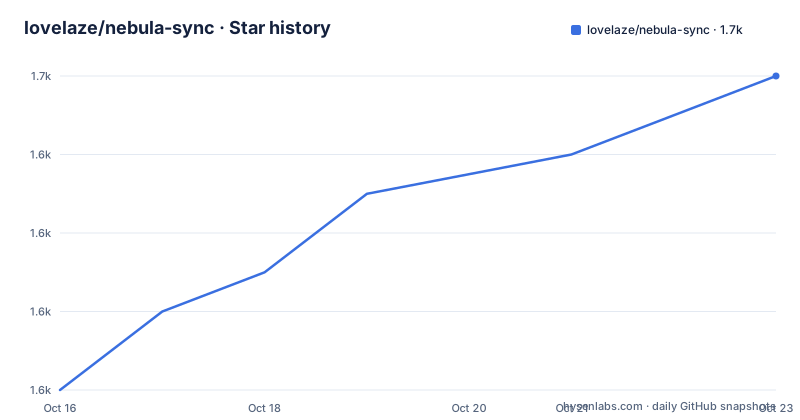
Star history
- lovelaze/nebula-sync1,650 ★ · +8
| Repository | 2026-10-16 | 2026-10-23 |
|---|---|---|
| lovelaze/nebula-sync | 1.6k | 1.7k |
8 Stars in the last 7 days, measured from the daily GitHub snapshot. Compare with other projects
Editorial analysis
nebula-sync's Primary-to-Replica Pi-hole Model
nebula-sync addresses configuration drift across a group of Pi-hole v6.x instances. Its data model is intentionally asymmetric: one Pi-hole is declared through `PRIMARY`, while one or more targets are listed through `REPLICAS`. The service then applies configuration from the primary to those replicas through APIs supplied by Pi-hole. This makes it relevant to administrators of home labs, distributed DNS deployments, container networks, or redundant Pi-hole installations that need the same operational state.
The project is not part of the official Pi-hole project. That distinction matters when evaluating support boundaries. nebula-sync depends on the behavior and interfaces of Pi-hole v6.x, so compatibility is tied to those external APIs rather than to an official replication protocol supplied by Pi-hole.
nebula-sync supports two synchronization modes. With `FULL_SYNC=true`, it uses Pi-hole Teleporter to export from the primary and import into replicas. The README says this carries all settings and configuration. With `FULL_SYNC=false`, an administrator can enable individual configuration areas or gravity object groups. That mode offers finer control, but it also requires more decisions about what should and should not be copied.
Full Teleporter Sync and Selective Pi-hole Transfers
The full synchronization path is the simplest to reason about because the README defines it as a Teleporter import and export between the primary and every replica. It is the appropriate choice when replicas should be broadly interchangeable with the primary and can safely accept all exported configuration. It also avoids maintaining a long list of `SYNC_CONFIG_*` and `SYNC_GRAVITY_*` switches.
That breadth is a constraint. A full transfer is not a field-level merge policy described by the project. The documentation presents one primary and replica targets, so local replica changes should be treated as state that may be overwritten when the next full transfer occurs. The README does not document conflict detection, bidirectional synchronization, change history, or automatic rollback.
Selective synchronization changes the boundary. Full sync is disabled, then the administrator can enable DNS, DHCP, NTP, resolver, database, miscellaneous, or debug settings. Separate switches also cover DHCP leases and selected gravity data, including groups, ad lists, domain lists, clients, and their group-specific variants. Filters can include or exclude case-sensitive configuration keys within sections. For example, DNS keys are written relative to the DNS section, such as `upstreams` or `cache.size`.
The include and exclude filters for the same section are mutually exclusive. Filters do nothing when `FULL_SYNC=true`. This makes selective mode more configurable, but configuration errors can become silent policy decisions. A misspelled or case-sensitive key may leave an intended setting outside the transfer.
Running nebula-sync with Docker Compose and Cron
The README recommends Docker Compose. The following example declares one primary, two replicas, enables full synchronization and gravity, and schedules execution every hour. Replace the example addresses and passwords before using it.
---
services:
  nebula-sync:
    image: ghcr.io/lovelaze/nebula-sync:latest
    container_name: nebula-sync
    environment:
    - PRIMARY=http://ph1.example.com|password
    - REPLICAS=http://ph2.example.com|password,http://ph3.example.com|password
    - FULL_SYNC=true
    - RUN_GRAVITY=true
    - CRON=0 * * * *
For a first run, inspect the container logs after replacing those values. The schedule expression means execution at minute zero of every hour. The repository layout includes example files under `examples/`, including `.env_full`, `.env_manual`, `docker-compose.yml`, and `docker-compose-with-secrets.yml`.
The image is built in two stages. Go dependencies are downloaded and verified before a statically configured binary is compiled. The runtime stage copies only the binary, zone information, and CA certificates, then runs as user `1001`. Its default entry point is `nebula-sync`, its default command is `run`, and its health check invokes `nebula-sync healthcheck`.
The README also documents native installation through a release binary or `go install`. A local execution can use direct variables, or `--env-file .env` when configuration is stored in a file. The repository module declares Go 1.26.2, which is a relevant constraint when building rather than using a release or container image.
Secrets, TLS, Retries, and Timeout Boundaries
The service stores Pi-hole endpoint and password pairs in `PRIMARY` and `REPLICAS`. The README also states that these variables support Docker secrets through `PRIMARY_FILE` and `REPLICAS_FILE`, and the repository provides `examples/docker-compose-with-secrets.yml`. That is preferable to duplicating credentials across several ordinary variables, although the README excerpt does not describe file ownership or secret formatting in detail.
`CLIENT_SKIP_TLS_VERIFICATION` defaults to `false`. Setting it to `true` disables verification of the Pi-hole endpoint's TLS certificate through the nebula-sync HTTP client. This can ease temporary self-signed deployments, but it removes an important check that the server identity matches the configured endpoint. It should be treated as an exception tied to a known network arrangement, not as a routine default.
`CLIENT_RETRY_DELAY_SECONDS` defaults to 1, while `CLIENT_TIMEOUT_SECONDS` defaults to 20. These controls address connection attempts and the HTTP request period, respectively. A longer timeout may be needed for Teleporter archives or slow replicas. A longer retry delay can reduce repeated requests against an unavailable service, but the README does not give a retry limit or explain how retries interact with partially completed synchronization.
`TZ`, such as `Europe/London`, controls logs and cron interpretation. The container includes zone information, which supports that setting. Administrators should still verify that the selected timezone produces the intended `CRON` times.
Operational Limits Compared with Native Pi-hole Administration
The main alternative is administering Pi-hole directly through each instance's API or user interface. Native administration is better when only one instance needs a change, when local replica ownership must be preserved, or when the deployment requires bidirectional edits. nebula-sync removes repetitive API work by making one instance authoritative and pushing its state outward.
That convenience depends on clear authority. The documentation does not describe automatic election of a new primary, multi-primary reconciliation, per-replica schedules, or conflict resolution. If two administrators expect to edit different Pi-hole instances independently and have both changes retained, this primary-to-replica model is the wrong abstraction.
The project also targets Pi-hole v6.x specifically. The README does not explain compatibility with earlier Pi-hole releases, and it provides no separate adapter model for different API generations. A deployment outside that boundary would require verification against the Pi-hole API rather than an assumption based on shared concepts such as DNS and gravity.
Another limitation is recovery. The README documents synchronization and a health-check command, but not rollback, conflict alerts, or a dry-run report. Operators should therefore preserve their existing Pi-hole backup and recovery process. Teleporter reduces configuration transfer work, but documentation does not promise that every runtime or network problem can be reversed by nebula-sync.
nebula-sync Maintenance, Release Cadence, and License Cost
The repository is not archived, and its last push was on 2026-10-16. Recent releases include v0.11.2 on 2026-05-05, v0.11.1 on 2025-09-11, and v0.11.0 on 2025-04-24. These dates show release activity across 2025 and 2026, but the README does not promise a fixed support window or compatibility policy for future Pi-hole v6.x changes.
The Go module records several implementation dependencies, including Cobra for command handling, `robfig/cron/v3` for scheduling, `envconfig` and `godotenv` for configuration, `retry-go` for connection attempts, and zerolog for logging. The repository also includes unit and end-to-end test targets in its Makefile. Those details indicate a conventional Go project structure, but this review has not installed or run those commands.
nebula-sync is licensed under the MIT License. That permits broad use, modification, distribution, and sublicensing under the License's stated conditions. An organization adopting the binary or container must also decide whether it will track upstream updates, pin image versions, validate changes against its Pi-hole deployment, and preserve credentials outside the example variables. The README does not document a rollback procedure for upgrades.
Editorial conclusion
nebula-sync fits administrators who already operate Pi-hole v6.x and need one designated primary to drive several replicas, particularly where a scheduled Docker service is acceptable. It is unsuitable for multi-writer setups, Pi-hole versions outside v6.x, or environments that require conflict resolution rather than primary-to-replica replication. Before adoption, verify the Pi-hole API authentication method, certificate policy, selected full or selective mode, and the exact settings that should move to each replica.
Frequently asked questions
What Pi-hole version does nebula-sync support?
The README describes nebula-sync as a tool for synchronizing Pi-hole v6.x configuration and does not claim support for other Pi-hole versions.
How do I install nebula-sync with Docker Compose?
The README recommends `ghcr.io/lovelaze/nebula-sync:latest` in a Compose service. Configure `PRIMARY`, `REPLICAS`, and `FULL_SYNC`, then add `CRON` if scheduled execution is required.
Does nebula-sync support partial Pi-hole configuration synchronization?
Yes. Set `FULL_SYNC=false`, then enable the required `SYNC_CONFIG_*` or `SYNC_GRAVITY_*` variables. Section-specific include or exclude filters can narrow configuration keys further.
Can nebula-sync synchronize multiple Pi-hole replicas?
Yes. `REPLICAS` accepts a comma-separated list of Pi-hole endpoint and password pairs. The documented Docker Compose example includes two replicas.
Does nebula-sync document rollback or conflict resolution?
No. The README documents full and selective synchronization but does not describe rollback, bidirectional conflict handling, or automatic primary election.
Official sources
Add this badge to your README
If you maintain this project, the badge below links readers to this analysis and shows its maintenance status from the daily GitHub snapshot. Paste the markdown into your README; add ?metric=license or ?metric=stars to the image URL for a different field.

[](https://hysenlabs.com/projects/lovelaze-nebula-sync)Star history chart for your README
[](https://hysenlabs.com/projects/lovelaze-nebula-sync)Was this useful?