hairline: Pointer-Responsive Isometric Figures for React and the DOM
Six isometric line figures that answer the pointer. For React and for anything with a DOM.
At a glance
- What is it?
- hairline is a TypeScript package for interactive isometric line figures that react to pointer position and motion. It offers a React component entry point, a framework-neutral DOM API, and an ESM-only package with no dependencies.
- Who is it for?
- Adopt hairline when an interactive decorative figure is worth adding to a React or DOM interface and pointer response is central to the treatment. Do not choose it for a conventional data visualization, static illustration, or framework that lacks DOM access.
- Can I use it commercially?
- Yes. MIT is a permissive licence: you can use, modify and sell software built on it, as long as you keep its copyright and licence notices.
- Is it still maintained?
- Yes. The repository last received commits 9 days ago.
- What is it written in?
- Mainly TypeScript, according to GitHub's language statistics.
Answers come from the project's GitHub data, last synced on October 23, 2026, and from our analysis. They are not legal advice.
Star history
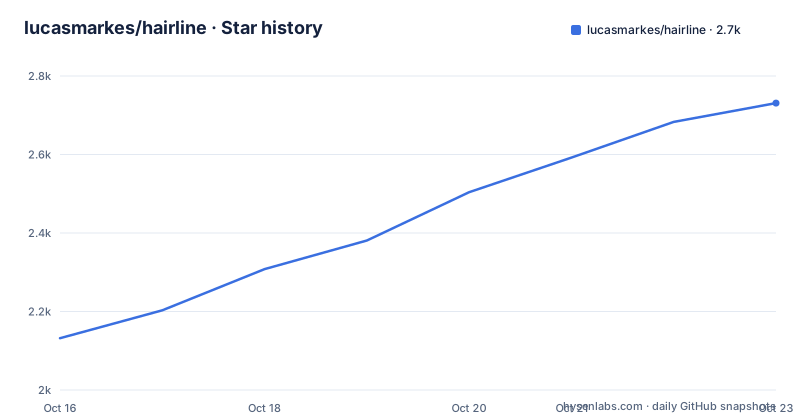
- lucasmarkes/hairline2,731 ★ · +599
| Repository | 2026-10-16 | 2026-10-23 |
|---|---|---|
| lucasmarkes/hairline | 2.1k | 2.7k |
599 Stars in the last 7 days, measured from the daily GitHub snapshot. Compare with other projects
Editorial analysis
hairline's Pointer-Responsive Drawing Problem
hairline addresses the gap between static SVG illustration and an interface element that responds to a visitor. Its figures are isometric line drawings that change according to pointer position, proximity, height, or flicking motion. The catalog includes a card tray, pillar field, layered app window, dot matrix, conveyor, turntable, commit graph, patch panel, magnifying glass, drawers, relay network, and file formatter. The repository description says "six isometric line figures," while the current README describes 33 figures. The README and its figure table provide the more detailed project catalog, so consumers should verify the exports for the version they install rather than rely on the short description.
The intended audience is front-end developers working in React or any browser environment with a DOM. It is a presentation library rather than a chart library or general interaction engine. The figures provide a recognizable technical object, then turn pointer input into a local motion such as a ripple, a widened gap, a delayed path, or a lid opening. This makes the package relevant to landing pages, product sections, empty-state areas, documentation, and decorative panels where the surrounding interface has a clear container.
The figures are deliberately sparse. The README describes bare wire baskets, empty drawer dividers, unpopulated test-sieve meshes, and loose file lines. That restraint keeps the project centered on response rather than content. It also means hairline does not claim to solve general illustration, image editing, or data presentation. A team looking for axes, legends, tooltips, and analytical charts would be using the wrong category of tool.
Two Entry Points for React and DOM Rendering
hairline exposes two paths around the same general figure model. React developers import named components from `@lucasmarkes/hairline/react`. A direct DOM integration imports `terrain` from `@lucasmarkes/hairline`, selects an existing element, initializes a figure, updates its options, and eventually calls `destroy`.
The React entry point is described as a client module, although a Server Component can render it without adding its own `"use client"` declaration. Every component accepts the documented options and every `<div>` attribute, and its ref is forwarded to the underlying `<div>`. This makes the component compatible with ordinary wrapper styling and parent sizing. The figure fills the parent's width and uses a 5:4 aspect ratio, so the integration needs a parent whose width and layout are defined.
The DOM API follows a controller lifecycle. `terrain` receives an element and returns an object with `update` and `destroy`. `update` changes options on the running figure, while `destroy` removes the elements that the figure added. The returned shape is also suitable for a Svelte action, because it exposes the update and cleanup operations expected by that integration style.
This separation is useful when a project has mixed rendering environments. React consumers can use declarative components, while non-React code can attach behavior to an existing element without introducing a React runtime. The package remains ESM only and has no runtime dependencies. React 18 or later is an optional peer dependency required only by `@lucasmarkes/hairline/react`.
Installing hairline and Rendering the First Terrain
The package manager command documented in the README is the direct installation route:
npm i @lucasmarkes/hairlineFor a React application, the first integration imports `Terrain` and renders it in a component:
import { Terrain } from "@lucasmarkes/hairline/react";

export function Hero() {
  return <Terrain />;
}
The React component fills its parent's width at a 5:4 aspect ratio. The parent must therefore provide the available width used by the component. Pointer movement over the rendered figure changes the terrain. According to the README, the terrain contains 81 pillars on a plinth, and pillars rise around the pointer. Increasing `intensity` makes the affected area wider.
For a DOM-based page, the documented pattern is:
import { terrain } from "@lucasmarkes/hairline";

const figure = terrain(document.getElementById("figure")!, { play: true });

figure.update({ intensity: 0.8 });
figure.destroy();
The example assumes an element with the ID `figure`. `terrain` draws at the element's width and preserves the 5:4 aspect ratio. The update call changes the running figure, while `destroy` performs cleanup. A Svelte integration can use the same controller shape through an action, as shown by the README's `use:terrain={{ intensity }}` example.
Choosing a Figure by Its Input Model
The figure catalog is more useful as an interaction map than as a list of decorative names. `Riffle` responds around a card under the pointer and also supports arrow-key navigation. `Terrain` uses pointer proximity to raise pillars. `Exploded` uses horizontal movement to open the gap and vertical movement to select one of four layers. `Phosphor` paints a dot matrix and leaves a fading trail. These are distinct models rather than visual skins for one animation.
Other figures map pointer height or motion to a specific mechanism. `Slow` changes the clock speed of crates passing through a gate without stopping them. `Turntable` responds to a flick and settles on the nearest quarter turn. `Keyboard` depresses the key under the pointer and follows with neighboring keys. `Elevator` uses pointer height to choose a floor. `Laptop` sets the lid angle and follows with a spring.
Several figures model layered or network-like structures. `Phone`, `Sieve`, and `Drawer` use pointer height to separate layers or components. `Branches` raises a commit and then its history. `Hub` raises a tile and makes its dashed link solid. `Relay` lights a path to a leaf hop by hop. `Settle` rearranges loose tiles into a tree as the pointer approaches.
The README documents `intensity` as a common option that changes the spread, lift, speed, or duration of a response depending on the figure. That makes intensity useful for adapting the same component to a smaller or calmer layout, but the exact visual result must be checked against the selected figure's documented behavior.
shadcn Installation Through the Hairline Registry
The README gives a separate installation path for shadcn. Instead of only adding the package manually, the documented command asks shadcn to add a wrapper that reads the theme's tokens:
npx shadcn@latest add https://hairline.lucasmarkes.com/r/hairline.jsonThis route is relevant to applications already organized around shadcn. The registry entry adds `@lucasmarkes/hairline` and supplies a wrapper. The README does not document the contents of that wrapper, its generated file path, or any additional configuration, so an engineer should inspect the generated files before committing them.
The shadcn path and direct npm installation serve different needs. Direct installation gives access to the package entry points documented in the README. Registry installation is intended to integrate the theme-aware wrapper. The project does not state that the wrapper is required for ordinary React use, and the core package remains usable through `@lucasmarkes/hairline/react` or `@lucasmarkes/hairline`.
The monorepo itself specifies Node `>=22` and uses `[email protected]`, but those values belong to the repository workspace rather than a separate README install instruction for package consumers. They are relevant when cloning or developing the repository, not necessarily a requirement imposed by the published runtime package.
Boundaries of the Hairline Package Model
hairline is not a general data-visualization component. Its figures are illustrative objects whose axes, values, and labels are not presented as analytical content. For example, `Plot` is described as a bar chart with flat tabs, while `Branches` is a commit graph and `Relay` is a hub with paths that light in sequence. The documentation does not provide APIs for scales, legends, tooltips, axis configuration, or data binding.
It also does not solve every interaction need. `Phosphor` fades like phosphor where the pointer paints it, `Slow` slows a clock, and `Turntable` responds to a flick, but the README does not document touch behavior, keyboard support for every figure, reduced-motion preferences, or an accessibility policy. It mentions arrow keys specifically for `Riffle`, which should not be generalized to all figures.
The React and DOM APIs have different cleanup responsibilities. React components accept a forwarded ref and `<div>` attributes, while the imperative API requires the caller to retain the returned controller and call `destroy`. In a non-React view that creates and removes elements frequently, failure to call `destroy` can leave figure-added content or listeners in place. The README documents the cleanup method but does not describe automatic disposal for arbitrary application lifecycles.
A conventional approach would be a hand-authored SVG or CSS illustration with a small pointer event handler. That alternative can be preferable when the design requires exact SVG path control, semantic content, reduced-motion behavior, or integration with a larger animation system. hairline instead provides a catalog of ready-made isometric figures and a shared controller model, reducing the need to build each response mechanism from scratch.
Maintenance Signals and Upgrade Boundaries
The repository is not archived, and its recorded last push was on 2026-10-14. Recent repository releases are `v0.5.1` on 2026-10-14, `v0.5.0` on 2026-10-08, and `v0.3.0` on 2026-10-05. Those facts indicate recent repository activity and recent package releases, but they do not establish compatibility across future versions.
The project uses an MIT license. That identifier permits use and modification under the license's terms, but this review does not provide legal advice. The README and repository layout do not describe a migration guide for upgrades between the listed releases. The changelog exists in the repository, so consumers changing versions should inspect it for changes to exports, options, figure behavior, and the shadcn wrapper.
The monorepo contains `packages/`, `apps/`, `fixtures/`, `registry/`, and scripts, indicating that the published package is developed alongside documentation, examples, registry content, and automated tooling. Consumers who only need the package can avoid taking on the monorepo's build and test commands. Those commands include `pnpm` workflows such as `build`, `typecheck`, `test`, `test:browser`, and `release`, but the README does not instruct package users to run them after installation.
Editorial conclusion
Adopt hairline when an interactive decorative figure is worth adding to a React or DOM interface and pointer response is central to the treatment. Do not choose it for a conventional data visualization, static illustration, or framework that lacks DOM access. Before adoption, verify the Node version required by the repository, the ESM-only distribution, the selected figure's pointer behavior, and how the component or controller is cleaned up when the surrounding interface changes. For a first integration, install `@lucasmarkes/hairline` and render `Terrain` inside a sized parent.
Frequently asked questions
How do I install hairline for a React project?
Install it with `npm i @lucasmarkes/hairline`, then import a component such as `Terrain` from `@lucasmarkes/hairline/react`. React 18 or later is required only for the React entry point.
Can hairline be used without React?
Yes. The DOM entry point exports `terrain`, which receives an element and returns a controller with `update` and `destroy`. The README also identifies this shape as suitable for a Svelte action.
What does the `intensity` option change?
The README says a stronger `intensity` generally increases the spread or size of a figure's response, such as a wider ripple, a larger raised area, a faster elevator, or a wider opening. Its visual effect depends on the selected figure.
Official sources
Add this badge to your README
If you maintain this project, the badge below links readers to this analysis and shows its maintenance status from the daily GitHub snapshot. Paste the markdown into your README; add ?metric=license or ?metric=stars to the image URL for a different field.

[](https://hysenlabs.com/projects/lucasmarkes-hairline)Star history chart for your README
[](https://hysenlabs.com/projects/lucasmarkes-hairline)Was this useful?