react-native-notifications claims local notifications that the Android side has not shipped
React Native Notifications
At a glance
- What is it?
- wix/react-native-notifications wraps the native push stack on both platforms, and the interesting detail is the gap between the opening sentence and the Android feature list, where local notifications are still marked upcoming. Everything else about the package is a well-worn native module with unusually old platform floors and four CI configurations.
- Who is it for?
- react-native-notifications fits an app that needs the full native notification surface, especially PushKit and managed notifications on iOS, and that is comfortable maintaining a native module. Check whether you need Android local notifications before choosing it, since the Android list defers them, and note that no release has been tagged since September 2023 even though the repository has moved since.
- Can I use it commercially?
- Yes. MIT is a permissive licence: you can use, modify and sell software built on it, as long as you keep its copyright and licence notices.
- Is it still maintained?
- Yes. The repository last received commits 40 days ago.
- What is it written in?
- Mainly Java, according to GitHub's language statistics.
Answers come from the project's GitHub data, last synced on November 14, 2026, and from our analysis. They are not legal advice.
Star history
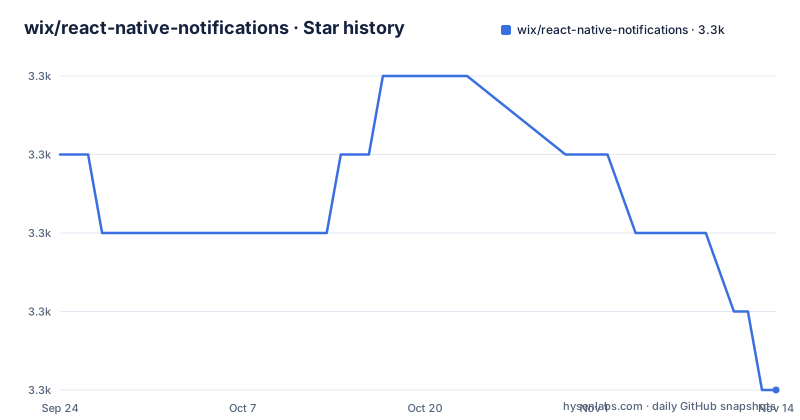
- wix/react-native-notifications3,337 ★ · -3
| Repository | 2026-09-24 | 2026-11-14 |
|---|---|---|
| wix/react-native-notifications | 3.3k | 3.3k |
-3 Stars in the last 51 days, measured from the daily GitHub snapshot. Compare with other projects
Editorial analysis
The summary promises what the Android list defers
The opening sentence handles all the aspects of push notifications, naming remote and local notifications, interactive notifications and silent notifications in one breath. Then the platform lists diverge. The iOS side lists five things with no caveats: remote push, local notifications, background or managed notifications, the PushKit API, and interactive notifications. The Android side lists four, and none of them is local notifications. Underneath the Android list there is a single italic line, upcoming: local notifications, background-state Rx queue, described as the iOS equivalent. So the headline sentence is true for iOS and aspirational for Android, and a reader who stops at the first paragraph will build the wrong expectation.
The declared floors are iOS 10 and Android 5.0
The requirement is a single sentence and it sets the minimum targets, not the recommended ones: apps may target iOS 10 and Android 5.0, which is API 21. Those are the floor values from several major versions back, so the constraint tells you almost nothing about what a current device needs. What it does tell you is that the native code compiles against those SDK levels, which in practice is what keeps the module installable on older projects. The development side is more permissive and less interesting: Windows, macOS or Linux may all be used as the development operating system. The example application is a TypeScript file, NotificationsExampleApp.tsx, sitting alongside example/index.js with both an android and an ios directory, so the sample app is a normal React Native project rather than a stripped-down harness.
Managed notifications and PushKit are the iOS-only pieces
Two entries in the iOS list have no Android counterpart and both exist because of how the platform works. Background or managed notifications are described as notifications that can be cleared from the server, with Facebook Messenger and WhatsApp Web given as the examples, which is a capability of the Apple push system rather than a feature of this library. The PushKit API is named next, with VoIP and other background messages as its purpose, which matters because VoIP calls on iOS are expected to arrive through PushKit rather than through the ordinary remote notification channel. Interactive notifications round out the list, explained as allowing additional functionality outside the application such as action buttons. The README also states in bold that all the native iOS notifications features are supported, which is a stronger claim than the Android side receives.
Android is where the extensibility argument lives
The Android list is written around behaviour rather than around API surface. Receiving notifications in any app state is spelled out as foreground, background and dead, so a notification sent while the process is not running still arrives and still opens the app. Built-in notification drawer management means the module owns the drawer rather than leaving it to the host application. The extensibility claim is that there is a high degree of code extensibility to allow advanced custom layouts and any specific notification behavior available by Android's API, which is a statement that you can drop down to the platform when the wrapper is in the way. The last entry is a compatibility shim: an Android equivalent of React Native's implementation of PushNotificationsIOS.getInitialNotification, so code written for the iOS name works on Android.
Four CI configurations for one repository
The build infrastructure is layered rather than replaced. The README badge points at a Jenkins job on wixpress.com for the master branch, and the repository root also carries a .buildkite/ directory, a .travis.yml file and a .github/ directory, so four distinct CI arrangements are committed at once. Two of them are certainly historical: Travis configuration has been superseded in most projects, and a Jenkins badge for one branch name is not something a fork can use. What remains current is the Buildkite directory and the GitHub workflows, and the test tooling around them is modern, with .detoxrc.json and an e2e/ directory for on-device runs, a wallaby.js file for an interactive test watcher, and a separate tsconfig-strict.json alongside the ordinary tsconfig.json for a stricter pass over part of the source.
The docs container mounts a directory the tree does not have
Documentation runs from a Docusaurus container declared in the repository's compose file, with the working directory set to the website directory and two ports published: 3000 for the site and 35729, which is the port a dev server uses for its live reload socket. Eight volumes are mounted into it. Seven of them point at paths under website, covering blog, core, i18n, pages, static, sidebars.json and siteConfig.js, which is a coherent set for a Docusaurus project. The eighth points at a docs directory at the repository root. No such directory appears in the top level listing, which contains website/ but not docs/, so that mount resolves to an empty path or creates an empty directory depending on the host. The container also builds from the repository root rather than pulling an image, so a local build is required before it can start.
services:
  docusaurus:
    build: .
    ports:
      - 3000:3000
      - 35729:35729
    volumes:
      - ./docs:/app/docs
      - ./website/blog:/app/website/blog
Every test script rebuilds the package first
The scripts make one design choice loudly: the build is rm -rf ./lib/dist && tsc, and there is a pre-hook on seven of the entry points that runs it. prestart, pretest-js, pretest-unit-ios, pretest-unit-android, pretest-e2e-ios-release and prerelease all trigger a rebuild, so a stale lib/dist cannot reach a test or a publish without being overwritten. The test surface itself is split by script rather than by flag: test-unit-ios and test-unit-android pass --ios or --android to a runner script, test-e2e-ios does the same with an extra --release variant, and test-js covers the JavaScript layer. Three developer shortcuts exist alongside them, opening the example workspace in Xcode, opening the example Android project in Android Studio, and running pod install against the example iOS project. The changelog is generated with gren, configured by .grenrc.js and written to CHANGELOG.gren.md, which sits next to a plain CHANGELOG.md.
No release has been tagged since September 2023
The three most recent releases are 5.1.0 on 2023-09-14, 5.0.0 on 2023-07-20 and 4.3.5 on 2023-05-28, and the manifest still reads 5.1.0, so the published version and the newest tag agree with each other. The commit history does not agree with them. The repository is not archived and its recorded last push is 2026-04-02, more than two years after the tag. That gap is the practical question for anyone adopting the module: the source tree has moved, while the published package has not, so a fork and a registry install are not the same codebase. The package itself is marked nativePackage true, declares wildcard peer dependencies on react and react-native, and points main at lib/dist/index.js with typings alongside it, so the compiled directory is part of the published surface.
Editorial conclusion
react-native-notifications fits an app that needs the full native notification surface, especially PushKit and managed notifications on iOS, and that is comfortable maintaining a native module. Check whether you need Android local notifications before choosing it, since the Android list defers them, and note that no release has been tagged since September 2023 even though the repository has moved since. Decide separately whether the iOS 10 and Android 5.0 floors are acceptable to you, since they say nothing about the platforms you must actually run on.
Frequently asked questions
How to show notifications in React Native?
The package wraps the native stacks on both platforms: iOS gets remote push, local notifications, background or managed notifications that can be cleared from the server, the PushKit API for VoIP and interactive notifications with action buttons. Android is documented as receiving notifications in any app state, foreground, background or dead, with notification drawer management built in.
How do I install Notifee in React Native?
The project does not mention Notifee or any alternative. What it provides is the npm package react-native-notifications with a CocoaPods podspec and a react-native.config.js for autolinking, a pod-install script targeting the example project, and documentation reached through a Getting Started page and a general API page.
How do I enable push notifications?
The README does not carry the enablement steps itself. It directs readers to a Getting Started guide and an API reference, sets the platform floors at iOS 10 and Android 5.0, and points at a separate wiki page for integrating properly with react-native-navigation on Android.
How do notifications work with FCM?
FCM is not named anywhere in this repository's documentation. What is named is Android's own notification API as the target for advanced custom layouts and specific notification behaviour, which is where a Firebase transport would connect rather than something the module configures for you.
react native notifications vs notifee
The project makes no comparison with Notifee. Its own position is the claim that all native iOS notification features are supported, a package built by Wix, and wildcard peer dependencies on react and react-native rather than pinned versions. The Android feature list is where the gap sits, since local notifications there are still listed as upcoming.
Official sources
Add this badge to your README
If you maintain this project, the badge below links readers to this analysis and shows its maintenance status from the daily GitHub snapshot. Paste the markdown into your README; add ?metric=license or ?metric=stars to the image URL for a different field.

[](https://hysenlabs.com/projects/wix-react-native-notifications)Star history chart for your README
[](https://hysenlabs.com/projects/wix-react-native-notifications)Was this useful?