arxiv.py gives you a generator of results, and the rate limit is a client setting
Python wrapper for the arXiv API
At a glance
- What is it?
- A Python wrapper for the arXiv API with a Client, a Search and a Result type, backed by requests and lxml and nothing else. The design point is that rate limiting and pagination live in a reusable client rather than in the query, so a bulk fetch does not accidentally hammer the API.
- Who is it for?
- Adopt arxiv.py if you need to query arXiv programmatically and want pagination, retries and rate limiting handled for you rather than hand rolled. Do not adopt it if you need a bulk metadata harvest, because page size, delay and retry count are settings you have to choose for yourself.
- Can I use it commercially?
- Yes. MIT is a permissive licence: you can use, modify and sell software built on it, as long as you keep its copyright and licence notices.
- Is it still maintained?
- Yes. The repository last received commits 6 days ago.
- What is it written in?
- Mainly Python, according to GitHub's language statistics.
Answers come from the project's GitHub data, last synced on November 7, 2026, and from our analysis. They are not legal advice.
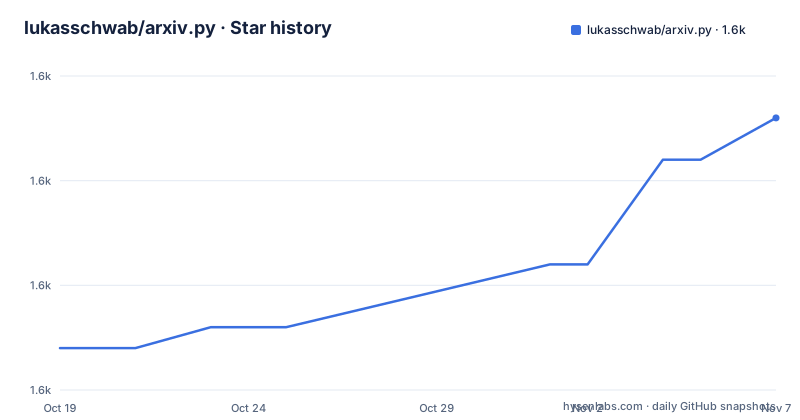
Star history
- lukasschwab/arxiv.py1,563 ★ · +11
| Repository | 2026-10-19 | 2026-11-07 |
|---|---|---|
| lukasschwab/arxiv.py | 1.6k | 1.6k |
11 Stars in the last 19 days, measured from the daily GitHub snapshot. Compare with other projects
Editorial analysis
Three types, and the client is the one that matters
The public API of arxiv.py is three types, and the README describes each of them in a way that tells you which one carries the design.
A `Client` specifies a reusable strategy for fetching results from arXiv's API, and for most use cases the default client should suffice. Client configurations specify pagination and retry logic, and reusing a client allows successive API calls to use the same connection pool and ensures they abide by the rate limit you set.
That last clause is the reason the client exists. A `Search` specifies a search of arXiv's database and is used with `Client.results` to get a generator yielding `Result` objects. The `Result` objects include metadata about each paper, and the meaning of the underlying raw data is documented in the arXiv API user manual under the section on details of Atom results returned.
So the split is: `Search` is a description, `Client` is a policy, and `Result` is data. The rate limit lives on the client because the rate limit is a property of how you talk to the server over time, not of what you are asking for.
The basic usage is short.
import arxiv

client = arxiv.Client()

search = arxiv.Search(
  query = "quantum",
  max_results = 10,
  sort_by = arxiv.SortCriterion.SubmittedDate
)

results = client.results(search)
The results object is a generator, so you can iterate over it one element at a time, or exhaust it into a list, and the README warns that exhausting a large result set into a list is slow. That warning is a little odd to read for a generator, and it points at the real cost, which is the network round trips behind the generator rather than the iteration itself.
The client configuration is where you control the load you put on arXiv
The custom client example is the one to read, because it shows the three parameters you have and what they are for.
big_slow_client = arxiv.Client(
  page_size = 1000,
  delay_seconds = 10.0,
  num_retries = 5
)

for result in big_slow_client.results(arxiv.Search(query="quantum")):
  print(result.title)
The comment on that example says it prints 1000 titles before needing to make another request, which is `page_size` at work. The default page size is smaller, which the logging example shows when it requests 100 results, so raising it trades a larger single response for fewer round trips.
`delay_seconds` is the pacing between requests, and ten seconds is a deliberately unhurried value. `num_retries` is how many times a failed request is retried, and five is a generous number for a service that occasionally returns errors under load.
The combination is the design. A client with a large page size and a long delay gets through a lot of data slowly and politely. A client with a small page size and no delay will hammer the API, which is why the delay is a client setting rather than a hardcoded constant.
For anyone using this in a pipeline, the recommendation is to construct one client at module scope and reuse it, because the README is explicit that reusing a client is what keeps the connection pool and the rate limit in effect across calls. Constructing a fresh `arxiv.Client()` for every query throws away both.
The related project arxivql is mentioned in a tip as a way to simplify constructing complex query strings, and the advanced query syntax itself is documented in the arXiv API user manual rather than in the wrapper, which is the right division.
The generator model is the API design decision to be aware of
The `results` object being a generator rather than a list is the detail that will affect your code most.
The README shows both patterns.
for r in client.results(search):
  print(r.title)

all_results = list(results)
print([r.title for r in all_results])
The comment on the second form says to be careful, that it is slow for large result sets. The reason is that the generator only fetches a page at a time, and each page fetch is a network request with a delay attached, so materialising the whole thing means making all of those requests before your loop starts. With the default client that is fine. With a client configured for a large page size and a long delay it is exactly the case where you want to consume results as they arrive.
There is a related pattern for single results, which is `next()`.
search_by_id = arxiv.Search(id_list=["1605.08386v1"])
first_result = next(client.results(search_by_id))
print(first_result.title)
Taking the first element of the generator and abandoning the rest is the efficient way to fetch one known paper, and it works for the advanced query syntax too, with `arxiv.Search(query="au:del_maestro AND ti:checkerboard")` followed by `next(client.results(search))`.
The logging section is worth a look for a different reason. Configuring a DEBUG level logger shows the request being built, including the full query URL and the user agent string, which in the example output carries the library name and version.
>>> import logging, arxiv
>>> logging.basicConfig(level=logging.DEBUG)
>>> client = arxiv.Client()
>>> paper = next(client.results(arxiv.Search(id_list=["1605.08386v1"])))
INFO:arxiv.arxiv:Requesting 100 results at offset 0
Seeing the actual URL is the fastest way to work out why a query returns what it returns, and it also shows the request pattern arXiv sees, which is the thing to be careful about if you are running many clients.
Downloading the PDF and the source tarball is two URL methods
The download example is short and shows that the result object exposes both artefacts of a paper.
import arxiv
from urllib.request import urlretrieve

paper = next(arxiv.Client().results(arxiv.Search(id_list=["1605.08386v1"])))

urlretrieve(paper.pdf_url, "paper.pdf")
urlretrieve(paper.source_url(), "paper.tar.gz")
`pdf_url` is a property, and `source_url()` is a method, which is a small inconsistency that is easy to trip over. The PDF is the rendered paper, and the source tarball is the LaTeX and figures the author submitted, which is the more valuable artefact for anything that wants to work with the content rather than read the rendered version.
Note that the download uses `urllib.request.urlretrieve` from the standard library rather than a method on the result. The library does not download files for you, it hands you URLs. That is a deliberate and defensible choice, because the download is a large operation that a caller may want to control, and because using the standard library keeps the dependency list at three packages.
The dependency list in the metadata is indeed small. `lxml` at 6.1.0 or newer for parsing the Atom XML the API returns, `requests` at 2.32 or newer for the HTTP layer, and `typing_extensions` for Python versions below 3.11. There is no HTTP client beyond requests, no XML library beyond lxml, and nothing for the download path.
For context on the data, the README describes arXiv as a Cornell University Library project providing open access to more than a million articles in Physics, Mathematics, Computer Science, Quantitative Biology, Quantitative Finance and Statistics. They are worth knowing before you build a category filter.
A version 4 package with hatch, uv and a security audit in the build
The version history shows a project that has recently made a major API change and is now on a stable footing. Version 4.0.1 was published on 2026-07-31, 4.0.0 on 2026-05-17 and 3.0.0 on 2026-04-12, so two major versions in about four months, which means the interface changed twice recently and an upgrade is not a trivial version bump.
The version field is dynamic, derived from the version control system, with hatch-vcs and a `dirty-tag` local scheme. That means the published version comes from the tag, and the source tree does not carry a hardcoded number, which is a clean way to avoid a stale version string.
The build backend is hatchling with hatch-vcs, and the wheel packages the `arxiv` directory. The development setup uses uv while maintaining compatibility with traditional pip installation for end users, and the README says the same thing in the installation instructions, where `pip install arxiv` is annotated with an alternative of `uv add arxiv` or similar.
The Makefile is where the project's working habits are visible. The default target runs lint, test and docs. There is a `check` target that chains lint, type-check and test. The docs target runs pdoc with the restructuredtext docformat over the package's `__init__.py`, excluding the private `_feed` module, which is how the API documentation is generated. There is an `audit` target running pip-audit, so the dependency tree is checked for known vulnerabilities as part of the tooling, and a `type-check` target running mypy over the package entry point.
The dev dependency group includes pytest, ruff, pdoc, pip-audit, mypy and types-requests, and the lint configuration selects the standard Ruff rule set with a line length of 100 and the E501 and W191 rules ignored. The repository has a `uv.lock`, a `release.sh`, a Makefile, a `tests/` directory and a `LICENSE.txt`, and the licence is MIT with the package classified as Production/Stable and requiring Python 3.10 or newer. The last push was on 2026-10-05 and the repository is not archived.
Editorial conclusion
Adopt arxiv.py if you need to query arXiv programmatically and want pagination, retries and rate limiting handled for you rather than hand rolled. Do not adopt it if you need a bulk metadata harvest, because page size, delay and retry count are settings you have to choose for yourself. Verify first that the query syntax you need is in the arXiv API user manual rather than in the wrapper, that you set a page size and delay appropriate to how much you are pulling, and that the version you pin has the search fields and result attributes your pipeline expects.
Frequently asked questions
How do I install arxiv.py and run a search?
Run pip install arxiv, or uv add arxiv. Then create a client with arxiv.Client(), build a query with arxiv.Search(query=..., max_results=..., sort_by=...), and iterate over client.results(search), which yields Result objects with the paper metadata.
How do I control how many results arxiv.py requests at once?
Configure the client. arxiv.Client(page_size=1000, delay_seconds=10.0, num_retries=5) sets how many entries come back per request, how long the client waits between requests, and how many times a failed request is retried. The default client should suffice for most use cases.
How do I download the PDF or the source of an arXiv paper?
The Result object exposes paper.pdf_url as a property and paper.source_url() as a method. Fetch them yourself, for example with urlretrieve from urllib.request, which is what the README example does.
Why is exhaust() slow for large arxiv.py result sets?
The results object is a generator that fetches one page at a time, so materialising it into a list makes every page request before your loop starts. Iterating directly over the generator avoids that, and taking the first element with next() is the efficient way to fetch a single known paper.
What is the current version of arxiv.py and what does it depend on?
The recent releases are 4.0.1 from 2026-07-31, 4.0.0 from 2026-05-17 and 3.0.0 from 2026-04-12. The runtime dependencies are lxml, requests and typing_extensions, and the licence is MIT with the package classified as Production/Stable for Python 3.10 and newer.
Official sources
Add this badge to your README
If you maintain this project, the badge below links readers to this analysis and shows its maintenance status from the daily GitHub snapshot. Paste the markdown into your README; add ?metric=license or ?metric=stars to the image URL for a different field.

[](https://hysenlabs.com/projects/lukasschwab-arxiv-py)Star history chart for your README
[](https://hysenlabs.com/projects/lukasschwab-arxiv-py)Was this useful?