Retrolambda: A Bytecode Backport for Java 8 Lambdas on Older Runtimes
GitHub describes it as Backport of Java 8's lambda expressions to Java 7, 6 and 5. The repository metadata lists Java as its primary language. The metadata lists the Apache-2.0 license. This article stays within the project description and details documented in the GitHub repository README.
At a glance
- What is it?
- Retrolambda transforms Java 8 class files so lambda expressions, method references and try-with-resources run on Java 7, 6 or 5. It is a build-time tool with no runtime dependencies, but it does not backport the Java 8 API.
- Who is it for?
- Adopt Retrolambda if you must ship on Java 7 or older and cannot migrate the whole codebase to Java 8, especially when you already have a Maven build and can run comprehensive tests on the target JVM. Avoid it if you need Java 8 APIs, if you rely on default or static interface methods without the full backport, or if you can use Android Studio's built-in Java 8 support.
- Can I use it commercially?
- Yes. Apache-2.0 is a permissive licence: you can use, modify and sell software built on it, as long as you keep its copyright and licence notices.
- Is it still maintained?
- Probably not. The repository last received commits 37 months ago, on September 26, 2023.
- What is it written in?
- Mainly Java, according to GitHub's language statistics.
Answers come from the project's GitHub data, last synced on October 21, 2026, and from our analysis. They are not legal advice.
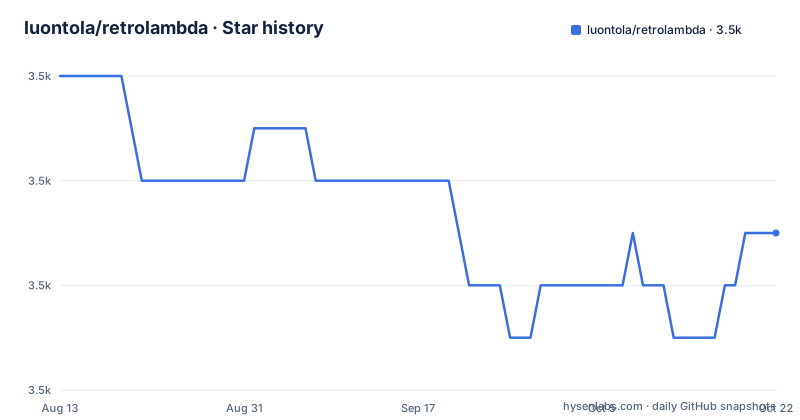
Star history
- luontola/retrolambda3,513 ★ · -3
| Repository | 2026-08-13 | 2026-10-21 |
|---|---|---|
| luontola/retrolambda | 3.5k | 3.5k |
-3 Stars in the last 69 days, measured from the daily GitHub snapshot. Compare with other projects
Editorial analysis
The Problem Retrolambda Solves
Java 8 introduced lambda expressions, method references and try-with-resources, but many production environments were still running Java 7 or older when Retrolambda appeared. You could not use those language features without upgrading the runtime, which was often impossible due to legacy infrastructure or third-party dependencies. Retrolambda attacks this by transforming the compiled bytecode, not by providing a runtime library. The README positions it as the successor to Retroweaver, which did the same for generics on Java 1.4. The target audience is teams that want the syntactic benefits of Java 8 in their source code while still producing class files that run on old JVMs. It is a build-time tool, so the transformed output is just normal class files with no extra jars to ship.
How the Bytecode Transformation Works
Retrolambda takes the class files produced by a JDK 8 compiler and rewrites them. Lambda expressions become anonymous inner classes, with a specific optimization: stateless lambdas use a singleton instance to avoid repeated object allocation. Method references are treated as syntactic sugar for lambdas and are transformed the same way. Try-with-resources is handled by removing calls to Throwable.addSuppressed when the target bytecode version is below Java 7. For Java 6 and 5, Objects.requireNonNull calls are replaced with Object.getClass, because JDK 9's compiler emits null checks through Objects.requireNonNull. The transformation is driven by system properties, with retrolambda.bytecodeVersion controlling the major version number of the generated class files. The README notes that the transformation is applied to already-compiled classes, so you must compile with JDK 8 first and then run Retrolambda on the output.
Getting It Running: Maven, Gradle and the Command Line
The simplest path is the Maven plugin. Add the plugin with groupId net.orfjackal.retrolambda, artifactId retrolambda-maven-plugin, version 2.5.7, and bind the goals process-main and process-test to executions. That is the entire configuration shown in the README. The Gradle plugin is a separate project by Evan Tatarka, not part of this repository. For command-line use, download retrolambda.jar from Maven Central. You need JDK 8 to compile your source and also to run Retrolambda itself. The usage is java -Dretrolambda.inputDir=? -Dretrolambda.classpath=? -jar retrolambda.jar, with the classpath property pointing at the dependencies. The README recommends setting environment variables like JAVA8_HOME and JAVA7_HOME and referencing them in the build, rather than relying on whatever JAVA_HOME points to. You also need Java 8 to generate Javadocs, because JDK 7's Javadoc tool fails on some valid Java 8 code.
Optional Backports: Default and Static Interface Methods
Retrolambda has limited support for default methods and static methods on interfaces, but this feature is disabled by default. When enabled, default methods are copied to a companion class named after the interface plus a dollar sign, as static methods. The interface itself gets abstract methods instead, and every class that implements the interface gets the necessary method implementations. Static methods on interfaces are moved to the same companion class, and all method calls are updated to point to the new location. There is a catch: the README warns that static methods are moved to a companion class even when default method support is disabled, because some of them may be lambda implementation methods. But the method calls to static methods are not updated in that case, which can cause weird error messages if you accidentally use static interface methods without enabling the feature. That is a fragile design choice, and you should treat it as a reason to either enable the feature fully or avoid static interface methods entirely.
Known Limitations and Failure Modes
The most obvious limitation is that Retrolambda does not backport the Java 8 APIs. If your code calls java.util.stream or java.time, the transformed classes will still fail on Java 7 because those classes do not exist. The README points to separate projects for those APIs: streamsupport for java.util.stream and ThreeTen for java.time. Another limitation is that backporting default and static interface methods requires all backported interfaces and implementing classes to be processed consistently; the README truncates before giving the full condition, but the warning about weird error messages suggests that partial processing leads to subtle breakage. The try-with-resources backport for below Java 7 simply removes addSuppressed calls, which means suppressed exceptions are silently swallowed. The README says that if you want them logged instead, you should create a feature request, implying that no such option exists yet. For Java 7 targets, addSuppressed exists, so try-with-resources works naturally, but for Java 6 and 5 you lose that information. The README also stresses running comprehensive tests on the target JVM, because Retrolambda cannot catch accidental use of Java 8 APIs or unbackported language features.
Alternatives and the Android Context
The README itself names the first alternative: Android Studio has built-in support for Java 8 features, and it says that is probably the first thing to try. That support is integrated into the Android build system and does not require a separate bytecode transformation step. For non-Android JVM projects, the alternative is to stay on Java 8 and require the target runtime to be Java 8, which avoids the backport entirely. There is also the family of Java backporting tools listed on Wikipedia, but the README does not describe them in detail. The key difference in approach is that Retrolambda works on bytecode after compilation, whereas a source-level solution like the Android tooling rewrites the source or uses a different compiler pipeline. Retrolambda's approach has the advantage of being language-independent at the source level, but it also means you must integrate it into your build and verify the output, which is extra work compared to just using a newer runtime.
Maintenance, Licensing and Upgrade Cost
Retrolambda is licensed under Apache-2.0, which permits commercial use and modification with attribution. The repository is not archived, but the README's copyright notice says 2013-2017, and the last push is unknown, so the maintenance status is uncertain. The Maven plugin version 2.5.7 is the one shown in the README, and there are no recent releases listed. That means you should treat Retrolambda as a stable but possibly dormant project. The upgrade cost is moderate: you must keep the plugin version fixed, test after any JDK 8 compiler update, and ensure that your continuous integration uses the target Java version for tests. The README specifically recommends running all tests on the target JVM during CI and release builds, not just in development. The transformation itself is deterministic, but if you change your source to use more Java 8 features, you need to verify that Retrolambda supports them. The absence of active releases means you cannot expect quick fixes for new JDK 8 compiler changes, so a conservative pinning strategy is wise.
Editorial conclusion
Adopt Retrolambda if you must ship on Java 7 or older and cannot migrate the whole codebase to Java 8, especially when you already have a Maven build and can run comprehensive tests on the target JVM. Avoid it if you need Java 8 APIs, if you rely on default or static interface methods without the full backport, or if you can use Android Studio's built-in Java 8 support. Before adopting, verify that your build can consistently run Retrolambda after every compilation, and test every release on the actual target Java version, not just on JDK 8.
Frequently asked questions
What does Retrolambda do?
It transforms Java 8 compiled bytecode so that lambda expressions, method references and try-with-resources statements run on Java 7, 6 or 5. The output is ordinary class files with no additional runtime dependency. There is also limited support for default methods and static methods on interfaces, and that support is disabled by default.
Does Retrolambda backport the new Java 8 APIs?
No, and it says so under known limitations. It transforms language features only. Other projects cover some of the APIs, with streamsupport for the java.util.stream package and ThreeTen for java.time, and the README adds that Animal Sniffer and IntelliJ IDEA can warn you about Java 8 API usage.
Why does backported try-with-resources lose suppressed exceptions?
Because the calls to Throwable.addSuppressed are removed when the target bytecode version is below Java 7, and with them the record of which exception was already being handled. The README says that if you would rather have them logged than swallowed, you should create a feature request, since the behaviour is not configurable today.
How do I run Retrolambda from the command line?
Download retrolambda.jar from Maven Central, compile your source with JDK 8, then run the jar using Java 8 on the class files that JDK 8 produced. Configuration is passed as system properties for the input directory and the classpath, and the jar can also be attached as a java agent. Running it with no options prints its own instructions.
What is the limitation of static methods on interfaces in Retrolambda?
They are moved to a companion class named after the interface with a dollar sign, but the footnote explains that this happens even when default method support is disabled, and that the calls to those static methods are not updated in that case, which can produce confusing error messages at runtime.
Official sources
Add this badge to your README
If you maintain this project, the badge below links readers to this analysis and shows its maintenance status from the daily GitHub snapshot. Paste the markdown into your README; add ?metric=license or ?metric=stars to the image URL for a different field.

[](https://hysenlabs.com/projects/luontola-retrolambda)Star history chart for your README
[](https://hysenlabs.com/projects/luontola-retrolambda)