Minecraft Console Client: a terminal client for Java servers, halfway through a rewrite
Lightweight console for Minecraft chat and automated scripts. Currently supports up to Minecraft 26.2
At a glance
- What is it?
- A C# TUI client that connects to Minecraft Java servers to send commands and read chat without launching the game, now with a 2.0 rewrite whose early access binary ships before its source. The licence is CDDL-1.0 with borrowed code carrying its own terms.
- Who is it for?
- MCC is the right tool if you run or monitor a Java server and want command output in a terminal, on a headless box, or over SSH, and the wrong tool if you need world editing, mods, or the actual game client.
- Can I use it commercially?
- Check first. The repository uses a licence we do not classify automatically, so read its LICENSE file before any commercial use.
- Is it still maintained?
- Yes. The repository last received commits 1 day ago.
- What is it written in?
- Mainly C#, according to GitHub's language statistics.
Answers come from the project's GitHub data, last synced on October 20, 2026, and from our analysis. They are not legal advice.
Star history
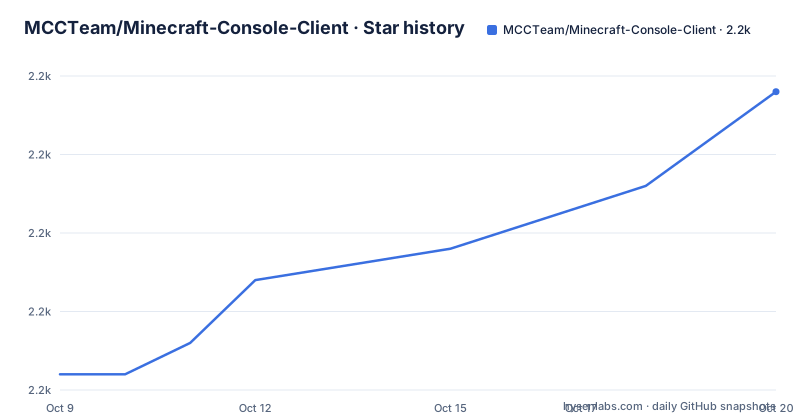
- MCCTeam/Minecraft-Console-Client2,167 ★ · +9
| Repository | 2026-10-09 | 2026-10-20 |
|---|---|---|
| MCCTeam/Minecraft-Console-Client | 2.2k | 2.2k |
9 Stars in the last 11 days, measured from the daily GitHub snapshot. Compare with other projects
Editorial analysis
The quick install pipes a remote script into a shell
The README's quick install is one line per platform.
curl -fsSL https://mccteam.github.io/install.sh | shOn Windows the same idea runs through PowerShell with an Invoke-WebRequest piped into Invoke-Expression. The script is said to detect your architecture and fetch the matching binary.
This is a reasonable default and it is also the one thing to look at before you run it, because a pipe into a shell executes whatever the server returns at the moment you invoke it, with no file to review and no checksum to compare. If you want to see what it does, fetch the script to disk and read it first, or skip it entirely and take the binary from the releases page, which the README also links. The installation guide is documented separately and covers wget and manual downloads.
Beyond the mechanics, this is a text-mode client rather than a game. The README describes it as a lightweight cross-platform TUI client for Java edition that connects to any Minecraft Java server, sends commands and receives text messages, without opening the main game. That framing matters for what you can expect from it: this is a server-side console and chat tool, not a way to play.
Chat bots, scripts and two solutions in one repository
The configuration surface is bigger than the README's quick install suggests, and the repository layout shows why. There are two solution files, one for the console client and one for a GUI variant, so the terminal program and a graphical front end are separate projects built from one repository. There is a tests project, a debug tools directory, a console interactive component, and a Docker directory.
Sample configurations live in a config directory inside the project and are linked from the README as the place to start. Documentation is spread across a website repository in eight languages, and translations are managed through Crowdin rather than by editing files here.
The automation story is the part that has changed most. The README links a chat bots guide alongside usage and configuration, and the repository's long-running feature has been server-side scripting that reacts to chat and events. The 2.0 release notes announce that this model is being replaced by something called Beacon scripts and plugins, and that an MCP server plugin was created so the client can be driven by an AI agent.
That agent-facing direction is visible in the tree as much as in the notes. There are directories for Claude, Codex and Cursor configuration, plus a skills directory, and both an AGENTS.md and a CLAUDE.md at the root. For contributors this is now a repository that carries agent tooling alongside its code, and the release notes say separate skills will be provided to convert old scripts and chat bots into the new Beacon format. Whether that conversion lands well is the open question for anyone with an existing setup.
The 2.0 build is downloadable while its source is not published
The README opens with an announcement rather than a description, and it is the most important thing on the page. After what it calls thirteen years of development, the project is being rewritten from the ground up, led by a named maintainer, with UX changes and new features alongside the refactoring.
The first early access build of the 2.0 client is linked from the README and published as a release, dated the same day as the last push to the repository. The release notes for that build state three things plainly: the source code is not yet on GitHub and will follow in the coming weeks once the code is tidied and stabilised, support is provided on Discord rather than through the issue tracker, and the old configuration, scripts and chat bots do not work in 2.0 as things stand.
So the project's front page describes itself as open source while its flagship release is a binary whose source you cannot read yet. That is a temporary condition by the maintainers' account, and the README does say the old client will remain available after 2.0 ships. But if you are evaluating this for anything you intend to build on, the distinction between the stable line and the rewrite matters today.
The migration promise is also asymmetric, and this is the part to plan around. Configuration will be ported to the release version. Chat bots and scripts will not be, and the notes say so directly.
Version support disagrees between the repository description and the new build
Two facts about supported Minecraft versions sit next to each other and do not match. The repository description states that the client currently supports up to Minecraft 26.2. The change log inside the 2.0 early access build lists implemented 26.3 support as one of its first entries.
Both are current statements from the project rather than stale documentation, and the explanation is the rewrite itself: the 2.0 line is a separate codebase being developed alongside the old client, so the newest supported version depends on which line you are reading about. The stable line and the preview line are at different versions.
There is a second, quieter version discrepancy in the same place. The stable releases are named by date and number, with tags like 20260906-516 and 20260829-511, while the 2.0 build carries a name describing its channel instead. There is no shared version scheme between them, so you cannot compare a stable tag to a 2.0 tag and learn anything.
If you need a specific Minecraft version, the practical move is to check the change log of the line you actually intend to install rather than the description at the top of the repository.
CDDL-1.0, file-level exceptions, and a licence identifier GitHub cannot read
The licensing story is more interesting than a single identifier, and the metadata reflects that.
The repository's licence field comes back as NOASSERTION, meaning GitHub's licence detection did not recognise a standard licence in the files. The README nonetheless states the position in plain terms: unless specifically stated, the code is from the team or contributors and available under CDDL-1.0, and otherwise the licence and original author are mentioned in the headers of the individual source files. There is a LICENSE.md file at the tree root.
That file-level exception clause is the part to read carefully. It means the repository is not uniformly CDDL code. Some files carry their own terms and their own author attribution, so the licence you get for a given file depends on which file you take.
The CDDL terms the README summarises have two consequences worth naming without going near legal advice. First, you may use the licensed code in a program of any licence, including closed or commercial ones. Second, any modification or improvement must itself be published as source under CDDL-1.0. That second clause is why the README spends so much space on it: a change to the client's own code cannot simply be kept private, even when you ship the result inside a proprietary product. Third-party files with their own headers do not inherit that requirement.
If your plan is to modify the client and keep those changes to yourself, that is the question to resolve before you start, and the answer lives in the headers of the files you touch.
Where to look when something does not connect
The support arrangement tells you how the project expects to be used. There is a Discord server linked prominently from the README, the issue tracker is linked from the same page, and both the website and the README are offered as places where an answer may already exist. The contribution request is specific: the team describes itself as small, asks for help implementing upgrades for new Minecraft versions, and links to issues labelled as awaiting a contributor.
That is a project whose maintenance capacity is visible and whose work queue is public. It also means the answer to a version-specific question is often in the issue tracker rather than in documentation.
For 2.0 specifically the routing is different, and this is worth knowing before you file anything. The early access build's notes say not to open issues for it and to take problems to Discord instead, because the code is still being tidied. The in-client help commands are also part of the new design: the notes point at slash help and slash man for commands, features and plugins, and at a CLI help flag for command line parameters.
Activity is current, with the last push on 2026-09-25 alongside the early access release, and the stable line was still receiving feature work in early September, including a way to inspect a single inventory slot and error handling for a recipe book packet. The repository is large enough to have an ideas directory, an issue template set and a pull request template in its hidden folder, which suggests contribution is meant to be guided rather than improvised.
Editorial conclusion
MCC is the right tool if you run or monitor a Java server and want command output in a terminal, on a headless box, or over SSH, and the wrong tool if you need world editing, mods, or the actual game client. Install the stable release and read the sample configurations under MinecraftClient/config before writing anything, because the 2.0 rewrite changes the scripting model rather than extending it: existing scripts and chat bots do not carry over, and the release notes promise configuration migration but not script migration. Two decisions deserve your attention. The quick install pipes a remote script into a shell, so read it first if that is not a habit you keep. And the project is CDDL-1.0 rather than a permissive licence, with third-party files keeping their own terms, which matters if you intend to redistribute a modified client.
Frequently asked questions
How do you install Minecraft Console Client?
On Linux and macOS the README gives a curl command that pipes the install script into a shell, and PowerShell has an equivalent. The script detects your architecture and downloads the matching binary, and you can instead take a build directly from the releases page if you would rather not execute a remote script.
Is Minecraft Console Client open source?
The README describes the project as open source under CDDL-1.0, with individual files keeping the licence and author named in their headers where the code is not the team's. The repository's own licence field reports NOASSERTION, so automated detection does not recognise a standard licence there. The 2.0 early access build is an exception: its release notes state the source is not yet published.
Do my existing scripts and chat bots work in Minecraft Console Client 2.0?
No. The 2.0 early access notes say the old configuration, scripts and chat bots do not work as things stand, and that configuration will be ported to the release version while chat bots and scripts will not be. Separate skills are promised to help convert them into the new Beacon scripts and plugins.
Which Minecraft versions does Minecraft Console Client support?
The repository description says up to Minecraft 26.2, while the change log for the 2.0 early access build lists implemented 26.3 support. The difference comes from the rewrite running alongside the stable line, so the newest supported version depends on which client you install.
Can Minecraft Console Client be used to play the game?
No. It is a text-mode client that connects to a Java server to send commands and receive chat messages, without opening the main game. For anything involving world editing or rendering, you need the actual game client.
Official sources
Add this badge to your README
If you maintain this project, the badge below links readers to this analysis and shows its maintenance status from the daily GitHub snapshot. Paste the markdown into your README; add ?metric=license or ?metric=stars to the image URL for a different field.

[](https://hysenlabs.com/projects/mccteam-minecraft-console-client)Star history chart for your README
[](https://hysenlabs.com/projects/mccteam-minecraft-console-client)