LxgwZhenKai is a bolder WenKai whose later glyphs are drawn by AI
霞鹜臻楷:基于「霞鹜文楷」衍生,前期手动加粗调整字形,后期由 AI 生成字形辅助补字的开源中文字体。A bolder weight, AI-assisted font derived from LXGW Wenkai.
At a glance
- What is it?
- LXGW ZhenKai started as a hand emboldened derivative of LXGW WenKai, was abandoned in 2022 because the author thought it had missed its point, and was revived with machine generated outlines. Since version 0.700 every Han glyph is AI produced, which makes the character shapes more uniform in weight but lowers the quality of the outline curves, and the older unsuffixed version is frozen while the GB version keeps growing.
- Who is it for?
- Adopt LXGW ZhenKai if you want a heavier Chinese face than LXGW WenKai for screen reading and you are comfortable with machine drawn outlines, and prefer the GB build for broad coverage. Do not adopt it if you need the printing style look of the earlier manual glyphs, because the unsuffixed version is frozen at v0.800.2, and do not expect new WenKai characters to appear on the same day.
- Can I use it commercially?
- Check first. The repository uses a licence we do not classify automatically, so read its LICENSE file before any commercial use.
- Is it still maintained?
- Yes. The repository last received commits 20 days ago.
- What is it written in?
- GitHub does not report a main language for this repository.
Answers come from the project's GitHub data, last synced on November 7, 2026, and from our analysis. They are not legal advice.
Star history
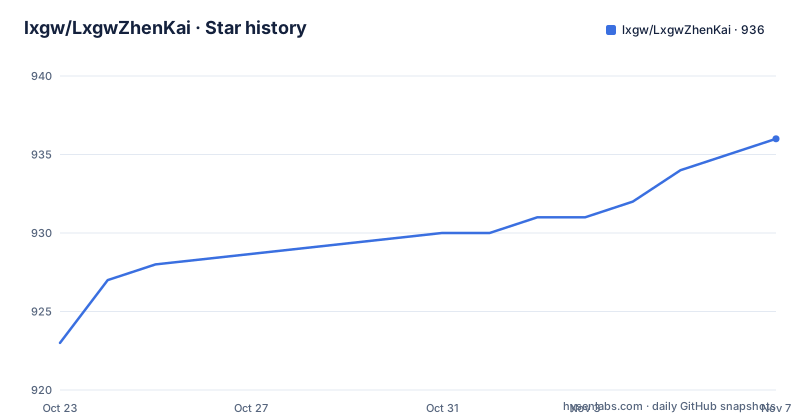
- lxgw/LxgwZhenKai936 ★ · +13
| Repository | 2026-10-23 | 2026-11-07 |
|---|---|---|
| lxgw/LxgwZhenKai | 923 | 936 |
13 Stars in the last 15 days, measured from the daily GitHub snapshot. Compare with other projects
Editorial analysis
A derivative that is explicitly not part of the WenKai family
LXGW ZhenKai, written in the README as a bolder weight derived from LXGW WenKai, was originally an attempt to produce a bold weight of LXGW WenKai. The starting point is a specific complaint about WenKai's own weights. The README says that the current WenKai Medium weight, which was previously Bold and is also the regular weight of the WenKai Screen version, still looks too thin for some users, and that using the transform function of a font editor to embolden it directly makes some glyphs blur into a single mass. So the project began: on top of the editor's emboldening function, most glyphs were adjusted by hand, including shortening strokes, thinning strokes and reducing the amount of emboldening, so that the font stays legible while bold and reduces stroke sticking, blur and burrs. The second half of the note in the README is the part that matters for anyone installing it. Although this font is derived from WenKai by emboldening, ZhenKai is an independent font and does not belong to the WenKai series. Users may for now treat it as a bold version of WenKai and pair the two, but its updates are not synchronised with WenKai, and there is no plan to align its character set with WenKai's. That means two things in practice. You can pair it with WenKai without a licensing or technical conflict, but you cannot expect a new WenKai character to appear in ZhenKai on the same day.
Why the author stopped, and why the project came back
The history of this font is unusual, and the README is unusually honest about it. The emboldening turned out to be too conservative. Some users said the font was still very thin, and phone font enthusiasts even made bolder versions of their own. The author concluded that the project had not met its expected effect and had betrayed its original intent, and stopped maintaining it in June 2022. The revival came later, after realising that many people were sorry to see it go. The decision to restore maintenance came with a change in method: the earlier manually adjusted glyphs became the training source for the tool zi2zi, and after a period of training the WenKai shapes were made to lean toward the early ZhenKai ones, which makes it easier to fill in missing characters later. The argument for the switch is about consistency of weight. Manual emboldening and thinning carries personal subjective factors, so hand adjusted glyphs inevitably have uneven grey values. AI generated glyphs are more even, and in theory their grey value and stroke thickness are more uniform, which is why from version 0.700 all Han glyphs use AI generated shapes. The cost is stated just as plainly. The curve quality of the glyph outlines is somewhat worse as a result. So the trade is deliberate: uniform weight and easier expansion in exchange for smoother, more manual curves. A second consequence is that the two variants of the font now differ in character. The version without a suffix, which keeps the printing style features such as 直点 and 断笔, has stopped being updated and its last version is v0.800.2.
Two different fonts in one repository: GB and the unsuffixed version
The repository carries two products and the README explains the difference in coverage. From version 0.800, LXGW ZhenKai GB contains 21003 Han characters and radicals within the GBK range, 9810 characters within the IICore range, and the 8105 standard characters from the 通用规范汉字表 together with their traditional forms, for a total of 2.13万 characters, which the README says is enough for the needs of screen reading fonts. The unsuffixed LXGW ZhenKai as of v0.800 contains 1.3万 characters, and the README details what those are. For simplified Chinese there are 3603 common characters, which is the combined total of the old 3500 character list from 现代汉语常用字表 and the new 3500 character list from 义务教育语文课程常用字表, the level 2 characters of GB/T 2312-1980 and the 通用规范汉字表, and the level 3 characters of the 通用规范汉字表 along with the 7000 characters of 现代汉语通用字表. For traditional and other scripts the coverage runs to 6866 characters from GB/T 12345-1990, 4808 common traditional characters from Taiwan's 常用国字标准字体表, the common characters and some variant forms from Hong Kong's 常用字字形表, 5401 BIG5 level 1 characters, the traditional forms in the standard character comparison table, the 9810 characters in the IICore range, and the first and second level characters of JIS X 0213. So the practical choice is between a broad screen reading font and a smaller one that preserves the printing style look. The repository layout is minimal for a font project: OFL.txt, README.md and a documentation/ directory.
Unicode variation sequences for choosing quote width
One feature deserves a mention because it is unusual in a Chinese font. LXGW ZhenKai supports Unicode Variation Sequences, used to select the width of the curly quotes, and the README links a table of the mappings at documentation/uvs.pdf. In Chinese typography the width of the quotation marks is a real decision, because the fullwidth forms take a whole em while the proportional forms do not, and mixed Latin and Chinese text can look loose if the wrong one is chosen. Encoding the choice as variation sequences means the renderer can pick the form, and the font carries both. This is a small detail that shows the project cares about how text actually sets, rather than only about glyph coverage. The preview images in the README are the other place where that shows. There are eleven of them, and the README notes that the preview images keep printing style features such as 直点 and 断笔, which belong to the unsuffixed version that has stopped being updated.
Where to get it, and the Homebrew route on macOS
The download instructions start with the release page. You enter the Release page of the repository and download the TTF file for the version you want. The author's own distribution points are synchronised as well, the 永硕 personal netdisk and 蓝奏云 with the password 3s01, and the font is listed on 猫啃网 and Zfont.cn, where the README notes that the site owners are contacted after a GitHub update so those copies lag slightly behind, and warns that other sites collecting free fonts for commercial use may carry an older version. That warning is worth taking seriously. With a font that ships several files per release and a distinction between a frozen variant and a growing one, the version you download matters. For macOS users who already have Homebrew, the README points at the cask fonts tap.
brew tap homebrew/cask-fontsThe repository also contains, in the source form FontCreator project files for the Han part of the font, split so that some strokes are separated for easier emboldening adjustment, in two tiers of characters, and the TTF subset with merged strokes, likewise split by tier. Those are in the FCP-subset and TTF-subset folders. The presence of the source project files is unusual and useful. It means the emboldening process the author describes is not a black box, and anyone who disagrees with the AI generated results can look at, or rebuild, the manual versions.
OFL-1.1, frequent releases, and what the version numbers mean
The licence is OFL-1.1, with OFL.txt at the root of the repository and a licence badge in the README. The SIL Open Font License is the standard choice for open source fonts and it is about as permissive as a licence gets for embedding a typeface in a product, including commercial use. It requires that the font not be sold on its own and that the licence travel with redistributed copies, and it includes a reserved font name rule, which matters here because the README distinguishes two separately named variants of the same family. Activity is current. The last push was on 2026-10-18, the repository is not archived, and the releases are v0.827 dated 2026-10-13, v0.826 dated 2026-10-12, and v0.825 dated 2026-03-17. Those version numbers encode a date, in the form the README shows as 26/10/13, which is a useful thing to know when comparing two builds. It also makes the release history legible at a glance: a jump from March to October is seven months of no releases followed by a burst, and a change in the third component signals one of the two variants moving rather than a routine rebuild. The homepage for the project is the repository itself, with the documentation folder holding the preview images and the variation sequence table, and there is no separate site to consult.
Editorial conclusion
Adopt LXGW ZhenKai if you want a heavier Chinese face than LXGW WenKai for screen reading and you are comfortable with machine drawn outlines, and prefer the GB build for broad coverage. Do not adopt it if you need the printing style look of the earlier manual glyphs, because the unsuffixed version is frozen at v0.800.2, and do not expect new WenKai characters to appear on the same day. Before you install, take the TTF from the repository release page rather than a mirror, since the README warns that other sites may carry an older version, and check the OFL reserved font name rules if you rename the family.
Frequently asked questions
What is the difference between LXGW ZhenKai and LXGW WenKai?
ZhenKai is derived from WenKai by emboldening, with most glyphs adjusted by hand to avoid strokes sticking and blurring. The README is explicit that ZhenKai is an independent font that does not belong to the WenKai series, that its updates are not synchronised with WenKai, and that there is no plan to align its character set with WenKai's.
Are the glyphs of LXGW ZhenKai generated by AI?
Since version 0.700 all Han glyphs use AI generated shapes, produced with the zi2zi tool, using the earlier hand adjusted glyphs as training material. The README states the trade-off: the weight and grey value are more uniform, but the curve quality of the outlines is somewhat worse.
How many characters does LXGW ZhenKai GB contain?
Since v0.800 the GB version contains 21003 Han characters and radicals in the GBK range, 9810 characters in the IICore range, and the 8105 standard characters of the 通用规范汉字表 with their traditional forms, for a total of 2.13万 characters. The version without a suffix contains 1.3万 characters.
Which version of LXGW ZhenKai is still being updated?
The unsuffixed version, which keeps printing style features such as 直点 and 断笔, has stopped being updated and its last version is v0.800.2. The GB version continues to receive releases, with v0.827 published on 2026-10-13.
How do I install LXGW ZhenKai on macOS?
The README points macOS users who already have Homebrew at the cask fonts tap, which is added with brew tap homebrew/cask-fonts. Otherwise you download the TTF file from the repository release page and install it as a system font.
Official sources
Add this badge to your README
If you maintain this project, the badge below links readers to this analysis and shows its maintenance status from the daily GitHub snapshot. Paste the markdown into your README; add ?metric=license or ?metric=stars to the image URL for a different field.

[](https://hysenlabs.com/projects/lxgw-lxgwzhenkai)Star history chart for your README
[](https://hysenlabs.com/projects/lxgw-lxgwzhenkai)Was this useful?