Card Master turns userscripts and page powers into a collectible card game
A card-game browser extension that turns various browser scripts and extensions into playable cards, and can use AI to auto-generate brand-new card plugins.
At a glance
- What is it?
- A gamified browser extension that manages userscripts as cards, with AI script generation, per-page dark mode and video speed controls, SponsorBlock integration and WebDAV sync across Chromium, Firefox and Safari.
- Who is it for?
- Card Master fits browser users, especially from the Bilibili ecosystem, who want userscript power, dark mode, video speed and SponsorBlock behind one playful interface with per-card control and their own WebDAV sync, on Chromium or Firefox today. Skip it if you are a heavy userscript author wedded to Tampermonkey's tooling, if you need Safari right now, or if you prefer minimal single-purpose extensions.
- Can I use it commercially?
- Yes, with conditions. GPL-3.0 is a copyleft licence: if you distribute software that includes it, you must release that software's source code under the same licence. Running it internally without distributing it does not trigger that obligation.
- Is it still maintained?
- Yes. The repository last received commits 7 days ago.
- What is it written in?
- Mainly TypeScript, according to GitHub's language statistics.
Answers come from the project's GitHub data, last synced on November 25, 2026, and from our analysis. They are not legal advice.
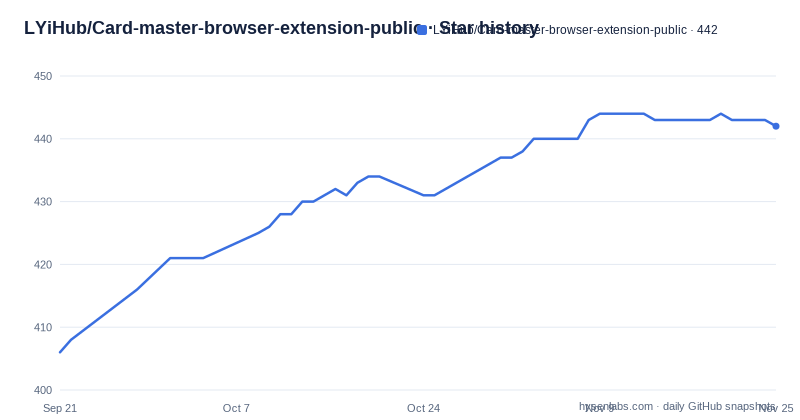
Star history
- LYiHub/Card-master-browser-extension-public442 ★ · +36
| Repository | 2026-09-21 | 2026-11-25 |
|---|---|---|
| LYiHub/Card-master-browser-extension-public | 406 | 442 |
36 Stars in the last 65 days, measured from the daily GitHub snapshot. Compare with other projects
Editorial analysis
Userscripts as collectible cards
Userscript managers are powerful and ugly, a settings page with a list. Card Master, from LYiHub, replaces that model with a metaphor: every capability, installed scripts as well as built-in powers, renders as a playable card in a deck, with artwork and game-flavored names. The project arrived with a push from Bilibili creator Lin Yi, whose introduction video the README links, and the audience that implies is exactly right: Chinese-speaking browser users who want script power without the power-user interface.
Underneath the theme sits a serious extension. One core codebase builds for Chromium, Firefox and Safari, the version badge reads 0.2.8, the licence is GPL-3.0-only with third-party notices and an upstreams manifest, and the feature list ranges from userscript lifecycle management to AI-assisted script creation. The card frame is not just decoration; it is the organizing unit for permissions and toggles, which turns a permissions audit into flipping cards.
The card set: what each card does
The built-in deck covers the familiar userscript canon with game names. The kill card hides ads or any picked page content. Dark night recomputes page colors for dark mode, off by default on install. The time dragon adjusts playback speed uniformly across sites. The sheep-stealing card discovers and captures media from pages, Chromium and Firefox only, also off by default.
Video enhancements bundle several effects plus SponsorBlock support for Bilibili and YouTube. The Konami-code card unifies input, mouse, keyboard and gamepad, including an on-screen keyboard with pinyin and voice. Userscripts themselves install, import, update and toggle as cards, newly installed ones enabled by default. And a WebDAV card syncs scripts, cards and plugin configuration across devices against your own server, with merge previews, conflict choices and history restore, which is more sync discipline than most extensions ship.
Installing: zip, checksum, and the user-script switch
Distribution is via GitHub Releases, and the README is blunt that the zips are not installers: you download the zip for your platform, verify it against the published SHA256SUMS.txt, unzip it, and load the folder containing manifest.json. On Chromium browsers that means the extensions page with developer mode on and Load unpacked; on Firefox it is a temporary add-on via the debugging page.
One Chromium step decides whether the extension works at all: the detail page's Allow User Scripts toggle must be on, and the README warns that without it no userscripts run, including the preinstalled ones. Site-level permissions are granted from the same page when a site shows not-allowed. Variants with browser-new-tab in the filename swap the new-tab takeover for the browser's own page, and switching between variants is an overwrite-in-place procedure with a warning against uninstalling first, since that would lose the stored deck and settings.
The AI workshop
The AI card is the differentiator. The Script Workshop searches for scripts, creates new ones, explains existing ones, and repairs broken ones, with compatibility for both OpenAI Responses and Chat Completions API shapes, so most model providers fit. You bring your own configuration; the extension does not bundle a key.
Placed in the userscript ecosystem, that is a meaningful shift: the historical cost of userscripts was reading someone else's JavaScript before trusting it with your pages. Generation does not remove that trust problem, and the README does not claim it does, but explain and repair modes at least give non-programmers a path to audit what they run. Combined with per-card toggles, the model is closer to capability packages than raw script injection, which is arguably the right abstraction for the audience the project courts.
Building from source
The source path is documented with exact tooling: Node.js 22 or newer and pnpm 11.18.0.
pnpm install --frozen-lockfile
pnpm check
pnpm extension:package --platform=all
Artifacts land in extension-dist, and the Chromium and Firefox builds simultaneously generate the browser-new-tab variants, sharing all runtime files with the standard builds. The repository runs a modern hygiene stack: Biome for linting, gitleaks configuration, pnpm workspaces, a THIRD_PARTY_NOTICES.md file and an upstreams.json declaring dependencies, embedded runtimes and the licenses of preinstalled scripts.
That upstreams file deserves attention from anyone auditing the supply chain: a gamified script manager that bundles runtime components and preinstalled scripts is exactly the kind of project where provenance questions matter, and publishing the manifest is the correct first answer. The last push was on 2026-09-16, with three releases published, the current one 0.2.8.
Safari: the honest status
Safari support exists in the codebase but not yet in distribution: the README states that no Safari download is currently offered while Apple's notarization completes, tracked in issue 2, and explicitly warns against old unsigned preview packages or disabling system security to force an install.
The Safari page also documents what the platform cannot do, which is rarer than the caveat itself. Safari web extensions lack history, bookmarks, topSites, downloads and full webRequest access, so the daily-review new-tab card and the media-grab card simply do not appear on Safari, and the README says they are missing by design, not by oversight. Userscripts there run through the extension's own injection, and setup requires granting the extension permission across websites in Safari's settings. For a project this playful, the platform documentation is unexpectedly rigorous.
Against Tampermonkey and single-purpose extensions
The established alternatives are the userscript managers, Tampermonkey chief among them, which are deeper on script compatibility, site rules and editor tooling, and are the safer choice for a heavy scripter with an existing library. The other alternative is the pile: one extension for dark mode, one for video speed, one for SponsorBlock, each with its own permission grants and icon. Card Master's bet is that the pile is the actual competitor for normal users, and a single gamified surface with per-card toggles and WebDAV sync beats six icons fighting for toolbar space.
The trade-offs are the flip of that bet. A gamified layer plus bundled runtime components is more code between you and the page than a single-purpose extension, and script compatibility with a manager this new will lag the incumbents at the edges. For the target user, someone who wants the powers without managing them, the deck abstraction is genuinely easier to audit than a settings page. For a power user, the incumbents remain the tools of trade, and this project does not pretend otherwise.
Editorial conclusion
Card Master fits browser users, especially from the Bilibili ecosystem, who want userscript power, dark mode, video speed and SponsorBlock behind one playful interface with per-card control and their own WebDAV sync, on Chromium or Firefox today. Skip it if you are a heavy userscript author wedded to Tampermonkey's tooling, if you need Safari right now, or if you prefer minimal single-purpose extensions. Verify before adopting: download the release, check the SHA256SUMS file, load it unpacked, enable the user-scripts toggle, and confirm your three most-wanted cards actually work on the sites you care about.
Frequently asked questions
How do I install Card Master?
Download the zip for your platform from GitHub Releases and verify it against SHA256SUMS.txt. The zips are not installers: unzip and load the folder with manifest.json as an unpacked extension in Chromium, or as a temporary add-on in Firefox. Chromium users must also enable Allow User Scripts on the extension's detail page.
Which browsers does Card Master support?
Chromium browsers, Firefox and Safari, built from one core. The Safari package is pending Apple notarization, and Safari lacks the new-tab and media-grab cards because the platform does not expose the needed APIs.
Does Card Master use AI?
Yes. The AI Script Workshop searches for, creates, explains and repairs userscripts, compatible with the OpenAI Responses and Chat Completions API shapes, using your own API configuration rather than a bundled key.
Official sources
Add this badge to your README
If you maintain this project, the badge below links readers to this analysis and shows its maintenance status from the daily GitHub snapshot. Paste the markdown into your README; add ?metric=license or ?metric=stars to the image URL for a different field.

[](https://hysenlabs.com/projects/lyihub-card-master-browser-extension-public)Star history chart for your README
[](https://hysenlabs.com/projects/lyihub-card-master-browser-extension-public)Was this useful?