JarvisHub: a canvas-native harness for long-horizon creative agents
JarvisHub: An Open Harness for Canvas-Native Multimodal Creative Agents
At a glance
- What is it?
- JarvisHub turns an editable canvas into shared project state for multimodal creative work, with a TypeScript agent runtime on top of PostgreSQL and a one-command launcher. It is early, opinionated, and heavier to run than a prompt tool.
- Who is it for?
- JarvisHub fits teams already comfortable running Node 24.15.0, pnpm 10.8.1, Docker Compose and Python 3.10+ locally, and who want agent actions to land on an inspectable canvas instead of inside a chat transcript.
- Can I use it commercially?
- Yes. Apache-2.0 is a permissive licence: you can use, modify and sell software built on it, as long as you keep its copyright and licence notices.
- Is it still maintained?
- Yes. The repository last received commits 112 days ago.
- What is it written in?
- Mainly TypeScript, according to GitHub's language statistics.
Answers come from the project's GitHub data, last synced on November 22, 2026, and from our analysis. They are not legal advice.
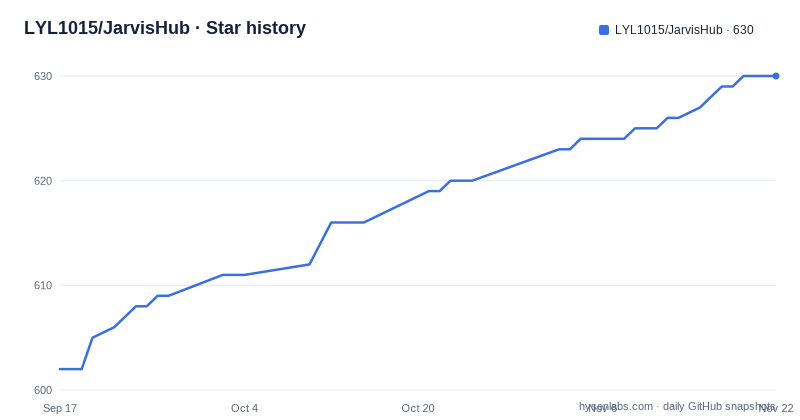
Star history
- LYL1015/JarvisHub630 ★ · +28
| Repository | 2026-09-17 | 2026-11-22 |
|---|---|---|
| LYL1015/JarvisHub | 602 | 630 |
28 Stars in the last 66 days, measured from the daily GitHub snapshot. Compare with other projects
Editorial analysis
The gap JarvisHub targets: creative state that survives the conversation
Most creative tooling loses the middle of the work. The README makes this the project's starting argument: prompt-to-output tools hide intermediate decisions, failed trials and revision history, while chatbot agents can call tools but represent spatial layouts, asset dependencies and version branches badly, because a linear conversation is the wrong shape for them. Node-based workflows expose execution steps but usually depend on pipelines a human specified in advance.
JarvisHub's answer is to make the canvas the source of truth. Text, references, character sheets, scenes, storyboards, images, videos, audio, webpage previews, slides, candidates and revision notes become addressable nodes and links. On every turn, per the README, the agent observes the canvas, selects a permitted action, invokes a model or tool, and commits the returned artifacts and evidence back to the same workspace.
That framing sets the audience. This is for people building agents that run for many steps over media: narrative generation, interactive web development, presentation decks. It is not aimed at someone who wants one image from one prompt. The README is explicit that JarvisHub is not a replacement for generation models; it is a runtime for orchestrating them and keeping their output inspectable.
Three layers: canvas state, protocol bridge, agent runtime
The architecture is split into three named layers, and the repository layout matches them. Canvas State stores editable artifacts, spatial layout, dependencies, versions, runtime status, user choices and feedback, implemented across apps/web, packages/canvas-layout, packages/schemas and PostgreSQL. The Protocol Bridge exposes capabilities and execution grants, validates canvas mutations and tool actions, and commits state transitions; it lives in apps/hono-api. The Agent Runtime observes the canvas, plans actions, invokes Skills, Memory, Tools and Subagents, and returns commit-ready observations; it lives in apps/agents-cli.
The interesting part is the middle layer. An agent does not write to the canvas directly. It proposes a mutation, the bridge checks it against exposed capabilities and grants, and only then does state transition. That is a deliberate bottleneck, and it is where you would look first if you wanted to constrain what an agent is allowed to touch. The README does not describe the schema of an execution grant or how grants are revoked, so the validation rules have to be read out of apps/hono-api rather than the documentation.
The upper layer is conventional in shape: Skills hold reusable procedures, Memory holds preferences and prior decisions, and Subagents explore independent subtasks before the parent agent integrates results. The README states that requests, actions, observations, feedback, repair decisions and canvas updates are recorded for inspection and recovery, which is the claim that matters for long-horizon work. Recovery is only as good as what the bridge persists, so the two layers are coupled.
Installing JarvisHub and getting the launcher to come up
The README specifies Node.js v24.15.0, pnpm (the package.json pins packageManager to [email protected]), Docker and Docker Compose for the default local PostgreSQL database, and Python 3.10+ with python-pptx and Pillow. The .nvmrc file at the repository root is the place to check the exact Node line before you install anything.
The documented startup path is a single script at the repository root:
./run.shOn the first run the README says the launcher installs missing workspace dependencies, starts and waits for local PostgreSQL, validates the vendored PPT Master runtime, selects a compatible Python executable, builds the Agents CLI, and then starts Web, API, Agents Bridge and Trace Viewer. It stays in the foreground and aggregates service logs; Ctrl+C stops it. Expect the first run to be slow, because it is doing dependency installation and a build before anything is reachable.
If you prefer to drive the pieces yourself, the workspace scripts are the entry points:
pnpm run dev:web
pnpm run dev:api
pnpm run dev:agents
Those map to the @jarvishub/web, @jarvishub/api and agents packages respectively, and pnpm run build runs the three builds in sequence. For the database, pnpm run compose:up and pnpm run compose:down wrap docker compose up -d and docker compose down. The README does not document the ports the services listen on, so read the compose file and the Hono API config if you need to point a browser or client at them.
What the open-source distribution does not include
The bluntest limitation is in package.json. The test script is:
"test": "echo \"Tests are not included in this open-source distribution.\""So there is no test suite to run against your changes, and no CI signal from the repository that you can reproduce locally. For a runtime whose central promise is that agent actions are validated and committed through a protocol bridge, that is the gap to weigh hardest. You are trusting the bridge's validation logic by reading it, not by running its tests.
The repository has no published GitHub releases either, so there is no version to pin against. The README's update log lists a single entry, dated 2026.7.28, for the repository being open-sourced and the paper uploaded. The last push to the default branch was on 2026-08-03, roughly six weeks before this writing, so the project is not archived, but there is not enough history here to infer a release cadence.
The operational surface is also wide for an open-source tool: Node, pnpm, Docker Compose, PostgreSQL, and a Python interpreter with python-pptx and Pillow, plus a vendored PPT Master runtime the launcher validates on first run. If your environment cannot run Docker, the default database path is closed to you and the README does not describe a supported alternative.
Where JarvisHub is the wrong tool, and what to use instead
If your work is generating one asset from one prompt, JarvisHub adds a database, a validation bridge and a canvas you will not read. The README's own framing of prompt-to-output tools is that they are effective at producing individual assets; the trade it makes is hiding intermediate decisions. For a single asset, those intermediate decisions are not worth a PostgreSQL instance.
The closer alternative is a node-based workflow tool, and the difference is in who defines the pipeline. Node workflows expose execution steps but, as the README puts it, commonly rely on manually specified pipelines rather than a project state an agent can continuously inspect, repair and extend. In JarvisHub the graph is the state the agent reads and mutates each turn, not a diagram a human drew once. If your pipeline is stable and you want to watch it run, a node workflow is the simpler and more predictable choice. If the pipeline itself is what the agent has to figure out, that is the case JarvisHub is built for.
Chatbot agents with tool access sit in between. They handle multi-step instructions, but a conversation is a poor container for spatial layout and version lineage. JarvisHub's bet is that those structures belong in a canvas with typed nodes and edges, and that the agent should commit artifacts and evidence there rather than narrate them.
Licence, maintenance and what an upgrade costs you
JarvisHub is Apache-2.0, per the LICENSE file at the repository root and the badge in the README. That is a permissive licence with an explicit patent grant, and it does not impose copyleft obligations on your own code. It says nothing about the models and external tools the agent invokes, which carry their own terms; the repository's licence does not cover those, and this is not legal advice.
The maintenance picture is thin rather than bad. The repository is not archived and the last push was on 2026-08-03, so it is recent, but there is no release history to read and the README records exactly one update entry. Upgrading means tracking the main branch. The practical cost of that shows up in the workspace: package.json pins the package manager to [email protected], the README pins Node to v24.15.0, and the launcher validates a vendored PPT Master runtime at startup. A Node or pnpm bump is a coordinated change across apps/ and packages/, not a version range you can float.
Because the test script is a placeholder, an upgrade you cannot verify by running a suite has to be verified by exercising the launcher and the three task types yourself. Treat the vendored directory as a review target on every pull, since it is code the launcher depends on and the README gives no versioning policy for it.
Editorial conclusion
JarvisHub fits teams already comfortable running Node 24.15.0, pnpm 10.8.1, Docker Compose and Python 3.10+ locally, and who want agent actions to land on an inspectable canvas instead of inside a chat transcript. Skip it if you only need single-asset generation, or if you need a supported release with tests, because package.json prints "Tests are not included in this open-source distribution." Before adopting it, run ./run.sh on a clean machine and confirm all five services start, then read apps/hono-api to see exactly which canvas mutations and tool actions it validates, since that bridge is the trust boundary for everything the agent commits.
Frequently asked questions
What is JarvisHub?
It is an open harness for canvas-native multimodal creative agents, written in TypeScript and licensed Apache-2.0. The README describes it as making an editable canvas the shared project state, so text, references, storyboards, images, video, audio, slides and revision notes become addressable nodes and links that the agent observes and updates each turn.
How do I install and start JarvisHub?
The README documents a one-command startup with ./run.sh at the repository root. On first run that launcher installs workspace dependencies, starts local PostgreSQL, validates the vendored PPT Master runtime, selects a Python executable, builds the Agents CLI, and starts Web, API, Agents Bridge and Trace Viewer. You need Node.js v24.15.0, pnpm, Docker and Docker Compose, and Python 3.10+ with python-pptx and Pillow.
Does JarvisHub include tests?
No. The test script in package.json prints "Tests are not included in this open-source distribution." The repository also has no published GitHub releases, so any change to the protocol bridge in apps/hono-api has to be verified by exercising the launcher and the agent flows rather than by running a suite.
Official sources
Add this badge to your README
If you maintain this project, the badge below links readers to this analysis and shows its maintenance status from the daily GitHub snapshot. Paste the markdown into your README; add ?metric=license or ?metric=stars to the image URL for a different field.

[](https://hysenlabs.com/projects/lyl1015-jarvishub)Star history chart for your README
[](https://hysenlabs.com/projects/lyl1015-jarvishub)Was this useful?