k3s-ansible: the upgrade section opens by saying it is not an upgrade path
The easiest way to bootstrap a self-hosted High Availability Kubernetes cluster. A fully automated HA k3s etcd install with kube-vip, MetalLB, and more. Build. Destroy. Repeat.
At a glance
- What is it?
- An Ansible collection that builds a highly available single-binary Kubernetes cluster with a virtual IP in front of the control plane, plus a load balancer for services, across three processor architectures and three distributions. Its documentation is unusually careful in the places that matter, naming an exact chart tag that must not be used, admitting that the reset playbook leaves state behind, and stating in its first line that the version variables are not an upgrade mechanism.
- Who is it for?
- Use this if you want a small highly available cluster built the same way every time, on hardware you control, with a virtual IP in front of the control plane, and you are prepared to do upgrades by hand. Three things to take from the documentation.
- Can I use it commercially?
- Yes. Apache-2.0 is a permissive licence: you can use, modify and sell software built on it, as long as you keep its copyright and licence notices.
- Is it still maintained?
- Yes. The repository last received commits 7 days ago.
- What is it written in?
- Mainly Jinja, according to GitHub's language statistics.
Answers come from the project's GitHub data, last synced on November 22, 2026, and from our analysis. They are not legal advice.
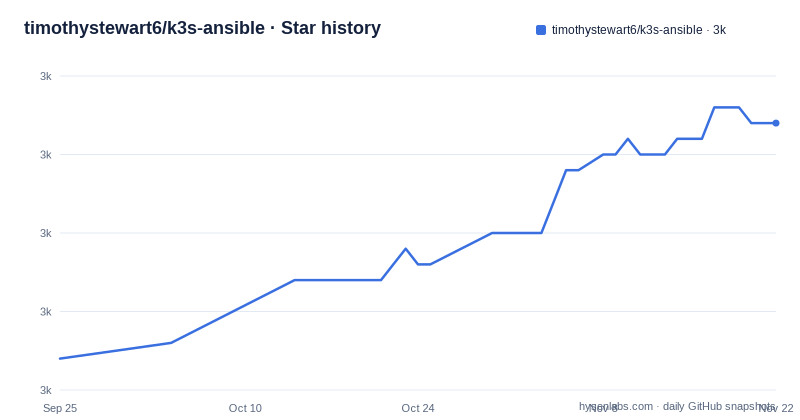
Star history
- timothystewart6/k3s-ansible3,032 ★ · +15
| Repository | 2026-09-25 | 2026-11-22 |
|---|---|---|
| timothystewart6/k3s-ansible | 3k | 3k |
15 Stars in the last 58 days, measured from the daily GitHub snapshot. Compare with other projects
Editorial analysis
The upgrade section opens by saying it is not an upgrade path
There is a section titled upgrading an existing cluster, and the inventory carries version variables you would reasonably assume drive upgrades.
The first two sentences say otherwise. Those variables select the components used for a fresh installation, and they are not a supported direct in-place upgrade path. Three components each require staged upgrades for a long-lived cluster.
That is the most valuable paragraph on the page, because it corrects the assumption a reader arrives with.
The rest of the section is specific rather than general, and worth reading closely because it names exact versions. For the main component: do not jump an embedded-etcd cluster straight to the current release, and upgrade one minor version at a time. From the sample default it gives the whole hop sequence, the last patch of the current minor, then each successive minor in turn, with one hop called out as needing a specific etcd version bundled into it. Servers before agents, backups and a health check at each step.
Then the sentence that tells you how much of this is yours to do: the playbook does not automate the upgrade, so those remain manual operational steps.
So this section is a documented procedure you follow by hand, not a command you run. Each component links its own upstream upgrade documentation.
A chart version that looks like an application version, named exactly
The load balancer component carries a version warning precise enough to be worth repeating in full.
The project installs one application version. A different tag exists that is numerically adjacent and reads like a newer release. That tag is a chart version, not an application or image release, and it must not be used as the controller or speaker image tag.
The reason is that packaging systems version the chart and the application separately, so the newer-looking number belongs to the wrapper rather than to the software inside it. Pointing an image field at it gives you a cluster whose load balancer does not come up, with no error from the tool that installed it.
Naming the exact wrong tag is what makes this warning useful. A general caution to use the right version is easy to nod at. A specific string you might have been about to paste is not.
The networking component gets the same treatment. A resource-identifier behaviour changed at a named version, and if you have operators holding references pointing at resources under one namespace, remove and recreate those references around the upgrade.
Both notes share a shape: a version boundary, the observable consequence, and the manual action that avoids it. That is the difference between documentation that informs and documentation that prevents a ticket.
The destroy path needs a manual reboot afterwards
The project's own tagline is three words: build, destroy, repeat. It does ship a playbook for each of those.
The removal command is one line, and the caveat under it is the interesting part. Reboot the nodes after the reset, because the virtual IP may remain configured.
So teardown is not complete. The address that fronts the control plane can survive it, which means a subsequent build in the same environment can collide with a stale virtual IP.
Most automation documentation leaves that out. Here it is one sentence, and it is the sentence that prevents the worst support question this project could receive, which is a destroy that appears to have failed when it actually succeeded.
The third playbook covers reboots rather than lifecycle, and it is the most operationally thoughtful of the three. It can reboot everything at once or stage the reboot across the cluster:
ansible-playbook reboot.yml -i inventory/my-cluster/hosts.ini \
  --extra-vars 'concurrent_reboots=2 wait_seconds_after_reboot=30'
The number of concurrent reboots can be a count or a percentage, and there is an optional pause between batches. The reason for the pause is stated: so pods in the batch that just came back can settle before the next one goes down.
That pause exists because without it you restart nodes faster than cluster name resolution and connectivity recover, manufacturing an outage inside an operation meant to be routine.
The kubeconfig section shows the careless command first
The step for getting cluster credentials onto your machine opens with the command nearly everyone uses, which will fail on a correctly permissioned system because the file belongs to root.
Then it does what a good document does, which is acknowledge the failure and give you the careful version.
That version installs the file to a temporary path from the control node, with an explicit restrictive mode and ownership set to the invoking user, rather than loosening the permissions on the original.
Then it names the reason any of that matters: the file contains cluster credentials, so avoid world-writable permissions on it.
Two things make this better than the norm. It says to use the least permissive method available for the target system, rather than prescribing one size for all. And it tells you to restore the original ownership and permissions immediately after copying, which closes the window the temporary copy was meant to avoid.
Showing the easy command first and the careful one second is the right order. The easy command is what people paste, and finding out why it failed from a later paragraph is how people end up running a recursive permission change over a directory of credentials.
The one instruction to delete the temporary copy afterwards is where the visible text stops, which is an unfortunate place to lose a security step.
A hostname collision is caught before anything is provisioned
There is a precondition in the requirements section that most cluster automation would leave to fail halfway through a build.
Every node must have a unique hostname. The reason is given: the component being installed registers each node keyed by its hostname, so two nodes sharing one cannot join the same cluster.
And the project does not merely warn. The build playbook asserts the condition up front and fails immediately if it finds a duplicate.
The ordering is the whole point. A duplicate hostname discovered after the control plane is running means a half-built cluster to unpick by hand. Catching it in the first seconds is the difference between a clear error and an afternoon.
It also shows what a requirements section is for. Most requirement lists cover tool versions and package managers. This one covers a property of the target environment, explains the mechanism that makes it matter, and names the check that enforces it before any work starts.
The other two requirements are more ordinary and equally precise. Nodes should support passwordless SSH, with the interactive alternative spelled out as two flags you must pass to every playbook invocation. And a Python networking package must be reachable by the automation tool, which is already true if the tool came from the system package manager and is not true if it came from a virtual environment.
That last one is a genuine trap, because the two installation methods differ in a way that stays invisible until it fails.
Three generations of derivation, and the direct parent is a fork
The project states its lineage in a single sentence: it is based on a fork, which is based on the original upstream collection.
So there are three generations between this and the project it grew from, and the immediate parent is an individual's fork rather than the upstream repository.
Worth knowing for two reasons. Fixes made upstream do not flow here automatically, because the intermediate fork is where divergence accumulates. And when something breaks, the useful report may belong two hops away rather than to the place you are reading.
The rest of the page is unusually careful, which makes the lineage the more notable gap. Distributions are listed with the exact version tested rather than a vague support claim. Three processor architectures are supported, including 32-bit ARM, which is more than most cluster automation bothers with. There is an explicit minimum version for the component being installed and a variable to select a different one.
Documentation lives outside the repository, in a blog post on the maintainer's personal site, linked as the primary reference alongside a video. The repository's homepage metadata points at that blog post rather than at a documentation site or at the repository itself.
A personal blog as canonical documentation is a single-maintainer dependency, and the same person maintains the blog, the collection, and the fork it derives from.
Two agent-guidance files sit at the root for two different tools, which is the other sign of a one-person project: the conventions are written down for whoever, including an automated assistant, touches the code next.
A generated lockfile with 2023-era pins in a 2026 toolchain
The Python requirements file is not hand-maintained. Its header says so, names the tool that generated it, records the interpreter version used, and gives the exact command. It is a compiled lockfile generated from a looser input file sitting beside it.
Every package in it is pinned to an exact version, and each carries a comment explaining which package pulled it in. That is what a good lockfile looks like, and the count of pinned entries is in the dozens rather than the hundreds, which is a sign the direct dependency list is small.
The testing tool carries a long tail. It brings in a virtual-machine plugin and a stack of small helper packages that exist only to serve it. Worth knowing before you install the test tooling merely to run a linter.
The more interesting detail is the spread of ages. Several pins date from 2023, including the certificate bundle, a schema validator and its companion specification package, a packaging library, and an attributes library. Those arrive as transitive constraints from the automation framework and from the pre-commit tooling, both of which still permit them.
So installing from this lockfile today puts a handful of packages more than two years old into the middle of an otherwise current toolchain. That is the normal consequence of compiling a lockfile rather than curating one, and the alternative of floating versions is clearly worse.
One related skew is worth naming: the requirements file pins the automation core to a recent 2.x release, while the page states the supported minimum as 2.11 or newer. The floor is seven minor versions below what the project actually develops against, so a machine on the documented minimum is outside the tested configuration.
Editorial conclusion
Use this if you want a small highly available cluster built the same way every time, on hardware you control, with a virtual IP in front of the control plane, and you are prepared to do upgrades by hand. Three things to take from the documentation. Read the upgrade section as a procedure rather than a command, because it says so in its opening line and then gives you the exact hop sequence for each component. Note that the reset playbook does not clear the virtual IP, so budget a reboot. And if you rely on the load balancer, check you have the application tag rather than the chart tag, because the two are versioned separately and the wrong one fails quietly.
Frequently asked questions
What does the k3s-ansible collection build?
A highly available Kubernetes cluster using k3s, with a virtual IP in front of the control plane provided by kube-vip, and either MetalLB or kube-vip handling service load balancing. It ships playbooks to build the cluster, to reset it, and to reboot its nodes, and is tested on Debian, Ubuntu and Rocky across x64, arm64 and armhf.
Can I use k3s-ansible to upgrade an existing cluster in place?
No, and the page says so in its first line. The version variables select components for a fresh installation and are not a supported direct in-place upgrade path. It gives the staged hop sequence for each component instead, and states that the playbook does not automate it.
What happens to the cluster after running the k3s-ansible reset playbook?
The nodes should be rebooted afterwards, because the virtual IP may remain configured. The teardown is therefore not complete, and a subsequent build in the same environment can collide with a stale address.
Which MetalLB version does k3s-ansible install?
One specific application version. A numerically adjacent chart-only tag exists that is not an application or image release, and the page warns that it must not be used as the controller or speaker image tag, since chart and application versions are numbered separately.
What are the prerequisites for running the k3s-ansible playbooks?
An automation tool of a stated minimum version on the control node, the required collections installed from a bundled requirements file, passwordless SSH access to every node, and a Python networking package reachable by the tool. Every node also needs a unique hostname, which the build playbook asserts before provisioning.
Official sources
Add this badge to your README
If you maintain this project, the badge below links readers to this analysis and shows its maintenance status from the daily GitHub snapshot. Paste the markdown into your README; add ?metric=license or ?metric=stars to the image URL for a different field.

[](https://hysenlabs.com/projects/timothystewart6-k3s-ansible)Star history chart for your README
[](https://hysenlabs.com/projects/timothystewart6-k3s-ansible)Was this useful?