LX Music Desktop: An Electron Music Player That Delegates Audio Sources to User-Defined Providers
An Electron-based music player.
At a glance
- What is it?
- LX Music Desktop is an Electron and Vue 3 music player for Windows, macOS, and Linux. Its core design delegates audio retrieval to user-configured sources, which creates flexibility and legal risk in equal measure.
- Who is it for?
- LX Music Desktop suits technical users who want a configurable music player and are comfortable managing their own audio sources. It is not for users who expect a plug-and-play app with bundled legal content, nor for those in jurisdictions with strict copyright enforcement.
- Can I use it commercially?
- Yes. Apache-2.0 is a permissive licence: you can use, modify and sell software built on it, as long as you keep its copyright and licence notices.
- Is it still maintained?
- Yes. The repository last received commits 3 days ago.
- What is it written in?
- Mainly TypeScript, according to GitHub's language statistics.
Answers come from the project's GitHub data, last synced on November 15, 2026, and from our analysis. They are not legal advice.
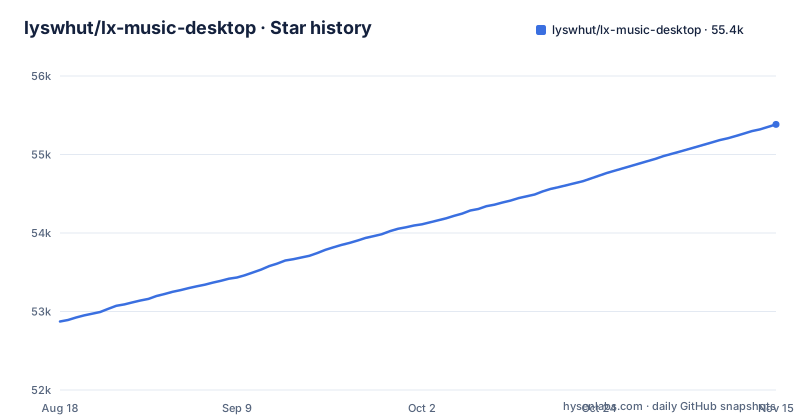
Star history
- lyswhut/lx-music-desktop55,383 ★ · +2,510
| Repository | 2026-08-18 | 2026-11-15 |
|---|---|---|
| lyswhut/lx-music-desktop | 52.9k | 55.4k |
2,510 Stars in the last 89 days, measured from the daily GitHub snapshot. Compare with other projects
Editorial analysis
What LX Music Desktop Actually Does
LX Music Desktop is a desktop music player built with Electron 30+ and Vue 3. It runs on Linux, macOS, and Windows 7 and above. The project solves a specific problem: giving users a single interface to play music from multiple online platforms without requiring each platform's official client. The README states that the software pulls data from public servers of official platforms like Kuwo, Kugou, and Migu, then filters and merges it for display. However, the actual audio playback depends on a user-selected source. The player does not fetch audio itself; it sends song name and artist information to a source, and if that source returns a link, the player uses it. This design separates the player from the content, which is both the project's core feature and its main legal complication.
The Architecture: Player and Source Are Separate
The key mechanism is the custom source setting. According to the license section, the software has no built-in ability to obtain audio data. Instead, the user configures a source in the settings, and the player passes track metadata to that source. The source returns an online link, which the player treats as the audio. This means the player is essentially a shell that handles playlists, UI, and playback controls, while the source determines what audio is actually delivered. The documentation warns that the player cannot verify whether the returned link is the correct song, so mismatches or playback failures can occur. This architecture is unusual for a music app; most players bundle their own content or use a single API. Here, the user takes on the role of content integrator.
Getting It Running: Installation and Configuration
The README directs users to GitHub Releases for downloads. The project maintains a separate documentation site with a FAQ and a source code usage guide. To run from source, you clone the repository, switch to the dev branch, and follow the setup instructions at the documentation page. The data storage directory varies by platform: Linux uses $XDG_CONFIG_HOME/lx-music-desktop or ~/.config/lx-music-desktop, macOS uses ~/Library/Application Support/lx-music-desktop, and Windows uses %APPDATA%/lx-music-desktop. On Windows, if a folder named portable exists in the program directory, the app uses that folder for data storage. The README also mentions that default settings and UI are not beginner-friendly, so users should review settings and read the playlist mechanism and hotkey documentation before use.
Integration Features: Scheme URLs, Sync Server, and Open API
Since v1.17.0, the app supports Scheme URLs, allowing external calls from browsers or other tools. The project provides a userscript that pairs with this feature. Since v2.2.0, there is a separate data sync server project that users can deploy on their own server for private multi-device synchronization. Since v2.7.0, the app can enable an open API service that starts a local HTTP server exposing player-related endpoints for third-party software. These features extend the app beyond a simple player, making it a component in a larger automation setup. For example, a userscript could send a song to the player via a scheme URL, or a separate app could query the player's state through the open API. The sync server requires a server you control, so it adds operational overhead but also gives you data ownership.
The License and Its Unusual Terms
The project is released under Apache License 2.0, but the README includes a supplementary agreement that takes precedence in case of conflict. This agreement defines the project as LX Music Desktop and sets rules about data sources, copyright data, and usage limitations. It states that online data comes from public servers of official platforms, and the player is not responsible for data accuracy. It also requires users to clear any copyright data generated during use within 24 hours. The agreement says the project is only for exploring and researching technical feasibility and does not accept commercial cooperation (including advertising) or donations. Users must accept the agreement by using the software. These terms are unusual for an open source project; they shift legal responsibility to the user. If you plan to use this in a business context, the research-only framing of the agreement is worth considering.
Limitations and Failure Modes
The most obvious limitation is that the player cannot guarantee correct audio. Because the source returns a link, the player has no way to verify that the link matches the requested song. The README explicitly warns that you may hear a different track than intended, or nothing at all. Another limitation is the lack of beginner-friendly defaults; the project states that its UI and settings are not designed for novice users. The 24-hour copyright data clearance requirement is not a technical limitation but a legal one, and it could be impractical for users who maintain large playlists. Additionally, the project only officially releases on GitHub, and the README warns that other channels are third-party reuploads. This means users must trust the GitHub release process and verify the integrity of downloaded binaries. Finally, the open API and sync server require technical setup, so they are not out-of-the-box features for non-technical users.
Alternatives and Their Different Approaches
A direct alternative is the mobile version of LX Music, which is a separate project at lyswhut/lx-music-mobile. It is the mobile counterpart, so it does not replace the desktop experience. Another alternative is a conventional music player like VLC or Strawberry, which plays local files and streams but does not integrate with online platforms or custom sources. The difference is that VLC and similar players are self-contained: they handle all media input themselves. LX Music delegates content acquisition to external sources, which gives it flexibility but also makes it dependent on those sources' availability and correctness. If you want a player that you fully control without external dependencies, a local-file player is simpler. If you want online platform integration, LX Music's approach is more adaptable than a fixed API, but it requires you to manage the sources.
Maintenance and Upgrade Considerations
The latest release is v2.12.6 on 2026-09-19, following v2.12.5 and v2.12.4, but the README says the developers' future effort will mainly go to the newer Any Listen project. The project does not publish a maintenance policy or upgrade guide in the README. The changelog is available separately, so users should review it before upgrading. However, the sync server is a separate project, so upgrading the desktop app does not automatically update the sync server; you must manage both independently. Re-read the supplementary agreement in the README after major updates. The project's non-commercial clause means you cannot fund development through donations, which may affect long-term sustainability.
Editorial conclusion
LX Music Desktop suits technical users who want a configurable music player and are comfortable managing their own audio sources. It is not for users who expect a plug-and-play app with bundled legal content, nor for those in jurisdictions with strict copyright enforcement. Before adopting, verify the source behavior you plan to use, read the custom source documentation, and understand that the project's license places responsibility for copyright data on you. Check the FAQ and the open API docs to confirm the exact configuration keys and sync server setup you need.
Frequently asked questions
What is the best music app for desktop?
The repository does not rank desktop music apps or compare itself against them. It presents LX Music as a free music search assistant built on Electron 30+ and Vue 3 for Linux, macOS, and Windows 7 and above, and it notes that a newer project, Any Listen, already covers most of its functions.
Can I download the YouTube Music desktop app?
That name appears nowhere in this repository, so nothing here either supports or blocks it. LX Music is a separate Electron and Vue application, and its README states that GitHub Releases is the only original release address while all other channels are third party re-publications unrelated to the project.
Can I download YouTube music to your desktop?
The project states that it has no ability to obtain audio data itself. What plays is the link returned by the source you chose in the custom source setting, and the terms say the accuracy of that link cannot be verified, so the audio may not match the track you requested or may fail to play at all.
Official sources
Add this badge to your README
If you maintain this project, the badge below links readers to this analysis and shows its maintenance status from the daily GitHub snapshot. Paste the markdown into your README; add ?metric=license or ?metric=stars to the image URL for a different field.

[](https://hysenlabs.com/projects/lyswhut-lx-music-desktop)Star history chart for your README
[](https://hysenlabs.com/projects/lyswhut-lx-music-desktop)Was this useful?