Awkward Array: nested, variable-length data with NumPy-style indexing
Manipulate JSON-like data with NumPy-like idioms.
At a glance
- What is it?
- Awkward Array gives jagged and nested arrays the slicing syntax people expect from NumPy, while keeping the compiled execution model that makes particle physics and genomics datasets tractable. It suits people with genuinely irregular data, and it is unnecessary weight for a table that already fits in a DataFrame.
- Who is it for?
- Adopt Awkward Array when your data has lists of variable length inside lists of variable length, when a flat Python loop would be too slow, and when you already think in NumPy indexing. Do not adopt it for regular tabular data, where a DataFrame is the better fit, and do not plan a pip install from a git URL, because the README states that this does not work for the two-package layout.
- Can I use it commercially?
- Yes. BSD-3-Clause is a permissive licence: you can use, modify and sell software built on it, as long as you keep its copyright and licence notices.
- Is it still maintained?
- Yes. The repository received new commits within the last day.
- What is it written in?
- Mainly Python, according to GitHub's language statistics.
Answers come from the project's GitHub data, last synced on November 7, 2026, and from our analysis. They are not legal advice.
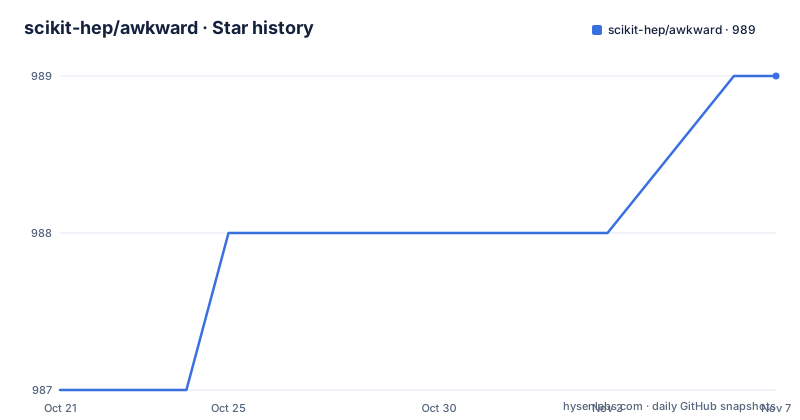
Star history
- scikit-hep/awkward989 ★ · +2
| Repository | 2026-10-21 | 2026-11-07 |
|---|---|---|
| scikit-hep/awkward | 987 | 989 |
2 Stars in the last 17 days, measured from the daily GitHub snapshot. Compare with other projects
Editorial analysis
The data shape that breaks NumPy
Particle physics and genomics produce data that does not fit a rectangle. A detector event is a list of jets, each jet carries a fixed number of particles, and each particle carries fields whose count varies by type. Lists nest inside lists, records mix field types, and values are missing. NumPy has no representation for that, so the standard workarounds are all bad: flatten everything into object arrays, pad every list to the maximum length, or write Python loops.
Awkward Array is the library that takes this shape seriously. The README describes it as a library for nested, variable-sized data, including arbitrary-length lists, records, mixed types and missing data, using NumPy-like idioms. The audience is therefore people doing HEP, genomics or any analysis on irregular JSON-like structures, and the requirement on the user is familiarity with NumPy-style indexing, since the library's whole pitch is that you keep that idiom.
The library comes from the Scikit-HEP project, with a Zenodo DOI for citation, and the repository topics connect it to Apache Arrow, columnar formats, CERN ROOT, RDataFrame, jagged and ragged arrays. The licence is BSD-3-Clause, and the documentation site is awkward-array.org, with a getting started section, a user guide, an API reference and a no-install browser demo.
Dynamic types, compiled execution, NumPy semantics where they fit
The central design claim is a pairing that sounds contradictory until you see it work. The README states that the arrays are dynamically typed but that operations on them are compiled and fast, and that their behavior coincides with NumPy when array dimensions are regular and generalizes when they are not.
The indexing expression is where this shows. Given an array of lists of records with x and y fields, where y is itself a list, the slice that selects the y values, drops the first element of each inner list and squares what remains is a single expression:
output = np.square(array["y", ..., 1:])The ellipsis is doing the heavy lifting. It stands for the intermediate levels of ragged structure, so the slice broadcasts down through lists of different lengths without the user counting axes. The same value, computed with plain Python lists and dicts, takes three nested loops. The output of the one-liner is the same nested list of squared values, including the empty inner list for the empty sublist.
Under the hood, the execution model is compiled rather than interpreted. The repository contains kernel-specification.yml and kernel-test-data.json, which describe the kernels that the array operations are built from, plus awkward-cpp/ for the compiled implementation and src/ for the Python layer. That separation is why the library can be dynamically typed at the user level and still avoid the interpreter overhead on every element.
The speed and memory claim, as the README states it
The README publishes a comparison for the same nested-square operation on a problem ten million times larger than the motivating example, run single-threaded on a 2.2 GHz processor. On those numbers, the Awkward Array one-liner takes 1.5 seconds and uses 2.1 GB of memory, while the equivalent written with Python lists and dicts takes 140 seconds and uses 22 GB of memory.
Those are the project's own published figures rather than an independent measurement, and they are worth reading carefully for what they say. The memory ratio of roughly ten times is the part that follows from the data structure itself, since a ragged array stores the actual values while nested Python objects store a pointer and a type tag per element. The time ratio is larger because the loop version also pays interpreter overhead per element.
The README adds that Awkward Array is even faster when used inside Numba's JIT-compiled functions, which points at the intended route for heavy work: keep the array in Awkward, compile the inner kernel with Numba rather than writing it in interpreted Python.
One Python package on top of a compiled C++ core
Awkward ships as two packages, and that split explains both its strengths and its install friction. The awkward package itself is pure Python, and it downloads the awkward-cpp compiled components as a dependency. pyproject.toml pins awkward_cpp at exactly version 57, and lists numpy>=1.21.3, packaging, fsspec, plus importlib_metadata for Python below 3.12 and typing_extensions below 3.11. The build backend is hatchling with hatch-fancy-pypi-readme.
The compiled side is developed in the same repository under awkward-cpp/, with the header-only C++ dependencies pulled in as git submodules, which is why a clone must be recursive. A noxfile.py at the root drives the source generation step, and there are separate requirement files for the different test matrices: requirements-test-basic.txt, requirements-test-full.txt, requirements-test-gpu.txt, requirements-test-ml.txt, requirements-test-minimal.txt, requirements-test-nogil.txt and requirements-test-numpy1.txt. A tests-cuda/ directory and the GPU requirement set indicate CUDA coverage in the test matrix.
The classifiers in pyproject.toml list Python 3.10 through 3.15, including a Free Threading classifier for free-threaded builds, and requires-python is set to >=3.10. The documentation badge covers Python 3.10 to 3.14.
Installing, and the git install that will not work
For most users the install is one command from PyPI:
pip install awkwardThe same package is on conda-forge:
conda install -c conda-forge awkwardThe README is explicit about what happens next. The awkward package is pure Python and pulls in awkward-cpp as a dependency, and if there is no awkward-cpp wheel for your platform and Python version, pip will attempt to compile it from source, which needs a C++ compiler and other dependencies. That is the first thing to check when an install takes a long time or fails.
There is also a trap worth repeating. The README states that because awkward-cpp may be updated on GitHub but not on PyPI, installing through git with pip install git+https://... will not work, and the developer path should be used instead. That path clones the repository recursively to get the header-only C++ dependencies, installs awkward-cpp from the local directory and then installs awkward as editable:
git clone --recursive https://github.com/scikit-hep/awkward.git
cd awkward

python -m pip install -v ./awkward-cpp
python -m pip install -e .
The test suite runs under pytest, in parallel:
python -m pytest -n auto testsWhere Awkward Array is the wrong tool
The library's central limitation is the mirror image of its strength. Its indexing semantics generalise NumPy precisely in the places where NumPy works, and the cost is that the regular case pays for the general case. If your data is a clean table, a DataFrame gives you the same familiar idiom without a second package, a compiled core and a kernel specification to reason about.
There is also a plain Python cost. If the dataset is small enough that a nested loop runs in a second, Awkward buys you nothing except a dependency, and the one-liner is arguably less readable to the next person than the explicit loop it replaces.
The install path is the second limitation, and it is real rather than incidental. The two-package split means pip cannot install from a git URL, the compiled component is version-locked to exactly 57 in pyproject.toml, and a platform without a matching wheel forces a source build. For an environment with unusual Python versions, that is a recurring cost.
Finally, the package layout makes version management a two-variable problem, since awkward and awkward_cpp must agree and only one of them is published on PyPI in step with the other.
Against a hand-written loop or a padded NumPy array
The real alternatives are both common and both worse in specific ways. The first is the nested Python loop, which the README itself shows side by side with the one-liner. Its advantage is that it is obvious, needs no dependency, and will still run in ten years. Its cost is per-element interpreter overhead and the memory cost of Python objects, which is exactly what the published comparison measures.
The second is the padding trick: find the maximum length, fill the shorter lists with sentinels, and use an ordinary NumPy array. This is fast and compact, and it is wrong in ways that are hard to see. A sentinel is a value that must be chosen so it can never be confused with real data, and any analysis that touches a masked entry can produce a plausible but incorrect result. It also forces a single length for every list, so a single long list inflates the memory of the entire dataset.
The difference in approach is that Awkward keeps the ragged structure and pushes the irregularity into the type system and the kernel layer, where the compiled code handles the varying lengths. The cost of that design is the extra package, the compiled dependency and the learning curve for the indexing rules. For a working physicist or genomicist with genuinely irregular data, that cost is repaid quickly; for a table that happens to be stored as JSON, it is not.
Editorial conclusion
Adopt Awkward Array when your data has lists of variable length inside lists of variable length, when a flat Python loop would be too slow, and when you already think in NumPy indexing. Do not adopt it for regular tabular data, where a DataFrame is the better fit, and do not plan a pip install from a git URL, because the README states that this does not work for the two-package layout. Check first that a wheel exists for your platform and Python version, since otherwise pip compiles awkward-cpp from source and needs a C++ compiler, and pin awkwardly_cpp, which the pyproject.toml fixes at exactly version 57. Releases move steadily, with 2.12.0 on 2026-07-28, 2.13.0 on 2026-08-14 and 2.14.0 on 2026-09-17, and the last push was on 2026-10-19.
Frequently asked questions
How do I install Awkward Array?
Run pip install awkward, or conda install -c conda-forge awkward. The Python package is pure Python and pulls in the compiled awkward-cpp dependency, and if no wheel matches your platform and Python version pip compiles it from source, which needs a C++ compiler.
Why does pip install from a git URL not work for Awkward Array?
The README explains that awkward-cpp may be updated on GitHub but not on PyPI, so a git-based pip install will not work. Use the developer path instead: clone with --recursive, then run python -m pip install -v ./awkward-cpp followed by python -m pip install -e .
What does Awkward Array do that NumPy cannot?
It handles nested, variable-sized data such as arbitrary-length lists, records, mixed types and missing data, using NumPy-like indexing. Its behavior coincides with NumPy when the dimensions are regular and generalises when they are not, and the arrays are dynamically typed while operations on them are compiled.
Which Python versions does Awkward Array support?
pyproject.toml sets requires-python to >=3.10 and lists classifiers for Python 3.10 through 3.15, including a Free Threading classifier. The README badge covers Python 3.10 to 3.14.
What licence is Awkward Array released under?
BSD-3-Clause, stated in pyproject.toml with the license-files entry pointing at the LICENSE file in the repository root. Read that file for the exact terms before redistributing it.
How do I run the Awkward Array tests after a development install?
The README shows the test suite run with pytest in parallel over the tests directory using python -m pytest -n auto tests. The repository also keeps separate requirement files for the basic, full, gpu, ml, minimal, nogil and numpy1 test matrices.
Official sources
Add this badge to your README
If you maintain this project, the badge below links readers to this analysis and shows its maintenance status from the daily GitHub snapshot. Paste the markdown into your README; add ?metric=license or ?metric=stars to the image URL for a different field.

[](https://hysenlabs.com/projects/scikit-hep-awkward)Star history chart for your README
[](https://hysenlabs.com/projects/scikit-hep-awkward)Was this useful?