EasySNI (V2RayEz): a single-binary DPI bypass panel for SNI spoofing and domain fronting
Bypass censorships using Go Lang
At a glance
- What is it?
- EasySNI, distributed under the V2RayEz name, is a Go binary that serves a local control panel for SNI-spoofing tunnels, xray and sing-box engines, scanners and a client-side domain-fronting proxy. The panel is broad and the documentation is uneven, so adoption depends on how much you are willing to verify yourself.
- Who is it for?
- EasySNI suits engineers who already understand SNI spoofing and fronting and want one binary that bundles the tunnel, the engines, the scanners and a config library. It is not a fit if you need a documented, auditable tool for production traffic, or if you rely on a platform the repository does not build for.
- Can I use it commercially?
- Yes. MIT is a permissive licence: you can use, modify and sell software built on it, as long as you keep its copyright and licence notices.
- Is it still maintained?
- Yes. The repository last received commits 155 days ago.
- What is it written in?
- Mainly Go, according to GitHub's language statistics.
Answers come from the project's GitHub data, last synced on November 23, 2026, and from our analysis. They are not legal advice.
Star history
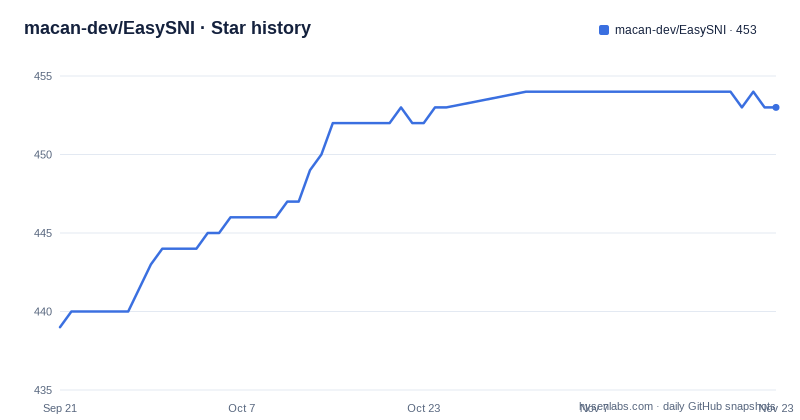
- macan-dev/EasySNI453 ★ · +14
| Repository | 2026-09-21 | 2026-11-23 |
|---|---|---|
| macan-dev/EasySNI | 439 | 453 |
14 Stars in the last 63 days, measured from the daily GitHub snapshot. Compare with other projects
Editorial analysis
What EasySNI solves, and who it is written for
EasySNI is a Go program, distributed under the name V2RayEz, that packages several circumvention techniques behind one local web page. The problem it addresses is specific: many basic DPI filters read the SNI field sent in the clear during a TLS handshake and block the connection when that hostname is on a list. The README describes the core trick plainly. V2RayEz connects to the real server but writes a permitted hostname into that field, so the filter sees an allowed domain while the real session continues.
The audience is not someone who wants a consumer VPN client. The dashboard bundles a config library that accepts vless://, vmess://, trojan:// and ss:// links, an engine runner for xray and sing-box, a set of scanners, and a client-side domain-fronting proxy. That is a toolbox for someone who already knows what a Reality key or an ALPN list is and wants to stop juggling five separate utilities. The README labels the project as for education, testing and research only, and places responsibility for local law and for the terms of any service used with it on the operator. That framing is worth taking literally: this is an operator's tool, not a set-and-forget product.
How the SNI tunnel and the fronting proxy actually differ
The repository ships two distinct mechanisms, and conflating them is the easiest way to misconfigure the tool.
The SNI Tunnel is a local TCP proxy. According to the README, it performs the TLS handshake with a fake SNI while connecting to the real endpoint, with optional DPI-desync features: fragmentation, fake packets and uTLS fingerprints. The filter reads a permitted name; the destination is the real one. This works against filters that inspect the SNI field, and it does nothing against a filter that has the destination IP on a blocklist.
The Domain Fronting tab is a different animal. It runs a local MITM proxy that reads each request's real Host header, resolves that host through a fronted DoH server so a poisoned resolver is never consulted, and then reaches the site's CDN edge behind an allowed front SNI. Rules are written one per line in the form host-suffix = front-SNI, and optionally host-suffix = front-SNI = dial-host when the TCP connection itself must be redirected. That third field matters for some CDNs and is absent from many fronting guides. Hosts with no matching rule pass through directly, which means a misconfigured rule fails open rather than closed. The two mechanisms can be used together, but they solve different failure modes and the README does not describe a combined mode.
Installing EasySNI and running a first tunnel
There is no installer. The README's quick start is a release binary that you execute directly, and the panel then listens on 0.0.0.0:8765 by default and opens the dashboard. If the browser does not open, the README says to visit http://127.0.0.1:8765.
# run a release build
./v2rayez            # Linux / macOS
v2rayez.exe          # Windows
Building from source requires Go 1.22 or newer, which matches the go directive in go.mod. The clone step in the README uses a placeholder URL, so you must substitute your own fork or the upstream remote; that placeholder is the one gap in an otherwise complete build recipe.
git clone <your-fork-url> v2rayez
cd v2rayez
go build -o v2rayez .
./v2rayez
Two optional transports sit behind build tags, and the README is explicit that the flags go before the dot. The wrong order produces a malformed import path error rather than a helpful message, so the distinction is worth remembering.
go build -tags "psiphon livekit" .        # correct
# go build . -tags psiphon                 # WRONG: "malformed import path -tags"
For a first real use, the README's Config Library tab is the starting point. You paste a vless://, vmess://, trojan:// or ss:// link, or import a subscription URL, then press Connect on the row. The row is handed to whichever engine is selected in the XRay Core tab, and the README states that the result is either a local SOCKS5 proxy or a system-wide TUN VPN. Before pointing a browser at anything, you can restrict the panel itself to loopback, which the README gives as its example of a local-only run.
./v2rayez -addr 127.0.0.1:8765 -open=false -window=false # local onlyThe flag table lists -addr, -open, -window and -minimize, with -minimize applying only on Windows. For cross-compilation the README gives the GOOS and GOARCH combinations directly, and build-all.sh or build-all.bat produce output in dist/, with the Windows executable receiving the app icon.
Where EasySNI is the wrong tool
The largest constraint is the panel itself. It listens on 0.0.0.0:8765 by default, which means every interface on the host can reach a control page that starts tunnels, edits configs and sets the system proxy. The README offers the -addr flag as the remedy but does not present binding to loopback as the default posture. On a shared or untrusted network, that default is a problem you have to notice on your own.
Second, the project carries an explicit warning that it is for education, testing and research only, provided as is with no warranty. That is not boilerplate in this category. A tool that performs a MITM handshake on your behalf and rewrites DNS resolution through a fronted DoH server sits directly in the path of your traffic. If something in the rule set is wrong, you are the one debugging it.
Third, the fronting mechanism depends on a CDN continuing to accept the front-SNI pattern you configured. The README ships a built-in rule set ready to use, but nothing in the repository guarantees those fronts remain valid, and the documentation does not describe how to detect that a front has stopped working beyond the live request and error logging in the tab. If your threat model includes an adversary who blocks by destination IP rather than by SNI, the SNI Tunnel does not help at all.
Finally, the platform claim and the build recipe do not fully line up. The README badge advertises Windows, macOS and Linux, and the cross-compile examples cover all three, but the repository also carries WinDivert.dll and WinDivert64.sys at the top level and a minimize_windows.go alongside a minimize_other.go. That layout suggests the Windows path has native components the other platforms do not, and the README does not state which features are unavailable elsewhere.
How EasySNI compares with a plain xray or sing-box setup
The honest alternative is running xray or sing-box directly. EasySNI does not replace either; the README says the XRay Core tab detects and downloads both and runs any config as a local SOCKS5 proxy or a TUN VPN. The difference is entirely in what surrounds that engine.
With xray or sing-box alone, you write a JSON or YAML config, start the process, and point your client at the local port. You control every field and you can diff your configuration in version control. What you do not get is a config library with groups and subscriptions, bulk relay and speed tests, an SNI scanner, a Clean IP Scanner, a CDN Edge test, or a structured editor with a live preview. EasySNI's value is that bundle plus the panel, and the SNI Tunnel and Domain Fronting tabs, which are not part of either upstream engine.
So the trade is legibility for convenience. A hand-written xray config is auditable line by line. EasySNI's state lives in files such as ezsni-config.json and v2rayez-saved-sni.json, and the README says the library is auto-saved. If your requirement is a configuration you can review and reproduce, the upstream engines are the better fit. If your requirement is scanning for a working SNI and testing a batch of configs without writing scripts, the panel is doing work you would otherwise script yourself.
Maintenance, licence and the cost of upgrading
The repository is not archived, and the last push was on 2026-06-21. The most recent release listed is v4.7.5 from 2026-06-12, following v4.6.5 on 2026-06-03 and v4.5.1 on 2026-05-31. Three releases inside two weeks, then a push nine days after the last one, is a burst pattern rather than a steady cadence, and the README does not describe a release schedule.
The practical upgrade cost is low if you use release binaries: the README's quick start is a single executable with no installer, so replacing the file is the upgrade. Building from source adds a step, because the optional transports behind build tags require fetching their dependencies first, and the README gives the go get commands for psiphon-tunnel-core and the livekit server SDK. If you build with those tags, an upgrade means re-fetching those modules, not just pulling the repository.
Licensing is MIT, which is permissive and places few obligations on redistribution beyond preserving the notice. Two caveats sit outside the licence text itself. The README states that you are responsible for the terms of any service you use the tool with, naming Google and Cloudflare as examples, and domain fronting through a CDN edge may conflict with those terms regardless of what the MIT licence permits. The repository also bundles WinDivert.dll and WinDivert64.sys, which are separate components with their own licensing, and the README does not state their terms. Check those files before redistributing a build. Nothing here is legal advice.
Editorial conclusion
EasySNI suits engineers who already understand SNI spoofing and fronting and want one binary that bundles the tunnel, the engines, the scanners and a config library. It is not a fit if you need a documented, auditable tool for production traffic, or if you rely on a platform the repository does not build for. Verify three things first: that your Go version is 1.22 or newer, that the -addr flag binds where you expect, and that your front-SNI rules actually resolve through the fronted DoH server rather than your local resolver.
Frequently asked questions
What is EasySNI (V2RayEz) and what does it do?
It is a single-binary local web control panel written in Go that bundles an SNI-spoofing tunnel, xray and sing-box engine management, scanners, a config library and a client-side domain-fronting proxy behind one dashboard. The README describes it as for education, testing and research only.
How do I install and start EasySNI?
There is no installer. You run the release binary for your platform, and the README states it listens on 0.0.0.0:8765 by default and opens the dashboard; if it does not open, you visit http://127.0.0.1:8765. Building from source requires Go 1.22 or newer.
What is the difference between the SNI Tunnel and Domain Fronting in EasySNI?
The SNI Tunnel is a local TCP proxy that completes the TLS handshake with a fake SNI while connecting to the real endpoint. Domain Fronting is a local MITM proxy that reads the real Host header, resolves it through a fronted DoH server, and reaches the CDN edge behind an allowed front SNI.
Which platforms does EasySNI support?
The README advertises Windows, macOS and Linux, and gives cross-compile examples for all three. The repository also ships WinDivert.dll and WinDivert64.sys plus a minimize_windows.go, and the README does not state which features are unavailable on the non-Windows builds.
Official sources
Add this badge to your README
If you maintain this project, the badge below links readers to this analysis and shows its maintenance status from the daily GitHub snapshot. Paste the markdown into your README; add ?metric=license or ?metric=stars to the image URL for a different field.

[](https://hysenlabs.com/projects/macan-dev-easysni)Star history chart for your README
[](https://hysenlabs.com/projects/macan-dev-easysni)Was this useful?