kage: render the page in a real browser, then delete the JavaScript
Shadow any website for offline viewing, with the JavaScript stripped out
At a glance
- What is it?
- A command-line tool that mirrors a website for offline reading by letting a headless browser finish loading, snapshotting what a person would have seen, and then removing every script and pulling the assets down to local paths. The crawler, the packer, and a container image that runs as root for a documented reason.
- Who is it for?
- kage suits anyone who has lost a page to a dead script and wants a copy that will still open in ten years, and the workflow is short enough to try on one site before committing to a mirroring habit. Two things to check before you mirror anything at scale.
- Can I use it commercially?
- Yes. MIT is a permissive licence: you can use, modify and sell software built on it, as long as you keep its copyright and licence notices.
- Is it still maintained?
- Yes. The repository last received commits 97 days ago.
- What is it written in?
- Mainly Go, according to GitHub's language statistics.
Answers come from the project's GitHub data, last synced on November 15, 2026, and from our analysis. They are not legal advice.
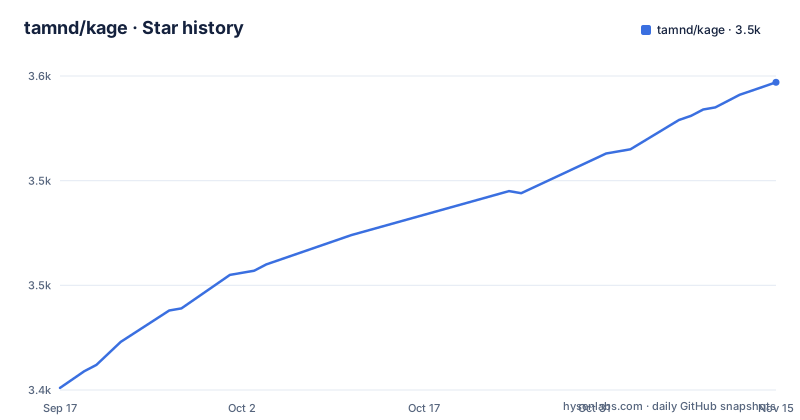
Star history
- tamnd/kage3,547 ★ · +146
| Repository | 2026-09-17 | 2026-11-15 |
|---|---|---|
| tamnd/kage | 3.4k | 3.5k |
146 Stars in the last 59 days, measured from the daily GitHub snapshot. Compare with other projects
Editorial analysis
Render the page, then take the scripts away
The mechanism is stated in five steps and every one of them is load-bearing. Each page is opened in real headless Chrome rather than fetched over HTTP, so whatever the site does to a person happens first. The tool waits for the page to settle rather than guessing when it is finished. It then snapshots the document object model, meaning it captures what a human would actually have seen rather than the markup the server first sent. After that it deletes all the JavaScript, and finally it pulls the stylesheets, images, and fonts down to local paths so nothing points back at the origin. What lands on disk therefore runs no code at all. The stated motivation is the failure mode of a browser's own save command, which produces a blank page, a spinner that never stops, or a copy that still tries to reach an analytics server that no longer exists.
The crawl is polite, idempotent, and resumable
Three properties define the crawler, and each is a design decision rather than an implementation detail. It is polite: it reads the standard exclusion file before anything else, seeds itself from the site's sitemap when one exists, and stays on the host you named unless you explicitly ask for subdomains. It is idempotent, and the mechanism is neat enough to be worth describing: each page is keyed by the file it writes, so the same article reached over plain and encrypted addresses, with or without a trailing slash, is fetched exactly once rather than three times. And it is resumable. Interrupting it saves its place on the way out, so running it again picks up where it stopped. Two flags cover the cases that behaviour does not: refreshing re-renders an existing mirror in place so new pages appear, and forcing deletes the host's mirror and starts clean.
Thirteen flags, two of which are about manners
The flag table is more informative than the prose, because several defaults encode opinions. The page budget defaults to unlimited and the depth budget likewise, so an unbounded clone is what you get unless you ask otherwise, and the documented example caps both for a quick taste. The quirk worth knowing is that the page budget counts pages that fail, that the exclusion file disallows, and that are not even HTML, so a site with a lot of broken links exhausts your budget faster than the number of saved pages suggests. Three flags govern manners: one ignores the exclusion file outright, one overrides the crawl delay the file asks for, and one scopes the crawl to a single path and its descendants, which is the right tool for archiving one section of a documentation site. Scoping and exclusion are both path-based rather than substring-based, so excluding a path will not accidentally match a similarly named path elsewhere.
A mirror is a folder, and pack makes it one file
Cloning produces a directory of files, which browses well and travels badly. The serve command exists because of that: it runs a small static file server over the folder so that links and assets resolve the way they would on the original host, on a local port.
kage serve $HOME/data/kage/paulgraham.com
# open http://127.0.0.1:8800
The pack command is the answer to the travel problem, and it has three output shapes. The first is a ZIM archive, a single-file format built for offline collections. The second is a self-contained viewer binary that serves the mirror itself and needs nothing installed on the machine that opens it. The third is a double-click application for people who will never see a command line. Opening a packed archive simply serves it back for reading, so the packed form is not a dead end.
The container runs as root, and the file explains exactly why
The container image is not a plain command-line image, because the tool always drives a real browser, so Chromium is bundled and an environment variable points the tool at it rather than letting it download its own. It is also built unusually: the file states that the release tooling copies an already cross-compiled binary out of the build context instead of compiling in the image, which keeps the image build fast and guarantees the image ships the same static binary as every other artefact. Then comes the interesting part. The container deliberately runs as root, and three paragraphs explain the reasoning. A bind-mounted output directory belongs to whoever created it on the host, so a fixed non-root identity cannot write to it, and both the mirror and the resume state then fail with a permission error on directory creation.
The same permission problem breaks the browser too
The container comment continues past the filesystem argument, because the unwritable home directory breaks the browser as well. Chrome launches its crash handler with an empty crash database path when it cannot write one, and the handler aborts, which takes down the browser process and makes every render fail. So the fix is not just a convenience for the output directory: it is what keeps the rendering step alive. Two other details from the same file are worth noting. The base is a minimal Linux image with Chromium, certificates, timezone data, and one font package, and the font package is there specifically because rendered pages need glyphs to lay out, which is an easy detail to omit and an annoying one to debug. The release tooling stages each architecture's binary under a directory named for its target platform and selects it with an automatic build argument, so one image definition covers several architectures.
Two binaries, and only one of them needs cgo
The build file shows a project that ships one tool by default and a second one as an opt-in. The default build is a pure Go binary with cgo disabled, stamped with three values through linker flags: the version derived from the version control description, the short commit, and a build timestamp. The second target turns cgo on, adds a build tag, and produces a native-window viewer that opens a packed site in the operating system's own webview component instead of a browser tab. That target needs a separate build and is handled by the release pipeline, which tells you the two artefacts have genuinely different requirements. Testing follows the same split between fast and complete: one target runs the whole suite with the race detector and includes the end-to-end tests that drive a real browser, while a short mode exists specifically for machines without one.
Editorial conclusion
kage suits anyone who has lost a page to a dead script and wants a copy that will still open in ten years, and the workflow is short enough to try on one site before committing to a mirroring habit. Two things to check before you mirror anything at scale. It drives a real browser, so a browser binary has to be present on the host unless you use the container image. And the crawler respects the standard exclusion files by default, so decide early whether you are mirroring a site you own, one you have permission to archive, or something you simply want a local copy of for reading.
Frequently asked questions
What does kage do to a website it clones?
It opens each page in real headless Chrome, waits for the page to settle, snapshots the document model as a person would have seen it, deletes all the JavaScript, and pulls the CSS, images, and fonts down to local paths. What lands on disk runs no code and needs no network.
How do I install kage?
With the Go toolchain by installing the command from the repository, or with a prebuilt archive or system package from the releases page, or through a package manager: a Homebrew cask, a Scoop bucket, or an apt repository added with its signing key. A container image is also published with a browser bundled in.
How does the kage crawler behave?
It is a polite breadth-first crawl that reads the standard exclusion file, seeds from the sitemap, and stays on the seed host unless told otherwise. Pages are keyed by the file they write, so the same address in different forms is fetched once, an interrupted run saves its place, and flags exist to refresh an existing mirror or wipe it and start clean.
Why does the kage container run as root?
Because a bind-mounted output directory belongs to whoever created it on the host, so a fixed non-root identity cannot write to it, and both the mirror and its resume state fail with a permission error. The same unwritable home directory also breaks the browser, which aborts when its crash handler cannot open its database.
Official sources
Add this badge to your README
If you maintain this project, the badge below links readers to this analysis and shows its maintenance status from the daily GitHub snapshot. Paste the markdown into your README; add ?metric=license or ?metric=stars to the image URL for a different field.

[](https://hysenlabs.com/projects/tamnd-kage)Star history chart for your README
[](https://hysenlabs.com/projects/tamnd-kage)Was this useful?