World2Agent: a protocol for feeding real-world signals into agent runtimes
World2Agent(W2A) is an open protocol that standardizes how Al agents perceive the real world.
At a glance
- What is it?
- World2Agent defines a sensor schema and a set of runtime bridges so that Claude Code, Hermes and OpenClaw sessions can receive structured external events. The protocol is small and the installation path is concrete, but the security model puts the whole burden on whoever picks the sensor.
- Who is it for?
- Adopt World2Agent if you already run Claude Code, Hermes or OpenClaw and want external events to arrive as structured signals without writing your own polling loop. Do not adopt it if you need a stable wire format with a versioned spec and a published release history, because the repository shows no releases and the format lives in docs/signal-format.md.
- Can I use it commercially?
- Yes. Apache-2.0 is a permissive licence: you can use, modify and sell software built on it, as long as you keep its copyright and licence notices.
- Is it still maintained?
- Yes. The repository last received commits 23 days ago.
- What is it written in?
- Mainly TypeScript, according to GitHub's language statistics.
Answers come from the project's GitHub data, last synced on November 22, 2026, and from our analysis. They are not legal advice.
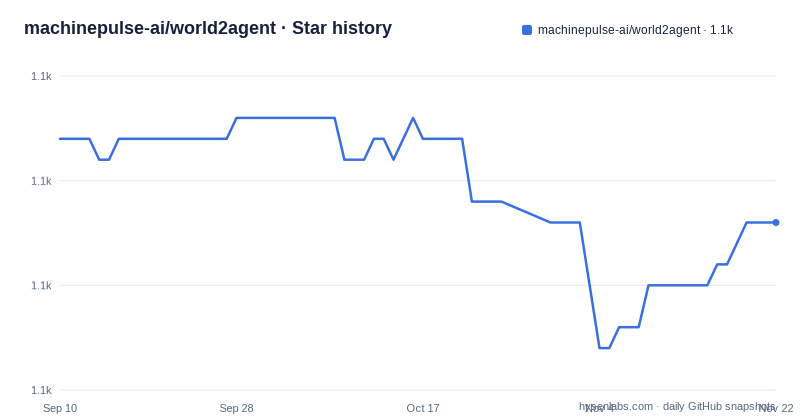
Star history
- machinepulse-ai/world2agent1,128 ★ · -4
| Repository | 2026-09-10 | 2026-11-22 |
|---|---|---|
| machinepulse-ai/world2agent | 1.1k | 1.1k |
-4 Stars in the last 73 days, measured from the daily GitHub snapshot. Compare with other projects
Editorial analysis
The gap W2A targets: agents that only see what you paste into them
An agent session starts with no ambient awareness. Anything it knows about the outside world arrived because a human put it in the context window, or because someone wrote a bespoke polling script. World2Agent takes the position that this is a protocol problem rather than a per-project integration problem, and the README states the premise directly: agents cannot act on what they cannot perceive. The project is aimed at people running agent runtimes who want external events, such as Hacker News stories or posts from frontier AI labs, to appear in a session as structured data rather than as pasted text.
The intended audience is narrow and identifiable. The quick start ships native plugins for Claude Code, Hermes and OpenClaw, and the README points developers who want to embed the same idea in their own agent system at a separate SDK path in docs/quick-start.md. If you run none of those three runtimes and have no intention of writing against the SDK, the protocol is documentation to read rather than software to install. The README is explicit that W2A is not a product: it describes the repository as an open protocol plus an invitation, with the first sensors built by the maintainers and the rest expected from the community.
World, Sensor, Agent: the three-stage data flow
The architecture is stated as a single chain in the README: World to Sensor to Agent. A sensor watches some data source and emits structured data that conforms to the W2A Protocol. The agent receives those signals and decides what to do with them. The schema that makes sensors swappable is specified in docs/signal-format.md, and the README claims that swapping one sensor for another requires no changes on the agent side because they all speak the same schema.
What the README does not do is show a signal payload. Anyone evaluating this for a production pipeline should read docs/signal-format.md before assuming the schema is stable or expressive enough for their case.
The roadmap names one extension: a graph layer that would compose and enrich signals from several sensors before they reach the agent, with an RFC at docs/rfc-graph.md. Today, the material suggests each sensor emits on its own, and any joining of signals happens on the agent side. That is the part of the design most likely to change, since the RFC exists but the README lists it under roadmap rather than as shipped behaviour.
Three runtimes, three install paths, and one restart each
Claude Code uses the plugin marketplace. Inside an active session you run /plugin marketplace add machinepulse-ai/world2agent-plugins, then /plugin install world2agent@world2agent-plugins, then /reload-plugins. Sensors are added with slash commands such as /world2agent:sensor-add @world2agent/sensor-hackernews. The README then asks you to restart the client with the plugin channel loaded: claude --dangerously-load-development-channels plugin:world2agent@world2agent-plugins. That flag name is worth reading twice before you type it.
Hermes installs a bridge globally with npm install -g @world2agent/hermes-sensor-bridge, then hermes skills install machinepulse-ai/world2agent-plugins/hermes-sensor-bridge/skills/world2agent-manage. After that, adding a sensor is a natural-language or slash request, /world2agent-manage add @world2agent/sensor-hackernews, and the agent handles the npm install, the SETUP.md questions, webhook subscription and subprocess startup. The README notes that each signal triggers a fresh AIAgent.run_conversation() call against a generated handler skill.
OpenClaw is the same shape with different names: npm install -g @world2agent/openclaw-sensor-bridge and openclaw skills install world2agent-manage, then a chat instruction to use the world2agent-manage skill to install a sensor. The bridge writes a managed hooks block into ~/.openclaw/openclaw.json and generates hooks.token if it is missing. The README states that a timestamped backup of the original config is kept beside the file, and that you run openclaw gateway restart once. If a chat platform is configured through a PLATFORM_HOME_CHANNEL variable in ~/.openclaw/.env, replies are pushed to that chat by default.
Config files the bridges touch, and why that matters at upgrade time
Two files outside the project directory are modified during setup. On OpenClaw, ~/.openclaw/openclaw.json gains a managed hooks block, and the token is generated if absent. On the same runtime, ~/.openclaw/.env may already hold a PLATFORM_HOME_CHANNEL value that changes where agent replies are delivered. Neither file lives in your repository, so neither appears in a code review, and a teammate who installs a sensor on a shared machine changes behaviour for everyone using that account.
The README describes the config edit as managed and says a timestamped backup is kept next to the original. It does not describe an uninstall path for the bridge, nor a command that removes a sensor once added. That is a real gap. Treat the install commands as easy and the removal path as unspecified, and plan accordingly.
A sensor is an instruction source, and the README says so
The security note in the README is unusually direct: a sensor's signals drive what your agent perceives and does, so an untrusted sensor is effectively an untrusted instruction source. It advises sticking to open-source sensors from authors you trust and reviewing the code first. That advice is correct, and it also describes the main failure mode of the whole design. Signals arrive from a third-party npm package, pass through a bridge, and land in a session where the agent may act on them. The protocol standardises the shape of the data. It does not sandbox the sensor.
The install ergonomics work against caution here. On Hermes and OpenClaw, a single natural-language sentence causes the agent to run npm install, answer setup questions, subscribe a webhook and start a subprocess. That is convenient when the sensor is one you wrote and risky when it is not. The npm namespace convention matters too: the README points at SensorHub as the catalog and mentions npm search w2a-sensor as a fallback, which means package naming is a convention rather than an enforced scope. A name that looks official is not proof of anything. This is the case where W2A is the wrong tool: if your agent holds credentials or can take irreversible actions, wiring an unreviewed third-party signal source into its context is a decision you should make deliberately, not through a one-line chat command.
How this differs from webhooks and from tool-calling servers
The closest thing to a competitor is the hand-rolled approach: a webhook endpoint plus a small script that formats the payload and injects it into the agent session. The difference in approach is where the schema lives. With a custom webhook, you own the payload shape, you control versioning, and you know exactly which fields exist because you wrote them. With W2A, the payload shape is defined by the protocol, and the value you get in return is substitutability: the README's claim is that you can swap sensors freely because they share a schema, so replacing a Hacker News sensor with a frontier-AI-lab sensor does not require touching your agent. That trade only pays off if you actually intend to run more than one sensor or change them over time. For a single fixed feed, a webhook and a formatter is less machinery.
A second comparison point is the runtime plugin itself. Claude Code, Hermes and OpenClaw all have their own extension mechanisms, and W2A is layered on top of them rather than replacing them. The plugins repository is separate from this one, and the bridges are npm packages under the @world2agent scope. So adopting W2A means adopting a protocol plus at least one bridge plus one or more sensor packages, each with its own version.
Licence, maintenance and what to verify before you commit
The repository is Apache-2.0, which permits commercial use and modification and includes an explicit patent grant. That is a permissive licence, and it applies to this repository. The sensor packages and the runtime bridges are separate npm packages, so check the licence of each one before you depend on it. Nothing here is legal advice; if you are shipping W2A inside a product, read the LICENSE file and the licences of the packages you install.
On maintenance, the observable facts are thin. The repository is not archived and the last push is dated 2026-09-03. The repository has no published GitHub releases, so there is no version history to read before upgrading. The protocol spec lives in docs/signal-format.md inside the repository, which means a change to the schema is a commit rather than a versioned release. If you build against the SDK, pin the packages you use and read the diff on docs/signal-format.md before upgrading, because that file is the contract. The graph layer described in docs/rfc-graph.md is a proposal, not shipped behaviour, so do not design around composed signals yet.
Editorial conclusion
Adopt World2Agent if you already run Claude Code, Hermes or OpenClaw and want external events to arrive as structured signals without writing your own polling loop. Do not adopt it if you need a stable wire format with a versioned spec and a published release history, because the repository shows no releases and the format lives in docs/signal-format.md. Before installing anything, read the sensor package source, check whether it writes to ~/.openclaw/openclaw.json or ~/.openclaw/.env, and confirm the backup file the OpenClaw bridge claims to leave next to the original config.
Frequently asked questions
How do I install a World2Agent sensor?
It depends on the runtime. Claude Code adds a plugin marketplace, installs the plugin and reloads plugins in-session, then relaunches with `claude --dangerously-load-development-channels plugin:world2agent@world2agent-plugins`. Hermes and OpenClaw each take a global bridge install plus a skills install, and both require one gateway restart on first use. Sensors are standard npm packages, so `npm search w2a-sensor` also works.
What does the world2agent repository actually publish to npm?
Nothing installable. Its single package is `@world2agent/protocol` at version 0.1.0 and it is marked private, with no main entry, no exports, no binary and no runtime dependencies, only dev dependencies for schema generation and validation. What is published are sensors, which are separate npm packages written by other authors.
Does the World2Agent schema reject unknown fields?
No. The schema is generated with `--noExtraProps=false`, so additional properties are not forbidden, which leaves room for a sensor to send fields the validator accepts and no consumer reads. The schema itself is generated from TypeScript types under a versioned `schema/0.1/` directory, and example payloads are validated against it by a second script.
Is multi-sensor composition supported in World2Agent today?
Several sensors can be installed, and a multi-sensor guide exists among the repository's documents, but the roadmap lists a graph layer for composing and enriching signals from multiple sensors before they reach the agent as future work, with a link to a request for comments on the design.
Official sources
Add this badge to your README
If you maintain this project, the badge below links readers to this analysis and shows its maintenance status from the daily GitHub snapshot. Paste the markdown into your README; add ?metric=license or ?metric=stars to the image URL for a different field.

[](https://hysenlabs.com/projects/machinepulse-ai-world2agent)Star history chart for your README
[](https://hysenlabs.com/projects/machinepulse-ai-world2agent)Was this useful?