Nanobrowser: a Chrome extension AI web agent with Ask mode, per-site rules and your own API key
Open-Source Chrome extension for AI-powered web automation. Run multi-agent workflows using your own LLM API key. Alternative to OpenAI Operator.
At a glance
- What is it?
- Nanobrowser runs an LLM agent from Chrome's side panel that reads pages, clicks, types and moves between tabs, using a cloud or local model you pick. Its permission model is clear about what it guards, and equally clear that it cannot guard everything.
- Who is it for?
- Nanobrowser suits Chrome or Edge users who already pay for an LLM API, or run Ollama or LM Studio locally, and want an agent that works in their own tabs under Ask mode and per-site rules. It is the wrong choice for Firefox, Safari or Brave users, and for anyone who would leave Auto mode running unattended on sites holding money or credentials.
- Can I use it commercially?
- Yes. Apache-2.0 is a permissive licence: you can use, modify and sell software built on it, as long as you keep its copyright and licence notices.
- Is it still maintained?
- Yes. The repository last received commits 5 days ago.
- What is it written in?
- Mainly TypeScript, according to GitHub's language statistics.
Answers come from the project's GitHub data, last synced on November 14, 2026, and from our analysis. They are not legal advice.
Star history
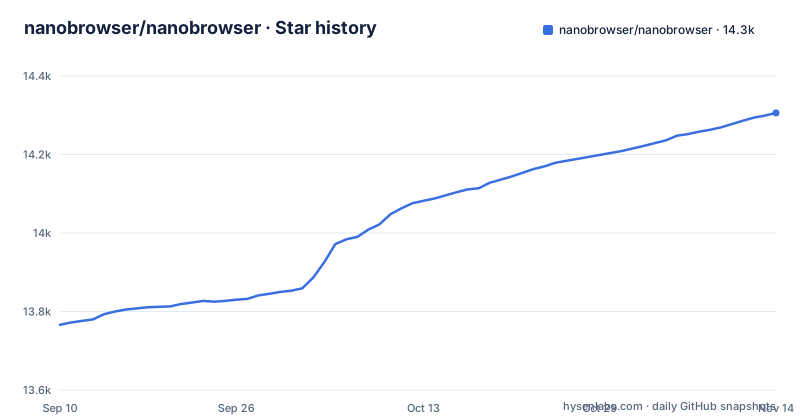
- nanobrowser/nanobrowser14,306 ★ · +540
| Repository | 2026-09-10 | 2026-11-14 |
|---|---|---|
| nanobrowser/nanobrowser | 13.8k | 14.3k |
540 Stars in the last 65 days, measured from the daily GitHub snapshot. Compare with other projects
Editorial analysis
A Chrome side-panel agent that clicks and types in your own tabs
Nanobrowser puts an LLM agent in Chrome's side panel. You describe a task in plain words, and the agent reads the open pages, clicks, types and switches tabs until the task is done. Everything runs inside your browser rather than in a remote browser somewhere else, and the model behind it is one you choose and pay for directly. There is no Nanobrowser subscription.
Each task gets its own tab group. That is how several tasks can run side by side while you keep browsing in other tabs, and it gives you a visible boundary for what the agent is touching. Results do not have to stay in the chat. The agent can write a CSV table or a Markdown report to your Downloads folder, and Chrome asks for permission the first time it does. You can attach images, text files or a screenshot of the current tab, and the agent can upload your files to a page.
The README's example prompts show the intended scale: summarising a page, comparing three open laptop listings in a table, or extracting the top 10 TechCrunch headlines from the last 24 hours into a CSV file. These are short research and data-gathering jobs, not unattended pipelines.
Ask mode, Auto mode and the three steps it always hands back
Permissions are the core of the design, and they are split into three tiers of action. Reading pages, clicking links, scrolling and moving between tabs proceeds without asking in both modes. Submitting, sending, deleting or uploading is where the modes differ: Ask mode, the default, stops and asks you first, while Auto mode goes ahead. Paying, entering a password or code, and granting access are never done by the agent in either mode. It hands those steps to you.
Per-site rules sit on top of the mode. In Settings → Permissions you can mark a site as Allow (the agent proceeds in both modes), Ask (it asks in both modes) or Block (the agent may not use it at all). That makes a mixed setup possible: Auto mode for a scraping-heavy research session, with your bank and email set to Block.
The README states that when the agent does recognise a step that needs you, your settings always apply and no AI model can change them. In other words, the rules are enforced by the extension, not left to the model's judgement. That guarantee covers recognised steps only, which is the subject of the next section.
Prompt injection and unrecognised steps: where Ask mode stops protecting you
Two failure modes are stated outright in the README, and both matter more than any feature list.
First, the agent may not notice every step that needs you. The permission tiers only fire when the agent classifies an action as a submit, a send, a payment or a password entry. A form that submits on an unusual control, or a destructive button with an unhelpful label, can slip through as an ordinary click. On a site where one click has consequences, Ask mode is not a full safety net. Block is.
Second, prompt injection. The agent treats text on a web page as information, never as orders, which the README says helps against pages that try to trick it, followed by the admission that no protection is perfect. Since the agent reads arbitrary pages and can act on them, a hostile page is a real risk, and the project's own advice is to use sites you trust, keep an eye on the agent and press Stop to take over.
The practical consequence: Nanobrowser is safe to the degree that you supervise it. Running Auto mode in the background across unfamiliar sites trades away the protections that make the tool reasonable to use.
Bring your own model, as long as it supports tool calling
Nanobrowser has no model of its own. Cloud providers listed in the README are Anthropic, OpenAI, Google Gemini, OpenRouter, xAI Grok, DeepSeek, Mistral and any OpenAI-compatible endpoint. Locally it works with Ollama and LM Studio, and with other servers such as llama.cpp and vLLM through the OpenAI-compatible provider. Under the hood, package.json pulls in the `ai` package (7.0.150) with the @ai-sdk/anthropic, @ai-sdk/google and @ai-sdk/openai adapters.
The hard requirement is tool calling. A model without it cannot drive the agent, and Test models in Settings checks each configured model and marks the ones that cannot be used. Model and reasoning effort are picked per conversation in the panel, with defaults in Settings. Vision models can also take screenshots of the page and read attached images.
Local models come with caveats. The README says they work best for simple, clear tasks, recommends Qwen3.8 27B, and asks for a context window of 16k tokens or more. Ollama refuses the extension until `OLLAMA_ORIGINS` allows it, and LM Studio needs CORS turned on. If you expect a small local model to handle a ten-tab comparison, expect to be disappointed. Long chats are kept going by summarising older steps automatically, while your own messages are always kept in full.
Installing the nanobrowser extension from the Chrome Web Store or building it with WXT
For most readers installation is one step: add Nanobrowser from the Chrome Web Store, where it is free. Then open the side panel, add an API key for a provider (or point it at a local server), run Test models, and give it a first task such as summarising the current page in a few bullet points.
Building from source is a WXT project. The repository has wxt.config.ts and an entrypoints/ directory, and the package.json scripts map to WXT: `dev` runs `wxt`, `build` runs `wxt build`, and `zip` runs `wxt zip`. A postinstall hook runs `wxt prepare`. Tests run with `vitest run`, and there are scripts that serve local fixtures and install a test copy of Chrome through fixtures/chrome.mjs.
One file deserves attention before a source build. The .env.example file configures PostHog analytics:
VITE_POSTHOG_API_KEY=
VITE_POSTHOG_HOST=https://us.i.posthog.com
According to the comments in that file, a production build (pnpm build) with both values set sends the anonymous daily ping, plus the usage counts and problem reports the user allows, to the PostHog project behind that key. Development and autorun builds never send to PostHog. A variable exported in your shell wins over the file, so if you have one set from elsewhere, unset it before building with `env -u VITE_POSTHOG_API_KEY`.
What leaves the browser: keys, pages and the anonymous daily count
The privacy claim is precise, and worth reading as stated. API keys stay in the browser and are sent only to their own provider. Page content goes only to the model you choose. Separately, a daily count of users and usage counts are sent without an ID, and they never include your pages or sites. PRIVACY.md in the repository holds the full policy.
That last point is the one to check if you work under a policy that forbids any outbound telemetry from browser extensions. The ping is anonymous, but it exists. Per .env.example, only a production build with both PostHog values set sends it, so a source build controls whether it happens.
The bigger exposure is the model provider, not Nanobrowser. Every page the agent reads goes to whichever model handles the chat, so pointing a cloud model at an internal admin page sends that page's content to the provider. A local model through Ollama or LM Studio keeps page content on your machine, at the cost of the task limits described above. Memory works the same way: whatever you tell the agent to keep in mind in every chat, such as who you are or how you like answers, travels to the model with each conversation.
No nanobrowser for Firefox: Chrome and Edge only
Supported browsers are Chrome and Edge, and that list is short on purpose. Firefox and Safari are not supported. Other Chromium-based browsers, named in the README as Opera, Arc and Brave, are not supported either. The README says Nanobrowser may work in them but that they are not tested.
For a Firefox user that is a full stop: there is no build to install. For a Brave or Arc user it is a gamble with consequences beyond a broken button. The permission model above depends on the extension correctly recognising and gating actions, and an untested browser is the last place to rely on that. If the agent misbehaves in Arc, the project has already said it does not test there.
The interface ships in English, Simplified Chinese and Traditional Chinese, in light or dark themes. Voice input is available, but only through OpenAI's or Gemini's voice model, using your key from that provider, so a local-only setup has no voice input.
A 0.x release line and the OpenAI Operator comparison
Nanobrowser describes itself as an open-source alternative to OpenAI Operator. The difference it claims is architectural: the agent runs in your own browser with your own key and your own choice of model, and the code is public under Apache-2.0, so you can read and modify how the agent decides what to click. Apache-2.0 permits modification and redistribution, with its notice and attribution terms attached.
The version number tells you to expect change. package.json is at 0.3.0. v0.3.0 shipped on 2026-10-15 and v0.2.0 on 2026-10-02, after a gap back to v0.1.13 on 2025-11-22. The last push was on 2026-10-24. Two minor releases in two weeks after a ten-month gap means settings, permission behaviour and supported providers can still shift between versions, and anyone building a routine around specific behaviour should re-check it after each update. The README links a Discord server and GitHub Sponsors, and AGENTS.md, CLAUDE.md and CONTRIBUTING.md sit at the repository root for contributors.
Editorial conclusion
Nanobrowser suits Chrome or Edge users who already pay for an LLM API, or run Ollama or LM Studio locally, and want an agent that works in their own tabs under Ask mode and per-site rules. It is the wrong choice for Firefox, Safari or Brave users, and for anyone who would leave Auto mode running unattended on sites holding money or credentials. Before installing, open Settings and run Test models against the model you plan to use, since a model without tool calling cannot drive the agent at all.
Frequently asked questions
What is Nanobrowser?
Nanobrowser is an open-source AI agent that runs as a Chrome extension in the side panel. You give it a task and it reads pages, clicks, types and moves between tabs, asking before it submits, sends, deletes or uploads anything.
How do you use Nanobrowser?
Install it free from the Chrome Web Store, add an API key for a cloud provider or connect a local model through Ollama or LM Studio, then describe a task in the side panel. The model must support tool calling, which Test models in Settings checks.
Is Nanobrowser safe to use?
In the default Ask mode it asks before submitting, sending, deleting or uploading, and it always hands payments, passwords, codes and access grants to you. The README also warns that the agent may not notice every step that needs you and that prompt injection protection is not perfect, so it advises using trusted sites and watching the agent.
Is Nanobrowser a free browser agent?
Nanobrowser is free with no subscription. You pay only your own model provider for API usage, or nothing extra if you run a local model.
Official sources
Add this badge to your README
If you maintain this project, the badge below links readers to this analysis and shows its maintenance status from the daily GitHub snapshot. Paste the markdown into your README; add ?metric=license or ?metric=stars to the image URL for a different field.

[](https://hysenlabs.com/projects/nanobrowser-nanobrowser)Star history chart for your README
[](https://hysenlabs.com/projects/nanobrowser-nanobrowser)Was this useful?