dns-proxy-server: a DNS server that resolves Docker container names
Solve your DNS hosts from your docker containers, then from your local configuration, then from internet
At a glance
- What is it?
- DPS is a Java DNS proxy aimed at developers and server administrators who need one hostname to resolve to different addresses per environment, answering container names, local configuration entries and wildcards before falling back to recursive resolution, with the trade-off that it needs the Docker socket.
- Who is it for?
- dns-proxy-server suits a team whose local or CI environments run many containers and want shared hostnames instead of hardcoded addresses, and it suits developers who need a local DNS entry that points back to their own machine. It is the wrong choice for a production resolver, since it must hold the Docker socket, and it is unnecessary for a single container that can be reached on a published port.
- Can I use it commercially?
- Yes. Apache-2.0 is a permissive licence: you can use, modify and sell software built on it, as long as you keep its copyright and licence notices.
- Is it still maintained?
- Activity is slowing. The repository last received commits 6 months ago.
- What is it written in?
- Mainly Java, according to GitHub's language statistics.
Answers come from the project's GitHub data, last synced on November 3, 2026, and from our analysis. They are not legal advice.
Star history
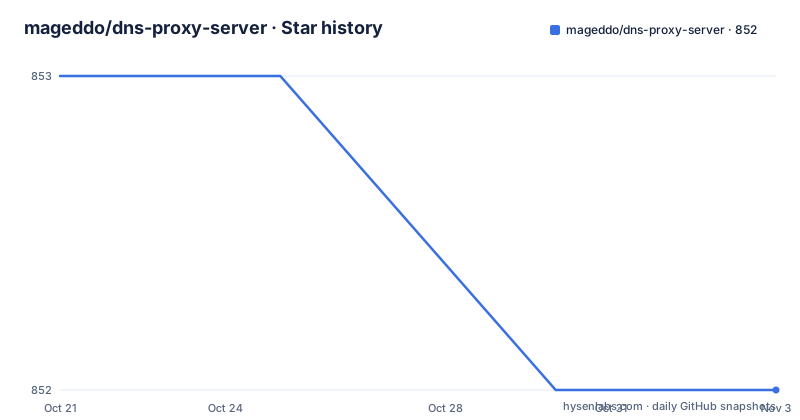
- mageddo/dns-proxy-server852 ★ · -1
| Repository | 2026-10-21 | 2026-11-03 |
|---|---|---|
| mageddo/dns-proxy-server | 853 | 852 |
-1 Stars in the last 13 days, measured from the daily GitHub snapshot. Compare with other projects
Editorial analysis
One hostname, different addresses per environment
DPS is described in the repository description as solving DNS hosts from your docker containers, then from your local configuration, then from internet. The README calls it a lightweight end user DNS server tool for developers and server administrators which makes it easy to develop in systems where one hostname can resolve to different IPs based on the configured environment.
That is the problem it solves. In a multi-container development setup, the address of a service is not known until the containers start, it changes every time you recreate them, and it differs between your laptop, a CI runner and a shared test environment. The usual workarounds are static host entries that go stale, or an application configured with environment specific URLs that have to be rewritten per environment.
DPS turns the container name into the hostname. Start a container named nginx-app and the name resolves; give a container the hostname nginx.dev and that resolves. The point is that the address becomes a property of the running system rather than something you configure twice.
The feature list in the README covers solving hostnames to Docker containers, solving hostnames from a local configuration database, recursive solving from a list of configured remote DNS servers, solving hostnames using wildcards or regular expressions, a graphic interface to create, list, update and delete A, AAAA and CNAME records, and solving the host machine IP through the host.docker hostname.
Every answer type the README demonstrates
The README walks through the resolution cases with nslookup commands against the local resolver on port 5555, and the set of examples is the clearest description of the product.
A container started with a name resolves by that name:
$ docker run --rm --name nginx-app nginx

$ nslookup -po=5555 nginx-app.docker 127.0.0.1
172.17.0.3
A container started with a hostname resolves by that hostname instead. A name registered ahead of time in the local configuration database at conf/config.json resolves to a configured address, for example dps-sample.dev returning 192.168.0.254. A public name such as google.com resolves through the remote DNS servers configured for recursive solving.
Two cases are more interesting. Stub hostnames such as nip.io and sslip.io are solved directly, so machine-1.192.168.0.1.stub returns 192.168.0.1 without any configuration. And the host machine is reachable through the fixed name host.docker, which returns the address of the machine running the containers.
That last one removes a recurring annoyance. Instead of hunting for the host IP to reach a service running on it, you configure the application to talk to host.docker and the DNS server tells it where the host is.
Wildcards let one name cover a whole subtree
The README shows a wildcard case where a container is started with a leading dot in its hostname:
$ docker run --rm --hostname .nginx.dev nginx

$ nslookup -po=5555 site1.nginx.dev 127.0.0.1
172.17.0.3
Any subdomain of nginx.dev then resolves to that container. This is how you run several instances of a service behind one hostname, with the wildcard covering whichever of them the caller addresses.
The feature list states that hostnames can be solved using wildcards or regular expressions, which is the general form of the same idea. Wildcards give you a family of names without an entry per name, and regular expressions give you a family of names that follow a pattern rather than a prefix.
The examples directory in the repository is organised around exactly these situations, with folders named wildcards, custom-hostnames-compose-file, pre-registered-hosts, docker-different-networks, using-same-compose-file, using-different-compose-files and api-gateway_service-discovery_reverse-proxy. Those names describe the situations people actually hit: the same compose file used by several people, different compose files with conflicting names, and containers on separate Docker networks.
Running it means giving the process the Docker socket
There are two ways to run DPS. You can download the latest binary release and run it natively, or use the Docker images on Docker Hub. The README points to separate documentation for running on Mac, Windows and Docker.
The native invocation on Linux or Mac is short:
sudo ./dns-proxy-server --server-port 5555 --register-container-namesTwo things to notice. The port is chosen by you with --server-port, and the process is started with sudo, which suggests it needs elevated privileges to bind a DNS port on the standard resolver port. And the --register-container-names flag is what tells the server to watch Docker for container names, so without it you get a plain DNS proxy without the container resolution.
The container image is built from a slim Debian base and wires the socket in explicitly:
FROM debian:12-slim
COPY ./build/artifacts/linux-amd64/dns-proxy-server /app/dns-proxy-server
WORKDIR /app
LABEL dps.container=true
ENV DPS_CONTAINER=1
VOLUME ["/var/run/docker.sock", "/var/run/docker.sock"]
ENTRYPOINT ["/app/dns-proxy-server"]
The VOLUME line for /var/run/docker.sock is the whole security story in two lines. The resolver needs the Docker API to learn container names and addresses, and giving a process the Docker socket is equivalent to giving it root on the host. The DPS_CONTAINER environment variable and the dps.container label tell the running server it is inside a container.
For a developer tool on a laptop that is a reasonable trade. On a shared or production host it is a decision that needs an owner's sign off.
A build matrix for amd64, aarch64 and a JRE image
The build system is Gradle, with build.gradle, gradle.properties, settings.gradle, gradlew and gradlew.bat at the top level, plus a builder.bash script. The interesting part is the matrix of Dockerfiles at the root.
There are separate builder and runtime Dockerfiles for linux-amd64, linux-aarch64, a static amd64 build, a JRE build and a frontend builder, plus Dockerfile.deploy. The compose file mirrors that with one service per variant, and each image tag is parameterised by a VERSION variable defaulting to snapshot:
  image-linux-aarch64:
    image: defreitas/dns-proxy-server:${VERSION:-snapshot}-aarch64
    build:
      context: .
      dockerfile: Dockerfile.aarch64

  image-linux-jre:
    image: defreitas/dns-proxy-server:${VERSION:-snapshot}-jre
    build:
      context: .
      dockerfile: Dockerfile.jre
The aarch64 service also declares platform: linux/arm64/v8, so ARM machines are first class rather than an afterthought, and there is a docker-compose-qemu.yaml for emulating those builds on other architectures.
The static and JRE variants cover two different deployment needs. A static binary needs no libc on the target, which matters for minimal images, and the JRE variant carries a Java runtime for environments where the system Java is not something you want to depend on.
Since the project is written in Java, the native binary route in the README is interesting: the release binaries are self-contained executables produced by the build, not a jar you run with java.
Versioning, licence and what the feature table does not tell you
The README includes a section on versioning and releasing, and points to a dedicated documentation page on how DPS controls its releases, so that you can use the most recent features and updates or prefer the more stable and older builds. That page is worth reading before you pin a version.
The release list on the repository is a mixture: 5.9.0 dated 2026-03-10, then 5.9.0-snapshot on 2026-01-14, then 5.9.1-snapshot on 2026-04-29. Snapshot versions appear alongside numbered releases, which is consistent with the compose file defaulting to snapshot images and with a project that ships a rolling build.
The comparison table in the README claims authoritative mode, recursive mode, secondary mode, caching, IPv6, wildcard support, DNS over HTTPS and RFC-1035 compliance, and a doh/ directory at the top of the repository is consistent with the DNS over HTTPS claim.
What the table does not include is any statement about the proxy's own security posture, and the README does not document how the proxy handles queries it cannot answer from containers or configuration. It also says nothing about a rollback procedure, or about how the local configuration database is edited other than through the graphic interface and the conf/config.json file.
The licence is Apache-2.0 with a LICENSE file at the repository root, and the project is maintained under an open source licence with a donation link and a badge asking for help keeping DPS up to date. The repository is not archived and the last push was on 2026-04-29.
Editorial conclusion
dns-proxy-server suits a team whose local or CI environments run many containers and want shared hostnames instead of hardcoded addresses, and it suits developers who need a local DNS entry that points back to their own machine. It is the wrong choice for a production resolver, since it must hold the Docker socket, and it is unnecessary for a single container that can be reached on a published port. Before adopting it, check the versioning documentation for how releases are cut, since the release list mixes plain versions with snapshot versions, and confirm that granting access to /var/run/docker.sock is acceptable in your environment before you run the container image.
Frequently asked questions
How do I run the dns-proxy-server and resolve a Docker container name?
Start the server with sudo ./dns-proxy-server --server-port 5555 --register-container-names, then run a container with a name and query it. The README shows docker run --rm --name nginx-app nginx followed by nslookup -po=5555 nginx-app.docker 127.0.0.1 returning the container address.
What permissions does the dns-proxy-server container image need?
The Dockerfile in the repository declares VOLUME ["/var/run/docker.sock", "/var/run/docker.sock"], so the server needs access to the Docker socket to discover container names and addresses. It also sets ENV DPS_CONTAINER=1 and the label dps.container=true.
Can dns-proxy-server resolve hostnames other than container names?
Yes. The README shows pre-configured entries resolved from conf/config.json, public names resolved recursively through configured remote DNS servers, stub hostnames such as nip.io and sslip.io solved directly, wildcards resolving all subdomains to one container, and the host machine address resolved through the fixed name host.docker.
Official sources
Add this badge to your README
If you maintain this project, the badge below links readers to this analysis and shows its maintenance status from the daily GitHub snapshot. Paste the markdown into your README; add ?metric=license or ?metric=stars to the image URL for a different field.

[](https://hysenlabs.com/projects/mageddo-dns-proxy-server)Star history chart for your README
[](https://hysenlabs.com/projects/mageddo-dns-proxy-server)Was this useful?