MALVIN-XD: deploying a feature-heavy WhatsApp bot
MALVIN XD Whatsapp Bot | World Best Whatsapp Bot | Made In Zimbabwe ɓy Malvin King
At a glance
- What is it?
- MALVIN-XD is a Node.js WhatsApp bot with media, group, AI, RPG, and status-handling features. Its hosted deployment templates simplify setup, while session credentials and an external API key remain operational dependencies.
- Who is it for?
- MALVIN-XD fits operators who want a broad WhatsApp bot feature set and can maintain a hosted Node.js service with an authenticated WhatsApp session. It is a poor fit for users needing the official WhatsApp Business API, documented rollback procedures, or a minimal auditable bot core.
- Can I use it commercially?
- Not without permission. GitHub finds no licence file in the repository, and without a licence all rights are reserved by default: you may read the code but not reuse it. Check the README, or ask the authors, before using it.
- Is it still maintained?
- Yes. The repository last received commits 24 days ago.
- What is it written in?
- Mainly JavaScript, according to GitHub's language statistics.
Answers come from the project's GitHub data, last synced on November 6, 2026, and from our analysis. They are not legal advice.
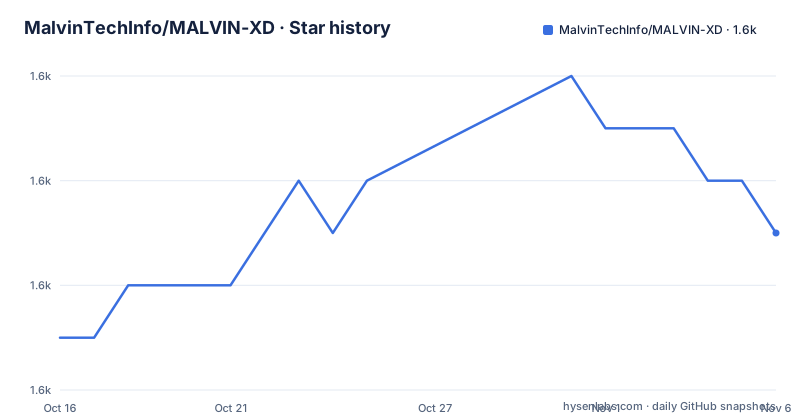
Star history
- MalvinTechInfo/MALVIN-XD1,585 ★ · +2
| Repository | 2026-10-16 | 2026-11-06 |
|---|---|---|
| MalvinTechInfo/MALVIN-XD | 1.6k | 1.6k |
2 Stars in the last 21 days, measured from the daily GitHub snapshot. Compare with other projects
Editorial analysis
What MALVIN-XD adds to a WhatsApp connection
MALVIN-XD addresses the problem of turning a WhatsApp connection into a command-driven bot without requiring the operator to assemble each capability separately. The README presents the project for people who want direct or group chat automation, media handling, status actions, games, and utility commands in one application. Its feature table marks support for status save and send, group operations, chatbot responses, downloads, anti-delete handling, AI, an RPG economy, status replies and reactions, automatic reactions, and call rejection.
The project is aimed at operators rather than ordinary chat users. A deployment is tied to a generated `SESSION_ID`, a public or private access `MODE`, an owner identity, and a `MALVIN_API_KEY`. Public mode allows anyone to use the bot, while private mode is documented as owner-only. That distinction makes access policy a deployment decision rather than a fixed characteristic of every installation.
This is not presented as an official WhatsApp Business API integration. The `package.json` identifies `@whiskeysockets/baileys` and `mrxd-baileys` as dependencies, while the project’s session website supplies a pairing code or QR code for connecting the bot. Operators are therefore responsible for a bot session model that differs from operating a business endpoint through WhatsApp’s official platform.
Inside MALVIN-XD's Node.js command architecture
The repository layout identifies `index.js` as the CommonJS entry point declared by `package.json`. Command implementations appear under the `king/` and `malvin/` directories, dividing the bot's behavior across modules rather than placing everything in one startup file. Configuration is externalized through `config.js` and `.env.example`, while deployment metadata is split among `app.json`, `render.yaml`, `railway.toml`, `heroku.yml`, `koyeb.yaml`, and several host-specific JSON files.
The documented data flow begins when a hosting service receives a `SESSION_ID` generated from the project’s pairing service. At startup, the application uses that session to connect to WhatsApp, loads runtime settings such as `MODE` and `TIME_ZONE`, and exposes bot commands. Persistence is selected through `DATABASE_URL`: the project uses PostgreSQL when a URL is supplied and falls back to a local `database.db` file when it is blank. That fallback suits a persistent host with a writable filesystem, but it is a poor match for deployments whose local storage is ephemeral.
The dependency list also shows why media commands require more than the WhatsApp connection. `ffmpeg-static`, `@ffmpeg-installer/ffmpeg`, `fluent-ffmpeg`, `sharp`, `jimp`, `adm-zip`, `file-type`, and `wa-sticke` point to processing for media, images, archives, and stickers. The `Dockerfile` installs `ffmpeg` in a Node.js 20 slim image, confirming that the official container includes system-level media tooling rather than relying only on npm packages.
Some declared dependencies use wildcard or floating versions, including `pm2` and packages marked `latest`. Unless the repository contains an exact lockfile, a rebuild can resolve a different dependency tree. The README does not explain dependency pinning or provide a reproducible upgrade procedure, so deployment owners should inspect the repository before rebuilding production instances.
Configuring the first MALVIN-XD session
The README directs users to fork the repository before deployment, then generate either a pairing code or QR code through `session.malvintech.co.zw`. The pairing page can generate a session without a fork, although the documented hosting workflow still expects the operator to deploy a copy of the repository.
Install the production dependencies with the same command used by the `Dockerfile`. A local process also needs FFmpeg because the container installs it as a system package.
npm install --omit=devConfigure the runtime through the variable names documented by the README and `.env.example`. `SESSION_ID`, `MODE`, `TIME_ZONE`, and `MALVIN_API_KEY` are required. `OWNER_NUMBER` and `OWNER_NAME` identify the operator, while an empty `DATABASE_URL` selects the SQLite fallback. The session and API key must come from their respective project services.
Start the development process through the exact script declared in `package.json`. The command runs `index.js` directly and should leave the Node.js process running while it attempts the WhatsApp connection.
npm run devThe README does not provide a terminal command for printing the bot menu or checking connection health after startup. Its feature table is the clearest description of intended commands, but it does not document individual command names, required arguments, permissions, or expected replies. A first operator can therefore configure and launch the process, but cannot reproduce a specific chat command from the README alone.
Heroku, Render, and Railway deployment paths
MALVIN-XD includes deployment descriptors for several hosted platforms, which is more useful than offering an undocumented single-server script. Heroku can build the repository from its `Dockerfile`. The README says the `heroku-postgresql:essential-0` addon is provisioned automatically and that `app.json` prefills the remaining settings, leaving `SESSION_ID` and `MALVIN_API_KEY` for the operator.
Render uses a different route. Its instructions require forking the repository, creating a Blueprint, and connecting that fork to Render. Render reads `render.yaml` and provisions a database named `malvin-db`. The documented prompt asks for `SESSION_ID` and `MALVIN_API_KEY`, while other settings use defaults. The README also states that Render’s free PostgreSQL lasts 90 days, after which the deployment needs an external `DATABASE_URL` from neon.tech or supabase.com, or it must rely on the SQLite fallback.
Railway configuration is present in `railway.toml`, but the README ends during the Railway instructions. The repository also contains `jexhost.json` and `stianhost.json`, suggesting additional hosting templates, but their exact settings and documented workflow are not available in the README and should not be inferred.
The container exposes port 5000 and starts through PM2. Its build stages are compressed below for clarity, without changing the documented runtime behavior.
FROM node:20-slim
WORKDIR /app
COPY package*.json ./
RUN npm install --omit=dev
COPY . .
EXPOSE 5000
CMD ["npm", "start"]
Media conversion and sticker processing can require more memory, CPU, and disk than a text-only chat service. The README does not document minimum host sizing, so those platform limits should be checked before moving a busy deployment into production.
Storage, session, and API-key constraints
MALVIN-XD offers two documented persistence paths. PostgreSQL is selected through `DATABASE_URL` and is used by the platform templates. Leaving `DATABASE_URL` empty falls back to `database.db` through SQLite dependencies. The fallback simplifies local setup, but it transfers availability and backup responsibilities to the host’s filesystem.
Session continuity is equally important. The README does not document a session replacement procedure, recovery after device removal, or a way to revoke and recreate a compromised `SESSION_ID`. It also does not say whether session state is stored through the pairing service or the configured database. Operators should not assume that a deployment restart automatically preserves or restores WhatsApp access.
The required `MALVIN_API_KEY` comes from the separate `api.malvintech.co.zw` dashboard. The README does not enumerate which commands consume this key, whether calls are metered, or whether every feature remains functional when that service is unavailable. This boundary matters because the feature table lists capabilities without identifying which are local and which depend on the hosted API.
Mode selection also affects exposure. The `.env.example` defaults to `MODE=public`, while the README defines `public` as usable by anyone and `private` as owner-only. A public bot exposes the same command surface to every user and may create downstream API usage without a documented rate or quota policy.
Limits, maintenance, and the lighter Baileys alternative
MALVIN-XD’s breadth creates its main limitation. The application combines WhatsApp session management, command dispatch, media processing, group behavior, status actions, AI access, an RPG economy, PostgreSQL or SQLite persistence, and PM2 process control. A failure can therefore originate in the host, session, API service, database, Node.js dependency, or media codec. The README does not provide troubleshooting procedures, a rollback guide, or per-feature dependency status beyond the feature table.
Maintenance activity is recent according to the repository record. The repository is not archived, its last push was on 2026-10-15, and `v3.0.0` was released on 2026-09-25 as “The RPG Update.” That does not guarantee compatibility with future WhatsApp or library changes. Migration cost rises where modules and broad media dependencies must be tested together.
The `package.json` declares the `MIT` license, although no separate repository license file is identified in the repository listing. That distinction matters when reviewing redistribution: the package metadata says MIT, but the README does not discuss licensing. Dependency licenses also require separate review because the project includes media, database, WhatsApp, translation, and utility packages.
A smaller alternative is to build directly on `@whiskeysockets/baileys`, which MALVIN-XD itself uses. That approach avoids adopting MALVIN-XD’s command menus, RPG economy, media stack, external API key, and hosting templates, but leaves the operator responsible for session handling, command routing, persistence, media dependencies, and process management. Choose MALVIN-XD for a broad ready-made command set; choose a smaller Baileys-based implementation when the added menu and hosting surface create more maintenance than the features justify.
Editorial conclusion
MALVIN-XD fits operators who want a broad WhatsApp bot feature set and can maintain a hosted Node.js service with an authenticated WhatsApp session. It is a poor fit for users needing the official WhatsApp Business API, documented rollback procedures, or a minimal auditable bot core. Verify first that the hosting plan supports the required Node.js and media-processing workload, that `SESSION_ID` and `MALVIN_API_KEY` are available, and that the selected PostgreSQL or SQLite storage model matches the deployment.
Frequently asked questions
What is MALVIN-XD used for?
MALVIN-XD is a Node.js WhatsApp bot with commands for media downloads and stickers, group operations, AI and chatbot responses, status handling, reactions, and RPG-style games and economy features.
How do I install MALVIN-XD?
The README recommends forking the repository and deploying it through prepared configuration for Heroku, Render, or Railway. A local development process is also declared as `npm run dev`, after dependencies and required environment values are in place.
Which environment variables does MALVIN-XD require?
The README marks `SESSION_ID`, `MODE`, `TIME_ZONE`, and `MALVIN_API_KEY` as required. `DATABASE_URL` is optional because an empty value falls back to a local SQLite database.
Official sources
Add this badge to your README
If you maintain this project, the badge below links readers to this analysis and shows its maintenance status from the daily GitHub snapshot. Paste the markdown into your README; add ?metric=license or ?metric=stars to the image URL for a different field.

[](https://hysenlabs.com/projects/malvintechinfo-malvin-xd)Star history chart for your README
[](https://hysenlabs.com/projects/malvintechinfo-malvin-xd)Was this useful?