angular-oauth2-oidc: Angular OAuth 2 and OIDC Integration Guide
Support for OAuth 2 and OpenId Connect (OIDC) in Angular.
At a glance
- What is it?
- angular-oauth2-oidc adds OAuth 2 and OpenID Connect flows to Angular applications, including Code Flow with PKCE, token refresh, userinfo, discovery, validation, and logout. It fits developers who want provider-facing protocol support inside Angular rather than a hand-built authentication client.
- Who is it for?
- Adopt angular-oauth2-oidc when an Angular application needs OAuth 2 or OIDC behavior across supported flows and identity providers. Do not choose it for a non-Angular client or assume that one flow suits every provider.
- Can I use it commercially?
- Yes. MIT is a permissive licence: you can use, modify and sell software built on it, as long as you keep its copyright and licence notices.
- Is it still maintained?
- Yes. The repository last received commits 126 days ago.
- What is it written in?
- Mainly TypeScript, according to GitHub's language statistics.
Answers come from the project's GitHub data, last synced on November 7, 2026, and from our analysis. They are not legal advice.
Star history
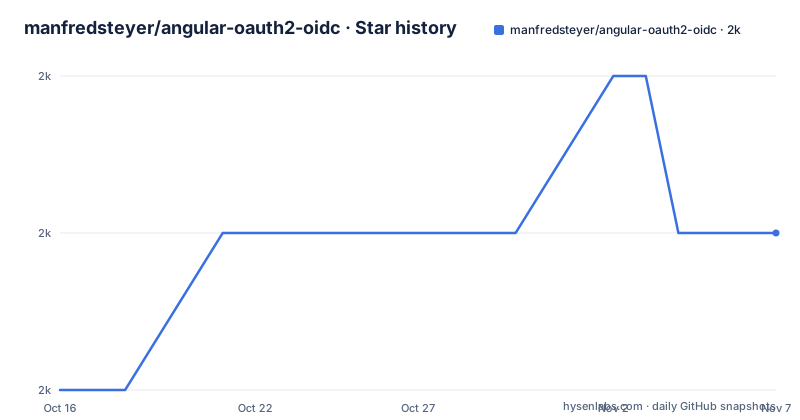
- manfredsteyer/angular-oauth2-oidc1,983 ★ · +1
| Repository | 2026-10-16 | 2026-11-07 |
|---|---|---|
| manfredsteyer/angular-oauth2-oidc | 2k | 2k |
1 Stars in the last 22 days, measured from the daily GitHub snapshot. Compare with other projects
Editorial analysis
Why angular-oauth2-oidc belongs in an Angular application
The project addresses a focused problem: an Angular single-page application often needs to delegate authentication to an external authorization server, receive tokens, call protected APIs, and restore or refresh its session after navigation or a page reload. Implementing that protocol behavior directly in application components tends to spread redirect handling, token state, validation, and expiry logic across unrelated parts of an application. angular-oauth2-oidc packages those responsibilities for Angular.
The intended users are Angular developers building applications that interact with OAuth 2 or OpenID Connect providers. The README lists IdentityServer, Keycloak, and Auth0 as server-side environments used for testing, and it also points to separate guidance for Azure Active Directory and Okta. That does not mean every provider configuration is identical. Client settings, supported grants, logout behavior, and claim details still belong to the selected provider.
The library covers more than the initial redirect. Its documented feature list includes token refresh, automatic refresh before expiry, discovery-document queries, userinfo queries, ID token claim validation, custom validation hooks, single sign-out redirects, and token revocation under RFC 7009. Code Flow with PKCE is the preferred direction for new applications because the README explicitly says it is prepared for OAuth 2.1. Implicit Flow and Password Flow remain documented features, but each creates a different security and provider-compatibility decision.
Standalone provider setup in Angular 15 and later
For an Angular 15 or later standalone application, first install the package in the project that owns the Angular application. The repository gives one installation command, with no additional runtime package in the same block:
npm i angular-oauth2-oidc --saveAfter installation, register `provideOAuthClient()` alongside the Angular HTTP provider in `main.ts`. The following is the standalone setup shown by the README. It boots `AppComponent` through `bootstrapApplication`, provides `HttpClient`, and makes the OAuth client API available to the application:
import { bootstrapApplication } from '@angular/platform-browser';
import { provideHttpClient } from '@angular/common/http';
import { AppComponent } from './app/app.component';
import { provideOAuthClient } from 'angular-oauth2-oidc';

bootstrapApplication(AppComponent, {
  providers: [
    provideHttpClient(),
    provideOAuthClient()
  ]
});
This is registration, not a complete login implementation. The README excerpt does not show the subsequent issuer, client ID, scope, redirect URI, or login-trigger code, so it would be misleading to invent those values. The generated source documentation linked by the repository is the place to continue with provider-specific configuration and the first authorization request. At this stage, a successful result is an application that builds with the OAuth provider installed and can inject the library's client services.
Angular 14 and NgModule compatibility
Angular 14 introduced standalone components, but it does not provide the standalone HTTP API used by the newer example. The repository therefore documents a different bootstrap arrangement for Angular 14. It imports `HttpClientModule`, wraps it with `importProvidersFrom`, and still calls `provideOAuthClient()`:
import { bootstrapApplication } from '@angular/platform-browser';
import { HttpClientModule } from '@angular/common/http';
import { AppComponent } from './app/app.component';
import { provideOAuthClient } from 'angular-oauth2-oidc';
import { importProvidersFrom } from '@angular/core';

bootstrapApplication(AppComponent, {
  providers: [
    importProvidersFrom(HttpClientModule),
    provideOAuthClient()
  ]
});
The version boundary matters. The README states that Angular 22 should use the library's 22.x release, Angular 21 should use 21.x, and the same pattern continues down the listed major versions. It also states that Angular 11 should use library version 10.x and Angular 6 should use version 4.x. This is not a recommendation to install the newest package automatically. The library major and Angular major are separate compatibility choices.
For applications that still use NgModules, the README retains the older module-based option for compatibility with existing code bases. The linked source documentation is more authoritative for an application that has not yet migrated to standalone providers.
Protocol behavior and security boundaries
Code Flow with PKCE sends the browser through the authorization server and returns to the Angular application with an authorization result that the client can exchange while using PKCE protection. The README describes this as the flow intended to remain safe for OAuth 2.1. That does not mean the library makes an incorrectly configured provider safe. Registered redirect URIs, allowed response types, client authentication settings, token handling, and provider policy still have to match one another.
The library can also use Implicit Flow, where the user is redirected to the identity provider, and Password Flow, where a user enters credentials into the client. Those choices are explicitly present, but they should not be selected merely because the API exposes them. Password Flow in particular places a credential-entry experience inside the client and depends on provider support. Code Flow with PKCE is the more appropriate default for a browser application when the identity provider supports it.
Automatic token refresh reduces the need for application code to coordinate every expiry, but it does not remove the need to define failure behavior. The README does not document in this excerpt how concurrent refresh failures, revoked sessions, offline browser startup, or provider outages are surfaced to application code. It also does not document rollback. Developers should inspect the source documentation for those cases before relying on a single global retry or navigation rule.
Provider coverage and configuration trade-offs
The README reports testing with Angular 4.3 through Angular 22 and names IdentityServer, Keycloak, and Auth0. Auth0 support is described as official since library version 10. It separately recommends an additional Azure Active Directory B2C article and points to Okta community guidelines. This is useful evidence of intended integration scope, but it is not a claim that the library controls every provider-specific behavior.
Discovery can reduce manual configuration by reading the authorization server's discovery document. That convenience depends on server availability and on the provider exposing the metadata needed by the client. The library also supports querying the userinfo endpoint, validating ID token claims against the specifications, and adding custom validations. These features create several separate trust boundaries. Discovery describes the server, userinfo returns user claims, and the ID token carries claims used for authentication. An application should not assume that one endpoint is a substitute for another.
Single sign-out is implemented by redirecting to the authorization server's logout endpoint. Token revocation is separately listed as RFC 7009 support. Logout and revocation are not necessarily interchangeable. The first concerns a browser session at the authorization server, while the latter concerns a token. The repository excerpt does not specify how they are coordinated in every provider, so that behavior belongs in acceptance testing rather than assumption.
Maintenance, releases, and the MIT license
The repository is not archived, and its last push was on 2026-07-05. Recent releases include 22.0.2 on 2026-07-02, 21.0.3 on 2026-07-02, and 22.0.1 on 2026-06-24. These dates indicate recent project activity. They do not remove the need to match releases to Angular versions, especially because the README documents different library majors for different Angular majors.
The stated release cycle is one major release for each Angular version, containing new features, bug fixes, and pull requests, with critical bug fixes on demand. Upgrade cost therefore includes more than changing a package version. An application may need to review Angular APIs, bootstrap configuration, provider setup, routing behavior, and provider-specific authentication code. The standalone and Angular 14 examples show why a bootstrap migration can itself affect the integration.
The package metadata declares the `MIT` license. That permits use and modification under the license's stated conditions, including preservation of its copyright and permission notice. It is not a security guarantee or a promise that the identity provider will accept every configuration. The repository includes `LICENSE`, and its build scripts copy that file into distribution output, which is a useful packaging detail for organizations that need the notice alongside distributed artifacts.
Editorial conclusion
Adopt angular-oauth2-oidc when an Angular application needs OAuth 2 or OIDC behavior across supported flows and identity providers. Do not choose it for a non-Angular client or assume that one flow suits every provider. Verify first that the selected library major version matches your Angular version, then configure the exact authorization server, redirect URI, client ID, and scopes required by that provider.
Frequently asked questions
How do I install angular-oauth2-oidc in an Angular project?
The README documents installing it with `npm i angular-oauth2-oidc --save`. For a standalone Angular application, register `provideOAuthClient()` in `main.ts` and provide Angular HTTP support.
Which angular-oauth2-oidc version should I use with Angular 22?
The README says Angular 22 should use a 22.x version of the library. It also lists corresponding major versions for older Angular releases, so the Angular version and library major should be selected together.
Does angular-oauth2-oidc support automatic token refresh and logout?
Yes. The README lists automatic token refresh before expiry and single sign-out by redirecting to the authorization server's logout endpoint. It also lists token revocation under RFC 7009.
Official sources
Add this badge to your README
If you maintain this project, the badge below links readers to this analysis and shows its maintenance status from the daily GitHub snapshot. Paste the markdown into your README; add ?metric=license or ?metric=stars to the image URL for a different field.

[](https://hysenlabs.com/projects/manfredsteyer-angular-oauth2-oidc)Star history chart for your README
[](https://hysenlabs.com/projects/manfredsteyer-angular-oauth2-oidc)Was this useful?