Master CSS: markup-driven CSS language with zero-runtime and runtime-rendering modes
A markup-driven CSS orchestration language for developers and AI agents.
At a glance
- What is it?
- Master CSS is a TypeScript CSS language that lets developers write styles in the markup layer and choose between zero-runtime compilation or in-request CSS generation. Setup documentation is at rc.css.master.co, not the README, and the default branch is named rc.
- Who is it for?
- Master CSS suits developers building markup-heavy applications who want styles colocated with HTML. Zero-runtime compilation is a genuine option for teams that need to avoid client-side overhead, and the 15 example integrations cover major JavaScript frameworks.
- Can I use it commercially?
- Yes. MIT is a permissive licence: you can use, modify and sell software built on it, as long as you keep its copyright and licence notices.
- Is it still maintained?
- Yes. The repository last received commits 15 days ago.
- What is it written in?
- Mainly TypeScript, according to GitHub's language statistics.
Answers come from the project's GitHub data, last synced on October 22, 2026, and from our analysis. They are not legal advice.
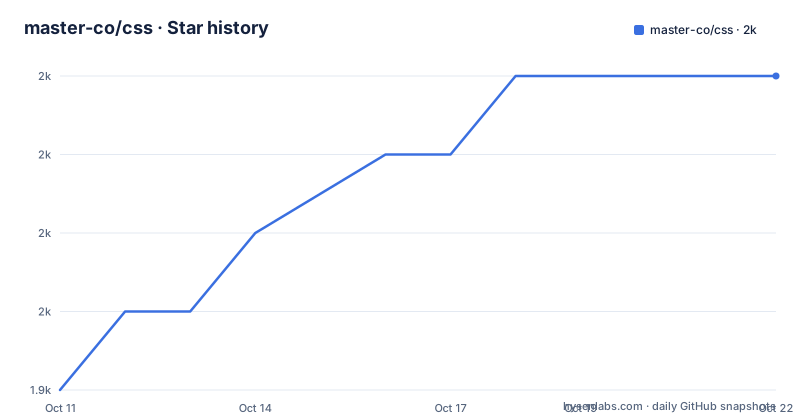
Star history
- master-co/css1,953 ★ · +4
| Repository | 2026-10-11 | 2026-10-22 |
|---|---|---|
| master-co/css | 1.9k | 2k |
4 Stars in the last 11 days, measured from the daily GitHub snapshot. Compare with other projects
Editorial analysis
Markup-driven CSS with separate zero-runtime and runtime-rendering execution paths
Master CSS describes itself as a markup-driven CSS orchestration language for developers and AI agents. Styles are expressed in the markup layer alongside HTML elements rather than in a separate stylesheet file, which is what markup-driven means in this context. Two execution modes appear in the project's topic metadata: zero-runtime and runtime-rendering.
Zero-runtime compiles styles away at build time, producing standard CSS with no JavaScript engine running at request time. Runtime-rendering generates CSS on demand, in the browser or on the server, based on the markup being rendered at that moment. Server-side rendering and progressive rendering also appear in the topic list, bringing the named delivery paths to 4 in total.
Each mode addresses a different delivery constraint. AI agents are explicitly named alongside developers as an intended audience, and dedicated documentation files at the repository root reflect that design decision.
Virtual CSS takes the Virtual DOM pattern and applies it to stylesheet generation
Virtual CSS, the concept at the center of Master CSS, is attributed in the README to the Virtual DOM, and a link to the React documentation on virtual DOM internals accompanies that credit. Virtual DOM keeps a virtual representation of the document tree in memory, diffing it against the real DOM before applying updates; Virtual CSS applies the same pattern to stylesheet management, maintaining a virtual representation of styles from which actual CSS is generated.
Runtime-rendering relies on that design to produce precisely the styles a given page needs at the moment they are needed, without requiring a complete CSS file written in advance. Zero-runtime inverts this: all virtual-to-real CSS resolution happens at build time, so no engine runs in the browser.
How the virtual CSS representation is structured, how invalidation works and what the performance profile of each mode looks like are not in the README; those details are in the documentation at rc.css.master.co.
Syntax extensions drawing on SASS and TypeScript rather than standard CSS alone
SASS and TypeScript are both cited in the README as inspirations for what it calls the concept of enhanced syntax. SASS extended CSS with nesting, variables, mixins and functions; TypeScript extended JavaScript with a type layer and compile-time checks. Master CSS follows the same pattern, adding a syntax layer on top of an existing standard that compiles or transforms into the base format.
Calling itself a language rather than a framework is the project's own characterization, and the distinction is meaningful. A framework applies patterns on top of an existing language; a language defines its own syntax rules. Standard CSS notation is the target output, but the input syntax is different.
What those extensions look like in practice is not demonstrated with any code example in the README. All syntax documentation and usage examples are at rc.css.master.co rather than in the repository.
@master/css is on npm, but install steps live at an external guide URL
@master/css is the npm package name for Master CSS, traceable from the badge in the README that links directly to npmjs.com/package/@master/css. Beyond the package name, the README provides no command-line steps, no package.json entries and no configuration file content.
Getting Started in the README is a single sentence: read the installation guide to set up Master CSS for an application. That link points to rc.css.master.co/guide/installation. Listed as the project's homepage is https://css.master.co, but the Getting Started link uses rc.css.master.co, a different subdomain. A developer following the README's own Getting Started instruction lands on documentation served from the rc subdomain rather than the main domain, and the README does not flag this distinction.
15 integration examples span frameworks from Angular to webpack, including CDN and Laravel
15 subdirectories in examples/ represent integration paths: angular, astro, blank, cdn, eslint, eslint-legacy, integration-lab, laravel, lit, next.js, nuxt.js, react, svelte, vite and webpack. None of these 15 directories is described in the README; what each integration covers requires reading the source code directly.
Coverage spans the major JavaScript front-end frameworks (Angular, React, Svelte), meta-frameworks (Astro, Next.js, Nuxt.js), build tooling (Vite, webpack), CDN delivery, a PHP framework (Laravel), a web components library (Lit), and ESLint configurations in 2 variants. An integration-lab directory sits alongside the named frameworks with no README description.
Verifying that any specific integration is complete requires reading the source code in that subdirectory directly, as the README makes no claims about the coverage depth or completeness of any example.
v2.0.0-rc.88 is the current version, and the default branch is named rc
v2.0.0-rc.88, released on 2026-07-24, is the current version; the last push was on 2026-09-28.
Default branch naming in the repository is rc rather than main, master or stable, and cloning the repository places a developer on rc-branch code by default rather than any stable tagged commit. That is a detail the repository's description does not highlight, so automated tooling and new contributors should check which branch they are on.
CI pipelines that assume main or master as the integration target require explicit adjustment. Any workflow file that pins to the default branch by name will target rc rather than a semantic version tag, and references to the branch in configuration should use rc explicitly rather than relying on default-branch resolution.
AGENTS.md and .ai/ document how AI tools should interact with the codebase
AGENTS.md, CLAUDE.md and a .ai/ directory are all present at the repository root. AI agents are named alongside developers in the project description as an intended audience, so this documentation is part of the design rather than an incidental addition.
AGENTS.md and CLAUDE.md are files that AI coding tools read to understand how to interact with a codebase: which commands to run, where functionality lives and which conventions apply. Their presence at the root signals that Master CSS is built for AI-assisted development from the start.
What these files contain is not described in the README, and whether they address the CSS language's syntax, the build process or contribution workflow requires reading them directly. This is the most concrete expression of the project description's claim that it is designed for AI agents.
SSR and progressive rendering appear as topics but receive no explanation in the README
Server-side rendering and progressive rendering both appear in the project's topic list alongside zero-runtime and runtime-rendering. All 4 mode names appear as separate, non-overlapping entries in the topic metadata.
Server-side rendering generates HTML with styles on the server before delivery to the browser. Progressive rendering builds the page in stages, adding styles as content becomes available. Both are standard terms; what Master CSS specifically means by them, and how they differ from the zero-runtime and runtime-rendering modes, is not explained in the README.
For developers choosing between SSR and progressive rendering in a Master CSS project, the README offers no configuration guidance, no description of the trade-offs and no comparison between the 4 modes. Documentation at rc.css.master.co is where those distinctions would be found.
Editorial conclusion
Master CSS suits developers building markup-heavy applications who want styles colocated with HTML. Zero-runtime compilation is a genuine option for teams that need to avoid client-side overhead, and the 15 example integrations cover major JavaScript frameworks. Before adopting, check css.master.co and rc.css.master.co: the default branch is rc, setup documentation lives on the rc subdomain, and the installation guide at rc.css.master.co/guide/installation is the only setup reference the README provides.
Frequently asked questions
What is Master CSS?
A markup-driven CSS orchestration language for developers and AI agents, written in TypeScript. It supports zero-runtime compilation, runtime-rendering, server-side rendering and progressive rendering as named execution modes.
How do I install Master CSS?
Getting Started in the README points to rc.css.master.co/guide/installation as the installation guide. No install command appears in the README. The npm package name is @master/css, from the badge in the README.
What JavaScript frameworks does Master CSS support?
15 integration examples are in the examples/ directory: Angular, Astro, CDN, ESLint (2 variants), integration-lab, Laravel, Lit, Next.js, Nuxt.js, React, Svelte, Vite and webpack.
What is the zero-runtime mode in Master CSS?
Zero-runtime is listed as an execution mode in the project's topic metadata. The README does not describe the mechanism; documentation at rc.css.master.co covers the details.
Does Master CSS support server-side rendering?
Server-side rendering is listed as a project topic alongside runtime-rendering, zero-runtime and progressive-rendering. Setup details are at rc.css.master.co, not in the README.
Official sources
Add this badge to your README
If you maintain this project, the badge below links readers to this analysis and shows its maintenance status from the daily GitHub snapshot. Paste the markdown into your README; add ?metric=license or ?metric=stars to the image URL for a different field.

[](https://hysenlabs.com/projects/master-co-css)Star history chart for your README
[](https://hysenlabs.com/projects/master-co-css)