vue-gtag wraps gtag.js so a Vue 3 app can send analytics events
Global Site Tag plugin for Vue (gtag.js)
At a glance
- What is it?
- vue-gtag is a Vue plugin around Google's gtag.js tagging API, published as an ES module with typed entry points. The README is short, and the interesting details sit in the manifest, where the peer dependency asks for Vue 3.5.13 while the README still says Vue 3.0.0.
- Who is it for?
- vue-gtag suits teams that want to send analytics events from Vue 3 components without hand-writing gtag calls in every view, and the typed entry point and sideEffects false marking make it a low-friction dependency for a bundler-based setup. It does not suit a Vue 2 project, since the plugin requires Vue 3, and it does not suit a team that wants a vendor-neutral analytics abstraction, because the API surface is tied to Google's tag platform.
- Can I use it commercially?
- Yes. MIT is a permissive licence: you can use, modify and sell software built on it, as long as you keep its copyright and licence notices.
- Is it still maintained?
- Activity is slowing. The repository last received commits 6 months ago.
- What is it written in?
- Mainly TypeScript, according to GitHub's language statistics.
Answers come from the project's GitHub data, last synced on November 7, 2026, and from our analysis. They are not legal advice.
Star history
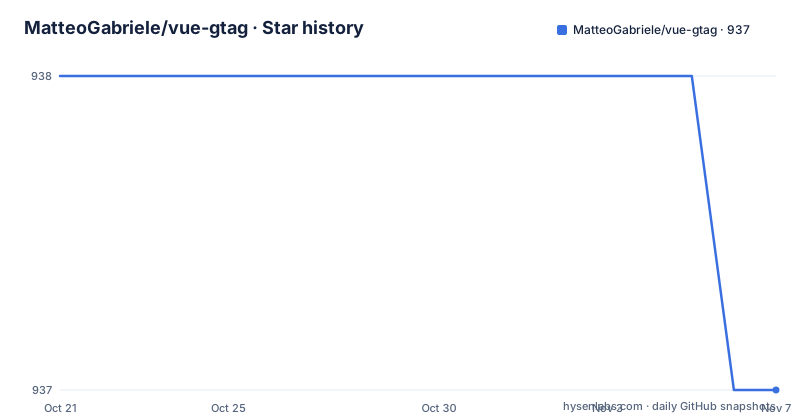
- MatteoGabriele/vue-gtag937 ★ · -1
| Repository | 2026-10-21 | 2026-11-07 |
|---|---|---|
| MatteoGabriele/vue-gtag | 938 | 937 |
-1 Stars in the last 17 days, measured from the daily GitHub snapshot. Compare with other projects
Editorial analysis
A Vue binding for Google's tagging API, not a new analytics service
vue-gtag is described in the repository as a Global Site Tag plugin for Vue, and in the manifest as Global Site Tag (gtag.js) plugin for Vue.
The distinction matters. gtag.js is Google's own tagging framework and API, and the README states that it allows you to send event data to Google Analytics, Google Ads and Google Marketing Platform. The plugin is a Vue-shaped layer over that API, not a different analytics product and not a wrapper around a competing tag manager. The README points at the official gtag.js developer guide for the general documentation, which is where the semantics of events, parameters and destinations are defined.
The audience is application developers who already have a Vue front end and a Google Analytics or Google Ads property, and who want the tracking calls to live inside the component tree rather than being sprinkled through a template or a global helper. The topics attached to the repository list analytics, google-analytics, gtags and tracking, which is the same picture.
What the plugin does not do is anything about consent, cookie handling or data residency. None of that appears in the README, so if those are requirements, they are yours to solve around the plugin rather than inside it.
One npm install and one requirement to check
Installation is a single npm command.
npm install vue-gtagThe README lists the requirement as Vue ^3.0.0 and nothing else, so a reader would reasonably expect the plugin to work with any Vue 3 release. The manifest tells a different story, which is covered in the next section.
The documentation lives outside the repository, at the gitbook site matteo-gabriele.gitbook.io/vue-gtag/, which the README links alongside the official gtag.js documentation. That is the reference for how to register the plugin, how to configure it and how to dispatch events. The repository itself carries no usage example, no configuration snippet and no code sample beyond the install command, so reading the site is not optional if you want to get past the first page.
For a package this small, that is a fair arrangement, but it does mean the repository tells you almost nothing about what the plugin does once it is installed.
The manifest asks for Vue 3.5.13 while the README says 3.0.0
This is the single most useful thing to notice before you install the package.
The README states the requirement as Vue ^3.0.0. The package manifest declares the peer dependencies as vue at ^3.5.13 and vue-router at ^4.5.0 or ^5.0.0.
"peerDependencies": {
  "vue": "^3.5.13",
  "vue-router": "^4.5.0 || ^5.0.0"
},
Those two statements cannot both be true for a given application. An app on Vue 3.4 satisfies the README and violates the manifest, which means a strict package manager such as pnpm will refuse or warn on the install, and a loose one will install a plugin that expects a Vue release it was not built against.
The peer dependency on vue-router is the second thing to note. It is declared unconditionally rather than as optional, so an application that does not use Vue Router at all is still asked to satisfy that range. The README says nothing about router integration, so the dependency is either a hard requirement of the implementation or an unnecessary constraint, and the repository does not say which.
The practical takeaway is to read the manifest rather than the README when you check compatibility, and to check it again after every minor bump of Vue.
An ES module with types, marked free of side effects
The manifest describes the published shape of the package precisely, and the shape tells you how it will behave in a bundler.
"type": "module",
"sideEffects": false,
"exports": {
  ".": {
    "types": "./dist/vue-gtag.d.ts",
    "import": "./dist/vue-gtag.js",
    "node": "./dist/vue-gtag.js"
  }
},
"main": "./dist/vue-gtag.js",
"module": "./dist/vue-gtag.js",
"types": "./dist/vue-gtag.d.ts"
Two details stand out. The package is ESM only, with no CommonJS export condition, so a project still on CommonJS output has to handle that at the bundler level rather than with a require call. And sideEffects false tells a bundler it can drop the import entirely when nothing uses it, which is the marking you want for a plugin that is not imported for its side effects alone.
Type declarations ship from the same entry point, so TypeScript users get types without a separate @types package. The files array restricts the published tarball to dist, and the package is authored by Matteo Gabriele with the issues tracker on GitHub.
The type field says module and the manifest has no bundler of its own, which fits a package that expects to be consumed by a bundler such as the Vite setup the repository itself uses.
The toolchain behind the releases: tsdown, vitest, biome and publint
The repository is a pnpm workspace with a single package at its root, and the scripts show a modern build and release pipeline.
"dev": "tsdown --watch",
"build": "tsdown",
"test": "vitest",
"test:once": "vitest run",
"typecheck": "tsc --noEmit",
"check": "biome check",
"validate": "pnpm typecheck && pnpm check && pnpm lint && pnpm test:once && pnpm build",
"prepublishOnly": "pnpm validate"
The build uses tsdown, configured in tsdown.config.ts, with vite.config.ts also present. Tests run under vitest, with jsdom in the dev dependencies, which suggests the test environment simulates a browser rather than running the plugin in Node. The type check is a separate tsc pass with noEmit, and biome handles both linting and formatting through the check and fix scripts, backed by a biome.json configuration.
Publishing is gated. The prepublishOnly script runs the full validate chain, and publint is a dev dependency, so the published tarball is checked for packaging correctness before it goes out. Releases are automated with semantic-release, which explains the .releaserc.json file and the CHANGELOG.md at the root, plus a separate plugin for semantic-release changelog generation.
That is a well ordered pipeline for a package this small, and it is also the answer to how the version numbers are produced: they follow commit messages rather than being chosen by hand.
v3.7.1 is the current tag and the last push was on 2026-04-25
The release history is short and regular. Version 3.6.3 was tagged on 2025-10-31, version 3.7.0 on 2026-02-02 and version 3.7.1 on 2026-04-25, with the manifest version matching the newest tag at 3.7.1. The pattern of a minor bump followed by a patch is what semantic-release produces for feature commits and fixes.
The repository is not archived, and the last push was on 2026-04-25. That date is the same day as the v3.7.1 tag, so the last recorded change to the default branch is the release itself rather than work that has landed since.
The licence field on the repository says MIT, which is permissive and places no copyleft obligation on applications that depend on the plugin.
For upgrade planning, the CHANGELOG.md is generated by semantic-release, so the entries are commit-driven rather than hand-written prose. That means you will find a list of changes without a narrative explanation of what changed for users, and the risk of a breaking change hiding in a minor bump is low but not zero. The peer dependency ranges are the part to watch, since a Vue upgrade can make a previously working install fail at the peer resolution step rather than at runtime.
The alternative: the gtag.js snippet without a Vue layer
The README points to the official gtag.js documentation, and that documentation is where the alternative approach lives: load the gtag.js script in your HTML and call the global gtag function yourself.
The difference in approach is straightforward. The direct approach has no Vue dependency at all, no plugin registration, no peer ranges to satisfy and no build step. In exchange, every event call is a manual function invocation, and there is no shared configuration object: settings such as which measurement IDs are active have to be threaded through whatever code sends the event.
The plugin approach inverts that. Configuration and event dispatch move into the Vue layer, so the same settings apply everywhere, and calls can be made from components that already have the plugin's context. What you give up is a dependency footprint and the version compatibility constraints described earlier.
For a single-page application with a handful of events, the direct approach is honestly enough, and it removes an entire class of upgrade problems. The plugin earns its place when the number of tracked events grows, when multiple teams need one agreed configuration, or when the application already depends on Vue Router and the peer dependency costs nothing extra.
Editorial conclusion
vue-gtag suits teams that want to send analytics events from Vue 3 components without hand-writing gtag calls in every view, and the typed entry point and sideEffects false marking make it a low-friction dependency for a bundler-based setup. It does not suit a Vue 2 project, since the plugin requires Vue 3, and it does not suit a team that wants a vendor-neutral analytics abstraction, because the API surface is tied to Google's tag platform. Before installing it, check that your app runs Vue 3.5.13 or newer and Vue Router 4.5.0 or 5.0.0, because those are the peer ranges in the manifest rather than the looser Vue 3.0.0 stated in the README.
Frequently asked questions
How do I install vue-gtag?
Run npm install vue-gtag. The README lists Vue ^3.0.0 as the requirement, while the package manifest declares peer dependencies of vue ^3.5.13 and vue-router ^4.5.0 or ^5.0.0.
Which Vue versions does vue-gtag support?
The README states Vue ^3.0.0, but the manifest peer dependency is vue ^3.5.13, so the effective floor is Vue 3.5.13. The package also declares a peer dependency on vue-router ^4.5.0 or ^5.0.0.
Does vue-gtag send events to Google Ads as well as Google Analytics?
The README describes gtag.js as a tagging framework that allows you to send event data to Google Analytics, Google Ads and Google Marketing Platform. The general gtag.js semantics are documented by Google, and plugin specific usage is documented on the project's gitbook site.
Official sources
Add this badge to your README
If you maintain this project, the badge below links readers to this analysis and shows its maintenance status from the daily GitHub snapshot. Paste the markdown into your README; add ?metric=license or ?metric=stars to the image URL for a different field.

[](https://hysenlabs.com/projects/matteogabriele-vue-gtag)Star history chart for your README
[](https://hysenlabs.com/projects/matteogabriele-vue-gtag)Was this useful?