Prosper: A user-space PS5 compatibility layer that skips CPU emulation
A user-space PlayStation 5 to PC compatibility layer for Linux, Windows, and macOS.
At a glance
- What is it?
- Prosper reimplements the PS5's OS, ABI, and GPU stack on Linux and Windows, running x86-64 game binaries natively. It is an experimental project with real retail titles booting, but it is not a general-purpose runner yet.
- Who is it for?
- Adopt prosper if you are a developer or researcher who wants to experiment with running PS5 retail dumps on Linux and can accept frequent breakage; do not adopt it if you need a reliable game runner for a library of titles. Before relying on it, verify that your specific games are listed in COMPATIBILITY.md and that your GPU supports the required Vulkan features, since only a small set of engines reach interactive menus.
- Can I use it commercially?
- Not without permission. GitHub finds no licence file in the repository, and without a licence all rights are reserved by default: you may read the code but not reuse it. Check the README, or ask the authors, before using it.
- Is it still maintained?
- Yes. The repository received new commits within the last day.
- What is it written in?
- Mainly C++, according to GitHub's language statistics.
Answers come from the project's GitHub data, last synced on October 22, 2026, and from our analysis. They are not legal advice.
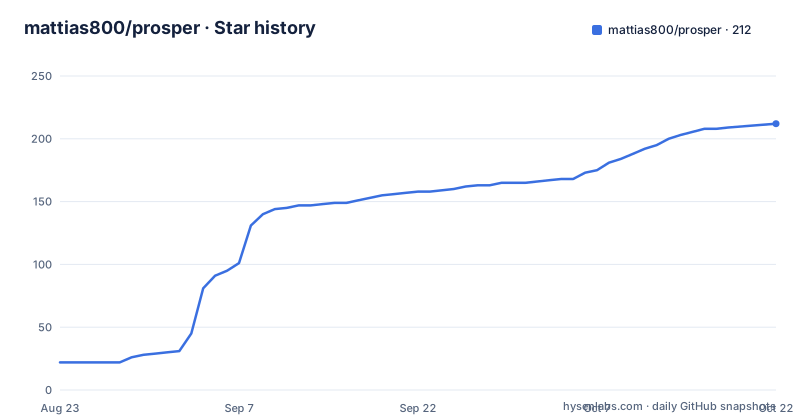
Star history
- mattias800/prosper212 ★ · +190
| Repository | 2026-08-23 | 2026-10-22 |
|---|---|---|
| mattias800/prosper | 22 | 212 |
190 Stars in the last 60 days, measured from the daily GitHub snapshot. Compare with other projects
Editorial analysis
What prosper actually solves
Prosper addresses a specific gap: running PlayStation 5 game binaries on a standard PC without emulating the CPU. Because the PS5 uses an AMD Zen 2 x86-64 processor, the game code can execute natively on any modern PC. The hard part is everything around that code: the console's operating system, its ABI, and its GPU command streams. Prosper reimplements those layers in user space, similar to how Wine handles Windows binaries. The intended user is a developer or researcher who has legally obtained a PS5 game dump and wants to run it on Linux, with Windows as a secondary target. It is not a tool for the average gamer looking to play a library of titles. The README is explicit: it is an experimental research project, not a general-purpose game runner.
Why no CPU emulation changes the architecture
The absence of CPU emulation shapes the entire design. Prosper loads Sony's SELF and ELF module formats and links multiple modules into one address space. It then performs high-level emulation of PS5 system libraries like libkernel, libc, libScePad, and libSceSaveData by thunking to host facilities: libc, pthreads, mmap, futex, and Vulkan. Where the guest's FreeBSD and SysV calling conventions differ from the host, it applies ABI translation. The graphics stack is the most involved part. PS5 games submit AGC command streams, and prosper decodes those into PM4 packets, folds them into a GPU register state, and builds Vulkan pipelines from that state. It also includes a from-scratch RDNA2 to SPIR-V shader recompiler, which translates the GPU ISA rather than emulating it. This approach is possible because the PS5 and many AMD Linux machines share the RDNA2 GPU family, which is why Linux is the primary target.
How to get it running: build and run basics
The README does not include a full build guide in the visible portion, but it names the frontend as prosper-app. That is the windowed application that presents the rendered output. To run a game, you must supply your own legally obtained dump, with unencrypted segments. The README stresses that no game files, assets, keys, or data are redistributed in the repository. The project builds from source, and the primary language is C++. You would clone the repository and build prosper-app, then point it at a dump. The exact commands are not in the visible material, so you would need to inspect the repository's build files. The README does mention that the frontend uses an optional SDL3 dialog frontend for system dialogs, so SDL3 may be a dependency. The project targets Linux first, with Windows as a secondary platform, and macOS is listed in the description but the README focuses on Linux.
What the graphics stack actually does
The graphics translation is the core engineering effort. Prosper decodes AGC command streams into PM4 packets, which are the low-level command format for AMD GPUs. Those packets update a register state that describes pipeline configuration, render targets, blend state, and more. From that state, prosper constructs real Vulkan graphics pipelines. The shader recompiler translates RDNA2 GPU ISA into SPIR-V, covering scalar and vector ALU operations, divergent control flow through EXEC-mask predication, and memory operations like MUBUF and MIMG. It also handles texture tiling: it de-swizzles GFX10 SW_4KB_S and SW_64KB_S formats for element sizes from 1 to 16 bytes, and decodes BC1 through BC7 and BC6H block compression. The result is a live renderer that respects the game's fast-clear color, per-MRT color write masks, and render-to-texture caches for multi-pass effects. The README claims pixel-verified output, and it includes screenshots of several retail titles running at native resolutions.
Real limitations and failure modes
The most obvious limitation is compatibility. The README states that tested retail titles reach different milestones and still expose substantial compatibility gaps. Some games only reach a menu or a tutorial room, not full playable sessions. For example, Syberia: Remastered is described as having a restored 3D scene that is still overexposed. That means graphics fidelity is not yet correct for all titles. Another limitation is that you must provide an unencrypted-segment dump of a game you legally own. That is a high barrier for most users. The project also depends on the host GPU supporting Vulkan and the RDNA2 feature set; if you have an NVIDIA or Intel GPU, the README does not promise support, and the focus on Linux with RDNA2 suggests those setups are secondary or unsupported. Finally, the project is at version 0.2.0 as of August 2026, which is early stage. Expect crashes, missing features, and no guarantee that a specific game will boot.
How it compares to emulators like RPCS3
The closest alternative is a full system emulator, like RPCS3 for the PlayStation 3. That project emulates the CPU, GPU, and entire console hardware, which allows it to run games on any architecture but at a significant performance cost. Prosper takes the opposite approach: it relies on the fact that the PS5 uses an x86-64 CPU, so it can run game code natively and only translate the OS and GPU layers. That is why the README says it is shaped like Wine, not like an emulator. The trade-off is that prosper is tied to the PS5's specific hardware conventions, particularly the RDNA2 GPU and the AGC command format. An emulator like RPCS3 is more portable but slower. For a PS5, there is no mature emulator yet, so prosper is effectively a research prototype that could lead to a faster path than full emulation, but it is far from a drop-in replacement for a console.
Maintenance, license, and upgrade cost
The repository is actively maintained, with the latest release v0.2.0 pushed on August 2, 2026, just weeks after v0.1.0. That indicates a fast development pace, but it also means the codebase is changing quickly. Upgrading between versions may require rebuilding and possibly adapting to new configuration or command-line options, though the README does not describe a stable API. The license is listed as unknown in the repository metadata, which is a red flag for adoption. Without a clear license, you cannot legally reuse the code in your own projects or distribute modified versions. You would need to contact the author or check the repository for a LICENSE file, but the visible material does not mention one. The project also has a CI system that validates SPIR-V modules with spirv-val, which suggests a level of quality control, but that does not replace a license. For any serious use, verifying the license is the first step.
Editorial conclusion
Adopt prosper if you are a developer or researcher who wants to experiment with running PS5 retail dumps on Linux and can accept frequent breakage; do not adopt it if you need a reliable game runner for a library of titles. Before relying on it, verify that your specific games are listed in COMPATIBILITY.md and that your GPU supports the required Vulkan features, since only a small set of engines reach interactive menus. The project's own README warns it is experimental, so treat every milestone as provisional.
Frequently asked questions
What is prosper, the PS5 compatibility layer?
It is a user-space layer that runs PS5 code, called Prospero after the codename, on Linux and Windows. Because the console is x86-64, guest code runs natively and there is no CPU emulation; the work is module loading, library reimplementation, ABI translation and AGC to Vulkan conversion.
Does prosper contain game files, keys or decrypted code?
No. You supply your own legally obtained dump, and the project holds no console keys, performs no decryption, and operates only on module segments that are already unencrypted. It also refuses to link the third-party library replacements some dumps carry.
What licence does the prosper repository have?
None. No LICENSE file exists yet, so no licence is granted by default, and the README says to open an issue to ask, which leaves the licence field empty as well.
How does prosper decide whether a title counts as working?
Progress is defined by a six-rung ladder per title. A game loop running over a black screen is not gameplay and a build that compiles is not progress, and per-title results are recorded in COMPATIBILITY.md.
How does prosper verify its claims?
Verification is programmatic through docs/VERIFICATION.md: Vulkan tests assert numeric and pixel results, a spirv-val gate runs on every SPIR-V emitter, and golden-image guards run over real boots. Falsified hypotheses are recorded in a Ruled out section.
Where are the build and test commands for prosper?
In BUILDING.md, which holds dependencies, build and test commands and how to launch a dump. The charter, CLAUDE.md, also carries build and run recipes, and no build command is reproduced in the README itself.
Official sources
Add this badge to your README
If you maintain this project, the badge below links readers to this analysis and shows its maintenance status from the daily GitHub snapshot. Paste the markdown into your README; add ?metric=license or ?metric=stars to the image URL for a different field.

[](https://hysenlabs.com/projects/mattias800-prosper)Star history chart for your README
[](https://hysenlabs.com/projects/mattias800-prosper)