openscience publishes with your own machine's credentials
The open-source AI workbench for scientific research
At a glance
- What is it?
- A research agent with a workbench around it, where permissions are the most concrete thing described, publishing and uploads run from the lead session using the machine's own GitHub and Hugging Face logins rather than a token pasted into chat, the bundled skill count comes with a caveat that the tools those skills name may not be installed, and one adapted skill records the exact upstream commit it came from.
- Who is it for?
- openscience is worth evaluating if your research work is a lot of real execution rather than ideas, because the file grants, the per host network consent and the trace left by every step are the parts it commits to. Two things to weigh first.
- Can I use it commercially?
- Yes. Apache-2.0 is a permissive licence: you can use, modify and sell software built on it, as long as you keep its copyright and licence notices.
- Is it still maintained?
- Yes. The repository received new commits within the last day.
- What is it written in?
- Mainly TypeScript, according to GitHub's language statistics.
Answers come from the project's GitHub data, last synced on November 15, 2026, and from our analysis. They are not legal advice.
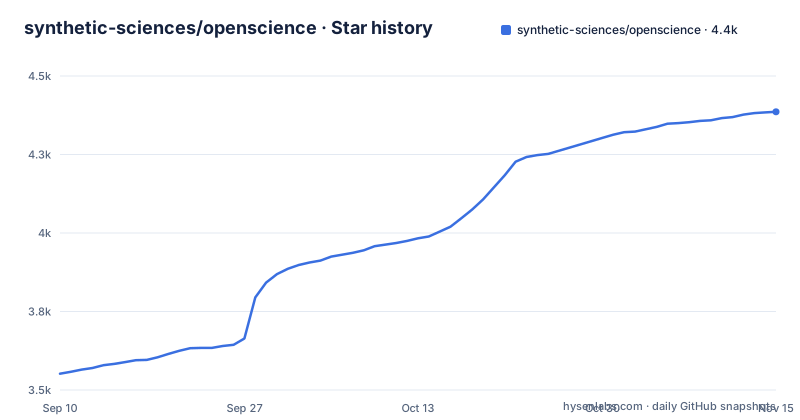
Star history
- synthetic-sciences/openscience4,386 ★ · +834
| Repository | 2026-09-10 | 2026-11-15 |
|---|---|---|
| synthetic-sciences/openscience | 3.6k | 4.4k |
834 Stars in the last 66 days, measured from the daily GitHub snapshot. Compare with other projects
Editorial analysis
Three names for one project across three files
It describes itself three ways and they are not interchangeable. The repository summary calls it the open source AI workbench for scientific research. The private root package calls itself an AI powered command line tool for machine learning research and development workflows, which is a narrower framing. And the name a user actually installs is a third thing, a scoped package on the npm registry, one of the four links in the badge row at the top of the page. Underneath the naming there is a similar split in tooling. The development instructions use the JavaScript runtime the manifest pins as its package manager, and the tree carries that runtime's lockfile and its configuration file, while the installation instructions tell users to install with npm. Two toolchains for two audiences, which is ordinary, and three self-descriptions, which is less so.
Permissions are the most concrete thing the page describes
Three choices are offered: always ask, ask only for risky actions, or full access. Two rules sit underneath them. Network commands ask once per destination host, so a crawl across fifty hosts is fifty prompts rather than one blanket yes. And files outside the project folder are read or written only with an explicit grant, which means the working folder is a boundary rather than a default. That combination is the clearest safety story in the document, and it is stated in terms of what the tool will not do without being told, rather than in terms of what it protects you from. The related scoping rules are equally plain: a conversation works in the project's connected folder, caches and throwaway output stay in a per session scratch space.
Publishing uses the machine's logins, and no token is asked for in chat
The most consequential sentence on the page is about credentials. It says publishing stays with you: pushes, releases and uploads run from the lead session using this machine's own GitHub and Hugging Face logins, and no token is ever asked for in chat.
openscience keys add        # your own API key
openscience local add       # Ollama, LM Studio, or another local endpoint
The design is deliberate and sensible. A conversational agent that can push to a repository should not be handed a fresh long-lived token by a user who pastes it into a prompt, and routing through the machine's existing logins means the credential never enters the transcript. The trade is that the agent inherits whatever those logins can do, which is a broader grant than a scoped token would be, and the page's mitigation for that is the permission ladder rather than a boundary.
The skill count comes with a caveat about availability
The claim is hundreds of bundled skills across biology, chemistry, physics, machine learning and data engineering, with connectors to databases including ChEMBL, UniProt, PubMed and arXiv. Then, further down the same page, there is a sentence that qualifies the whole thing: a skill describes a procedure, and it does not mean every tool or service it references is installed, with the instruction to check availability in the customize screen before a substantial task. That is an honest gap between the headline number and the working state, stated by the project. It is also the difference between a library of procedures and a library of working integrations, and a reader planning a run around one skill needs to know which of those they have.
The BioNeMo section states its provenance down to the commit
One integration gets more careful treatment than the rest of the page combined. OpenScience ships ten bring-your-own-key adapters for NVIDIA's BioNeMo endpoints, and they are named individually: Boltz-2, DiffDock, Evo 2, GenMol, MolMIM, MSA Search, OpenFold2, OpenFold3, ProteinMPNN and RFdiffusion. Each has a strict request schema, one approval per dispatch, and hashed artifacts written into the session, and each is marked experimental and needs your own NVIDIA API key under NVIDIA's service terms.
The `protein-binder-design` skill is adapted from the [NVIDIA BioNeMo Agent Toolkit](https://github.com/NVIDIA-BioNeMo/bionemo-agent-toolkit) (CC-BY-4.0 skills, Apache-2.0 code), pinned at commit `0e67a61`.Pinning an upstream adaptation to a commit, and naming that the upstream's skills and code carry different licences, is the provenance handling you would want and rarely get.
Four compute targets, and none of them start without approval
Local kernels cover everyday work, and the remote targets are named as Modal, SSH hosts, and Slurm and PBS clusters for GPUs and long jobs. The important clause is at the end: they are approved before they run. So the same permission ladder that governs a file write governs sending work to a cluster scheduler, and the approval is a separate step rather than a side effect of choosing the target. The bundled server-side adapters follow the same pattern, with one approval per dispatch rather than a blanket grant for the session.
Four install routes, and the npx name is not the package name
The install section gives four ways in, and they are not the same command.
npm install -g @synsci/openscience
opensciencenpx synscicurl -fsSL https://openscience.sh/install | bashThe global install runs a command named after the project; the no-install form runs a shorter name that is not the package name; and the third pipes a remote script into a shell. Alongside a desktop build for three desktop systems that updates itself, that is four routes with three different identifiers. The follow-up step is consistent, though: you connect a provider either through the settings screen or from the terminal.
Seven worker kinds, one placeholder column, three patches in three days
The architecture diagram says the lead agent can hand bounded work to workers and keeps the synthesis and the final say, and it counts them: two general kinds, one for exploring and one for general work, plus five domain specialists. So the delegation surface is seven worker types behind one leader, which is a more concrete number than the prose version of the same claim. One smaller thing. The release train is steady: v2.0.151, v2.0.152 and v2.0.153 were cut on 2026-10-05, 2026-10-18 and 2026-10-30.
Editorial conclusion
openscience is worth evaluating if your research work is a lot of real execution rather than ideas, because the file grants, the per host network consent and the trace left by every step are the parts it commits to. Two things to weigh first. Publishing is delegated to the machine's existing credentials, so anything that reaches a shell inherits them, and the project's answer to that is its three permission levels rather than a sandbox. And the bundled skill library counts procedures rather than installed tools, so check what is actually present before planning a run around one.
Frequently asked questions
What exactly is open science?
This repository is not about that movement. OpenScience is an AI research agent with a workbench around it: you describe a task in plain language and it plans, gathers evidence, runs code and experiments, then hands back results with the trace of what it did.
what is openscience
A research agent plus a workbench, offered as a desktop application, a browser workspace and a terminal command, running on your machine against your files. Model access is bring your own API keys, a supported provider, a local model, or Ace, the managed pay-as-you-go option.
how to use open science framework
Install it globally from the package registry, download the desktop build, or use the standalone installer. Then open a project folder with the command, connect a provider through the settings screen or the keys subcommand, and describe the work in plain language. Start with the plan command when you want to agree on the method before it runs.
openscience vs claude science
The README describes one tool, its four compute targets, its three permission levels and the approval it requires before any remote work runs.
open science vs open source
Not a question this repository addresses. Its own licensing is Apache 2.0, and one bundled skill is adapted from a third-party toolkit whose skills and code are described as carrying different licences, pinned to a specific upstream commit.
Is OpenScience free?
The source is under Apache 2.0, and there is a self-updating desktop build, a global package install and a standalone shell installer. Model access is the part you pay for: bring your own API keys, sign in to a provider, run a local model, or use Ace, the managed pay-as-you-go option.
Official sources
Where developers are discussing it
Posts on Hacker News, dev.to and Lobsters that link to this repository, found by our scan of those communities. 1 in the last 30 days; newest first.
- Open Science: The open-source AI workbench for scientific researchHacker News · Oct 31, 2026 · 2 points · 0 comments
Add this badge to your README
If you maintain this project, the badge below links readers to this analysis and shows its maintenance status from the daily GitHub snapshot. Paste the markdown into your README; add ?metric=license or ?metric=stars to the image URL for a different field.

[](https://hysenlabs.com/projects/synthetic-sciences-openscience)Star history chart for your README
[](https://hysenlabs.com/projects/synthetic-sciences-openscience)Was this useful?