maurodesouza/profile-readme-generator: a Next.js tool for building a GitHub profile README
🎨 Enhance your GitHub profile with this amazing tool, which allows you to create a personalized README quickly and easily. This profile README generator is the best you'll find 🚀
At a glance
- What is it?
- A self-hostable Next.js app that assembles a GitHub profile README from form fields instead of hand-written markdown. It is a UI, not a hosted service, and that shapes who should adopt it.
- Who is it for?
- Adopt it if you want a GitHub profile README built through a form UI and you are willing to run a Node 22 and pnpm 10.12.4 workspace yourself, or to use the hosted demo at profile-readme-generator.com. Do not adopt it if you need a hosted API, an AI writing assistant, or an animated SVG pipeline: the README describes none of those.
- Can I use it commercially?
- Yes. MIT is a permissive licence: you can use, modify and sell software built on it, as long as you keep its copyright and licence notices.
- Is it still maintained?
- Yes. The repository last received commits 33 days ago.
- What is it written in?
- Mainly TypeScript, according to GitHub's language statistics.
Answers come from the project's GitHub data, last synced on November 7, 2026, and from our analysis. They are not legal advice.
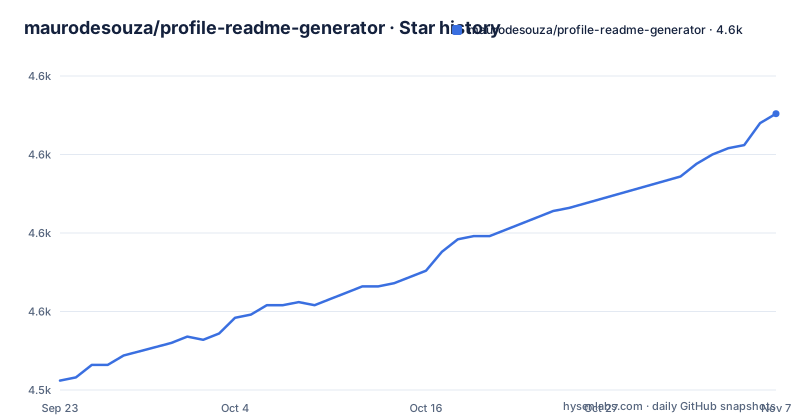
Star history
- maurodesouza/profile-readme-generator4,613 ★ · +85
| Repository | 2026-09-23 | 2026-11-07 |
|---|---|---|
| maurodesouza/profile-readme-generator | 4.5k | 4.6k |
85 Stars in the last 45 days, measured from the daily GitHub snapshot. Compare with other projects
Editorial analysis
What the profile-readme-generator actually produces
GitHub renders a special README from a repository named after your username, and that file is the first thing many visitors see. Editing it by hand means writing markdown, previewing it, and pushing a commit for every tweak. This project replaces that loop with a form: you fill in fields, the app renders a preview, and you copy the generated markdown into your profile repository. The README frames the target audience as people who are "tired of manually editing your GitHub profile", and the homepage at profile-readme-generator.com is the demo entry point. The output is plain markdown, so nothing about the result depends on the generator staying online. That is the important design property: the tool is a composition aid, and the artifact it produces outlives it.
Next.js, MobX and a client-side markdown pipeline
The stack is visible from package.json. The app runs on Next.js 16 with TypeScript, styled with Tailwind CSS 4 through @tailwindcss/postcss, and state lives in MobX with mobx-persist-store, which means form state survives a page reload in the browser rather than being saved to an account. UI primitives come from Radix packages (dialog, dropdown-menu, popover, switch, context-menu), with cmdk for command input and lucide-react for icons. Rendering is client-side: react-markdown and html-react-parser turn the composed markdown back into a preview, prismjs handles syntax highlighting, html-prettify formats the emitted HTML, and uuid generates identifiers. There is no database dependency in the dependency list, which fits a tool whose job is to hand you a string. next-intl is in the dependency list for internationalization. The repository also carries vitest.config.ts and playwright.config.ts, so unit and end-to-end test setups are both committed.
Installing the profile readme generator and running it locally
The README's requirements section asks for Git and Node, and recommends nvm for managing Node versions. The clone and start instructions in the README use yarn, while package.json declares [email protected] as the package manager and the Dockerfile activates that exact pnpm version through Corepack. Pick one and stay with it; mixing them will produce a lockfile mismatch, since pnpm-lock.yaml is the committed lockfile.
git clone https://github.com/maurodesouza/profile-readme-generator
cd profile-readme-generator
yarn
yarn dev
The README states the server initializes at http://localhost:3000 after yarn dev. If you prefer pnpm, the equivalent is pnpm install followed by pnpm dev, which matches the dev script defined in package.json. For a container build, the Dockerfile is a multi-stage setup that starts with a dependencies stage running pnpm install --frozen-lockfile on node:22.16.0-slim, and a builder stage that copies node_modules forward and runs the Next.js build in standalone mode. Two build arguments, NEXT_PUBLIC_APP_URL and NEXT_PUBLIC_API_URL, are declared and passed through as environment variables, and the Dockerfile comment notes they can be injected by Coolify. Once the dev server is up, the first real use is filling the form and copying the markdown preview into a repository named after your GitHub username.
Where this generator stops being the right tool
The generator composes markdown. It does not host anything, schedule anything, or keep your profile in sync. If you want a profile that updates itself from live data, this is the wrong layer: you would need a scheduled job or a GitHub Action that regenerates and commits the file, and the README describes no such workflow. The README also does not document rollback, versioning of generated output, or a way to diff two generations, so treating the tool as a source of truth for a profile you edit in several places will drift. A second constraint is the runtime. The tool is a Next.js application with a build step and a Node version pinned in the Dockerfile; anyone expecting a static HTML file they can drop on a CDN will be surprised by the dependency tree, which includes MobX, Radix, Framer Motion and Prism. Finally, the repository is private:true in package.json, so it is not published as an installable npm package. There is no CLI to script; the supported path is the web UI, locally or at the hosted demo.
How it differs from template repositories and hand-written markdown
The common alternative is a template repository: you fork a profile README, replace the placeholders, and maintain the markdown yourself. Templates give you a fixed layout and no build step, but every change is manual editing, and adding a new badge or section means writing the markdown and the HTML for it. This generator inverts that. The layout is assembled from form inputs, and the markdown is emitted for you, at the cost of running a Next.js app. The other alternative is writing the README by hand with no tooling at all, which is the most flexible option and the one the README explicitly positions itself against. If you already know markdown well and your profile changes twice a year, hand-writing is less work than cloning and building this. The generator earns its place when you want many sections, icon grids and badges composed quickly, or when you want a preview loop that does not require pushing a commit to see the result.
Maintenance, upgrades and the MIT licence question
The last push to the default branch was on 2026-10-06, so the project is not dormant, but nothing in the repository describes a release cadence and it has no published releases. Treat upgrades as a dependency-management task rather than a versioned-release task: the Next.js major is 16, Tailwind is on the 4.x postcss plugin, and MobX is on 7.x, so a future major bump in any of those is your migration, not the maintainer's. The Dockerfile itself carries a maintenance note telling you to update the NODE_VERSION argument to the latest LTS, which is a fair signal that the container is meant to be maintained by whoever deploys it. On licensing: package.json declares MIT and the README links a LICENSE.md, but the badge in the README points at a master path while the default branch is main, so read LICENSE.md in the repository rather than relying on the badge. MIT is permissive, and this is not legal advice; if you plan to redistribute a modified version, confirm the licence text yourself and keep the copyright notice.
Editorial conclusion
Adopt it if you want a GitHub profile README built through a form UI and you are willing to run a Node 22 and pnpm 10.12.4 workspace yourself, or to use the hosted demo at profile-readme-generator.com. Do not adopt it if you need a hosted API, an AI writing assistant, or an animated SVG pipeline: the README describes none of those. Before committing, check that the repository still receives pushes, since the last push was on 2026-10-06, and read LICENSE.md rather than trusting the MIT badge alone.
Frequently asked questions
How do I install and run maurodesouza/profile-readme-generator locally?
Clone the repository, enter the directory, install dependencies and run the dev script. The README shows yarn, yarn dev, while package.json declares [email protected] and a pnpm dev script; either works, but do not mix the two lockfiles. The README says the server initializes at http://localhost:3000 after the dev command.
What is the best GitHub profile README generator?
There is no measurable answer to that, and this project's own README calls itself "the best profile readme generator you will find", which is marketing rather than evidence. What can be compared is the mechanism: this one is a self-hostable Next.js app that emits markdown from a form, whereas a template repository gives you fixed markdown with no build step. Pick based on whether you want a UI or a file.
What is a profile generator?
In this project's case it is a web application that assembles a GitHub profile README from form inputs and shows a rendered preview. The output is markdown you copy into a repository named after your GitHub username. It is not a service that publishes or hosts your profile.
How can I generate a README file with profile-readme-generator?
Run the app, fill in the form fields, and copy the generated markdown from the preview. State is kept in the browser through mobx-persist-store, so a reload does not clear what you entered. The README does not document an export command or a CLI, so copying the markdown is the documented path.
How to design an attractive GitHub profile README?
This project's answer is composition rather than design theory: the tool builds a customized README, and the preview shows the rendered result before you commit anything. The README notes you can include whatever content you want within the limits of markdown. It does not document layout guidance beyond that.
Official sources
Add this badge to your README
If you maintain this project, the badge below links readers to this analysis and shows its maintenance status from the daily GitHub snapshot. Paste the markdown into your README; add ?metric=license or ?metric=stars to the image URL for a different field.

[](https://hysenlabs.com/projects/maurodesouza-profile-readme-generator)Star history chart for your README
[](https://hysenlabs.com/projects/maurodesouza-profile-readme-generator)Was this useful?