QGroundControl: The Cross-Platform GCS That Puts MAVLink First
Cross-platform ground control station for drones (Android, iOS, Mac OS, Linux, Windows).
At a glance
- What is it?
- QGroundControl is a full-featured ground control station for MAVLink drones, supporting PX4 and ArduPilot across five operating systems. Its breadth is impressive, but its complexity and reliance on a single protocol define who should use it.
- Who is it for?
- Adopt QGroundControl if you fly PX4 or ArduPilot vehicles and need a single GCS that works on Windows, macOS, Linux, Android, or iOS. It is the default choice for MAVLink-only workflows, but avoid it if you require proprietary protocols or a minimal interface.
- Can I use it commercially?
- Yes. Apache-2.0 is a permissive licence: you can use, modify and sell software built on it, as long as you keep its copyright and licence notices.
- Is it still maintained?
- Yes. The repository received new commits within the last day.
- What is it written in?
- Mainly C++, according to GitHub's language statistics.
Answers come from the project's GitHub data, last synced on November 14, 2026, and from our analysis. They are not legal advice.
Star history
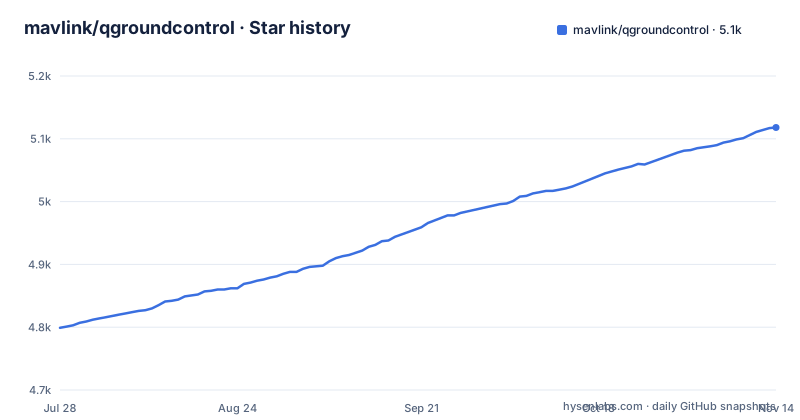
- mavlink/qgroundcontrol5,118 ★ · +319
| Repository | 2026-07-28 | 2026-11-14 |
|---|---|---|
| mavlink/qgroundcontrol | 4.8k | 5.1k |
319 Stars in the last 109 days, measured from the daily GitHub snapshot. Compare with other projects
Editorial analysis
The Problem QGroundControl Solves
Operating a drone without a ground control station is like flying blind. A GCS must handle mission planning, live telemetry, vehicle setup, and parameter tuning, and it must do so across different vehicles and operating systems. QGroundControl targets this directly: it is a cross-platform GCS for any MAVLink-enabled drone, including PX4 and ArduPilot. The intended user is a drone operator or developer who wants one tool that works on a laptop, a tablet, or a phone. The README lists Windows, macOS, Linux, Android, and iOS as supported platforms from a single codebase. That breadth is the core value proposition. If you fly multiple vehicle types or switch between desktop and mobile, QGC removes the need to learn several GCS tools.
How QGroundControl Works: MAVLink as the Backbone
QGroundControl is built around the MAVLink protocol. MAVLink is the communication standard that allows the GCS to talk to the autopilot, and QGC implements it natively. The README states that it provides full flight control and mission planning for any MAVLink-enabled drone. The architecture is not described in detail, but the feature list reveals the data flow. Telemetry comes from the vehicle over MAVLink, is decoded by QGC, and is displayed in the Fly View with maps and instruments. Mission planning works by sending waypoints and survey patterns to the autopilot. The Fact System is a notable mechanism: it allows inspection and editing of every vehicle parameter. That suggests a unified data model for parameters, which is useful when switching between PX4 and ArduPilot, since both expose parameters through MAVLink but with different names and ranges. The built-in MAVLink Inspector and console give a low-level view of the protocol traffic, which is a practical tool for debugging connection issues.
Getting QGroundControl Running
The README points to the releases page for downloads. It lists direct links for Windows (QGroundControl-installer-AMD64.exe), macOS (QGroundControl.dmg), Linux (QGroundControl-x86_64.AppImage), and Android (QGroundControl.apk). No iOS link is given in the README, which is a gap for mobile users. The AppImage format for Linux is convenient: download, make executable, and run, no package manager needed. For developers, the Developer Guide at docs.qgroundcontrol.com/master/en/qgc-dev-guide/ has build instructions, but the README does not include any commands. The contributing section mentions AGENTS.md for build/test/lint commands. The latest stable release, v5.1.5, is dated 2026-10-01, which indicates active maintenance.
Feature Depth: Mission Planning and Video Streaming
Two features stand out as differentiators. First, mission planning includes waypoint, survey, and structure-scan missions. Survey and structure-scan are not trivial to implement; they require generating flight paths that cover an area or a structure with appropriate overlap. This makes QGC suitable for aerial mapping and inspection work, not just hobbyist flying. Second, video streaming uses GStreamer for UDP RTP and RTSP, with recording in the Flight Display. GStreamer is a complex multimedia framework, and its integration is a common source of configuration headaches. The README does not say how to set up the video pipeline, so users must rely on the user manual. The multi-vehicle capability is also listed, allowing simultaneous connection to multiple vehicles. That is a demanding feature for a GCS, as it requires managing multiple telemetry streams and displays. The README claims it works, but the details of the interface are absent.
Where QGroundControl Stumbles
The most obvious limitation is that QGC is MAVLink-only. If you fly a drone that uses a proprietary protocol, such as DJI's or a custom autopilot, QGC will not connect. That is a hard boundary. Another limitation is the learning curve. The feature list is long: mission planning, Fly View, vehicle setup wizards, parameter tuning, video streaming, multi-vehicle, MAVLink Inspector, console, and log analysis. That is a lot of surface area. A new user may find the interface cluttered compared to simpler GCS tools. The README does not mention any minimal mode or simplified UI. Also, the mobile versions are listed as supported, but the README only provides an APK link for Android, not an iOS App Store link. That omission could indicate that iOS distribution is handled differently, or it could be an oversight. Either way, a user on iOS has to search for the app, which is a minor friction point.
Alternatives and the Protocol Divide
The main alternative to QGroundControl is Mission Planner, which is also a GCS but with a different focus. Mission Planner is Windows-centric and historically ties closely to ArduPilot. QGC is cross-platform and equally supports PX4 and ArduPilot. The key difference is that Mission Planner is built around ArduPilot's parameter system and has a more detailed, technical interface, while QGC aims for a more modern, cross-platform experience with wizards and a unified Fact System. Another alternative is MAVProxy, a command-line GCS that is lightweight and scriptable, but it lacks the graphical mission planning and video features. The choice comes down to platform and workflow: if you are on Windows and fly only ArduPilot, Mission Planner might be simpler; if you need Android or iOS, QGC is the only one of these with mobile support. The README does not compare itself to any of these, but the protocol and platform support are the deciding factors.
Maintenance, Licensing, and Community
QGroundControl is licensed under Apache-2.0, which is permissive for commercial use, but it is not legal advice. The repository is active, with the latest stable release v5.1.5 published on 2026-10-01. The presence of a security policy, code of conduct, and contributing guidelines in the repository indicates a structured project. The README links to a Discord server and a Crowdin translation project, showing an active community. The DOI on Zenodo suggests that the project is citable for academic or research use, which is a plus for researchers. Maintenance cost for a user is low if you use prebuilt binaries, but building from source requires setting up a Qt/C++ environment, which can be time-consuming. The developer guide is the place to find those details, but it is not in the README.
Editorial conclusion
Adopt QGroundControl if you fly PX4 or ArduPilot vehicles and need a single GCS that works on Windows, macOS, Linux, Android, or iOS. It is the default choice for MAVLink-only workflows, but avoid it if you require proprietary protocols or a minimal interface. Before deploying in a professional setting, verify that the latest stable release (v5.1.5) supports your specific vehicle firmware and that your GStreamer video pipeline is configured correctly, as the README does not detail those integration points.
Frequently asked questions
What is QGroundControl?
QGroundControl is a cross-platform ground control station for UAVs written in C++, providing flight control and mission planning for any MAVLink-enabled drone, including PX4 and ArduPilot platforms. It covers Windows, macOS, Linux, Android and iOS from one codebase and offers mission planning, live telemetry, vehicle setup, parameter tuning, video and log analysis.
How do you install QGroundControl?
From the releases page, which the README links for the latest stable build. Four assets are linked directly: a Windows installer named for AMD64, a macOS dmg, an x86_64 AppImage for Linux and an APK for Android. No package manager instructions are given, and no iOS asset is linked.
Is QGroundControl open source?
The project says it is open source and welcomes contributions, and the repository metadata reports Apache-2.0. The root listing holds both `LICENSE-APACHE` and `LICENSE-GPL`, and the README's licence link points at `.github/COPYING.md`.
How do I connect my drone to QGroundControl?
The README does not give connection steps. It lists the capability, monitoring multiple vehicles simultaneously, and points at the user manual at `docs.qgroundcontrol.com/master/en/qgc-user-guide/` for guidance, with build and development material on the developer guide site.
Official sources
Add this badge to your README
If you maintain this project, the badge below links readers to this analysis and shows its maintenance status from the daily GitHub snapshot. Paste the markdown into your README; add ?metric=license or ?metric=stars to the image URL for a different field.

[](https://hysenlabs.com/projects/mavlink-qgroundcontrol)Star history chart for your README
[](https://hysenlabs.com/projects/mavlink-qgroundcontrol)Was this useful?