RS-SDK: a RuneScape-style bot harness built for coding agents
Runescape automation library, optimized for use by coding agents.
At a glance
- What is it?
- RS-SDK is a TypeScript starter kit for running automated bots against a RuneScape style server emulator, with a gateway, a browser client, an MCP tool for interactive play and a leaderboard for comparing agents. It is a research sandbox built on the LostCity engine, not a tool for automating a live game.
- Who is it for?
- Adopt RS-SDK if you are researching goal directed program synthesis or comparing agent models, and you want an environment with a game shaped API, a leaderboard and a fast tickrate instead of a toy gridworld. Do not adopt it as a production automation framework, and do not point it at any account on a live service.
- Can I use it commercially?
- Yes. MIT is a permissive licence: you can use, modify and sell software built on it, as long as you keep its copyright and licence notices.
- Is it still maintained?
- Yes. The repository last received commits 3 days ago.
- What is it written in?
- Mainly TypeScript, according to GitHub's language statistics.
Answers come from the project's GitHub data, last synced on November 7, 2026, and from our analysis. They are not legal advice.
Star history
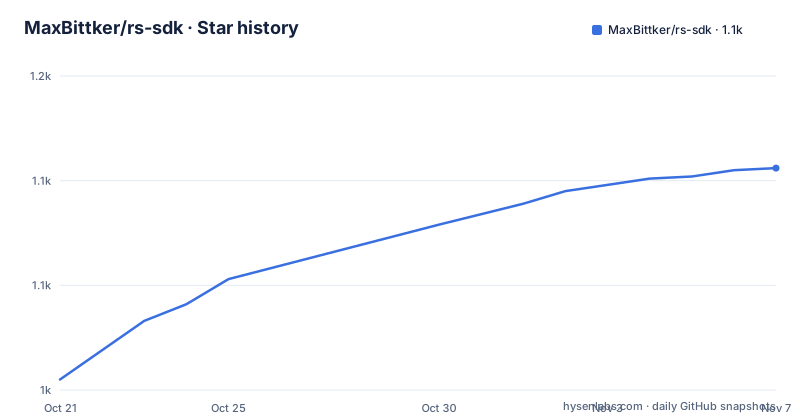
- MaxBittker/rs-sdk1,106 ★ · +101
| Repository | 2026-10-21 | 2026-11-07 |
|---|---|---|
| MaxBittker/rs-sdk | 1k | 1.1k |
101 Stars in the last 17 days, measured from the daily GitHub snapshot. Compare with other projects
Editorial analysis
A sandbox built on the LostCity emulator, not a live game client
RS-SDK is described as a research oriented starter kit for RuneScape style bots, and the framing matters more than the feature list. The README says you can automate the game, level an account to all 99s and experiment with agentic development techniques within a safe, bot only setting. The stated goals are a rich testing environment for goal directed program synthesis techniques such as Ralph loops, and research into collaboration and competition between agents.
The technology underneath is a fork. The README notes that RS-SDK is a fork of the LostCity engine and client, and points to the LostCity project as an existing thing it would not be possible without. So the game is a 2004 era RuneScape look and feel running on a server emulator that the project controls, and the SDK is the client library on top of it.
That is the line to hold. This is not a tool that logs into a live RuneScape account and plays it, which is the thing a reader might assume from the name. The safety comes from the target, and the README asks you not to manually play on the demo server and to hold accounts lightly, since the demo server is offered as a convenience with no uptime or data persistence guarantee.
The project also publishes a leaderboard at the demo server, ranked by highest total level per lowest account playtime, and points to a separate repository, rs-bench, for evaluation results across different models.
The SDK cannot talk to the game server, only to a client
The architecture is the interesting part, and the README is unusually clear about it. RS-SDK runs against an enhanced web based client, the botclient, which connects to the LostCity 2004scape server emulator. Between the SDK and that client sits a gateway server which accepts connections from botclient and SDK instances and forwards messages between them based on username.
The consequence is stated directly: the SDK cannot talk directly to the game server and must go through a client, either the browser botclient or the headless lite client under server/webclient/src/lite. The botclient relays game state to the SDK, and dispatches low level actions such as sendWalk(x, z) back the other way.
That shape is what makes the project usable as an agent environment. The bot is a program that drives a client, not a program that holds a socket to the world, and the client is a real browser or a headless variant, so the same scripts work either way.
The gateway is the piece with the sharp edges. It matches connections by username, which means a single gateway multiplexes many bots, and for a fleet of bots the headless lite client exists so you are not maintaining one browser tab per bot. You do not need to run your own gateway or web client bundler to automate against the demo server, though the README suggests doing so when you are fixing bugs or adding features to the project itself.
Dispatch is not confirmation, and the API says so
The single most useful thing the documentation tells an API user is what the API does not promise. The generated API surface is documented in sdk/API.md, and the README states that high level bot.* methods attempt to observe method specific game effects, while low level sdk.send* methods only confirm browser client dispatch and do not prove the server applied the effect.
The architecture section repeats the same warning in other words. Dispatch success is not confirmation that the game server applied the intended effect.
For a research tool aimed at agents, this is the difference between a benchmark that measures something real and one that measures an optimistic log. An agent that calls a low level send method will get a success return whether or not the world changed, and any evaluation built on that signal would reward a bot for trying rather than for doing. A script that relies on high level bot.* methods is waiting on observed effects instead.
The two programming styles are also different. MCP execute_code snippets receive bot and sdk globals, and standalone files under bots/<name>/ use runScript(async ({ bot, sdk }) => { ... }). The README points at learnings/README.md for copyable examples and mcp/README.md for execute_code behaviour, so the two modes are documented separately rather than being interchangeable in a reader's head.
Getting a bot running: clone, install, create, attach a client
The quick path is short. You clone the repository, install dependencies with bun, and create a bot with a name that is not already taken.
git clone https://github.com/MaxBittker/rs-sdk.git
bun install
bun bots/create-bot.ts {username}
The README also gives a route that suits an agent workflow, where the bot creation is the prompt rather than the command.
bun install
claude "start a new bot with name: {username}"
A bot on its own is not a running bot. MCP execute_code is the interactive path, and it opens a browser client for the bot automatically, which the README says to keep running when switching to a saved script. To start the client by hand you open a URL of the form shown below, with the credentials from the bot.env file in the bot directory, and the origin of your own server substituted for a local or custom deployment.
https://rs-sdk-demo.fly.dev/bot?bot={username}&password={PASSWORD}For a fleet, the headless lite client runs one process per bot from the webclient directory.
cd server/webclient && bun install && bun src/lite/runner.ts {username}Then a script is launched from the repository root. Without a client attached, the README says the script exits with the message No game client is attached, which is a useful, unambiguous failure rather than a silent hang.
Running your own engine, web client and gateway
The README is direct about the cost of self hosting: you want all three of these running.
# Game engine
cd server/engine && bun run start# Web client bundler
cd server/webclient && bun run watch# Gateway (bridges SDK <-> bot client)
cd server/gateway && bun run gatewayThe gateway listens on ws://localhost:7780 by default, and the port is configurable through the AGENT_PORT environment variable. Three processes, one of which is a watch mode bundler for the web client, is a heavier footprint than a single binary, and it is the price of a client that behaves like the real thing.
The payoff of self hosting is speed, and the README names it as the primary advantage, the ability to set a high tickrate. The tickrate lives in server/engine/.env as the NODE_TICKRATE variable, with a default of 400ms, and the suggestion is to try 200ms or 30ms for faster gameplay, which is described as especially useful for headless testing. There is also a runtime override, the in-game::speed <ms> command, with a minimum of 20ms that does not persist across restarts. A tickrate of 30ms compresses the interval between game ticks, which can turn a research loop that iterates in hours into one that iterates in minutes.
One more server knob is worth knowing. The chat profanity filter is disabled with NODE_PROFANITY_FILTER=false, and the default is on. The server censors chat before broadcasting and injects that setting into the browser client, but headless lite runners have no config channel from the server, so they need PROFANITY_FILTER=false set in the bot.env file or the process environment to stop their own local re-censoring.
Bot env files decide where a bot connects
Configuration for a bot lives in a bot.env file inside the bot directory, and the most important key is SERVER, which controls where the bot connects. Leaving it blank points the bot at your local gateway, because when SERVER is empty all connection paths default to ws://localhost:7780.
BOT_USERNAME=mybot
PASSWORD=test
SERVER=
SHOW_CHAT=true
Set SERVER to a hostname, for example rs-sdk-demo.fly.dev, and the bot connects to wss://{SERVER}/gateway instead. That single switch is the difference between a local research loop and a bot pointed at the shared demo server, and it is worth being deliberate about which one is in the file.
The other keys have their own traps. SHOW_CHAT defaults to true, and the README warns that seeing other players chat exposes the bot to scamming and prompt injection attempts, since other players can put text in front of a model that is deciding what to do. Opting out is done by setting SHOW_CHAT=false in the bot.env file, or by passing the --no-chat flag to the create command. For any work where the bot's decisions are made by a language model, that flag is not optional.
The password in the same file is the credential for the client URL, so a bot.env holds everything needed to connect. It lives inside the bot directory, which is inside a repository that also holds the server code, so it should not be committed.
Where the environment breaks, and what the checks catch
The weaknesses are documented, which is more than most projects manage. The demo server carries no uptime or data persistence guarantee, so any result recorded there has to be treated as provisional, and the README suggests hosting your own instance. The chat exposure described above is the second weakness, and the third is the architecture itself, since a script that appears to succeed may only have dispatched an action that the server never applied.
There is a fourth, quieter one. The server is modified from the original game to make bot testing easier, with an accelerated and less steep XP curve, infinite run energy so players never run out, and disabled random events, since the anti botting random events are turned off. That makes the environment good for learning and bad for fidelity. A policy trained here learns from a world without the interruptions that a real one has, and the leaderboard rankings of highest total level per lowest account playtime are a comparison within that modified world.
The project at least has an answer to drift between code and documentation. Development checks are described as the same checks CI runs: install the root and webclient dependencies with a frozen lockfile, then run the check script, which runs typecheck, a webclient typecheck and the test suite. A separate script regenerates the API reference, and CI fails when that document does not match the public TypeScript class surface.
bun install --frozen-lockfile
(cd server/webclient && bun install --frozen-lockfile)
bun run check
The package manifest shows the scale of that suite, with the test script pointing at directories under sdk/test, the webclient source, the lite client, the map view and a long list of engine test files covering the market, item search, file streaming, IP lookup, bank hiscores, reconnect, world feed, coffers, live moderation and hiscores performance, plus a gateway state fanout test. The root manifest also carries puppeteer as a dev dependency and the Model Context Protocol SDK as a runtime dependency, which is how the MCP server and the browser client meet.
Editorial conclusion
Adopt RS-SDK if you are researching goal directed program synthesis or comparing agent models, and you want an environment with a game shaped API, a leaderboard and a fast tickrate instead of a toy gridworld. Do not adopt it as a production automation framework, and do not point it at any account on a live service. Verify first that the client is attached before judging a script, since the SDK reports dispatch and not confirmed game effects, then read sdk/API.md for the exact generated surface, and host your own server instance if the work matters, because the demo server carries no uptime or persistence guarantee.
Frequently asked questions
What is RS-SDK and who is it for?
RS-SDK is a research oriented starter kit for RuneScape style bots, with a TypeScript SDK, agent documentation, bindings and a server emulator. The README says the goals are a rich testing environment for goal directed program synthesis techniques and research into collaboration and competition between agents.
How do I create and run a bot with RS-SDK?
Clone the repository, run bun install, then create the bot with bun bots/create-bot.ts {username}. A script is launched from the repository root with bun bots/{username}/script.ts, and without an attached client it exits with the message No game client is attached.
Does RS-SDK automate the live RuneScape game?
No. The project runs against a fork of the LostCity 2004scape server emulator, and the README describes the setting as bot only. The demo server is offered as a convenience, and the README asks that you not play on it manually and that you consider hosting your own instance.
How do I make a bot connect to my local server instead of the demo server?
Leave the SERVER variable blank in the bot.env file, because when SERVER is empty all connection paths default to ws://localhost:7780. Set SERVER to a hostname such as rs-sdk-demo.fly.dev and the bot connects to wss://{SERVER}/gateway instead.
How do I run many RS-SDK bots without dozens of browser tabs?
Use the optional headless lite client, running one process per bot with cd server/webclient && bun install && bun src/lite/runner.ts {username}. It avoids maintaining many browser tabs, and the README notes that lite runners have no config channel from the server, so PROFANITY_FILTER=false has to be set in the bot.env file or the process environment.
How fast can the RS-SDK server run?
The tickrate is set through the NODE_TICKRATE variable in server/engine/.env, with a default of 400ms, and the README suggests 200ms or 30ms for faster gameplay in headless testing. There is also an in-game ::speed <ms> command with a minimum of 20ms that does not persist across restarts.
Official sources
Add this badge to your README
If you maintain this project, the badge below links readers to this analysis and shows its maintenance status from the daily GitHub snapshot. Paste the markdown into your README; add ?metric=license or ?metric=stars to the image URL for a different field.

[](https://hysenlabs.com/projects/maxbittker-rs-sdk)Star history chart for your README
[](https://hysenlabs.com/projects/maxbittker-rs-sdk)Was this useful?