CrowdSec Bouncer for Traefik: five modes and a captcha path
Traefik plugin for Crowdsec - WAF and IP protection
At a glance
- What is it?
- This Traefik plugin turns CrowdSec decisions into HTTP 403 responses or captcha challenges at the proxy, with a streaming mode that keeps a local cache so the proxy rarely calls the local API. It also carries the AppSec component for virtual patching and legacy ModSecurity rules.
- Who is it for?
- Adopt this plugin when you already run CrowdSec behind Traefik and want the ban and captcha decisions applied at the proxy rather than in application code, and start from the stream mode so the cache absorbs most lookups.
- Can I use it commercially?
- Yes. Apache-2.0 is a permissive licence: you can use, modify and sell software built on it, as long as you keep its copyright and licence notices.
- Is it still maintained?
- Yes. The repository received new commits within the last day.
- What is it written in?
- Mainly Go, according to GitHub's language statistics.
Answers come from the project's GitHub data, last synced on November 7, 2026, and from our analysis. They are not legal advice.
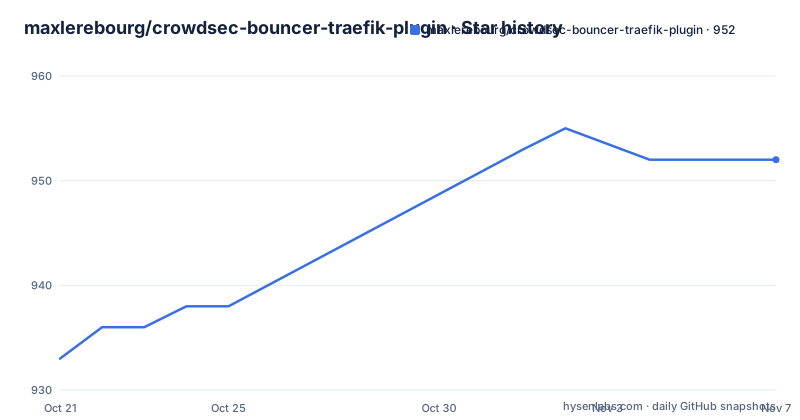
Star history
- maxlerebourg/crowdsec-bouncer-traefik-plugin952 ★ · +19
| Repository | 2026-10-21 | 2026-11-07 |
|---|---|---|
| maxlerebourg/crowdsec-bouncer-traefik-plugin | 933 | 952 |
19 Stars in the last 17 days, measured from the daily GitHub snapshot. Compare with other projects
Editorial analysis
CrowdSec decisions applied inside the proxy
The problem this plugin solves is narrow and real. CrowdSec is an open source intrusion prevention system that builds a blocklist from reported and validated behaviour, and the community list holds IPs banned from the network. Traefik, by itself, cannot ask CrowdSec about an address on every request. This plugin implements a CrowdSec Bouncer as a Traefik plugin, which lets Traefik authorize or block a request based on the reputation and behaviour of the client IP. When it runs alongside a local Crowdsec service it uses the local API, which analyses the Traefik logs and takes decisions on the requests users and bots make, so malicious actors are banned on patterns seen against your own site rather than on a list published elsewhere. The audience is operators who already run both Traefik and CrowdSec and want the two connected at the proxy layer.
Five CrowdsecMode values decide how often the LAPI is called
The mode setting, named CrowdsecMode, decides how the plugin talks to CrowdSec, and the five values differ in what they cache and how often they refresh. In none mode every request calls the CrowdSec local API, and a client IP on the ban list gets a 403 while everything else continues as usual. Live mode behaves the same way but can use a local cache to keep the status of each IP that queries, reducing the number of requests made to the local API. Stream mode keeps only the banned IPs in the local cache and authorizes anything that misses it, with the cache updated from the local API every minute. Alone mode is similar but fetches the blacklisted IPs from the central API every two hours, excludes locally banned IPs, and can work without a crowdsec service. Appsec mode disables IP checking entirely and applies AppSec checking instead, which suits deployments where IP checking already happens at the firewall level.
Stream mode trades freshness for a cache hit
The project recommends streaming mode for performance, and the reason is visible in the workflow: decisions are updated every 60 seconds by default, and that refresh is the only communication between Traefik and CrowdSec. Every request that arrives hits the cache for a quick decision rather than waiting on a network call to the local API. The tradeoff is a window of up to a minute during which a newly banned address can still get through, and a window in the other direction where a lifted ban has not yet been withdrawn from the cache. The cache itself can be local to Traefik in memory, or it can live in a separate Redis instance. The choice matters for a multi replica deployment: an in-memory cache is per process, so each replica keeps its own view and its own refresh timing, whereas a shared Redis gives the deployment one view. The repository ships a redis-cache example directory alongside the other examples, which makes that distinction easy to try out.
ban and captcha are the two remediation paths
Remediation comes in two shapes, and the plugin supports both. With the ban remediation the user is blocked in Traefik with an HTTP 403. With the captcha remediation the user is redirected to a page to complete a captcha challenge, and on successful completion the user is cleared for a specified period, after which a new resolution challenge is expected if CrowdSec still has a decision to verify the behaviour. The captcha providers currently supported are hcaptcha, recaptcha, turnstile, and a custom option called wicketkeeper, which is a separate project. The choice between 403 and captcha is a product decision rather than a technical one: a 403 ends the interaction, while a captcha lets a real user through after proving they are human, which is the point when the blocked traffic is misidentified background scanning rather than an attack.
AppSec brings virtual patching and ModSecurity rules
Newer plugin versions carry CrowdSec's AppSec component, which the documentation lists as offering low-effort virtual patching, support for legacy ModSecurity rules, and a combination of classic WAF behaviour with CrowdSec's own detection for cases that are hard to catch with rules alone. The version requirements are explicit. AppSec is supported from plugin version 1.2.0 together with Crowdsec 1.6.0, and AppSec bot detection is supported from plugin version 1.8.0 together with Crowdsec 1.8.0. So the pairing of versions is part of the contract: a plugin newer than the CrowdSec side, or the other way round, means a feature that is documented as available may not behave as the documentation describes. The AppSec documentation on the CrowdSec site is the place to check the details, and the repository carries an appsec-enabled example compose file for trying the component against a local stack.
Wiring the plugin into a Traefik container
The plugin is loaded the way Traefik loads any experimental plugin, through a modulename and version pair on the command line. The compose file in the repository shows the shape:
      - "--experimental.plugins.bouncer.modulename=github.com/maxlerebourg/crowdsec-bouncer-traefik-plugin"
      - "--experimental.plugins.bouncer.version=v1.7.1"
The plugin is then attached per router through a middleware label, and the sample services in the same file show the full router definition:
      - "traefik.http.routers.router-foo.rule=Path(`/foo`)"
      - "traefik.http.routers.router-foo.entrypoints=web"
      - "traefik.http.routers.router-foo.middlewares=crowdsec@docker"
Note the version in that file, v1.7.1, which is older than the current release, so a deployment built from it does not get the AppSec bot detection added in 1.8.0. The compose file also mounts the Docker socket read only for the Docker provider, and it exposes the Traefik dashboard on 8080.
Testing against a mock LAPI instead of a live CrowdSec
The build system is arranged so that the test suite does not need a real CrowdSec deployment. The Makefile comments say it plainly: the binary and mock suite, a Traefik binary plus a mock local API, is what CI runs, while the local Docker suite lives in a separate branch. Each scenario under tests/e2e/mock/scenarios has its own run script, and the e2e_mock target fans out over them:
e2e_mock:
	bash ./tests/e2e/mock/scenarios/$*/run.sh
The ordinary checks are the usual Go ones, with linting through golangci-lint and coverage enabled for the test run:
lint:
	golangci-lint run

test:
	go test -v -cover ./...
There is also a yaegi_test target, which runs the test suite under the Yaegi interpreter, a check that matters for a Traefik plugin because Traefik loads plugins as interpreted Go rather than as a normal compiled binary. The examples directory carries ready made compose files for the captcha, custom captcha, custom ban page, bot detection, appsec, redis cache, trusted IPs, TLS auth, behind proxy, standalone mode, Kubernetes and binary VM setups.
A small dependency footprint and frequent releases
The dependency list is short, which is what you would expect from something that runs inside the proxy. The module is github.com/maxlerebourg/crowdsec-bouncer-traefik-plugin, it requires Go 1.22.12, and it pulls in only two direct dependencies, github.com/leprosus/golang-ttl-map at v1.1.7 for the expiring cache entries and github.com/maxlerebourg/simpleredis at v1.0.12 for the Redis backend, with the rest of the tree vendored in the repository. The plugin logic lives in a small number of Go files at the top level, bouncer.go and its tests, alongside the Traefik plugin manifest .traefik.yml, the CrowdSec acquisition configuration acquis.yaml, and the ban.html and captcha.html pages that can be overridden. On maintenance, the pace is fast: v1.8.0 and v1.8.1 were both published on 2026-10-18, an alpha of the same line on 2026-09-12, and the last push to the main branch was on 2026-10-19. The licence field on the repository says Apache-2.0.
Editorial conclusion
Adopt this plugin when you already run CrowdSec behind Traefik and want the ban and captcha decisions applied at the proxy rather than in application code, and start from the stream mode so the cache absorbs most lookups. Do not adopt it as a standalone filter, because the standalone mode depends on the CrowdSec central API and the other modes need a local Crowdsec service, and do not expect the AppSec component to work below plugin version 1.2.0 with Crowdsec 1.6.0, or bot detection below 1.8.0. Verify first that the Traefik version you run supports experimental plugins and that you pin a plugin version, since the compose file in the repository still references v1.7.1 while the latest release is v1.8.1.
Frequently asked questions
What are the CrowdsecMode options in the CrowdSec Bouncer Traefik plugin?
There are five: none, live, stream, alone and appsec. Streaming mode keeps only banned IPs in the local cache and refreshes from the local API every minute, alone mode fetches the blacklist from the central API every two hours and can work without a crowdsec service, and appsec mode replaces IP checking with AppSec checking.
Which captcha providers does the CrowdSec Bouncer Traefik plugin support?
hcaptcha, recaptcha, turnstile and a custom option called wicketkeeper. With the captcha remediation the user is redirected to a challenge page and, on successful completion, is cleared for a specified period.
What versions are needed for AppSec and bot detection in the CrowdSec Bouncer Traefik plugin?
AppSec is supported from plugin version 1.2.0 with Crowdsec 1.6.0, and AppSec bot detection from plugin version 1.8.0 with Crowdsec 1.8.0. The AppSec component offers virtual patching and support for legacy ModSecurity rules.
How is the plugin loaded into Traefik?
Through the experimental plugins flags, with a modulename of github.com/maxlerebourg/crowdsec-bouncer-traefik-plugin and a version, and it is then bound to routers with a middleware label such as crowdsec@docker on the router labels.
Can the plugin be tested without a real CrowdSec instance?
Yes. The Makefile e2e_mock target runs each scenario script under tests/e2e/mock/scenarios against a Traefik binary plus a mock local API, and that is the suite CI runs. There is also a yaegi_test target that runs the tests under the Yaegi interpreter.
Official sources
Add this badge to your README
If you maintain this project, the badge below links readers to this analysis and shows its maintenance status from the daily GitHub snapshot. Paste the markdown into your README; add ?metric=license or ?metric=stars to the image URL for a different field.

[](https://hysenlabs.com/projects/maxlerebourg-crowdsec-bouncer-traefik-plugin)Star history chart for your README
[](https://hysenlabs.com/projects/maxlerebourg-crowdsec-bouncer-traefik-plugin)Was this useful?