GDAL for .NET Without the Binary Install: A Look at MaxRev.Dev/gdal.netcore
GDAL 3.x C#/F# bindings for .NET apps
At a glance
- What is it?
- MaxRev.Dev/gdal.netcore packages GDAL 3.x as NuGet libraries for C# and F#, bundling native runtimes and data files. This review covers what it solves, how it works, and where it falls short.
- Who is it for?
- Use MaxRev.Dev/gdal.netcore if you need GDAL in a .NET application and want to avoid installing system-wide GDAL binaries; the NuGet packages handle runtime and data files for you. Avoid it if you require a full GDAL driver set or need to modify GDAL internals, as the project does not compile all drivers and does not extend GDAL methods.
- Can I use it commercially?
- Yes. MIT is a permissive licence: you can use, modify and sell software built on it, as long as you keep its copyright and licence notices.
- Is it still maintained?
- Yes. The repository last received commits 3 days ago.
- What is it written in?
- Mainly C#, according to GitHub's language statistics.
Answers come from the project's GitHub data, last synced on October 23, 2026, and from our analysis. They are not legal advice.
Star history
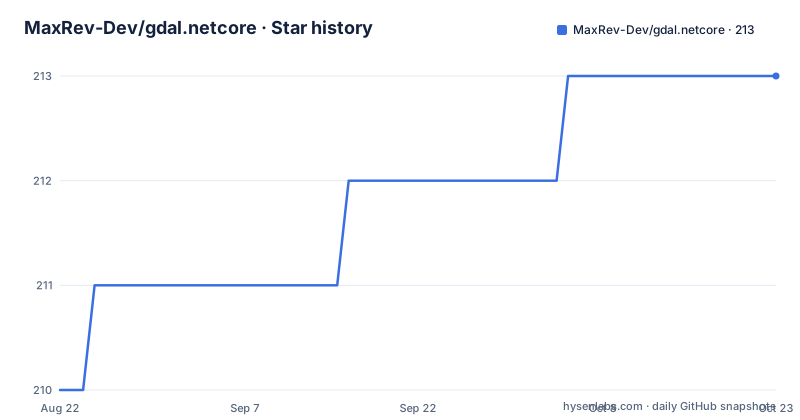
- MaxRev-Dev/gdal.netcore213 ★ · +3
| Repository | 2026-08-22 | 2026-10-23 |
|---|---|---|
| MaxRev-Dev/gdal.netcore | 210 | 213 |
3 Stars in the last 62 days, measured from the daily GitHub snapshot. Compare with other projects
Editorial analysis
The Problem: GDAL in .NET Without the System Install
GDAL is the de facto standard for reading and writing geospatial raster and vector formats. But wiring it into a .NET application usually means downloading a binary distribution, setting environment variables, and hoping the native library finds its data files. MaxRev.Dev/gdal.netcore attacks that friction directly. The README states its purpose: 'Provides a minimal setup without requirements to install heavy GDAL binaries into your system.' The target user is a .NET developer who wants GDAL functionality in a C# or F# project and does not want to manage a separate GDAL installation on every machine where the app runs. It is not a from-scratch reimplementation. It is a build engine that generates .NET assemblies from GDAL and bundles the native libraries into NuGet packages. That distinction matters because it sets expectations about what you get and what you do not.
How the Packaging Works: Core, Runtimes, and the Universal Package
The repository does not change GDAL source code. It compiles GDAL and wraps it with bindings, then splits the output into several NuGet packages. The core package, MaxRev.Gdal.Core, contains the .NET assemblies and the initialization logic. Separate runtime packages carry the native binaries for Windows, Linux, and macOS, each with x64 and arm64 variants where applicable. There is also a universal package, MaxRev.Gdal.Universal, which references the core and all runtime packages. That is convenient for a multi-platform project, but the README warns that it 'may increase the size of your nuget cache.' The design lets you install only the runtime you need. For example, a Windows-only app can reference MaxRev.Gdal.WindowsRuntime.Minimal and skip the Linux and macOS packages. The CLI tools are distributed separately as packages like MaxRev.Gdal.CLI.win-x64, which give you gdalinfo, ogr2ogr, and gdal_translate without a separate install.
Getting Started: Commands and the One-Line Initialization
Setup is a standard dotnet add package command. For the universal package, the README shows: dotnet add package MaxRev.Gdal.Universal. If you prefer to pick individual runtimes, you first install MaxRev.Gdal.Core, then add a runtime package such as MaxRev.Gdal.WindowsRuntime.Minimal or MaxRev.Gdal.LinuxRuntime.Minimal.arm64. The key runtime step is a single line of C#: GdalBase.ConfigureAll(). This call, made once before using GDAL, initializes all GDAL drivers and sets the PROJ6 shared library paths. The README emphasizes that this must happen before any GDAL function is used. After that, you use the GDAL API in the ordinary flow. There is no mention of F# specifics, but since the bindings are .NET assemblies, F# should consume them the same way. The documentation does not show an F# example, so you would need to verify that the generated API is ergonomic from F#.
What Is Included and What Is Not: Driver and Data Limitations
The README is explicit about the project's boundaries. It 'does not compile all drivers. Only configured, they are listed below.' That means the set of GDAL drivers available in these packages is a subset of what a full GDAL build would offer. The FAQ confirms this with a question: 'Missing {some} drivers, can you add more?' There is no detailed list of which drivers are compiled in the visible README, so you cannot assume every format you need is present. Another limitation concerns projection data. From version 3.7.0, GDAL_DATA is shipped, including the proj.db database. But the README notes that 'you may require proj-data grid shifts' for certain projections. If your application depends on high-accuracy datum transformations, you may need to supply additional grid shift files yourself. The FAQ also mentions that some drivers complain about missing data files, which indicates that the bundled data is not complete for every use case.
Known Failure Modes and Platform Gotchas
The FAQ section is a goldmine of real-world failure modes. It lists issues such as packages not working on CentOS 7 and Ubuntu 18.04, which suggests older glibc versions are a problem. There is an entry for MacOS Catalina or lower, and another for the first run on macOS being slow, taking more than three seconds. That is a concrete performance caveat. On Windows, the FAQ mentions BadImageFormatException and 'some types throw exceptions from SWIG on Windows.' SWIG is the binding generator, so those exceptions likely come from the generated wrapper code. There is also a note that in some methods performance is slower on Unix. None of these are described in detail in the visible text, but their presence tells you that the project has known rough edges. If you target an older Linux distribution or an older macOS, you should test early. The README does not provide workarounds for these issues, only acknowledgment that they exist.
An Alternative Approach: Official GDAL Binaries and Other Bindings
The obvious alternative is to install GDAL yourself and use a different .NET binding, such as the official GDAL C# bindings that come with the GDAL source tree. That approach gives you the full driver set and lets you control the exact GDAL version and build configuration. The cost is that you must manage the native library on every deployment target, set environment variables, and handle version mismatches between the binding and the native library. MaxRev.Dev/gdal.netcore removes that manual step by bundling everything into NuGet, but it trades away control over which drivers are compiled. There is also the option of calling the GDAL command-line tools from your .NET process, using the CLI packages provided by this same project. That is a different architecture: you spawn processes instead of calling into the library. It is simpler to set up but slower for frequent operations and harder to pass complex in-memory data. The choice depends on whether you need the full driver set or the convenience of a managed package.
Maintenance and Upgrade Considerations
The repository is actively maintained, with releases tracking GDAL versions. The latest release at the time of writing is v3.13.3.554, corresponding to GDAL 3.13.3. The versioning scheme embeds the GDAL version and a build number, which makes it easy to see which GDAL release you are on. Upgrading is a matter of updating the NuGet package version, but you should be aware that the native binaries change with each GDAL release. That means a patch update could alter behavior or fix bugs in drivers you rely on. The MIT license is permissive, so you can use it in commercial projects without copyleft obligations. The README does not discuss maintenance costs explicitly, but the build engine approach implies that keeping up with GDAL releases requires the maintainer to rebuild the bindings and runtimes each time. For you as a consumer, the main cost is verifying that your specific drivers and projection data still work after an upgrade. The FAQ's mention of environment-specific issues suggests that testing on your target platforms is not optional.
Editorial conclusion
Use MaxRev.Dev/gdal.netcore if you need GDAL in a .NET application and want to avoid installing system-wide GDAL binaries; the NuGet packages handle runtime and data files for you. Avoid it if you require a full GDAL driver set or need to modify GDAL internals, as the project does not compile all drivers and does not extend GDAL methods. Before adopting, verify that the specific drivers and projection data you need are included in the runtime packages, and check the FAQ for known issues with older Linux and macOS versions. If you need a different driver set or more control, consider using the official GDAL command-line tools or another binding that compiles the full library.
Frequently asked questions
Which gdal.netcore package do I install for my platform?
Install MaxRev.Gdal.Core plus one runtime package. Windows has MaxRev.Gdal.WindowsRuntime.Minimal for x64 only, while Linux and macOS have a bundle package that references both arm64 and x64, or a per-architecture package for just one.
Do I need to install GDAL on the machine to use gdal.netcore?
No. The project states that GDAL does not have to be installed, and that from version 3.7.0 the GDAL_DATA directory is shipped with the package including the proj.db database. Grid shifts may still require the separate proj-data package.
Does gdal.netcore include every GDAL driver?
No. It does not compile all drivers, only the configured ones, which the project lists in its build section, and it notes that GDAL by default has a lot of internal drivers.
What has to be called before using gdal.netcore in an app?
Call GdalBase.ConfigureAll() once before using GDAL. That single call initializes all GDAL drivers and sets the PROJ6 shared library paths, which is why a projections problem is worth checking against this step first.
Official sources
Add this badge to your README
If you maintain this project, the badge below links readers to this analysis and shows its maintenance status from the daily GitHub snapshot. Paste the markdown into your README; add ?metric=license or ?metric=stars to the image URL for a different field.

[](https://hysenlabs.com/projects/maxrev-dev-gdal-netcore)Star history chart for your README
[](https://hysenlabs.com/projects/maxrev-dev-gdal-netcore)Was this useful?