Sidebery: a Firefox sidebar for vertical tabs, bookmarks and snapshots
Firefox extension for managing tabs and bookmarks in sidebar.
At a glance
- What is it?
- Sidebery is a Firefox extension that replaces the tab strip with a configurable sidebar of panels. It is for people who keep dozens of tabs open and want them grouped, searchable and restorable, and it is the wrong tool if you use Chrome or expect a plugin that works without touching about:config.
- Who is it for?
- Adopt Sidebery if you run Firefox, keep more tabs open than the tab strip can show, and are willing to edit about:config or a userChrome.css file to reclaim the space the native tab bar occupies. Skip it if you use Chrome, since the README offers no Chrome build, or if you need an extension that works with zero browser-level configuration.
- Can I use it commercially?
- Yes. MIT is a permissive licence: you can use, modify and sell software built on it, as long as you keep its copyright and licence notices.
- Is it still maintained?
- Yes. The repository last received commits 3 days ago.
- What is it written in?
- Mainly TypeScript, according to GitHub's language statistics.
Answers come from the project's GitHub data, last synced on October 23, 2026, and from our analysis. They are not legal advice.
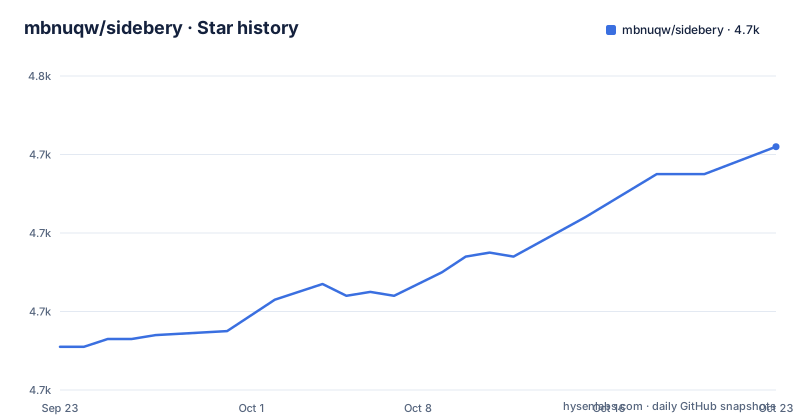
Star history
- mbnuqw/sidebery4,742 ★ · +51
| Repository | 2026-09-23 | 2026-10-23 |
|---|---|---|
| mbnuqw/sidebery | 4.7k | 4.7k |
51 Stars in the last 30 days, measured from the daily GitHub snapshot. Compare with other projects
Editorial analysis
The problem Sidebery solves, and who has it
Firefox ships a horizontal tab strip. Once you pass roughly twenty tabs it stops showing titles, and grouping is limited to whatever the browser provides. Sidebery moves that list into the sidebar and gives it structure: the README lists vertical tabs panels with tree or flat layout, bookmarks panels, a history panel, search inside panels, a customizable context menu, customizable styles, and snapshots, which are saved windows, panels and tabs. The tree layout is the part that matters most in daily use. A tab opened from another tab can sit underneath it instead of at the end of a flat list, so a research session stays readable after an hour. Snapshots address a different failure: closing a window by accident. If you never exceed a dozen tabs and never lose a window, the extension adds configuration surface you will not use. Its audience is closer to the person running several windows with persistent tab sets, and who treats the sidebar as a workspace rather than a list.
How the sidebar, panels and snapshots fit together
The extension is a WebExtension written in TypeScript, and the repository layout reflects that: src/ holds the source, build/ holds the build scripts, tests/ holds the test suite, and package.json drives everything through npm scripts. The build is not a single bundler pass. Separate scripts exist for styles, html, copy and scripts, and the aggregate entry points are build/all.vite.js for development and the same file without the dev flag for a production build. Vite handles the script bundling, with @vitejs/plugin-vue and @vue/language-plugin-pug in the toolchain, and Stylus compiles the styles. That split matters if you plan to modify the extension: changing a panel's appearance means touching the style pipeline, not the TypeScript. The feature model is panels first. A panel has a type, and the README names vertical tabs, bookmarks and history. Snapshots sit above panels as saved state, so restoring a snapshot brings back a window's worth of structure rather than a single tab. The README does not describe the storage format for snapshots or where they are written, so if you need to inspect or back up that data, treat it as undocumented.
Installing Sidebery and getting a first tree panel
The README points at two channels. The stable build is on the Mozilla Add-ons page, described there as reviewed by Mozilla, and on the GitHub releases page. A nightly build is also published as a signed XPI, currently named sidebery-5.6.1.5.xpi, built through a GitHub Actions workflow, and the README states it supports auto-updates. If you install the signed XPI by hand rather than through the add-on page, the README gives one extra step: open the Add-ons Manager and click Update Now in the Sidebery card, or restart the browser. The XPI filename for the nightly does not match the release tag v5.6.1, so confirm which build you actually downloaded before reporting a bug.
# Nightly build referenced by the README
# https://github.com/mbnuqw/sidebery/releases/download/v5.6.1/sidebery-5.6.1.5.xpi
After installing, open the sidebar and create a vertical tabs panel. The README does not give a click-by-click path for this, so the reliable route is the extension's own settings page, where panel types are chosen. Then decide how to deal with the native tab strip, because Sidebery does not remove it. The README offers two options. The first is to enable native vertical tabs, either by right-clicking the toolbar or tab-bar free space and choosing Turn on Vertical Tabs, or through about:config:
sidebar.revamp = true
sidebar.verticalTabs = true
Then resize the native sidebar to its minimum. The README notes this saves vertical space but leaves the native tabs visible and gives up some room to the Firefox sidebar header. The second option is a userChrome.css file. Enable toolkit.legacyUserProfileCustomizations.stylesheets in about:config, create a chrome folder in the profile directory with a userChrome.css file, and paste the CSS the README provides, which hides the sidebar panel header and, under a conditional block, the native tabs toolbar and the new Firefox sidebar. The README's example is roughly forty lines and expects you to comment and uncomment parts of it. That is not a cosmetic detail: it is the difference between a sidebar that looks integrated and one that sits under a leftover header.
Where Sidebery breaks or is the wrong choice
The README has an explicit incompatibility section, and it is the first thing to read. Sidebery may conflict with addons that handle the position of new tabs, with Tree Style Tab named as an example, and with addons that move or sort tabs. The stated consequence is unexpected behavior or a broken tab state at initialization. The remedy the README gives is to disable those addons in about:addons. If your workflow depends on another tab-management extension, Sidebery is not additive; you are choosing between them. The native-tabs problem is the second limitation, and it is structural rather than a bug. Firefox still draws its own tabs, and the README's own workaround for hiding them has a caveat: after enabling Hide tabs and sidebar in the native sidebar settings, a Firefox bug can cause that setting to be ignored on the next browser start or when a new window opens. So the cleanest-looking configuration is the one most likely to regress. The userChrome.css route avoids that specific bug but asks you to maintain CSS against Firefox's internal element ids, which the README itself hedges on, marking the window-buttons block with a note that it may not have been tested outside a Linux tiled window manager environment. Finally, anyone on Chrome should stop here. The README documents a Firefox extension, and nothing in it describes a Chrome build.
Sidebery against Firefox's built-in vertical tabs and Tree Style Tab
The closest comparison is with Firefox's own vertical tabs, which the README treats as a mechanism to enable rather than a rival. The difference is scope. Native vertical tabs move the existing tab list to the side; they do not add bookmarks panels, a history panel, in-panel search or snapshots, and they do not offer a tree layout. Sidebery also exposes customizable styles and a customizable context menu, which the native implementation does not. The cost is that you are running an extension on top of the browser's own tab machinery, which is exactly why the README warns about other tab-handling addons. Tree Style Tab is the other reference point, and the README names it only as a conflict source. Both put tabs in a tree in the sidebar, so the practical difference is not the layout but the surrounding product: Sidebery bundles bookmarks, history and snapshots into the same sidebar and treats styling as a first-class feature, while the README's guidance is that running the two together risks a broken tab state. If you already have a Tree Style Tab configuration you like, switching means giving up that configuration, not layering on top of it.
Building from source, licence and upgrade cost
The repository is MIT licensed, with a LICENSE file at the top level, and package.json declares "license": "MIT". That permits modification and redistribution, but the README does not discuss what happens to a fork that keeps the Sidebery name or the add-on id, and the project has no trademark file, so do not read the licence as covering branding. There is also a PRIVACY.md and a SECURITY.md in the repository, which is where questions about data handling belong; the README itself makes no claims about what the extension sends anywhere. Building locally uses npm scripts. The dev entry point is node build/all.vite.js --dev, the production build is node build/all.vite.js, packaging runs web-ext build against ./addon, and tests run through vitest. Linting is split into eslint over ./src and a type check via vue-tsc --noemit. The upgrade cost is low if you stay on the add-on page, which handles updates. It is higher if you run the nightly: the README says it supports auto-updates and is intended for testing new features, which is a fair description of what you are signing up for. Manual XPI installs need the extra Update Now click or a browser restart, per the README. The last push to the repository was on 2026-09-18, and the most recent release listed is v5.6.1 from 2026-07-16.
Editorial conclusion
Adopt Sidebery if you run Firefox, keep more tabs open than the tab strip can show, and are willing to edit about:config or a userChrome.css file to reclaim the space the native tab bar occupies. Skip it if you use Chrome, since the README offers no Chrome build, or if you need an extension that works with zero browser-level configuration. Before committing, check that the version you install matches the one whose notes you read, disable any addon that moves or sorts tabs, and confirm the hide-native-tabs option you pick survives a browser restart.
Frequently asked questions
Is there a Sidebery extension for Chrome?
The README describes Sidebery as a Firefox extension for managing tabs and bookmarks in the sidebar, and it documents no Chrome build. Installation is pointed at the Mozilla Add-ons page and the GitHub releases page.
How do I set up Sidebery in Firefox?
Install the stable build from the Mozilla Add-ons page or the GitHub releases page, or the signed nightly XPI if you want auto-updating test builds. Then decide how to hide the native tabs, either by enabling native vertical tabs or with a userChrome.css file, since Sidebery does not remove the tab strip itself.
How do I use Sidebery in Firefox?
Sidebery presents panels in the sidebar: vertical tabs with tree or flat layout, bookmarks, and history, with search inside panels. The README also lists snapshots, which save windows, panels and tabs.
Is Sidebery safe?
The repository contains a PRIVACY.md and a SECURITY.md file, and the stable build is distributed through the Mozilla Add-ons page, which the README describes as reviewed by Mozilla. The README makes no claims about data handling, so the privacy file is the place to look.
Sidebery vs Tree Style Tab: what is the difference?
The README names Tree Style Tab only as a potential conflict, warning that addons handling new-tab position or moving and sorting tabs can cause unexpected behavior or a broken tab state, and advises disabling them. Sidebery's own feature list covers vertical tabs, bookmarks, history, search in panels, a customizable context menu and styles, and snapshots.
Sidebery vs Firefox vertical tabs: which should I use?
The README treats Firefox's native vertical tabs as a way to reclaim space, enabled through the toolbar or via sidebar.revamp and sidebar.verticalTabs in about:config, and notes the native tabs remain visible. Sidebery adds bookmarks and history panels, in-panel search, snapshots and customizable styles on top of the sidebar tab list.
Official sources
Add this badge to your README
If you maintain this project, the badge below links readers to this analysis and shows its maintenance status from the daily GitHub snapshot. Paste the markdown into your README; add ?metric=license or ?metric=stars to the image URL for a different field.

[](https://hysenlabs.com/projects/mbnuqw-sidebery)Star history chart for your README
[](https://hysenlabs.com/projects/mbnuqw-sidebery)Was this useful?