Lucy: A package manager that treats Minecraft servers like an npm project
The Minecraft server package manager.
At a glance
- What is it?
- Lucy brings npm-style dependency management to Minecraft server components, covering Fabric, Forge, NeoForge, Spigot/Paper plugins, and MCDReforged. It is pre-beta, incomplete, and worth a look only if you accept moving targets.
- Who is it for?
- Adopt Lucy if you run multiple Minecraft servers with heterogeneous mod loaders and want a single command-line workflow for adding, removing, and bisecting broken mods. Do not adopt it for production yet: the README explicitly warns that pre-beta versions are not recommended for production, and several core commands (`doctor`, `export`, `upgrade`) are registered but not implemented.
- Can I use it commercially?
- Yes. Apache-2.0 is a permissive licence: you can use, modify and sell software built on it, as long as you keep its copyright and licence notices.
- Is it still maintained?
- Yes. The repository received new commits within the last day.
- What is it written in?
- Mainly Go, according to GitHub's language statistics.
Answers come from the project's GitHub data, last synced on October 23, 2026, and from our analysis. They are not legal advice.
Star history
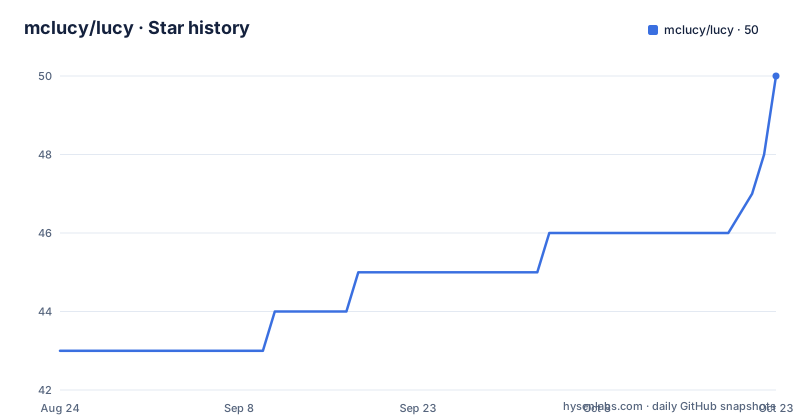
- mclucy/lucy50 ★ · +7
| Repository | 2026-08-24 | 2026-10-23 |
|---|---|---|
| mclucy/lucy | 43 | 50 |
7 Stars in the last 60 days, measured from the daily GitHub snapshot. Compare with other projects
Editorial analysis
What Lucy actually solves
Minecraft server administration has a fragmentation problem. Fabric, Forge, NeoForge, Spigot/Paper, and MCDReforged each have their own distribution channels, version constraints, and dependency rules. A server admin who mixes a Fabric mod with a Paper plugin has to track downloads, versions, and transitive dependencies by hand. Lucy aims to collapse that into a single workflow: declare what you want, let Lucy resolve the graph, and install from a lock file. The intended user is someone who runs a server and wants the reproducibility that npm or Cargo give to software projects. The README is explicit about the target: "Manage Minecraft server components from any ecosystem with `npm`-like experience." That is the whole pitch. It is not a launcher, not a server wrapper, not a monitoring tool. It is a package manager, and it stays in that lane.
The mechanism: manifest, lock file, and resolution
Lucy works in three stages, visible from the command list. First, `lucy init` creates a manifest and a lock file in the current directory, preserving any existing server files. The manifest holds your declared packages, like `fabric/fabric-api@stable`. The lock file records the exact resolved versions and transitive dependencies. Second, `lucy add` modifies the manifest and resolves the dependency graph, with optional dependencies skipped by default. Third, `lucy install` reads the lock file. The README states a key design choice: when the lock file is current, Lucy uses its exact data; when it is stale, it falls back to the manifest. That is a sensible way to handle version drift, but it also means you can end up with a server that does not match the lock file if the manifest was edited manually. The `remove` command prunes unused transitive dependencies from the lock file, which keeps the graph tidy. The `tree` and `leaves` commands give you visibility into the resolved graph, and `leaves` specifically lists packages with no dependents, which is a practical way to find candidates for removal.
Getting it running: commands and flags
Installation is straightforward if you have Go or Homebrew. With Go: `go install github.com/mclucy/lucy@latest`. With Homebrew: `brew install --HEAD mclucy/tap/lucy`. The `--HEAD` flag indicates a development build, which matches the pre-beta status. The quick start is four commands: `lucy init`, `lucy add fabric/fabric-api@stable`, `lucy status`, and `lucy install`. The `init` command accepts `--game-version` for non-interactive setups, defaulting to 1.21. The `add` command supports a `-f` flag to skip version, dependency, and platform warnings, which is useful for experimentation but dangerous if you use it blindly. The `search` command has filters for platform and sorting, and `info` shows metadata and version history. The `bisect` command is a notable addition: it runs a binary search over installed mods to isolate a faulty one. You start a session, mark midpoints as good or bad, and Lucy narrows down the culprit. That is a genuinely useful workflow for modded servers where crashes are often caused by one incompatible mod.
Limitations and failure modes
The most obvious limitation is that the project is incomplete. The README warns: "This project is under active development and is incomplete. APIs and behavior may change." Three commands are registered but not implemented: `doctor`, `export`, and `upgrade`. That means you cannot currently upgrade packages from the command line, which is a core expectation for any package manager. The `bisect` command is implemented, but it only works if you have a running server to probe, and the `--live` flag on `tree` and `leaves` implies a dependency on runtime state that may not be available in all setups. Another failure mode: the README warns that pre-beta versions are not recommended for production environments. If you run a live server with players, installing a mod through Lucy could break it, and the `bisect` tool is a mitigation, not a guarantee. The search and resolution depend on external data sources (like Modrinth, implied by `modrinth:carpet` in the search example), and those sources can change their APIs. The `cache` command has a `slugs` subcommand that maps slug-to-package-ID, which suggests a translation layer that could become stale.
A real alternative: manual management or a platform-specific tool
The main alternative is not another package manager; it is the status quo: downloading mods and plugins by hand from CurseForge, Modrinth, or the Spigot forums, and resolving dependencies manually. That approach has no lock file, no dependency resolution, and no `bisect` tool. You track versions in a spreadsheet or in your head. A more structured alternative is something like the Modrinth App, which is a graphical launcher and mod manager for clients, not a server-side package manager. It does not handle Forge or NeoForge server cores the way Lucy intends to. The difference in approach is that Lucy is command-line first, server-directory oriented, and cross-platform, whereas the Modrinth App is GUI-based and client-centric. If you need a server-side tool that works over SSH, Lucy is closer to what you want than a desktop app. But if you are on a single machine and prefer a GUI, the Modrinth App may be more approachable, though it will not give you a lock file or dependency pruning.
Maintenance and upgrade cost
The project is under active development, which cuts both ways. On one hand, you get new features and bug fixes. On the other, you get API changes and potential breakage. The README lists a contact email and a QQ group for contributors, which suggests a small, community-driven effort. There are no recent releases listed, and installation via `go install ...@latest` pulls the default branch, so you are always on the bleeding edge. That means every update could change command behavior or manifest format. The Homebrew tap uses `--HEAD`, which confirms the development-only status. The license is Apache-2.0, which is permissive and allows commercial use with attribution, but it does not come with any warranty. The copyright note about the logo and axolotl pixel art being Mojang's is a reminder that the project itself is not affiliated with Mojang, and you should not expect official support. The `cache` and `slugs` commands give you some control over local state, but there is no documented migration path for when the manifest format changes.
What to verify before you trust it
Before using Lucy on a real server, check three things. First, confirm that your server core and game version are supported. The README lists supported ecosystems but does not enumerate specific versions. Run `lucy search fabric/carpet` and see if results look current. Second, test `lucy install` on a copy of an existing server directory, not on your live server. The `init` command preserves existing files, but `install` will overwrite mod files, and there is no rollback command. Third, inspect the lock file after `lucy add` to see if the resolved versions match what you expect. The `--debug` flag and `--log-file` option can help you trace what Lucy is doing. The `bisect` command is a safety net, but it only helps if you have a reproducible crash. The README's warning about pre-beta versions is not boilerplate; it is the project's own assessment of its readiness.
Editorial conclusion
Adopt Lucy if you run multiple Minecraft servers with heterogeneous mod loaders and want a single command-line workflow for adding, removing, and bisecting broken mods. Do not adopt it for production yet: the README explicitly warns that pre-beta versions are not recommended for production, and several core commands (`doctor`, `export`, `upgrade`) are registered but not implemented. Before relying on it, verify that your exact server core and game version are supported by the current data sources, and test `lucy install` on a copy of an existing server. The lock file behavior is sensible, but the project is under active development and APIs may change without notice.
Frequently asked questions
How do I install lucy for a Minecraft server?
Two routes are documented: brew install --HEAD mclucy/tap/lucy on macOS or Linux, which tracks the unreleased head of the repository, or go install github.com/mclucy/lucy@latest. Pre-built binaries are advertised on the repository Releases page, though the project currently has no GitHub releases published.
What does lucy init create in my server directory?
It scaffolds two files, lucy.yaml and lucy-lock.yaml. The manifest records what you asked for and the lockfile records what resolved, and lucy install syncs the server runtime from the lockfile deterministically. Adding a package resolves dependencies, updates the lockfile and installs in one step.
Which Minecraft loader ecosystems does lucy support?
Five are listed as being worked on: Fabric, Forge, NeoForge, MCDReforged and Bukkit, Spigot or Paper. The README describes multi-ecosystem support as in progress rather than finished, and the quickstart shows a package reference carrying its ecosystem, in the form fabric/fabric-api.
Official sources
Add this badge to your README
If you maintain this project, the badge below links readers to this analysis and shows its maintenance status from the daily GitHub snapshot. Paste the markdown into your README; add ?metric=license or ?metric=stars to the image URL for a different field.

[](https://hysenlabs.com/projects/mclucy-lucy)Star history chart for your README
[](https://hysenlabs.com/projects/mclucy-lucy)Was this useful?