Melange compiles OCaml and Reason to JavaScript through Dune and opam
A mixture of tooling combined to produce JavaScript from OCaml & Reason
At a glance
- What is it?
- Melange is a compiler that turns OCaml and Reason into JavaScript, forked from the ReScript compiler and aimed squarely at the OCaml ecosystem. It fits teams that want OCaml's type system on the JavaScript side, and the editor tooling still constrains which OCaml version you can use.
- Who is it for?
- Adopt Melange if your team writes OCaml or Reason and wants JavaScript output with the OCaml toolchain intact, and if you are willing to track the compiler's OCaml version support. Skip it if you need the ReScript package ecosystem or a ReScript compatibility layer, since that layer was removed in Melange 2.0, and skip it if you need editor tooling on an OCaml version other than 4.14, since the emitted `.cmt` artifacts target the 4.14 binary format.
- Can I use it commercially?
- Check first. The repository uses a licence we do not classify automatically, so read its LICENSE file before any commercial use.
- Is it still maintained?
- Yes. The repository last received commits 2 days ago.
- What is it written in?
- Mainly OCaml, according to GitHub's language statistics.
Answers come from the project's GitHub data, last synced on November 7, 2026, and from our analysis. They are not legal advice.
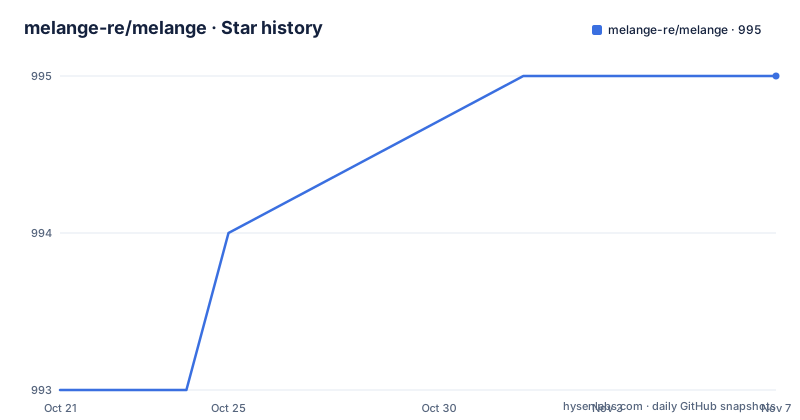
Star history
- melange-re/melange995 ★ · +2
| Repository | 2026-10-21 | 2026-11-07 |
|---|---|---|
| melange-re/melange | 993 | 995 |
2 Stars in the last 17 days, measured from the daily GitHub snapshot. Compare with other projects
Editorial analysis
OCaml semantics, JavaScript output, Dune as the build system
Melange is a compiler that emits JavaScript from OCaml or Reason, and the project describes it as a mixture of tooling combined to produce JavaScript from those two languages. The pitch is the OCaml type system and its inference, carried over to a language most teams already ship. The audience is specific. It is for people who want to write frontend code in OCaml without leaving their editor, their package manager and their build system, and who are willing to accept a compiler rather than a transpiler that treats types as decoration. The build story is Dune, and the project states that Melange has first class support in Dune, with Dune listed as a dependency alongside OPAM in its own comparison table. A second, quieter audience is anyone working in a mixed codebase, since the project is a fork of the ReScript compiler and its stated focus is a deeper integration with the OCaml ecosystem, including sharing code between backend and frontend through Dune's virtual libraries.
A ReScript fork that deliberately drifted away
The history matters for anyone weighing the tool against ReScript. The project states that it is forked from an earlier version of the ReScript compiler, focused on a deeper integration with the OCaml ecosystem. Melange 1.0 shipped a ReScript compatibility layer to keep ReScript syntax working and to preserve access to the ReScript package ecosystem, and the documentation says plainly that ReScript and Melange have since diverged significantly and that this compatibility layer was removed in Melange 2.0. That is the sharpest practical difference between the two projects, and it cuts both ways. The Melange side gains a compiler that is a citizen of the OCaml world rather than a fork of BuckleScript, but a team with existing ReScript packages has to check that layer before moving. The acknowledgements section states that Melange continues to incorporate patches to ReScript on a regular basis, so the fork still receives upstream fixes, and it points to `Credits.md` for the individual components carried over.
Installing with opam, or running the flake without a switch
The project is released to OPAM and the documented install is a single command.
$ opam install melangeThe documentation also points at melange.re for getting started, and a template repository, melange-re/melange-opam-template, is offered as a project starter for new codebases. Nix is supported as a second path. The repository provides a flake, `github:melange-re/melange` can be used as a flake input, and the flake exposes a `melange.overlays.default` overlay that adds melange to `pkgs.ocamlPackages.melange`. The compiler binary is `melc`, and it can be run straight from the flake with `nix run github:melange-re/melange`, with a versioned example given as `nix run github:melange-re/melange/2.0.0 -- --help`. That route is the useful one for a team that does not want a global OPAM switch, since it pins the toolchain with the code.
The OCaml version matrix and the .cmt artifact constraint
Which OCaml version you can use depends on which Melange version you use, and the documentation gives the mapping.
- Melange v3.0 works on OCaml 4.14 ([v3-414](https://github.com/melange-re/melange/releases/tag/3.0.0-414)) and 5.1 ([v3-51](https://github.com/melange-re/melange/releases/tag/3.0.0-51)).
- Melange v2.0 works on OCaml 5.1 only.
- Melange v1.0 can build projects with OCaml >= 4.13 (including OCaml 5.x).
The interesting line is the third one, because it carries a caveat: editor integration only works on OCaml 4.14, since Melange emits `.cmt` artifacts targeting the OCaml 4.14 binary format. In other words, the compiler may build against a newer OCaml while the language server experience degrades, because the type information the tools read is tied to one binary format. That is a compatibility constraint you inherit from the OCaml side of the toolchain rather than something Melange chose. The repository also shows a mismatch worth noticing between the documentation and the build setup, since the `opam-init` target in the Makefile creates a 5.4.0 switch while the compatibility list in the documentation stops at Melange v3.0 with OCaml 4.14 and 5.1.
Editor support runs through ocaml-lsp and Merlin
The editor story is built on the existing OCaml tooling rather than on something new. The project states that ocaml-lsp or Merlin works as usual, and in VSCode it recommends the VSCode OCaml Platform extension. Since Melange has first class support in Dune, the editor tools pick up the build through Dune's language server integration, which is why the `.cmt` constraint matters so much: the type information those tools consume comes from the compiler's output artifacts. A developer moving from ReScript will find the package manager and build system around it are the OCaml ones. The project also points at a Dune virtual libraries approach for sharing code between a backend and a frontend, which is the integration case the fork was created for.
Melange against ReScript: same job, different distribution
The project's own comparison table sets out the tooling around the compiler, and it is the clearest statement of where Melange sits. Two rows carry the point. ReScript is listed as "The brand around a syntax and a compiler that emits JavaScript", with the note that it is "Distributed via NPM as prebuilt binaries; previously called BuckleScript". Melange is listed as the "Compiler that emits JavaScript", with the note that it "Supports OCaml and Reason; derived from ReScript, focused on deeper integration with OCaml", and its dependencies given as "OPAM (to install), Dune (to build)".
Two differences matter in practice. The first is distribution. ReScript is delivered as prebuilt binaries over NPM with no OCaml dependencies to install, while Melange needs OPAM to install and Dune to build. The second is scope. ReScript is a brand around a syntax and a compiler, while Melange is a compiler that supports both OCaml and Reason and is derived from ReScript with a focus on deeper OCaml integration. If you want a JavaScript output with no OCaml toolchain at all, ReScript's npm distribution is the lighter path. If you want one language across a codebase that already runs on Dune and opam, Melange is the one that shares the build.
Building and testing the compiler with Dune targets
The repository is laid out like a compiler project, with directories for the compiler source, the JavaScript runtime export, the ppx, the playground, the RFCs, a belt directory, a test directory and a vendored directory, plus a `dune-project` and two opam packages, `melange.opam` and `melange-playground.opam`. Development happens inside a Nix develop shell, and the Makefile wraps the common commands.
nix-%:
	nix develop -L '.?submodules=1#' --command $*
The `dev` target builds the installable artefacts through Dune.
dev:
	dune build @install
The test target runs the Dune test suites of both packages.
test:
	opam exec -- dune runtest -p melange,melange-playground
For a local OPAM based setup instead, the `opam-init` target chains switch creation and dependency installation.
opam-create-switch: ## Create opam switch
	opam switch create . 5.4.0 -y --no-install
There are separate targets for the playground, including a blackbox test target, and a `generate-dune-files` target that runs a Node script, so a contributor needs both a Node runtime and an OCaml toolchain to work on the repository.
A custom licence and release tags from July 2026
The licensing is not a standard identifier, and that is worth reading closely. The project points at two files, `COPYING` and `COPYING.LESSER`, and the repository root also carries a `LICENSE` file, `Credits.md` and `Changes.md`. The combination of a base licence and a lesser file points to the same dual licensing pattern used for library code and for the parts linked into applications, but the exact terms live in those files rather than in a name you can check against a licence database. A team adding this compiler to a build chain should read them directly. On releases, three tags are listed, 7.0.1-55, 7.0.1-54 and 7.0.1-53, all published on 2026-07-12 within minutes of each other, and the last push was on 2026-10-18. The numbering shows a patch stream with a build counter rather than a semantic version scheme, so pinning is done on the exact tag, and the gap between the July tags and the October push means the trunk is ahead of the newest published release.
Editorial conclusion
Adopt Melange if your team writes OCaml or Reason and wants JavaScript output with the OCaml toolchain intact, and if you are willing to track the compiler's OCaml version support. Skip it if you need the ReScript package ecosystem or a ReScript compatibility layer, since that layer was removed in Melange 2.0, and skip it if you need editor tooling on an OCaml version other than 4.14, since the emitted `.cmt` artifacts target the 4.14 binary format. Verify three things first: that the OCaml version on your build machine matches the matrix for the Melange release you pin, that the `melange.opam` package in this repository builds under your Dune setup, and that the licence terms in `COPYING` and `COPYING.LESSER` match what your organisation accepts for a compiler in its build chain.
Frequently asked questions
How do I install Melange?
Melange is released to OPAM and the documented install is `opam install melange`. A Nix flake is also provided, with the `melange.overlays.default` overlay adding melange to `pkgs.ocamlPackages.melange`, and the `melc` binary can be run with `nix run github:melange-re/melange`.
Which OCaml versions does Melange support?
Melange v3.0 works on OCaml 4.14 and 5.1, Melange v2.0 works on OCaml 5.1 only, and Melange v1.0 can build projects with OCaml 4.13 or newer. Editor integration only works on OCaml 4.14, because Melange emits `.cmt` artifacts targeting the 4.14 binary format.
Can I still use ReScript packages with Melange?
Melange 1.0 included a ReScript compatibility layer that preserved access to the ReScript package ecosystem, but the project states that ReScript and Melange have since diverged significantly and that the layer was removed in Melange 2.0.
How do I set up editor support for Melange projects?
Melange has first class support in Dune, and ocaml-lsp or Merlin work as usual with it. In VSCode the project recommends the VSCode OCaml Platform extension.
Official sources
Add this badge to your README
If you maintain this project, the badge below links readers to this analysis and shows its maintenance status from the daily GitHub snapshot. Paste the markdown into your README; add ?metric=license or ?metric=stars to the image URL for a different field.

[](https://hysenlabs.com/projects/melange-re-melange)Star history chart for your README
[](https://hysenlabs.com/projects/melange-re-melange)Was this useful?