StudyMate: a study workflow plugin where lessons live in the host's reading pane
你的AI学习搭档:定路线、讲知识、做项目,边学边做,学透一门科目
At a glance
- What is it?
- StudyMate turns a learning agent into a course system, with a prerequisite-ordered outline, lessons rendered live in the host interface, progress stored as files and memory carried across subjects. It ships as a DeepSeek Harness plugin, an Antigravity plugin and a Codex and ChatGPT Work plugin, and it is candid about the mess its earlier versions were in.
- Who is it for?
- StudyMate suits a self-directed learner of mathematics or computer science who wants a plan rather than a chat, who is willing to keep a file-based workspace, and who hosts their agent in DeepSeek Harness, where the current work lands.
- Can I use it commercially?
- Yes. MIT is a permissive licence: you can use, modify and sell software built on it, as long as you keep its copyright and licence notices.
- Is it still maintained?
- Yes. The repository last received commits 1 day ago.
- What is it written in?
- Mainly JavaScript, according to GitHub's language statistics.
Answers come from the project's GitHub data, last synced on November 7, 2026, and from our analysis. They are not legal advice.
Star history
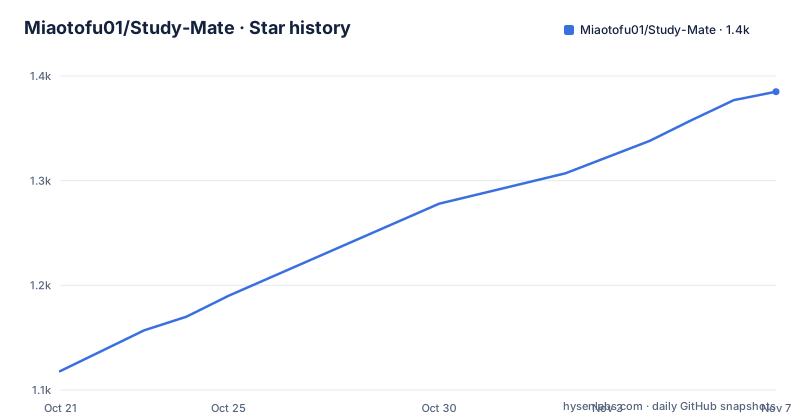
- Miaotofu01/Study-Mate1,385 ★ · +267
| Repository | 2026-10-21 | 2026-11-07 |
|---|---|---|
| Miaotofu01/Study-Mate | 1.1k | 1.4k |
267 Stars in the last 17 days, measured from the daily GitHub snapshot. Compare with other projects
Editorial analysis
What the project actually is
StudyMate is described as an AI study partner for mathematics and computer science subjects, built on the principle of learning by doing. The repository description puts it plainly: plan a route, explain the knowledge, do the projects.
Underneath, it is a set of learning workflows, skills and plugins rather than a model of its own. It supports the learning mode preset in DeepSeek Harness, a native multi-agent plugin for Google Antigravity, and a packaged plugin for Codex and ChatGPT Work. The package on npm is @yunmiao/studymate, and the current version is 2.0.2.
The structure of the work is described as five roles that the agent organises on demand: collecting material, sourcing images, designing the course, explaining, and assessing practice. When the host supports delegation, those roles are handed to sub-agents, and otherwise the same agent does them in sequence.
That division is what makes the project more than a prompt collection. The outline is a real artefact with a shape, the lessons are content with a defined format, and the assessment step is a separate pass over the exercises rather than something appended to an explanation.
The licence is MIT, with copyright held by Cattofu, and the interface language is Chinese with an English README alongside.
Course structure: prerequisites, lesson types and file-based progress
Each course is a single outline, and the outline is the plan. Knowledge points are arranged into a roadmap by prerequisite dependency, so the order carries meaning rather than being a list of topics. Each point is labelled with a lesson type, and the outline distinguishes three: a concept lesson, a hands-on lesson and a lab lesson, written in the outline as concept, practical and lab.
Progress is stored in files inside the learning workspace, which means it survives across conversations. A new session starts from what was already covered rather than from nothing, and the overview page lists every subject with the current node marked, and clicking into a subject opens its roadmap laid out in dependency layers and coloured by state. Clicking a node expands the lesson cards beneath it in place.
A course is described as made of lectures, exercises and project work, the same three-part structure expressed from the student's side: the concept, the practice and the thing you build.
The README is explicit that the exported lessons are textbook-style explanations with rich illustrations and customised exercises and project goals, rather than chat transcripts dressed up as a course.
The reading pane is the deliverable, not a generated page
The most interesting architectural decision is that lessons are not pre-rendered HTML files. The README says the page templates were retired with the engine rewrite, and that the lesson page is now rendered live by the reading pane in the host, with formulas, illustrations and exercises inside it. The DSH side is a single plugin package where the Host half registers native tools and the data routes for the reading pane, and the Client half is the reading pane itself. The preset and the workspace configuration are written by the installer.
That has an obvious benefit and an obvious cost. The benefit is that a lesson is live data, so an exercise can be answered and the answer checked inside the same surface. The cost is that the output is tied to the host's rendering, so a lesson cannot be opened outside it.
The answer to that cost is the export command:
npx -y @yunmiao/studymate exportThe exported copy lands in the export folder of the workspace and can be opened offline. It needs React available, installed globally with npm i -g react react-dom or pointed at with STUDYMATE_REACT_DIR, which is a dependency worth knowing about before you run it.
The workspace itself defaults to ~/StudyMate, and everything, course material and memory, is stored inside it. An existing configuration is reused, so moving machines means carrying that directory.
Installing it into the three hosts
The DeepSeek Harness route is a plugin install, and the README lists the web and desktop profiles separately, with matching update commands:
dsh plugin --profile web add @yunmiao/studymate
dsh plugin --profile web update @yunmiao/studymate@latest
The plugin requires DSH 0.1.7-alpha.1 or newer.
For Google Antigravity, the supported version is v1.0.0 only, and the tree has to be at that tag rather than on main, because the build comes from the v1.0.0 tree:
git checkout v1.0.0
node bin/studymate.mjs build-antigravity --install
The alternative is to build a ZIP with npm run build:antigravity and import it by hand.
For Codex and ChatGPT Work the support scope is also v1.0.0 and nothing later is guaranteed to work. You download the studymate-openai.zip from the v1.0.0 release and import it through the plugin import entry point that those hosts provide. Since there is no later build for this side, moving machines means reusing the same ZIP.
That version spread is the first thing to understand about the project. The newest work targets DeepSeek Harness, and the other two hosts are pinned to a release from before the rework.
Memory across subjects and how the agent adapts
Two features carry the learning over time. The first is cross-subject shared memory, which records what level you are already at, which explanations work for you and where you tend to get stuck, so the next subject does not begin with a fresh introduction of yourself.
The second is the adjustment loop, and the usage examples show it concretely. Saying that something is too simple or that you did not understand triggers a change of explanation, either adding boundaries and counterexamples or dropping a level of abstraction, and the preference is written into the shared memory so the next explanation starts from there.
Other examples show the shape of a session. Asking what to learn when you do not know yet starts an exploration that asks one question at a time and can be skipped in favour of a suggestion. Asking to learn C++ for competitions makes the agent ask about purpose, level, projects and how the lab work should run, and only then produces the outline and opens the first lesson. Bringing your own textbook is supported, with the local material converted to Markdown in a reference folder and the online sources converted into a sources folder, and both the outline and the lessons written against those texts.
Two smaller flows are worth noting: pasting a passage you do not understand gets an immediate short answer, an entry in the file and a return to where you were reading, and asking to be tested produces questions on the spot, verified against runnable evidence, with an assessment record and an updated progress state.
Testing, tool contracts and a series of recorded decisions
The README is unusually disciplined about where each fact lives, which is itself a design decision worth describing.
There is exactly one daily command, the self-check after installation:
npm testIt needs no real DSH, no browser and no model service. The tests create temporary subjects of their own and do not touch your learning workspace, which is what makes it safe to run on a machine with a course in progress. Behind it, the npm test script chains a type check, an installer test, an OpenAI build test, an Antigravity build test, a release check script and a static check.
The native tool surface has exactly two authoritative sources, the code in lib/tools/index.ts and the human-readable contract in the preset references, and the README refuses to restate either. The prerequisites, the on-demand entry points such as a real browser or a real DSH, and the exit code semantics live in the test documentation.
Several structural changes are recorded as numbered decision records. The engine moved from Python scripts to a TypeScript plugin shipped with the package, which is why the installer no longer probes for Python and why the package requires Node 22.19 or 24, and the standalone web runtime built on FastAPI and Next.js was moved out of the main line to a branch until it can be adapted to the new engine. Example workspaces are no longer committed to the repository, with test subjects created and discarded on the fly.
What the preface admits, and what that means for a user
The preface is the most unusual part of the README, and any evaluation should start with it.
The author says the project began as something thrown together for personal use, that many more people than expected liked it, and that code written that way had real problems: documentation that was bloated and full of an AI flavour with poor readability, a large amount of unnecessary defensive code, and confused functional modules. The current version works acceptably but is still a long way from what the author wants.
What follows is a commitment to look at those problems directly, to review every file by hand, and to maintain the project long term, with issues welcome.
That is a candid statement, and it is more useful than a polished one, because it tells you what to expect. A 2.0.x release with a rewritten engine in TypeScript, a reorganised module layout, a documentation set that exists as several normative documents rather than one README, and a decision record for every structural change is a project in the middle of a cleanup, not one that has finished it.
The practical reading for a user is that the workflow is worth trying, the harness integration is the part that is actively moving, and the other two hosts sit on an older release. The workspace being plain files in a directory means you can inspect, back up and edit what the agent produced, which is the strongest argument for the design.
Editorial conclusion
StudyMate suits a self-directed learner of mathematics or computer science who wants a plan rather than a chat, who is willing to keep a file-based workspace, and who hosts their agent in DeepSeek Harness, where the current work lands. It is the wrong choice for Antigravity or Codex users expecting current releases, since both sides are pinned to v1.0.0 from before the TypeScript rewrite, and it is the wrong choice if you want lessons you can open in any browser, since the reading pane is the product and the export path needs React installed. Verify first that your harness version satisfies the 0.1.7-alpha.1 floor, that npm test passes against your machine without touching your workspace, and that the export command finds React before you rely on the offline copy.
Frequently asked questions
How do I install StudyMate into DeepSeek Harness?
Run dsh plugin --profile web add @yunmiao/studymate for the web profile, or the same command with the desktop profile, and update it with dsh plugin --profile web update @yunmiao/studymate@latest. The plugin requires DSH 0.1.7-alpha.1 or newer.
Where is my learning data stored?
In the learning workspace, which defaults to ~/StudyMate, with all course material and memory kept inside it. An existing configuration is reused, and progress lives in files, so a new conversation continues from where you left off.
Does StudyMate need Python installed?
No. The engine moved from Python scripts to a TypeScript plugin shipped with the package, and the installer no longer probes for Python. One separate requirement exists for exporting static pages, which needs React installed globally or pointed at with STUDYMATE_REACT_DIR.
Which versions work with Google Antigravity and Codex?
Only v1.0.0 on both sides. Antigravity is built from the v1.0.0 tree with the build-antigravity command rather than from main, and for Codex and ChatGPT Work you import the studymate-openai.zip from that release, since there is no later build for that host.
Official sources
Add this badge to your README
If you maintain this project, the badge below links readers to this analysis and shows its maintenance status from the daily GitHub snapshot. Paste the markdown into your README; add ?metric=license or ?metric=stars to the image URL for a different field.

[](https://hysenlabs.com/projects/miaotofu01-study-mate)Star history chart for your README
[](https://hysenlabs.com/projects/miaotofu01-study-mate)Was this useful?