VacuumTube: YouTube Leanback as a desktop app with ad blocking
YouTube Leanback on the desktop, with enhancements
At a glance
- What is it?
- VacuumTube is an Electron wrapper around YouTube Leanback, the console and Smart TV version of YouTube, that presents it as a standalone desktop application with controller and touch support, ad blocking, SponsorBlock, DeArrow and a long list of display options. It suits someone who wants the TV interface on a desktop, and it is an unofficial front end over somebody else's service.
- Who is it for?
- VacuumTube suits a desktop user who prefers the Leanback TV interface to the standard YouTube site, especially with a game controller, and who wants the ad blocking, SponsorBlock and DeArrow features that the official clients do not offer. It does not suit a person who wants a general purpose desktop browser, since it opens one service and nothing else, and it does not suit macOS users who want automatic updates, because the macOS builds are unsigned.
- Can I use it commercially?
- Yes. MIT is a permissive licence: you can use, modify and sell software built on it, as long as you keep its copyright and licence notices.
- Is it still maintained?
- Yes. The repository last received commits 4 days ago.
- What is it written in?
- Mainly JavaScript, according to GitHub's language statistics.
Answers come from the project's GitHub data, last synced on November 7, 2026, and from our analysis. They are not legal advice.
Star history
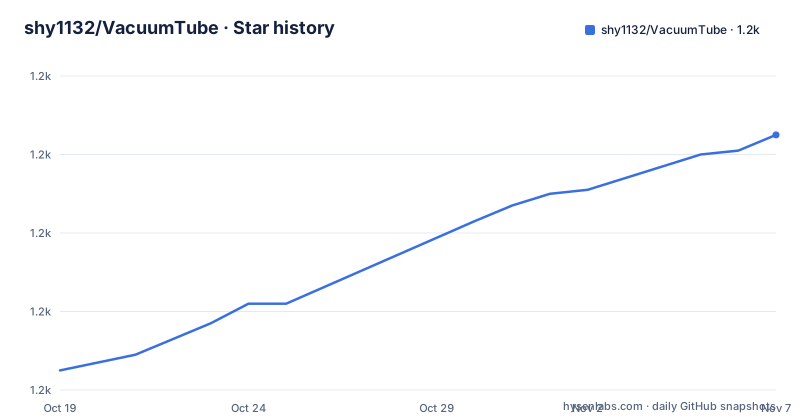
- shy1132/VacuumTube1,225 ★ · +60
| Repository | 2026-10-19 | 2026-11-07 |
|---|---|---|
| shy1132/VacuumTube | 1.2k | 1.2k |
60 Stars in the last 19 days, measured from the daily GitHub snapshot. Compare with other projects
Editorial analysis
It is a wrapper, and the project says so plainly
VacuumTube is described as an unofficial wrapper of YouTube Leanback, the console and Smart TV version of YouTube, for the desktop, with a built in adblocker and minor enhancements. The README is unusually direct about what the project is not. It is not a custom client, because YouTube Leanback is an official interface. The project simply encompasses it and makes it usable as a standalone desktop application.
The reason that is not trivial is worth understanding. YouTube Leanback is just an HTML5 app, so in principle you can use it in a browser by going to the TV address, but YouTube intentionally blocks browsers unless the request comes from one of their console or TV apps. The README says you can technically bypass this by spoofing your user agent, but that it is not the same experience you would get on a console or TV, since controllers are not supported outside the official app, and it is a much more involved process to get working.
So VacuumTube solves that by wrapping Leanback with Electron, presenting itself as the YouTube app, and implementing controller and touch support. The goal stated in the README is to make it feel as official as possible while adding niceties such as ad blocking, DeArrow and userstyles. The project invites issues if anything looks lazy or half baked, which is a reasonable thing to say about a project whose whole pitch is fidelity to another product's interface.
The repository is JavaScript, the primary language, and the layout has the familiar Electron shape with src/ for the application code, build/ for the electron-builder configuration, assets/ for icons, locale/ for translations, and a test/ directory. The package.json runs electron . to start and uses node --test for the tests, with per platform build scripts for Windows, macOS and Linux.
Downloads for every platform, and the Flathub route on Linux
The install section covers three platforms with prebuilt binaries, and the Linux story is the one that has a real decision in it.
On Windows there is an Installer, a VacuumTube-Setup.exe, and a portable ZIP in x64 and Arm 64 flavours. The readme says if you do not know the difference, pick the Installer.
On macOS there are three disk images, one for Apple Silicon and M-series, one for Intel, and a universal build. There is a caveat attached. The macOS builds are not yet signed, so they do not auto-update, and the readme asks users to check for updates periodically for now. That is a real friction point on the platform, since a signed build is what lets macOS update an app in place, and an unsigned one has to be replaced by hand.
On Linux the readme says that in most cases you very likely want the Flatpak, since it works across all distributions and common architectures. Otherwise there is a distribution package or a portable one, and again a nudge that if you do not know the difference you likely want amd64. The available artifacts are an AppImage, a deb for Ubuntu, Debian and Mint, and a tarball, each in amd64 and aarch64 flavours. The Flathub listing is referenced with a download statistics badge, so the project is measuring Flatpak installs.
The Flatpak route is also the one that avoids the file system permission problems Electron apps otherwise hit, and it is the reason the maintainer recommends it, though the readme states the distribution and architecture reason rather than the sandbox one.
The feature list is where the project actually lives
Almost everything VacuumTube does is in the settings, which are located in the YouTube settings and can also be opened with Ctrl+O. The list is long and specific enough to be worth walking through, because it tells you what the wrapper changes.
The ad blocking is described as seamlessly blocking video and feed ads, and the readme says it is not subject to YouTube's methods of preventing blockers. SponsorBlock automatically skips sponsored and other segments in videos based on a community-contributed database. DeArrow replaces titles and thumbnails with more accurate, less sensationalized versions from a public crowdsourced database. Return Dislikes uses community data from the Return YouTube Dislike API to show rough dislike counts, with the word rough doing real work there. Block Continue Watching suppresses the video paused, continue watching prompt that appears after idling.
Then there are the display and playback options, which are the ones that make this more than an ad blocker. Remove Super Resolution strips the AI upscaled quality options from low quality videos, and Unlock Resolution removes the monitor resolution cap so you can watch at any resolution. Filter Video Codecs lets you block specific codecs and forces YouTube to pick an alternative, which the readme compares to h264ify but calls more powerful. Hardware Decoding uses the GPU to decode video where possible. Wayland HDR enables HDR on Wayland platforms on Linux, with a warning that it can cause desaturated colors on unsupported platforms and needs up to date drivers and a compatible compositor.
The window options are Fullscreen, No Window Decorations and Keep on Top, and the readme notes that several of these also make the app launch in that state rather than only toggling it. Low Memory Mode tells YouTube to enable its own low memory mode, and Pause on Blur pauses the current video when the window loses focus.
Experimental extras, userstyles and controller support
Three groups of features sit apart from the rest, because they are either opt in, or they change how the app looks and behaves in ways that are more than a setting.
The Features section collects extra experimental features that add functionality, and the readme names three of them: Music Mode, Show Remaining Time and Ultrawide Support. The section is explicitly labelled as experimental, which is a fair signal that these may change or break between releases.
Custom CSS, or userstyles, enables injection of custom styles into the interface, with a further section of the readme covering it. This is the escape hatch for people who want the Leanback interface to look different, and it is a security-relevant feature in the sense that it runs your own stylesheet inside a page that loads remote content.
Touch Overlay enables on screen touch controls for easier navigation when touch input is detected, which is what makes the app usable on a touchscreen laptop or a tablet running the desktop build. Controller Support enables support for game controllers, including navigation and video playback controls, and it requires an external controller such as an Xbox controller. The readme notes it can be turned off to avoid conflicting with other applications, which is the sort of detail you only find in a project that has actually been tested alongside a lot of other software.
The Settings also include Guide Tabs, which lets you choose which guide tabs appear on the sidebar, and Hide Shorts, which hides YouTube Shorts from the homepage.
The Electron packaging tells you what the app is made of
The package.json is where the packaging story is visible. The app is named vacuumtube with the description YouTube for TV, on your PC, the entry point is src/index.js, and the start script is electron .. The build section configures electron-builder with the appId and desktopName both set to rocks.shy.VacuumTube, the productName VacuumTube, and an artifactName pattern of VacuumTube-${arch}.${ext}, which is what produces the per architecture filenames you see in the download links. The author is shy and the project is MIT licensed.
On Linux the target list covers deb, tar.gz and AppImage, each with x64 and arm64 architectures, and the desktop entry point uses the Type Application with the Categories AudioVideo and the Keywords YouTube and YT. There is a flatpak/ directory in the repository, which is the source for the Flathub build, and an assets/ directory with the icon, referenced by the linux icon path as an SVG.
The scripts section has a plain node --test test command, which tells you the test suite runs on Node's built in test runner rather than on a framework, and the per platform build scripts use electron-builder directly for Windows, macOS and Linux, with extra Linux variants for an unpacked directory and for an AppImage only build. The 2.0.0 version number and the release history, with v1.8.2 in July 2026, v1.8.1 earlier that month and v2.0.0 in October 2026, suggest a substantial rewrite in the 2.0 line rather than a gradual feature drip.
The licence is MIT, and the project is hosted on GitHub with the releases published there rather than through a package index.
Where VacuumTube is the wrong tool
Three cases argue against it. The first is someone who wants a desktop browser. VacuumTube opens one service and nothing else, and its entire feature set is about that one interface. If you want an ad blocked, sponsor skipped browsing experience across the web, a general purpose browser with an extension is the tool, and it will do more for you.
The second case is macOS. The readme is explicit that the macOS builds are not signed, so they do not auto-update, and asks users to check for updates periodically. An unsigned build also means the Gatekeeper prompt every time, and for a user who wants a set and forget install on a platform where Apple has code signing, that is a meaningful tax. The Windows and Linux paths, particularly the Flatpak, do not have this problem.
The third case is a user whose YouTube experience should be exactly what YouTube ships. Every enhancement here is a modification of somebody else's service by a third party, and the ad blocking in particular is described as not subject to YouTube's methods of preventing blockers, which is a race that the platform side is likely to keep running. The readme's own framing, that the goal is to feel as official as possible, is the honest one: this is a wrapper, and a wrapper can always lag behind the thing it wraps.
There is also the question of what a 2.0 rewrite means for a user who had a working 1.8 install, since the feature set grew substantially and the settings surface is now much larger. The release history shows v1.8.2 in July 2026 and v2.0.0 in October 2026, so anyone on 1.x is looking at a version jump with a settings list that has grown considerably.
Editorial conclusion
VacuumTube suits a desktop user who prefers the Leanback TV interface to the standard YouTube site, especially with a game controller, and who wants the ad blocking, SponsorBlock and DeArrow features that the official clients do not offer. It does not suit a person who wants a general purpose desktop browser, since it opens one service and nothing else, and it does not suit macOS users who want automatic updates, because the macOS builds are unsigned. Before you install it, pick the Flatpak on Linux, read the ad blocking section of the settings, and note that the last push was on 2026-10-12 with v2.0.0 released on 2026-10-10.
Frequently asked questions
What is VacuumTube?
It is an unofficial Electron wrapper around YouTube Leanback, the console and Smart TV version of YouTube, presented as a standalone desktop application with controller and touch support plus ad blocking and other enhancements. The project states it is not a custom client, since Leanback is an official interface.
How do I install VacuumTube on Linux?
The readme says that in most cases you very likely want the Flatpak from Flathub, since it works across all distributions and common architectures. Otherwise there are AppImage, deb for Ubuntu, Debian and Mint, and tarball builds in amd64 and aarch64 flavours.
Does VacuumTube update automatically on macOS?
No. The readme notes that macOS builds are not yet signed, so they do not auto-update, and asks users to periodically check for updates for now.
What can VacuumTube block or change?
The settings list ad blocking, SponsorBlock segment skipping, DeArrow titles and thumbnails, Return Dislikes counts, the continue watching prompt, super resolution qualities, monitor resolution caps, specific video codecs, YouTube Shorts, and a range of guide tabs and window behaviour options including fullscreen, no window decorations, keep on top and pause on blur.
Official sources
Add this badge to your README
If you maintain this project, the badge below links readers to this analysis and shows its maintenance status from the daily GitHub snapshot. Paste the markdown into your README; add ?metric=license or ?metric=stars to the image URL for a different field.

[](https://hysenlabs.com/projects/shy1132-vacuumtube)Star history chart for your README
[](https://hysenlabs.com/projects/shy1132-vacuumtube)Was this useful?