Editable: a code-owned Svelte CMS with in-page editing
The website you can edit on the page
At a glance
- What is it?
- Editable adds page editing, structured content, translations, images, and an MCP endpoint to a Svelte site that remains in its own repository. It fits teams that want direct content editing without adopting a separate CMS, but its preview releases and custom licence require review.
- Who is it for?
- Editable is appropriate for developers who want editors to change structured Svelte site content directly while retaining their own components, layouts, and Git workflow. It is a poor fit for teams requiring a static-only backend, mature video uploads through MCP, or a clearly classified permissive licence.
- Can I use it commercially?
- Check first. The repository uses a licence we do not classify automatically, so read its LICENSE file before any commercial use.
- Is it still maintained?
- Yes. The repository received new commits within the last day.
- What is it written in?
- Mainly TypeScript, according to GitHub's language statistics.
Answers come from the project's GitHub data, last synced on November 7, 2026, and from our analysis. They are not legal advice.
Star history
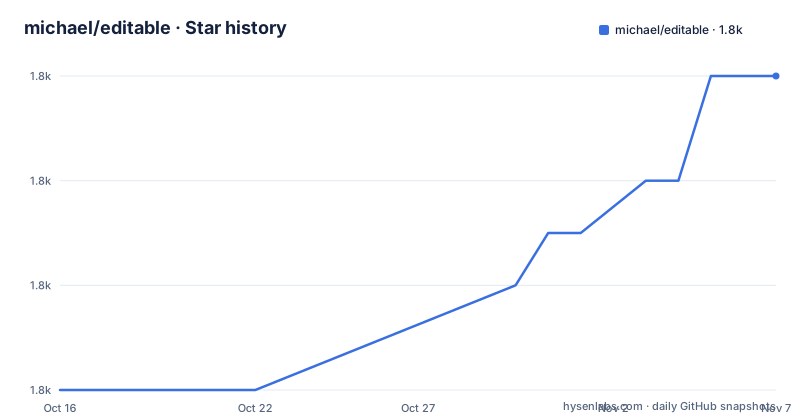
- michael/editable1,804 ★ · +6
| Repository | 2026-10-16 | 2026-11-07 |
|---|---|---|
| michael/editable | 1.8k | 1.8k |
6 Stars in the last 22 days, measured from the daily GitHub snapshot. Compare with other projects
Editorial analysis
Editable's code-owned content model
Editable addresses a specific split between content and presentation. A conventional site may keep its components in source control while editors modify content elsewhere, creating synchronization work and opportunities for mismatched structure. Editable instead places editing inside the rendered page while leaving the content model, components, layouts, and styles in a repository owned by the site team.
The intended users are developers building a Svelte website and editors who need to update it without editing source files. Administrators press `⌘` or `Ctrl` + `E`, authenticate with `ADMIN_PASSWORD`, and edit the page in place. A separate read-mode shortcut, `Ctrl` + `Shift` + `N`, creates a page. This is not a general-purpose page builder detached from the repository. Each site begins as its own checkout, and the README says teams can retain Editable as an `upstream` remote while owning the site code.
That approach makes content rules part of the application. Editors work through an EDF document model, while teams can adapt colors, fonts, components, layouts, or the content schema itself. The trade-off is operational ownership. Updating the model, schema, rendering components, database, or deployment configuration remains application work rather than a purely hosted CMS account.
How EDF documents reach the SQLite-backed site
Editable represents documents as EDF, an XML serialization that the server parses back into the JSON used by the editor. Each element is named by its node type, carries an `id`, and stores primitive properties as attributes. Nested elements describe children, while inline tags represent marks. This representation avoids character offsets and gives editors, pages, and MCP clients a common document format.
Identity is explicit. Nodes that retain their IDs are retained, including marks, while elements without IDs are new. The serializer writes all values, which means a saved document does not silently inherit a later schema default. References are also explicit: a page can reference the shared banner, navigation, and footer by IDs such as `nav="nav_1"`. Those shared documents remain separate, so editing a page cannot accidentally change its navigation.
Before storage, the server validates a document against the schema, applies the single-owner rule, and checks its version. If the editor or an MCP client changed the document after the other read it, the stale write fails. The browser editor applies the equivalent conflict choice in the opposite direction by asking which version to keep. Based on the repository layout, this parsing and serialization logic lives in `src/lib/edf.ts`, while the listed topics and `docker-compose.yml` indicate SQLite storage.
Installation from the stable branch
The README lists Git, pnpm, and Node.js 26 as prerequisites. It recommends the `stable` branch because that branch represents the latest tested release, while `main` may contain unfinished changes. The commands below install pnpm, select Node.js 26, clone the template, and create the local environment file:
curl -fsSL https://get.pnpm.io/install.sh | sh -
pnpm runtime set node 26 -g
git clone --branch stable https://github.com/michael/editable.git my-site
cd my-site
pnpm install
cp .env.example .env
If pnpm was just installed, the README says to open a new terminal before running the remaining commands. Set a value for `ADMIN_PASSWORD` in `.env`:
ADMIN_PASSWORD='change-me'The example value is a placeholder that must be replaced. The backend also requires `ORIGIN` whenever it is enabled, and `.env.example` sets it to the development URL:
ORIGIN="http://localhost:5173"`ORIGIN` must exactly match the URL opened in the browser or write requests return 403. Start Vite with:
pnpm devOpen `http://localhost:5173`, press `⌘` or `Ctrl` + `E`, and log in with the configured password. The README also supports `Ctrl` + `Shift` + `E` for editing.
MCP editing and its version boundaries
Editable exposes its backend as a remote MCP server. The documented tools cover schema inspection, page listing, document reads and writes, page creation, and image-upload preparation. `read_document` returns both EDF and the version required by `write_document`; `write_document` sends the complete document, so omitted nodes are deleted and new elements receive IDs.
For Claude Code, the README gives this remote HTTP configuration:
claude mcp add --transport http editable https://your-site.example.com/mcpRunning `/mcp` starts authentication. During local development, the same endpoint is available at `http://localhost:5173/mcp`. A client registration opens a browser consent page. The README states that an approval lasts 48 hours, logging out ends all connections immediately, and unapproved registrations expire after a day.
This interface is useful when an agent needs the site's schema rather than generic file-edit access. However, it has strict boundaries. Writes replace complete documents, concurrent changes are rejected, and agents must start a new MCP session after updating Editable. The endpoint belongs to the backend, so static deployments do not provide it.
Images, translations, and deployment constraints
MCP tool calls do not carry image bytes. `prepare_image_upload` returns a token valid for 30 minutes and instructs the agent to create a WebP original plus resized variants. The shell must have network access to the site. Uploaded WebP files must match their declared dimensions, and a document can reference an image only after all required variants are present. Video uploads are not supported through MCP.
Experimental translations add another document dimension. A path such as `/de/about` or the `language` argument selects a translated variant, and `write_document` can write one. Shared banner, navigation, and footer documents are translated independently. Structural and layout editing remains in the main language, while translation operations change text, inline formatting, and media.
For Docker deployments, `docker-compose.yml` binds the application to `127.0.0.1:3000` and requires a TLS reverse proxy. It maps `DATA_DIR` to `/data` and mounts `${HOST_DATA_DIR:-./data}` there. The file warns that failing to persist this path causes content to disappear between deployments. The Dockerfile uses Node.js `26.10.0`, SQLite and Litestream, but the visible material does not document every restore procedure. Any deployment decision must account for the data directory rather than treating the container as stateless.
Why a separate CMS can be the better choice
The closest architectural alternative is a separate hosted CMS connected to the Svelte application through its content API or SDK. The difference is ownership. With Editable, the site checkout contains the schema and rendering implementation, and editing tools operate on EDF documents inside that application. With a separate CMS, editors use the provider's interface while frontend code retrieves content through a service boundary.
That boundary may be preferable when multiple applications consume one content set, when a dedicated editorial team expects provider-managed workflows, or when the deployment target is static. Editable explicitly says its MCP endpoint is part of the backend and unavailable in static deployments. A separate content service can serve data without running the Svelte application's editing backend, although its schema, preview behavior, migration path, and export ownership would need separate evaluation.
Editable also has a smaller relevant toolset. It documents MCP image uploads but not video uploads, and it describes translations as experimental. A team that needs a documented media library, editorial approval stages, multi-destination publishing, or a non-preview release process should not infer those features from the current repository.
Preview releases, upgrades, and licence review
The repository is not archived, and the last push was on 2026-10-16. Recent tagged builds are `v2.0.0-preview.10` from 2026-10-09, `v2.0.0-preview.9` from 2026-10-02, and `v2.0.0-preview.8` from 2026-09-17. The `package.json` version is also `2.0.0-preview.10`. Those facts show active recent work, but the release name itself marks the package as preview software rather than a stable major release.
The README's recommendation to clone `stable` reduces exposure to unfinished `main` changes, but the visible release history does not explain how stable tags map to preview versions. Before an upgrade, teams should compare EDF schema changes, validate existing documents, and confirm that SQLite data and deployment volumes remain compatible. The package scripts provide `pnpm check`, `pnpm test`, and `pnpm lint`, but their outcomes cannot be inferred without running them.
The repository identifies its licence as a custom GitHub licence category and points to `LICENSE.md`. The visible text does not state its permissions, restrictions, redistribution terms, or contribution conditions. That is a procurement issue, not a cosmetic label. Code owners need to read `LICENSE.md` directly and resolve any mismatch with organizational policy before distributing a generated site.
Editorial conclusion
Editable is appropriate for developers who want editors to change structured Svelte site content directly while retaining their own components, layouts, and Git workflow. It is a poor fit for teams requiring a static-only backend, mature video uploads through MCP, or a clearly classified permissive licence. Verify the custom `LICENSE.md`, the stable-branch release, the SQLite persistence plan, and the `ORIGIN` configuration before adopting it.
Frequently asked questions
How do I install Editable and start editing a Svelte site?
Clone the `stable` branch with Git, install dependencies with pnpm, copy `.env.example` to `.env`, set `ADMIN_PASSWORD` and the matching `ORIGIN`, then run `pnpm dev`. Open `http://localhost:5173` and press `⌘` or `Ctrl` + `E`.
Can an MCP client edit content in Editable?
Editable provides an authenticated MCP endpoint where authorized clients can inspect schemas, list and read pages, create pages, and write complete EDF documents. Static deployments do not include this backend endpoint, and videos cannot be uploaded through MCP.
What licence and release status does Editable have?
The repository uses a custom licence found in `LICENSE.md`, which GitHub cannot classify. The package version is `2.0.0-preview.10`, so the licence and release channel should be reviewed before adopting or redistributing the project.
Official sources
Add this badge to your README
If you maintain this project, the badge below links readers to this analysis and shows its maintenance status from the daily GitHub snapshot. Paste the markdown into your README; add ?metric=license or ?metric=stars to the image URL for a different field.

[](https://hysenlabs.com/projects/michael-editable)Star history chart for your README
[](https://hysenlabs.com/projects/michael-editable)Was this useful?