Microsoft Azure Pipelines Agent: Cross-Platform CI Worker
Azure Pipelines Agent 🚀
At a glance
- What is it?
- Azure Pipelines Agent is Microsoft's cross-platform build and release worker for Azure Pipelines and supported Team Foundation Server deployments. It fits organizations using that ecosystem, but the README delegates installation and initial registration to external Microsoft documentation.
- Who is it for?
- Adopt this agent when pipeline jobs must execute on Windows, macOS, or Linux within Azure Pipelines or a supported Azure DevOps Server lifecycle. Do not treat it as a standalone CI engine, and do not assume it is suitable for the Windows agent exception associated with TFS 2015.
- Can I use it commercially?
- Yes. MIT is a permissive licence: you can use, modify and sell software built on it, as long as you keep its copyright and licence notices.
- Is it still maintained?
- Yes. The repository received new commits within the last day.
- What is it written in?
- Mainly C#, according to GitHub's language statistics.
Answers come from the project's GitHub data, last synced on October 23, 2026, and from our analysis. They are not legal advice.
Star history
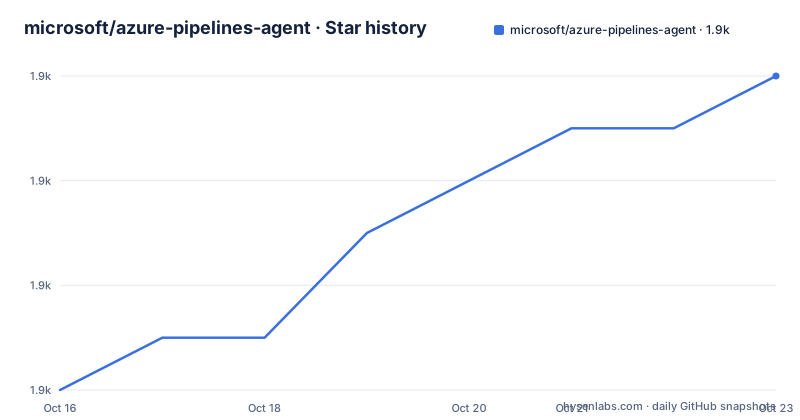
- microsoft/azure-pipelines-agent1,924 ★ · +6
| Repository | 2026-10-16 | 2026-10-23 |
|---|---|---|
| microsoft/azure-pipelines-agent | 1.9k | 1.9k |
6 Stars in the last 7 days, measured from the daily GitHub snapshot. Compare with other projects
Editorial analysis
Azure Pipelines Agent's Place in Microsoft's CI Ecosystem
Azure Pipelines Agent solves the worker-side problem in Azure Pipelines: an organization needs a machine that can receive and execute build or release jobs. The README describes the project as the cross-platform build and release agent for Azure Pipelines and Team Foundation Server 2015 and later. Its intended users are therefore organizations whose CI or release orchestration already depends on those Microsoft services, including supported on-premises deployments whose lifecycle still applies. This is not positioned as a general-purpose script runner or as an independent CI server.
The agent supports Windows, macOS, and several Linux distributions, with its status table naming Windows x64, Windows x86, Windows ARM64, macOS, Linux x64, Linux ARM, and RHEL 6 x64 configurations. That breadth matters when a pipeline mixes operating systems or needs a runner near a target build environment. Platform labels describe repository build and test coverage, however, not a guarantee that every pipeline workload or dependency will work unchanged on each operating system.
There is a specific compatibility boundary around Team Foundation Server. The project says it supports Azure DevOps Server, formerly Team Foundation Server, subject to the lifecycle of each on-premises product. It also identifies one exception: the Windows agent for TFS 2015 is distributed as a separate Node-based agent. An organization with that exact combination cannot simply assume that this C# implementation supplies the expected Windows worker.
Repository Structure and Implementation Boundaries
The repository is written in C# for .NET Core. Its top-level structure separates the main solution and source tree from operational material: `azure-pipelines-agent.sln` defines the repository-level solution, `src/` contains the implementation, `tools/` contains supporting tooling, and `release/` contains release-related files. Azure Pipelines definitions appear under `.azure-pipelines/` and in root files such as `.vsts.ci.yml` and `.vsts.release.yml`, while contributor instructions live under `docs/`.
Based on that layout, Azure Pipelines Agent is not a single command wrapped around an unrelated CI daemon. It has a substantial C# codebase, its own build definitions, release definitions, troubleshooting documentation, and dedicated contribution instructions. The README does not document the internal job handshake, task execution protocol, artifact transfer sequence, or worker lifecycle in enough detail to claim a more exact architecture. A prospective integrator should consult the corresponding source and protocol documentation rather than infer those details from the directory names.
One implementation change does affect configuration. The README describes a migration to .NET 6 and says that the legacy HTTP handler will no longer be available after that migration because of runtime changes. Consequently, `AZP_AGENT_USE_LEGACY_HTTP` will stop working once the migration is complete. Existing automation or host configuration that sets that knob should be treated as deprecated rather than as a long-term compatibility switch.
Installing Azure Pipelines Agent Through Microsoft's Agent Workflow
The repository does not provide a self-contained installation command in the README. Its “Get the Agent” section sends users to Microsoft's Azure DevOps documentation under the page title “Get started with the agent.” Installation, registration, permissions, service setup, and the commands for connecting a worker are therefore delegated to that external documentation. This article does not reproduce commands because the README does not state them.
A first real use follows the workflow described by the product boundaries: obtain the agent for the required operating system, follow Microsoft's linked setup instructions, register that machine with the applicable Azure Pipelines or Azure DevOps Server organization, and then assign pipeline work to the registered agent. The README confirms the intended Azure Pipelines and supported Azure DevOps Server usage, but it does not document a sample pipeline, agent-pool setup command, service startup command, or expected terminal output. Those details must come from the linked Microsoft documentation.
Before treating setup as complete, check the compatibility points that are visible here. Confirm the operating system and architecture against your own toolchain, verify whether the target server version is covered by its lifecycle, and review any use of `AZP_AGENT_USE_LEGACY_HTTP`. The repository's troubleshooting guide is also relevant if the external setup succeeds but a worker does not accept work.
Release Labels, Version Selection, and Upgrade Timing
Azure Pipelines releases can carry either a `Latest` or `Pre-release` label, and the README deliberately gives both non-obvious meanings. `Latest` denotes the current release and may still be in active deployment to all clients. `Pre-release` denotes the next version after its release process has started and it has already reached some users. Releases reach users in groups over several days, with the README stating that broad availability usually takes 6 to 8 days after the rollout begins.
This creates an operational detail that operators can otherwise misread: a pipeline may execute with a particular agent version while that version is still labeled `Pre-release`. The label alone does not prove that the selected agent is misconfigured. During a phased release, the version shown by an organization can depend on when that organization received it.
The recent release history includes `v5.281.0` and `v5.280.0` on 2026-10-14, followed earlier by `v5.279.0` on 2026-08-28. The repository is not archived, and its last push was on 2026-10-16. That supports recent development activity, but the README does not describe migration steps, compatibility changes, or upgrade procedures in detail. Upgrading an agent therefore requires checking the corresponding release information and Microsoft's agent documentation rather than assuming every rollout is operationally neutral.
Where Azure Pipelines Agent Is the Wrong Choice
The clearest wrong-tool case is a team that wants a platform-neutral CI system independent of Azure Pipelines. Azure Pipelines Agent is specifically coupled to Azure Pipelines and supported Team Foundation Server or Azure DevOps Server environments. Replacing its orchestration layer merely to reuse this worker would discard the platform alignment that gives the agent its purpose.
Another limitation is documented rather than speculative: `AZP_AGENT_USE_LEGACY_HTTP` will stop working after the stated .NET 6 migration. An environment that depends on that legacy handler should not select this agent version line while planning to retain the knob indefinitely. The README does not provide a replacement setting, a compatibility matrix for the HTTP handler, or a rollback procedure, so those points cannot be resolved from the repository overview alone.
Cross-platform support also should not be confused with portability of pipeline tasks. The agent host may run on several operating systems, while each build can still require platform-specific compilers, runtimes, credentials, or services. The README does not promise that a task written for one operating system is equivalent on another. The separate Node-based Windows agent required for TFS 2015 also shows that agent implementation and server compatibility can vary by environment.
Azure Pipelines Agent Compared with a Platform-Neutral CI Worker
A real alternative is a CI system with its own cross-platform worker model, where the controller and worker protocol are not tied to Azure Pipelines or Team Foundation Server. The difference is not merely the executable name. Azure Pipelines Agent is designed around Microsoft's build and release service, including support for Azure Pipelines and on-premises Azure DevOps Server products whose lifecycle applies. A platform-neutral CI worker generally centers on its own controller, job syntax, credentials model, artifact system, and service deployment process.
Choose Azure Pipelines Agent when retaining Microsoft's orchestration is more important than engine independence. Existing Azure Pipelines definitions, service integration, and the documented server compatibility boundary form the main reason to use this project. Choose another system when the organization needs its pipeline model to remain independent of Microsoft's hosted or on-premises services, or when its existing CI product does not recognize Azure Pipelines workers.
The MIT license permits use, modification, distribution, and sublicensing subject to its terms. That is a permissive licensing choice, but it does not remove operational integration costs. Teams must still manage installation, registration, permissions, service lifecycle, version rollout, host dependencies, and platform-specific build tools. The README does not claim that using the agent avoids those costs.
Editorial conclusion
Adopt this agent when pipeline jobs must execute on Windows, macOS, or Linux within Azure Pipelines or a supported Azure DevOps Server lifecycle. Do not treat it as a standalone CI engine, and do not assume it is suitable for the Windows agent exception associated with TFS 2015. Before deployment, verify the target server compatibility, the agent installation and registration procedure in Microsoft's linked documentation, and whether the pipeline uses AZP_AGENT_USE_LEGACY_HTTP. For adoption beyond the standard Azure ecosystem, a platform-neutral CI engine with its own agent model is the relevant alternative.
Frequently asked questions
Which operating systems does Azure Pipelines Agent support?
The README lists Windows, macOS, and several Linux distributions. Its status table specifically names Windows x64, Windows x86, Windows ARM64, macOS, Linux x64, Linux ARM, and RHEL 6 x64.
Does Azure Pipelines Agent support on-premises Team Foundation Server deployments?
It supports Team Foundation Server 2015 and later and Azure DevOps Server, based on the lifecycle of the applicable on-premises product. The Windows version for TFS 2015 is the stated exception and is distributed as a separate Node-based agent.
What happens to AZP_AGENT_USE_LEGACY_HTTP?
The README says the legacy HTTP handler will no longer be available after migration to .NET 6 because of changes in the .NET runtime. It advises users to stop using the `AZP_AGENT_USE_LEGACY_HTTP` knob.
Official sources
Add this badge to your README
If you maintain this project, the badge below links readers to this analysis and shows its maintenance status from the daily GitHub snapshot. Paste the markdown into your README; add ?metric=license or ?metric=stars to the image URL for a different field.

[](https://hysenlabs.com/projects/microsoft-azure-pipelines-agent)Star history chart for your README
[](https://hysenlabs.com/projects/microsoft-azure-pipelines-agent)Was this useful?