microsoft/fhir-server: An Azure-Oriented FHIR Service Implementation
A service that implements the FHIR standard
At a glance
- What is it?
- FHIR Server for Azure is a .NET Core implementation of the HL7 FHIR standard, organized around REST APIs, core FHIR logic, configurable hosting, and pluggable persistence. It fits Azure deployments, but its changing support policy and narrow infrastructure focus require careful evaluation.
- Who is it for?
- Developers seeking a customizable FHIR service for Azure should evaluate microsoft/fhir-server when SQL Server remains acceptable and their deployment needs match its supported lifecycle. Organizations that require the Cosmos DB provider or FHIR R4B should avoid selecting an unrevised future version without first checking the stated support deadlines.
- Can I use it commercially?
- Yes. MIT is a permissive licence: you can use, modify and sell software built on it, as long as you keep its copyright and licence notices.
- Is it still maintained?
- Yes. The repository last received commits 1 day ago.
- What is it written in?
- Mainly TSQL, according to GitHub's language statistics.
Answers come from the project's GitHub data, last synced on November 6, 2026, and from our analysis. They are not legal advice.
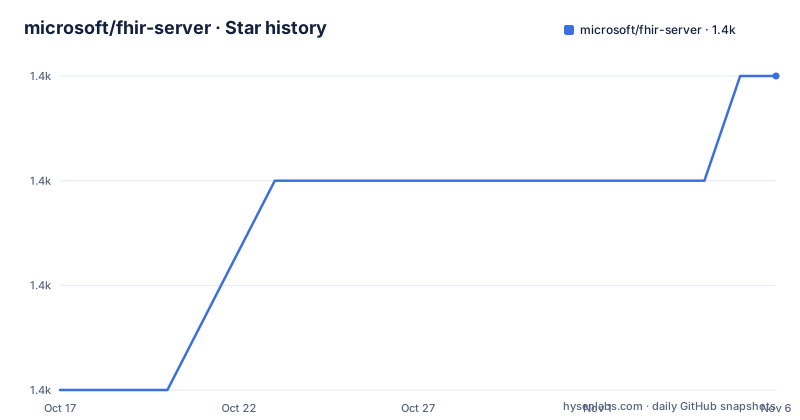
Star history
- microsoft/fhir-server1,391 ★ · +3
| Repository | 2026-10-17 | 2026-11-06 |
|---|---|---|
| microsoft/fhir-server | 1.4k | 1.4k |
3 Stars in the last 20 days, measured from the daily GitHub snapshot. Compare with other projects
Editorial analysis
FHIR Server for Azure's Clinical Data Problem
FHIR Server for Azure addresses the need to expose healthcare data through the HL7 Fast Healthcare Interoperability Resources specification rather than through a proprietary application interface. The README describes clinical data as information that must remain interoperable across systems, while the project provides a service foundation for ingesting and managing FHIR datasets in the cloud. Its intended users are developers who need to add a FHIR API to an application, assemble data for machine learning workloads, or customize a healthcare data service.
The project is specifically optimized for Microsoft Azure rather than presented as a platform-neutral FHIR server. The repository includes scripts and ARM templates for provisioning in Microsoft Cloud, plus scripts for mapping Azure Active Directory and enabling role-based access control. Those deployment assets do not prove that Azure is mandatory for every use of the source, but they make the intended operating environment clear.
This repository is also the open source foundation referenced by two managed Azure offerings: Azure API for FHIR and Azure Health Data Services. That distinction matters when comparing open-source deployment with a managed service. The former exposes code, configuration, persistence choices, schema management, and deployment work to the adopter. The managed offerings package provisioning and service operations, and Azure Health Data Services also supports deploying FHIR and DICOM servers in one workspace. The README does not claim that those offerings have identical features or deployment responsibilities.
FHIR Request Flow Through Four Server Layers
The repository describes a layered architecture intended to keep hosting, FHIR protocol behavior, application logic, and storage concerns separate. At the top is the Hosting Layer, which supports different environments and custom configuration of Inversion of Control containers. This is the boundary where a deployment can select infrastructure and composition details without folding those choices into FHIR logic.
Below it, the RESTful API Layer implements APIs defined by the HL7 FHIR specification. It is the external interface for clients and handles the protocol-facing side of the service. The Core Logic Layer then contains the core FHIR behavior. Finally, the Persistence Layer connects the server to a storage provider. The README calls this provider pluggable and says it can connect to virtually any data persistence utility. In practice, the repository provides a ready-to-use Azure Cosmos DB provider, while repository documentation identifies the SQL provider as the option associated with the Azure Health Data Services FHIR service.
That separation gives adopters a concrete extension point, but it is not an abstraction without consequences. Changing storage behavior means selecting or adapting a provider, understanding its query semantics, and dealing with its schema or operational requirements. The repository includes `SearchArchitecture.md`, indicating that search has a documented architecture of its own, but the README does not describe the query implementation or its provider-specific constraints. Engineers should not assume that every persistence backend supports identical search behavior merely because it implements the provider boundary.
Azure Provisioning Paths and the First Deployment
The README links separate quickstarts for deployment through the Azure portal, the CLI, and PowerShell. It does not include the exact commands, required subscription settings, resource names, or verification requests.
For a first deployment, follow `docs/QuickstartDeployPortal.md` if the portal is the desired route, `docs/QuickstartDeployCLI.md` for a command-line workflow, or `docs/QuickstartDeployPowershell.md` for the PowerShell route. Those guides, rather than the top-level README, are the authoritative first-use documentation for this repository. There is no home page listed in the repository information, but the documentation directory and `samples/` tree provide concrete entry points.
The identity setup is part of deployment rather than an afterthought. `docs/Register-Resource-Application.md` covers registering the resource application, which represents the FHIR server API in Azure Active Directory. `docs/Register-Client-Application.md` covers a client application that can authenticate for a user and request access to the resource application. `docs/Authentication.md` describes authentication settings for development and test scenarios, while `docs/Roles.md` explains the server's RBAC system. The first useful deployment therefore needs both a running service and a registered identity arrangement through which a client can access it. The README does not document a minimal local smoke-test request.
SQL Persistence, Schema Changes, and Upgrade Work
Persistence is the main operational decision exposed by the repository layout. The documented providers include Azure Cosmos DB and SQL, but their support status differs. The README states that CosmosDB provider support ends on 2026-09-30, aligned with the retirement of Azure API for FHIR. It also says that the SQL DB provider remains supported and corresponds to the Azure Health Data Services FHIR service. An adopter planning a new deployment around Cosmos DB would therefore be choosing a provider with a stated end date, even if the branch and selected release can still be inspected or forked.
SQL deployments have their own maintenance burden. `docs/SchemaMigrationGuide.md` is specifically provided to explain how to upgrade the schema for SQL Server. This indicates that application upgrades can require deliberate database migration work rather than only replacing binaries. The README does not state whether migrations are automatic, whether they can be rolled back, how long they take, or whether they require downtime. Those omissions are material for production planning.
The repository contains separate solution filters named `R4.slnf` and `R5.slnf`, along with `global.json`, `Directory.Packages.props`, and `Microsoft.Health.Fhir.sln`. Based on that layout, release-specific and SDK-specific concerns are represented in the build configuration. The README also links `docs/Testing-Releases.md` for testing a recent build. It does not provide an explicit upgrade compatibility matrix, so adopters must verify the selected release, target FHIR version, schema revision, persistence provider, and Azure resources as one combined deployment.
FHIR R4B and Cosmos DB Support Boundaries
The project has two explicit lifecycle boundaries. First, the README says FHIR R4B support ends on 2026-07-01, while FHIR R4 remains supported. If R4B behavior remains necessary after that date, the repository guidance is to fork an earlier version. That is a clear maintenance boundary rather than a feature toggle described in the repository.
Second, CosmosDB provider support ends on 2026-09-30. Earlier repository versions can be forked if that provider is still required, but doing so transfers responsibility for future compatibility, security updates, and provider changes. The open-source MIT license permits use and modification under its terms, including making a modified version, but the license does not by itself guarantee support for Azure infrastructure after Microsoft ends support. Any compliance, support, or operating commitments for such a fork need separate evaluation.
The recent release entries include `release/5.1.2`, dated 2026-10-11, along with `release/5.0.101` and `release/5.0.92`. These entries confirm recent release activity, but they do not reveal the FHIR version matrix or provider support for every release. The repository was not archived, and its last push was on 2026-10-15. That maintenance fact does not cancel the stated R4B and Cosmos DB retirement dates. Version choice must therefore be checked against those provider boundaries rather than inferred from repository activity alone.
Open-Source Customization Versus Azure Managed FHIR
The clearest alternative described by the README is Azure API for FHIR, a managed Azure offering backed by this open source project. Azure Health Data Services is another managed option and includes deployment of FHIR and DICOM servers in a single workspace. Their provisioning models differ from operating the repository directly because Microsoft handles those managed service layers, while open-source adopters take on the configuration and infrastructure described by the repository's scripts and templates.
This is more than a hosting comparison. The README associates Azure API for FHIR with the Cosmos DB open source FHIR server, while SQL is associated with Azure Health Data Services. It also notes that Azure API for FHIR is retiring and that CosmosDB provider support is ending. The documented Azure feature list is presented as a view of either the SQL service or the Cosmos DB service, which means the managed name alone is not enough to determine feature coverage.
For a team needing direct control over code, providers, hosting, or identity composition, the repository is more relevant than the managed route. For a team seeking turnkey provisioning described as compliant and secure, the managed Azure offerings address a different operational need. The README does not give a detailed pricing, performance, compliance-scope, or feature-equivalence comparison, so it cannot support a blanket claim that one option has every capability of the other.
Identity, Protected Data, and Operational Boundaries
Authentication and authorization are separate concerns in this project. The README says scripts can map the server to Azure Active Directory and enable RBAC, while the linked documentation explains registration and roles in more detail. This arrangement suits applications that already fit Azure identity conventions. A deployment outside that model would need another answer, and the README does not document a complete non-Azure identity configuration.
The project is intended to support workloads involving Protected Health Information. The README says the Azure services used by the server meet compliance requirements for PHI and points to Azure's compliance offerings. That is an infrastructure claim, not a guarantee that every application built on the server is compliant. Configuration, client behavior, data handling, access policy, operational controls, and the selected Azure services remain part of the adopter's environment. The README does not provide a certification or legal assurance for self-hosted deployments.
Bulk Export appears in the documentation as an additional capability, with `docs/BulkExport.md` devoted to it. The README does not explain its execution model, authorization rules, output format, resumability, or failure handling. That makes it unsuitable as the first feature to assume is production-ready without reading the dedicated guide. The documented authentication, roles, search, and export areas are meaningful extension points, but each also introduces configuration that must be checked against the selected release and persistence provider.
Editorial conclusion
Developers seeking a customizable FHIR service for Azure should evaluate microsoft/fhir-server when SQL Server remains acceptable and their deployment needs match its supported lifecycle. Organizations that require the Cosmos DB provider or FHIR R4B should avoid selecting an unrevised future version without first checking the stated support deadlines. The first checks should be SQL schema compatibility, authentication requirements, Azure resource dependencies, and the documentation associated with the exact release being deployed.
Frequently asked questions
What is microsoft/fhir-server used for?
It is a .NET Core implementation of the HL7 FHIR standard for exposing clinical data through a FHIR service. The README describes using it to ingest and manage FHIR datasets in Azure, integrate FHIR APIs into applications, and prepare normalized data for machine learning workloads.
How do I deploy microsoft/fhir-server to Azure?
The README links separate quickstarts for portal, CLI, and PowerShell deployment. Resource and client application registration are documented separately for Azure Active Directory integration.
Does microsoft/fhir-server still support Cosmos DB and FHIR R4B?
The README states that CosmosDB provider support ends on 2026-09-30 and FHIR R4B support ended on 2026-07-01. Cosmos DB is not listed for continued support after its stated end date, while FHIR R4 remains supported.
Official sources
Add this badge to your README
If you maintain this project, the badge below links readers to this analysis and shows its maintenance status from the daily GitHub snapshot. Paste the markdown into your README; add ?metric=license or ?metric=stars to the image URL for a different field.

[](https://hysenlabs.com/projects/microsoft-fhir-server)Star history chart for your README
[](https://hysenlabs.com/projects/microsoft-fhir-server)Was this useful?