RecyclableMemoryStream pools the buffers, not the streams, and a pool limit of 0 is a memory leak
A library to provide pooling for .NET MemoryStream objects to improve application performance.
At a glance
- What is it?
- A MemoryStream replacement from Microsoft that hands out chained small buffers or one contiguous large buffer from two bounded pools. The design pays off only if you size the pools and call Dispose.
- Who is it for?
- Adopt it if a .NET service creates many short-lived MemoryStream objects and shows gen 2 collections or Large Object Heap growth. Leave it alone for code that creates a few streams, or that needs a buffer bigger than the .NET array limit through GetBuffer().
- Can I use it commercially?
- Yes. MIT is a permissive licence: you can use, modify and sell software built on it, as long as you keep its copyright and licence notices.
- Is it still maintained?
- Yes. The repository last received commits 8 days ago.
- What is it written in?
- Mainly C#, according to GitHub's language statistics.
Answers come from the project's GitHub data, last synced on November 25, 2026, and from our analysis. They are not legal advice.
Star history
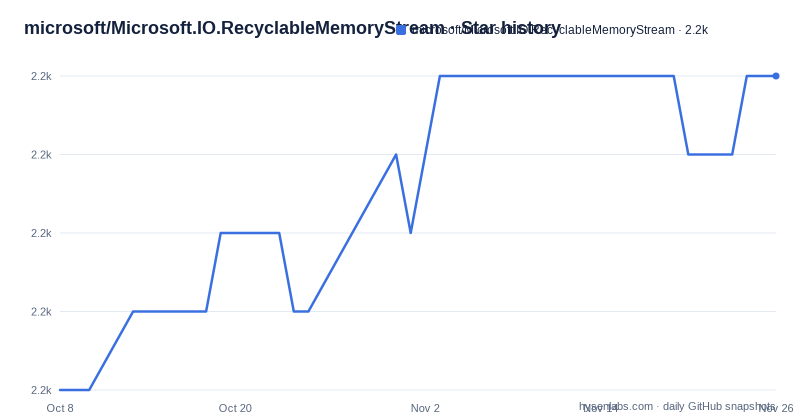
- microsoft/Microsoft.IO.RecyclableMemoryStream2,154 ★ · +4
| Repository | 2026-10-08 | 2026-11-25 |
|---|---|---|
| microsoft/Microsoft.IO.RecyclableMemoryStream | 2.2k | 2.2k |
4 Stars in the last 48 days, measured from the daily GitHub snapshot. Compare with other projects
Editorial analysis
Pooling the buffers lets Dispose return memory without reusing a stream object
Microsoft.IO.RecyclableMemoryStream replaces System.IO.MemoryStream in code where garbage collection pauses matter. The semantics follow the original class closely, and the stated goal is a drop-in replacement as far as possible. What changes is where the bytes live. The streams themselves are not pooled. The underlying buffers are, and Dispose hands them back to the pool.
That choice gives two side effects. The simple Dispose pattern is enough to release memory, and the library can detect invalid usage such as touching a stream after it has been disposed. Install it from NuGet:
Install-Package Microsoft.IO.RecyclableMemoryStreamThe latest release is v4.0.1 from 28 October 2026. The previous tags are v3.0.1 from June 2024 and 3.0.0 from December 2023, and the last push to the repository came on 22 October 2026. The change log lives in CHANGES.md at the top level, and a poolcomparison.png and a Diagrams.vsdx sit next to the source.
Large buffers stay in the gen 2 heap so full collections happen less often
The mechanism is deliberately simple. The larger buffers behind the streams are put into the gen 2 heap and stay there forever, which should make full collections happen less frequently. If you choose buffer sizes above 85,000 bytes, the buffers land on the Large Object Heap, which the garbage collector touches even less often.
The project lists what it is optimised for: eliminating Large Object Heap allocations by using pooled buffers, incurring far fewer gen 2 GCs and less time paused for GC, avoiding memory leaks through a bounded pool size, and avoiding memory fragmentation. It also lists several ways to read and write data without extra allocations, debuggability and logging, and metrics for performance tracking.
Benchmarks exist in the BenchmarkTests directory, and the results are published on the project's GitHub Pages site under dev/bench. Any speedup number you quote should come from running those benchmarks against your own workload.
Two pools: small chained blocks by default, a large pool for GetBuffer()
RecyclableMemoryStreamManager owns two separate pools. The small pool holds buffers of a configurable size and serves all normal read and write operations. Several small buffers are chained inside a RecyclableMemoryStream and presented as one stream. The large pool holds buffers that are only used when you need a single contiguous buffer, for instance when you plan to call GetBuffer().
A stream starts on a small buffer and chains more as the capacity grows. If you call GetBuffer() and the length exceeds one small buffer, the small buffers are converted into a single large buffer. You can also ask for an initial capacity. When that capacity is larger than the small pool block size, multiple blocks are chained, unless you call an overload with asContiguousBuffer set to true, in which case one large buffer is assigned from the start.
GetBuffer() is still bounded by .NET array size limits. For a stream larger than that limit, the guidance is not to use the method at all. Chained small buffers are what the library offers for enormous streams.
Linear and exponential large pools trade slot count for memory use
The large pool comes in two versions. The linear pool is the default. You give it a multiple and a maximum size, and it creates an array of slots at 1 times the multiple, 2 times, 3 times, up to the maximum. With a multiple of 1 MB and a maximum of 8 MB you get an array of length 8, the first slot holding 1 MB buffers and the second 2 MB buffers.
The exponential pool doubles the size at each slot. With a multiple of 256KB and a maximum of 8 MB the array has length 6, and the slots hold 256KB, 512KB, 1MB, 2MB, 4MB and 8MB buffers.
The guidance on choosing depends on your usage pattern. If large buffer sizes are unpredictable, the linear pool may suit better. If long streams are rare but you have many streams in the smaller sizes, the exponential pool can lower overall memory usage, which is the reason it was added. Asking for a capacity above the maximum poolable size still returns a working stream, but its buffers are not pooled. That limit is the one you set in the manager, not the .NET maximum array size.
Setting MaximumFreeSmallPoolBytes or MaximumFreeLargePoolBytes to 0 removes the bound
Buffers are created on demand the first time one is requested and nothing suitable sits in the pool. After use they return through the stream's Dispose method. At that moment the manager reads MaximumFreeSmallPoolBytes and MaximumFreeLargePoolBytes to decide whether the buffer goes back into the pool or is released to the garbage collector.
Those two properties are how you cap pool growth. Setting them to 0 allows unbounded growth, which the project describes as essentially indistinguishable from a memory leak. A bounded value handles spikes in usage without holding too much memory afterward.
The README makes the sizing your job. For every application you must determine, through analysis and experimentation, the balance between pool size and garbage collection. No default is offered as universally correct, and a value that fits a bursty web service may waste memory in a batch job. Pick the numbers after watching the metrics and events the library exposes, not before.
A forgotten Dispose is a leak, and tags with call stacks help find it
If code forgets to call Dispose on a stream, the buffers are never returned to the pool, and the project warns this could cause a memory leak. To reduce the damage, each stream has a finalizer as a backstop, so do not rely on it in place of Dispose.
Finding the offending call site is the purpose of the debugging features. Each stream can carry an identifying string tag that appears in logging, which the project describes as helpful for bugs and leaks caused by incorrect pool use. A further debug option records the call stack of the stream allocation so you can track down pool leaks.
The manager also emits metrics and events, so you can watch how the pool behaves under load instead of guessing. Thread safety has a boundary worth remembering. RecyclableMemoryStreamManager is thread-safe, and the streams are inherently not. Sharing one stream across threads is as unsafe here as it is with the original MemoryStream.
Modern span types are supported, but older targets and build tools set limits
The library implements IBufferWrite<byte> and has extensive support for newer memory-related types, naming Span<byte>, ReadOnlySpan<byte>, ReadOnlySequence<byte> and Memory<byte>. These give you ways to read and write without allocating, which is part of the point of using it.
Building the code needs at least MSBuild 16.8, which ships with Visual Studio 2019. For version 2.0 the supported targets are net462, netstandard2.0, netstandard2.1 and netcoreapp2.1, after net40, net45, net46 and netstandard1.4 were deprecated. Version 2.1 added a net5.0 target. The README does not list the targets of 3.x or 4.0, so check the NuGet package page for those.
Running the unit tests requires a minimum of .NET 5.0 and the NUnit test adapter. Set the default processor architecture for tests to x64, or the giant allocation test will fail. The repository also ships an Examples project with Readme.cs and readme.txt, which is the quickest place to see calls against the real API.
Editorial conclusion
Adopt it if a .NET service creates many short-lived MemoryStream objects and shows gen 2 collections or Large Object Heap growth. Leave it alone for code that creates a few streams, or that needs a buffer bigger than the .NET array limit through GetBuffer(). Before rollout, decide MaximumFreeSmallPoolBytes and MaximumFreeLargePoolBytes from measurement, because setting either to 0 gives unbounded growth that looks like a leak.
Frequently asked questions
What does Microsoft.IO.RecyclableMemoryStream replace?
It replaces System.IO.MemoryStream in performance-critical .NET code. It keeps close to the original semantics and pools the underlying buffers to reduce Large Object Heap allocations and gen 2 collections.
How do I install Microsoft.IO.RecyclableMemoryStream?
Install it from NuGet with Install-Package Microsoft.IO.RecyclableMemoryStream. The latest release tag is v4.0.1.
Is RecyclableMemoryStream thread safe?
RecyclableMemoryStreamManager is thread-safe, but the streams themselves are not. Each stream should be used from one thread at a time.
Official sources
Add this badge to your README
If you maintain this project, the badge below links readers to this analysis and shows its maintenance status from the daily GitHub snapshot. Paste the markdown into your README; add ?metric=license or ?metric=stars to the image URL for a different field.

[](https://hysenlabs.com/projects/microsoft-microsoft-io-recyclablememorystream)Star history chart for your README
[](https://hysenlabs.com/projects/microsoft-microsoft-io-recyclablememorystream)Was this useful?