Radzen Blazor: one NuGet package, one script tag, 155+ components
Radzen Blazor is the most sophisticated free UI component library for Blazor, featuring 145+ native components including DataGrid, Scheduler, Charts, and advanced theming with full support for Material Design and Fluent UI. If Radzen Blazor is useful to you, a ⭐ on GitHub helps other Blazor developers find it.
At a glance
- What is it?
- Radzen Blazor ships 155+ components for .NET 8, .NET 9 and .NET 10 Blazor apps, including the DataGrid, Scheduler and Charts most teams adopt it for. The catch is visible in the README itself: the library calls itself free of JavaScript framework dependencies yet the quick start still asks you to add a script tag by hand, and four of the nine themes sit behind a paid tier.
- Who is it for?
- Radzen Blazor offers an MIT-licensed component library with grids, scheduling, charts and other controls. The current README lists five free themes and four Pro themes, including Material 3 and Fluent.
- Can I use it commercially?
- Yes. MIT is a permissive licence: you can use, modify and sell software built on it, as long as you keep its copyright and licence notices.
- Is it still maintained?
- Yes. The repository last received commits 1 day ago.
- What is it written in?
- Mainly C#, according to GitHub's language statistics.
Answers come from the project's GitHub data, last synced on November 14, 2026, and from our analysis. They are not legal advice.
Star history
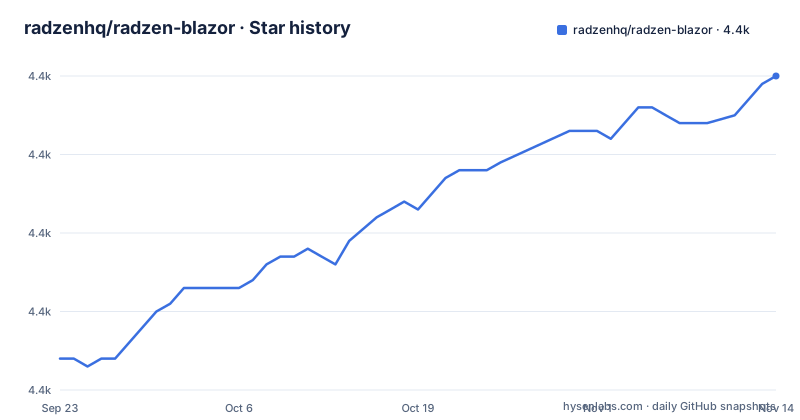
- radzenhq/radzen-blazor4,390 ★ · +36
| Repository | 2026-09-23 | 2026-11-14 |
|---|---|---|
| radzenhq/radzen-blazor | 4.4k | 4.4k |
36 Stars in the last 52 days, measured from the daily GitHub snapshot. Compare with other projects
Editorial analysis
What AddRadzenComponents actually registers in Program.cs
The choice Radzen Blazor puts to a Blazor team is whether a single vendor should supply the grid, the scheduler and the date picker instead of three separate packages. Radzen.Blazor answers yes, and the package counts 155+ native components. The intended reader is a team on .NET 8, .NET 9 or .NET 10 using Blazor Server, Blazor WebAssembly or .NET MAUI Blazor Hybrid, the targets the README names as supported. The mechanism is deliberately plain: the components are written in C# with no JavaScript framework underneath and no wrapper layer, so a DataGrid or a Scheduler is a Razor component you drop into a page, not a jQuery plugin you initialise. A single service registration call, builder.Services.AddRadzenComponents(), goes in Program.cs. That narrow surface is the appeal for anyone who has spent a year maintaining third-party JavaScript that broke on a Blazor upgrade.
The four-file install, and the one step that is yours to get right
The quick start is four edits. Add the package to the project first.
dotnet add package Radzen.BlazorThen make the namespaces visible to every component file.
@using Radzen
@using Radzen.Blazor
Registration goes in Program.cs alongside the rest of your services.
builder.Services.AddRadzenComponents();The fourth edit is the one to read twice, because App.razor needs two separate insertions rather than one. The theme component sits inside head, and the script goes after the last script element.
<!-- inside <head> -->
<RadzenTheme Theme="material" />

<!-- after the last <script> -->
<script src="_content/Radzen.Blazor/Radzen.Blazor.js"></script>
A page using a component then needs nothing more than the component itself, with Click pointing at your handler.
<RadzenButton Text="Hello World" Click="@OnClick" />The README points at the getting started page for render modes and for dialog and notification configuration, which tells you how much this four-line version leaves out.
Nine themes, including five free options
Theming is CSS variable based, and switching is a runtime operation rather than a rebuild, since a built-in theme service handles it. The count is nine built-in themes with light and dark variants each, and the split between the 2 tiers is the sharpest edge in the licensing story. Material, Standard, Default, Humanistic and Software, 5 of the 9, ship free with the package itself. Material 3, Material 3 Expressive, Fluent and Zen are premium themes included with Radzen Blazor Pro, so a design spec that lands on Material 3 turns a free library decision into a paid one. The full set of themes, including the four paid ones, is only reachable through the paid tier, which is worth checking before you commit a design system. Customisation runs through CSS variables, so recolouring a free theme does not require the premium tier; the paid part is the ready-made palette, not the mechanism. For teams with an existing token pipeline, that distinction decides the whole question.
The DataGrid, Scheduler and Gantt are the reason people stay
Most adoption decisions here are made by three components rather than by the full 145. DataGrid sits at the centre, with DataList, DataFilter, Pager, Tree and PivotDataGrid arranged around it for the cases where a table is not enough. Scheduler covers appointments and resource booking, Gantt covers dependency timelines, and Timeline and Spreadsheet cover the record-shaped work that a table widget usually refuses. Charts are a separate and unusually wide surface: line, bar, column, pie, donut, scatter, candlestick, SankeyDiagram, Heatmap, Treemap, plus gauge charts in radial, linear and arc forms. Two details are easy to miss. PivotDataGrid is in the free package. And the AI components, including AIChat, Chat, Markdown and SpeechToTextButton, ship in the same free package as the grid, which narrows what the paid tier actually contains.
Two solutions, an API generator and a Docker restore of the published package
The repository layout tells you what the project considers load-bearing. Radzen.Blazor holds the components, Radzen.Blazor.Api plus Radzen.Blazor.Api.Generator produce the API reference pages from the published package, RadzenBlazorDemos holds the demo application, and Radzen.Server.sln and Radzen.WebAssembly.sln let you run the demos under either hosting model. TrimTest, TrimRuntimeTest and TrimTest.Models exist because trimming is a live concern for WebAssembly publishing, with TRIMMING.md at the root, and e2e/ holds browser tests. The Dockerfile is the most revealing file in the tree. It restores the demo host project with -p:Configuration=Release so that the Radzen.Blazor NuGet package, which the demo project references in that configuration only, is on disk before the API page generator runs, and it sets NUGET_XMLDOC_MODE to none because the SDK image skips XML doc extraction that the generator needs. Running the demos locally needs the .NET 10 SDK, and the README points at VS2026. Build the components from source yourself if you need to patch them; the package itself is the normal route.
The no-JavaScript claim stops at the script tag
The README states that the library has no JavaScript framework dependencies and no wrappers, and that is true of the dependencies. It is not true of the integration cost, and the same quick start requires a manual script element. Two more edges deserve a look before you commit. The script path is rooted at _content/Radzen.Blazor, so check it against your static web assets configuration. And the trimming projects exist because WebAssembly trimming is not a solved problem, which tells you the component library treats publish size as a real constraint rather than a packaging detail.
Where MudBlazor and Radzen Blazor part ways
MudBlazor is another Blazor component set teams weigh against this one. On Radzen's side, the distinguishing points are scope and commercial shape. Radzen reaches far past the form-and-layout set into Scheduler, Gantt, PivotDataGrid, Spreadsheet, Timeline, a broad chart catalogue and a theme service that switches nine themes at runtime, and it keeps a paid tier alongside the free package for premium themes, a standalone design studio, Visual Studio tooling and an MCP server for coding assistants. Choose Radzen when scheduling, pivoting or charting carries weight in your application and you accept the two-tier theme story. If you take the Radzen route, confirm first which of the nine themes your design actually needs, because Material 3, Material 3 Expressive, Fluent and Zen sit in the paid tier.
Editorial conclusion
Radzen Blazor offers an MIT-licensed component library with grids, scheduling, charts and other controls. The current README lists five free themes and four Pro themes, including Material 3 and Fluent. Check the licensing and pricing of the theme you need, then verify render modes and static assets in your application.
Frequently asked questions
Is Blazor Radzen free?
The Radzen.Blazor NuGet package is free for commercial use, with no per-developer fees and no runtime royalties. Nine themes are built in, of which Material, Standard, Default, Humanistic and Software are free, while Material 3, Material 3 Expressive, Fluent and Zen come with the Radzen Blazor Pro subscription.
How to install radzen Blazor?
Add the package with dotnet add package Radzen.Blazor, then add the Radzen and Radzen.Blazor namespaces to _Imports.razor, call builder.Services.AddRadzenComponents() in Program.cs, and place RadzenTheme in the head of App.razor with the Radzen.Blazor.js script after your last script element.
What is radzen blazor?
It is a UI component library for .NET 8, .NET 9 and .NET 10 Blazor, covering Blazor Server, Blazor WebAssembly and .NET MAUI Blazor Hybrid. It ships 155 or more components written entirely in C#, including DataGrid, Scheduler and Charts.
Which is better for coding, MudBlazor or Radzen?
Radzen's README does not compare itself with MudBlazor. On Radzen's side, it covers scheduling, Gantt, pivot grids and charts and splits 9 themes across a free package and a paid tier.
Is Radzen Blazor Studio free?
Radzen Blazor Studio is part of the paid Radzen Blazor Pro subscription, not the free Radzen.Blazor package. It is a standalone Blazor IDE with a WYSIWYG design canvas, database scaffolding, CRUD wizards, app templates and deployment to IIS or Azure.
Official sources
Add this badge to your README
If you maintain this project, the badge below links readers to this analysis and shows its maintenance status from the daily GitHub snapshot. Paste the markdown into your README; add ?metric=license or ?metric=stars to the image URL for a different field.

[](https://hysenlabs.com/projects/radzenhq-radzen-blazor)Star history chart for your README
[](https://hysenlabs.com/projects/radzenhq-radzen-blazor)Was this useful?